


Googling "eBay listing templates" usually returns a hundred pages selling you a slick, color-matched HTML frame that supposedly makes buyers trust you and click Buy It Now.
But that one word, "template," is wearing three hats, and the one everyone is selling is the one eBay has spent the better part of a decade making obsolete.
That's not a shot at good design. It's just what happened when we started shopping on phones.
So before you pay anyone for anything, you might want to find out which template you actually need.
By the end of this, you'll know what eBay allows in 2026, how to build or get a template without breaking a single rule, whether free or paid is the better call, and the short list of things that genuinely help you sell more.
Key takeaways
"eBay listing templates" means three different things: a styled HTML description, a saved reusable listing setup inside eBay, and a bulk upload file. Most sellers optimize the wrong one.
HTML templates are still allowed in 2026, but only static HTML and CSS. Active content like JavaScript, Flash, and embedded widgets is blocked and stripped automatically.
Free tools cover most sellers. Paid templates mostly pay off for high-volume or brand-led stores.
Design rarely decides the sale. A mobile-friendly layout, clear condition detail, and item specifics do.
If you sell on more than one marketplace, the template that saves the most time is a reusable listing you build once and cross list everywhere, not a prettier frame.
What do people mean by "eBay listing templates"
Three things, actually:
The first is the HTML and CSS description design.
This is the styled look inside your listing: the branded header, the tidy sections, the colors, etc. It's in the description box, it's purely presentational, and it's what most template vendors are selling when they say "template."
The second is a reusable listing template inside eBay.
This is a saved setup that remembers your category, description, shipping, and other settings so you're not retyping the same details every time you list something similar.
It helps with speed, not with looks.
The third is a bulk listing template, which is really a spreadsheet-style file for sellers who sell dozens or hundreds of items at once through eBay's bulk tools.
Different problem again, different tool.
Why reach for any of them?
Listing items on eBay is repetitive, and repetition is exactly where wasted hours and small mistakes come from.
A good template lists faster, keeps your information consistent, and hands the buyer a more trustworthy page. All three are good reasons to use professional eBay templates.
Are eBay HTML templates still allowed in 2026?
Yes, but with an important caveat.
Static HTML and CSS are fine. You can brand your description, add a header, build sections, drop in a specs table, all of it.
What you can't use is what eBay calls active content, i.e., JavaScript, Flash, plug-ins, and form actions.
eBay started moving away from it back in 2017, and all active content has been removed from existing listings and is blocked in new ones.
What counts as active content can be confusing, so here are eBay's own examples: scrolling image pickers, embedded feedback widgets, social sharing icons, currency converters, etc.
The simplest way to know is to ask yourself whether the element runs code in the buyer's browser or just describes how the page should look.
If it does something, it's probably banned. If it only styles something, you're probably fine.
There are two related limits, though.
eBay restricts links inside product descriptions, so pointing buyers to your own website, your socials, or any third-party site isn't allowed, and anything a listing does load should come over a secure HTTPS connection.
When it comes to video, the old trick of embedding a player with an iframe no longer works, because an iframe is precisely the kind of active content eBay took out.
A good rule for the whole description is to keep fixed-width elements modest and lay things out with relative widths, so the page scales instead of forcing a buyer to pinch and drag on a small screen.
Now, remember when we said that eBay spent years making the fancy template matter less? eBay didn't do this just to be annoying.
Active content slowed pages down, broke on phones, and opened security holes, and since most eBay shopping now happens on mobile, a heavy decorative template became a liability instead of an advantage.
That's also why eBay gives you a free active content checker to scan a listing before you rely on it. Use it every time.
A template that looks good on your laptop but fails to render on a phone is often worse than no template at all.
So what happens if you ignore all this? eBay doesn't just email you a warning.
Non-compliant code gets taken down automatically, which means the fancy element you spent an hour on simply gets deleted from the live listing.
In some cases, the listing itself gets suppressed in search until you fix it.
How to create professional templates
Three realistic ways to do it, from no-code to full control.
The no-code route is eBay's own tooling, and most sellers never need more than this.
Start a listing in the advanced (Business) listing tool, open the description box, click into advanced editing, and you'll find the option in the dropdown to create and save a custom template.
Build your layout once, name it, and have it ready for use on every future listing. T
here's also the humble "Sell similar" button on any existing item, which clones that setup as your starting point. Fast and free.
The middle path is writing your own compliant HTML and CSS.
If you're comfortable with basic markup, you can have full control over layout and branding, as long as you stay inside the static-only rules above.
Keep it simple, and run it through the checker before you apply it to active listings.
The third path is a dedicated template builder.
Plenty of tools generate eBay-safe HTML code you paste straight into the description, and many are genuinely good, especially if you want one consistent branded look for the whole store.
Free vs paid eBay listing templates: which should you use?
A higher price doesn't always get you more sales. What sells is clarity, mobile-readability, and trust, none of which need a paid design behind them.
Free options cover most sellers comfortably. eBay's native tools, the free designs bundled with most builders, and your own simple HTML will carry a small or mid-size shop without complaint.
If you're listing a few dozen items a month, a paid template might not be something you need.
Paid templates make more sense when the shape of your needs changes.
Ongoing support, guaranteed compliance so you're not babysitting every rule tweak eBay makes, the ability to batch-apply one design to hundreds of listings at once, easier brand control across a full eBay store, etc.
All that can absolutely be worth it for a high-volume or brand-led business. For everyone else, far less.
The template habits that sell
This is a hard pill to swallow for some, but the things that convert are mostly not design.
Mobile first is an expectation nowadays, since most eBay buyers are on a phone.
If a template only works on desktop, it can have a direct impact on sales.
Lead with the one detail that sells the item rather than a giant banner, because buyers decide quickly and the thing that closes them should be near the top.
Be specific about condition, since vague wording generates unnecessary questions and returns. Swap the wall of text for a clean specs table people can easily read.
Lay out shipping, returns, and handling clearly, because they build trust, and trust tips even a hesitant buyer over the line.
Two more that outrank any header.
Don't stuff keywords into your template's static text, because eBay's search manipulation rules treat that as a violation, not a clever growth hack.
Also, item specifics, the structured fields eBay asks you to fill in, are a major factor in whether your item even shows up in search at all.
A beautiful description template does nothing if the listing never appears in the search results.
So a good-looking template is, at best, one piece of the puzzle, and rarely the decisive one.
Now that we've covered the kind of template that remains on a single listing, there's a bigger one worth your attention, especially if eBay isn't the only place you sell.
The template that scales: reusable listings
Everything we've covered so far shares one problem: it's eBay, and only eBay.
That's the limit of eBay's native templates and the "sell similar" trick. They speed up your next eBay listing and nowhere else.
If you start selling on Poshmark, Mercari, Depop, or anywhere else, you're back to rebuilding the same item by hand on each one.
That's a reuse problem, and it's a significant tax on a growing reseller.
This is where a reusable listing template becomes crucial, and where Crosslist fits. But let's be precise about what it is and isn't:
Crosslist does not design styled HTML frames, and it's not competing with a template design house.
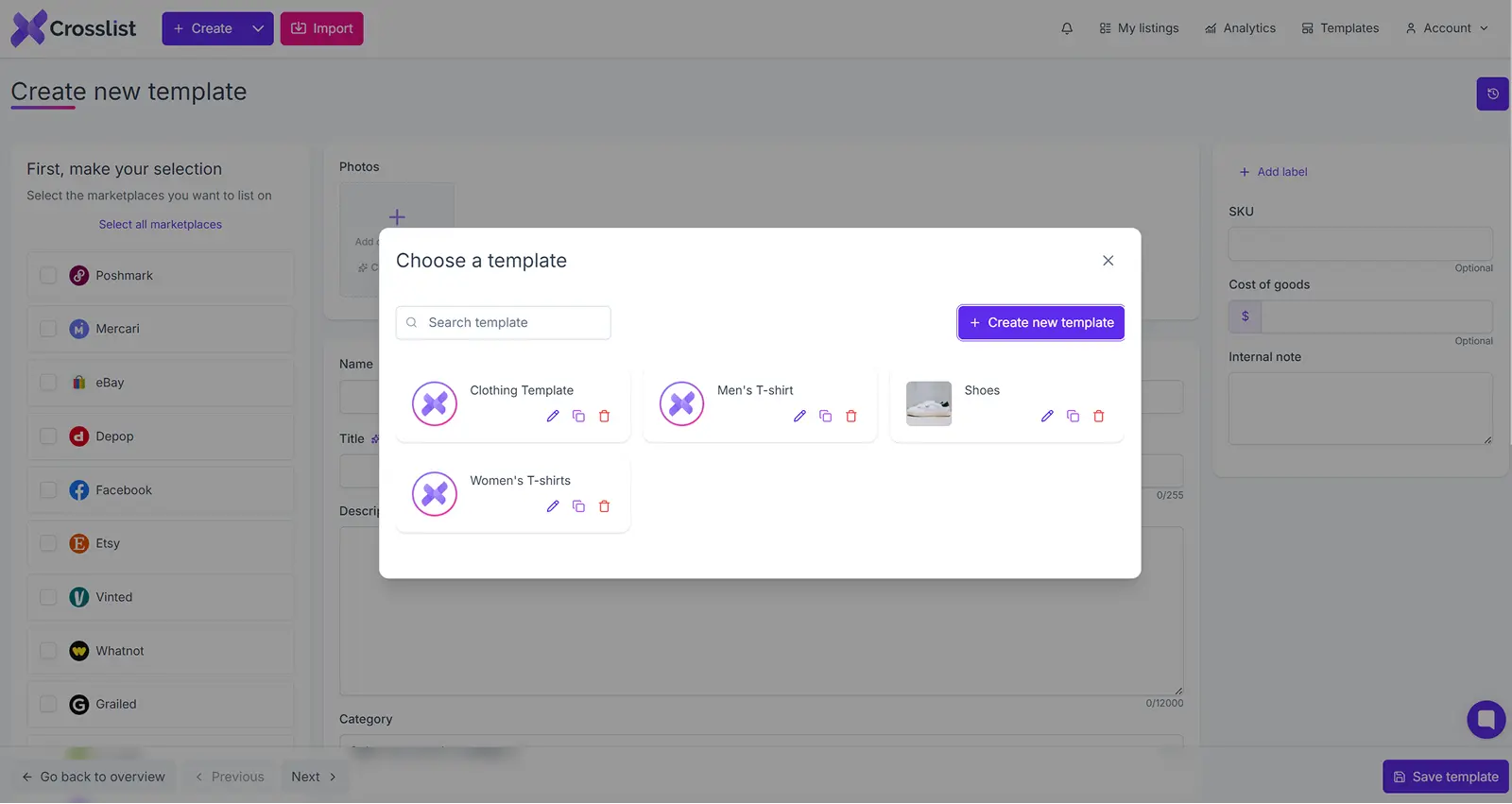
What it does is let you save a full listing template setup: the listing title, product description, product category, price, shipping, the whole configuration, and reload it in one click to create similar items, then cross list that listing across 11+ marketplaces at once.
Set it up once, reuse it everywhere you sell.
eBay's template makes your next eBay listing faster. A reusable Crosslist template makes your next listing faster on every marketplace you have listings.
Sell in one place, and you may never need it. Scale to several, and it's the scaling tool most other sellers still aren't taking advantage of.
The takeaway
So "eBay listing templates" was never a single thing.
There's the styled HTML design that has to stay static and mobile-friendly to comply with eBay's rules, there's eBay's own reusable setup that speeds up your next product listing, and there's the bulk file for heavy days.
Get yourself a clean, compliant, mobile-first template, rely on eBay's free tools or a builder if you want the polished look, and pour a lot of effort into condition detail, item specifics, and trust, which is what conversion comes down to at the end of the day.
And if eBay is just one of the places you sell, the smartest template isn't a prettier frame. It's the one you never have to build twice.
Crosslist lets you create a listing once and publish it across 11+ marketplaces, so the same item stops costing you five separate rebuilds.
Try it risk-free and find out how much time you get back.
Googling "eBay listing templates" usually returns a hundred pages selling you a slick, color-matched HTML frame that supposedly makes buyers trust you and click Buy It Now.
But that one word, "template," is wearing three hats, and the one everyone is selling is the one eBay has spent the better part of a decade making obsolete.
That's not a shot at good design. It's just what happened when we started shopping on phones.
So before you pay anyone for anything, you might want to find out which template you actually need.
By the end of this, you'll know what eBay allows in 2026, how to build or get a template without breaking a single rule, whether free or paid is the better call, and the short list of things that genuinely help you sell more.
Key takeaways
"eBay listing templates" means three different things: a styled HTML description, a saved reusable listing setup inside eBay, and a bulk upload file. Most sellers optimize the wrong one.
HTML templates are still allowed in 2026, but only static HTML and CSS. Active content like JavaScript, Flash, and embedded widgets is blocked and stripped automatically.
Free tools cover most sellers. Paid templates mostly pay off for high-volume or brand-led stores.
Design rarely decides the sale. A mobile-friendly layout, clear condition detail, and item specifics do.
If you sell on more than one marketplace, the template that saves the most time is a reusable listing you build once and cross list everywhere, not a prettier frame.
What do people mean by "eBay listing templates"
Three things, actually:
The first is the HTML and CSS description design.
This is the styled look inside your listing: the branded header, the tidy sections, the colors, etc. It's in the description box, it's purely presentational, and it's what most template vendors are selling when they say "template."
The second is a reusable listing template inside eBay.
This is a saved setup that remembers your category, description, shipping, and other settings so you're not retyping the same details every time you list something similar.
It helps with speed, not with looks.
The third is a bulk listing template, which is really a spreadsheet-style file for sellers who sell dozens or hundreds of items at once through eBay's bulk tools.
Different problem again, different tool.
Why reach for any of them?
Listing items on eBay is repetitive, and repetition is exactly where wasted hours and small mistakes come from.
A good template lists faster, keeps your information consistent, and hands the buyer a more trustworthy page. All three are good reasons to use professional eBay templates.
Are eBay HTML templates still allowed in 2026?
Yes, but with an important caveat.
Static HTML and CSS are fine. You can brand your description, add a header, build sections, drop in a specs table, all of it.
What you can't use is what eBay calls active content, i.e., JavaScript, Flash, plug-ins, and form actions.
eBay started moving away from it back in 2017, and all active content has been removed from existing listings and is blocked in new ones.
What counts as active content can be confusing, so here are eBay's own examples: scrolling image pickers, embedded feedback widgets, social sharing icons, currency converters, etc.
The simplest way to know is to ask yourself whether the element runs code in the buyer's browser or just describes how the page should look.
If it does something, it's probably banned. If it only styles something, you're probably fine.
There are two related limits, though.
eBay restricts links inside product descriptions, so pointing buyers to your own website, your socials, or any third-party site isn't allowed, and anything a listing does load should come over a secure HTTPS connection.
When it comes to video, the old trick of embedding a player with an iframe no longer works, because an iframe is precisely the kind of active content eBay took out.
A good rule for the whole description is to keep fixed-width elements modest and lay things out with relative widths, so the page scales instead of forcing a buyer to pinch and drag on a small screen.
Now, remember when we said that eBay spent years making the fancy template matter less? eBay didn't do this just to be annoying.
Active content slowed pages down, broke on phones, and opened security holes, and since most eBay shopping now happens on mobile, a heavy decorative template became a liability instead of an advantage.
That's also why eBay gives you a free active content checker to scan a listing before you rely on it. Use it every time.
A template that looks good on your laptop but fails to render on a phone is often worse than no template at all.
So what happens if you ignore all this? eBay doesn't just email you a warning.
Non-compliant code gets taken down automatically, which means the fancy element you spent an hour on simply gets deleted from the live listing.
In some cases, the listing itself gets suppressed in search until you fix it.
How to create professional templates
Three realistic ways to do it, from no-code to full control.
The no-code route is eBay's own tooling, and most sellers never need more than this.
Start a listing in the advanced (Business) listing tool, open the description box, click into advanced editing, and you'll find the option in the dropdown to create and save a custom template.
Build your layout once, name it, and have it ready for use on every future listing. T
here's also the humble "Sell similar" button on any existing item, which clones that setup as your starting point. Fast and free.
The middle path is writing your own compliant HTML and CSS.
If you're comfortable with basic markup, you can have full control over layout and branding, as long as you stay inside the static-only rules above.
Keep it simple, and run it through the checker before you apply it to active listings.
The third path is a dedicated template builder.
Plenty of tools generate eBay-safe HTML code you paste straight into the description, and many are genuinely good, especially if you want one consistent branded look for the whole store.
Free vs paid eBay listing templates: which should you use?
A higher price doesn't always get you more sales. What sells is clarity, mobile-readability, and trust, none of which need a paid design behind them.
Free options cover most sellers comfortably. eBay's native tools, the free designs bundled with most builders, and your own simple HTML will carry a small or mid-size shop without complaint.
If you're listing a few dozen items a month, a paid template might not be something you need.
Paid templates make more sense when the shape of your needs changes.
Ongoing support, guaranteed compliance so you're not babysitting every rule tweak eBay makes, the ability to batch-apply one design to hundreds of listings at once, easier brand control across a full eBay store, etc.
All that can absolutely be worth it for a high-volume or brand-led business. For everyone else, far less.
The template habits that sell
This is a hard pill to swallow for some, but the things that convert are mostly not design.
Mobile first is an expectation nowadays, since most eBay buyers are on a phone.
If a template only works on desktop, it can have a direct impact on sales.
Lead with the one detail that sells the item rather than a giant banner, because buyers decide quickly and the thing that closes them should be near the top.
Be specific about condition, since vague wording generates unnecessary questions and returns. Swap the wall of text for a clean specs table people can easily read.
Lay out shipping, returns, and handling clearly, because they build trust, and trust tips even a hesitant buyer over the line.
Two more that outrank any header.
Don't stuff keywords into your template's static text, because eBay's search manipulation rules treat that as a violation, not a clever growth hack.
Also, item specifics, the structured fields eBay asks you to fill in, are a major factor in whether your item even shows up in search at all.
A beautiful description template does nothing if the listing never appears in the search results.
So a good-looking template is, at best, one piece of the puzzle, and rarely the decisive one.
Now that we've covered the kind of template that remains on a single listing, there's a bigger one worth your attention, especially if eBay isn't the only place you sell.
The template that scales: reusable listings
Everything we've covered so far shares one problem: it's eBay, and only eBay.
That's the limit of eBay's native templates and the "sell similar" trick. They speed up your next eBay listing and nowhere else.
If you start selling on Poshmark, Mercari, Depop, or anywhere else, you're back to rebuilding the same item by hand on each one.
That's a reuse problem, and it's a significant tax on a growing reseller.
This is where a reusable listing template becomes crucial, and where Crosslist fits. But let's be precise about what it is and isn't:
Crosslist does not design styled HTML frames, and it's not competing with a template design house.
What it does is let you save a full listing template setup: the listing title, product description, product category, price, shipping, the whole configuration, and reload it in one click to create similar items, then cross list that listing across 11+ marketplaces at once.
Set it up once, reuse it everywhere you sell.
eBay's template makes your next eBay listing faster. A reusable Crosslist template makes your next listing faster on every marketplace you have listings.
Sell in one place, and you may never need it. Scale to several, and it's the scaling tool most other sellers still aren't taking advantage of.
The takeaway
So "eBay listing templates" was never a single thing.
There's the styled HTML design that has to stay static and mobile-friendly to comply with eBay's rules, there's eBay's own reusable setup that speeds up your next product listing, and there's the bulk file for heavy days.
Get yourself a clean, compliant, mobile-first template, rely on eBay's free tools or a builder if you want the polished look, and pour a lot of effort into condition detail, item specifics, and trust, which is what conversion comes down to at the end of the day.
And if eBay is just one of the places you sell, the smartest template isn't a prettier frame. It's the one you never have to build twice.
Crosslist lets you create a listing once and publish it across 11+ marketplaces, so the same item stops costing you five separate rebuilds.
Try it risk-free and find out how much time you get back.
Googling "eBay listing templates" usually returns a hundred pages selling you a slick, color-matched HTML frame that supposedly makes buyers trust you and click Buy It Now.
But that one word, "template," is wearing three hats, and the one everyone is selling is the one eBay has spent the better part of a decade making obsolete.
That's not a shot at good design. It's just what happened when we started shopping on phones.
So before you pay anyone for anything, you might want to find out which template you actually need.
By the end of this, you'll know what eBay allows in 2026, how to build or get a template without breaking a single rule, whether free or paid is the better call, and the short list of things that genuinely help you sell more.
Key takeaways
"eBay listing templates" means three different things: a styled HTML description, a saved reusable listing setup inside eBay, and a bulk upload file. Most sellers optimize the wrong one.
HTML templates are still allowed in 2026, but only static HTML and CSS. Active content like JavaScript, Flash, and embedded widgets is blocked and stripped automatically.
Free tools cover most sellers. Paid templates mostly pay off for high-volume or brand-led stores.
Design rarely decides the sale. A mobile-friendly layout, clear condition detail, and item specifics do.
If you sell on more than one marketplace, the template that saves the most time is a reusable listing you build once and cross list everywhere, not a prettier frame.
What do people mean by "eBay listing templates"
Three things, actually:
The first is the HTML and CSS description design.
This is the styled look inside your listing: the branded header, the tidy sections, the colors, etc. It's in the description box, it's purely presentational, and it's what most template vendors are selling when they say "template."
The second is a reusable listing template inside eBay.
This is a saved setup that remembers your category, description, shipping, and other settings so you're not retyping the same details every time you list something similar.
It helps with speed, not with looks.
The third is a bulk listing template, which is really a spreadsheet-style file for sellers who sell dozens or hundreds of items at once through eBay's bulk tools.
Different problem again, different tool.
Why reach for any of them?
Listing items on eBay is repetitive, and repetition is exactly where wasted hours and small mistakes come from.
A good template lists faster, keeps your information consistent, and hands the buyer a more trustworthy page. All three are good reasons to use professional eBay templates.
Are eBay HTML templates still allowed in 2026?
Yes, but with an important caveat.
Static HTML and CSS are fine. You can brand your description, add a header, build sections, drop in a specs table, all of it.
What you can't use is what eBay calls active content, i.e., JavaScript, Flash, plug-ins, and form actions.
eBay started moving away from it back in 2017, and all active content has been removed from existing listings and is blocked in new ones.
What counts as active content can be confusing, so here are eBay's own examples: scrolling image pickers, embedded feedback widgets, social sharing icons, currency converters, etc.
The simplest way to know is to ask yourself whether the element runs code in the buyer's browser or just describes how the page should look.
If it does something, it's probably banned. If it only styles something, you're probably fine.
There are two related limits, though.
eBay restricts links inside product descriptions, so pointing buyers to your own website, your socials, or any third-party site isn't allowed, and anything a listing does load should come over a secure HTTPS connection.
When it comes to video, the old trick of embedding a player with an iframe no longer works, because an iframe is precisely the kind of active content eBay took out.
A good rule for the whole description is to keep fixed-width elements modest and lay things out with relative widths, so the page scales instead of forcing a buyer to pinch and drag on a small screen.
Now, remember when we said that eBay spent years making the fancy template matter less? eBay didn't do this just to be annoying.
Active content slowed pages down, broke on phones, and opened security holes, and since most eBay shopping now happens on mobile, a heavy decorative template became a liability instead of an advantage.
That's also why eBay gives you a free active content checker to scan a listing before you rely on it. Use it every time.
A template that looks good on your laptop but fails to render on a phone is often worse than no template at all.
So what happens if you ignore all this? eBay doesn't just email you a warning.
Non-compliant code gets taken down automatically, which means the fancy element you spent an hour on simply gets deleted from the live listing.
In some cases, the listing itself gets suppressed in search until you fix it.
How to create professional templates
Three realistic ways to do it, from no-code to full control.
The no-code route is eBay's own tooling, and most sellers never need more than this.
Start a listing in the advanced (Business) listing tool, open the description box, click into advanced editing, and you'll find the option in the dropdown to create and save a custom template.
Build your layout once, name it, and have it ready for use on every future listing. T
here's also the humble "Sell similar" button on any existing item, which clones that setup as your starting point. Fast and free.
The middle path is writing your own compliant HTML and CSS.
If you're comfortable with basic markup, you can have full control over layout and branding, as long as you stay inside the static-only rules above.
Keep it simple, and run it through the checker before you apply it to active listings.
The third path is a dedicated template builder.
Plenty of tools generate eBay-safe HTML code you paste straight into the description, and many are genuinely good, especially if you want one consistent branded look for the whole store.
Free vs paid eBay listing templates: which should you use?
A higher price doesn't always get you more sales. What sells is clarity, mobile-readability, and trust, none of which need a paid design behind them.
Free options cover most sellers comfortably. eBay's native tools, the free designs bundled with most builders, and your own simple HTML will carry a small or mid-size shop without complaint.
If you're listing a few dozen items a month, a paid template might not be something you need.
Paid templates make more sense when the shape of your needs changes.
Ongoing support, guaranteed compliance so you're not babysitting every rule tweak eBay makes, the ability to batch-apply one design to hundreds of listings at once, easier brand control across a full eBay store, etc.
All that can absolutely be worth it for a high-volume or brand-led business. For everyone else, far less.
The template habits that sell
This is a hard pill to swallow for some, but the things that convert are mostly not design.
Mobile first is an expectation nowadays, since most eBay buyers are on a phone.
If a template only works on desktop, it can have a direct impact on sales.
Lead with the one detail that sells the item rather than a giant banner, because buyers decide quickly and the thing that closes them should be near the top.
Be specific about condition, since vague wording generates unnecessary questions and returns. Swap the wall of text for a clean specs table people can easily read.
Lay out shipping, returns, and handling clearly, because they build trust, and trust tips even a hesitant buyer over the line.
Two more that outrank any header.
Don't stuff keywords into your template's static text, because eBay's search manipulation rules treat that as a violation, not a clever growth hack.
Also, item specifics, the structured fields eBay asks you to fill in, are a major factor in whether your item even shows up in search at all.
A beautiful description template does nothing if the listing never appears in the search results.
So a good-looking template is, at best, one piece of the puzzle, and rarely the decisive one.
Now that we've covered the kind of template that remains on a single listing, there's a bigger one worth your attention, especially if eBay isn't the only place you sell.
The template that scales: reusable listings
Everything we've covered so far shares one problem: it's eBay, and only eBay.
That's the limit of eBay's native templates and the "sell similar" trick. They speed up your next eBay listing and nowhere else.
If you start selling on Poshmark, Mercari, Depop, or anywhere else, you're back to rebuilding the same item by hand on each one.
That's a reuse problem, and it's a significant tax on a growing reseller.
This is where a reusable listing template becomes crucial, and where Crosslist fits. But let's be precise about what it is and isn't:
Crosslist does not design styled HTML frames, and it's not competing with a template design house.
What it does is let you save a full listing template setup: the listing title, product description, product category, price, shipping, the whole configuration, and reload it in one click to create similar items, then cross list that listing across 11+ marketplaces at once.
Set it up once, reuse it everywhere you sell.
eBay's template makes your next eBay listing faster. A reusable Crosslist template makes your next listing faster on every marketplace you have listings.
Sell in one place, and you may never need it. Scale to several, and it's the scaling tool most other sellers still aren't taking advantage of.
The takeaway
So "eBay listing templates" was never a single thing.
There's the styled HTML design that has to stay static and mobile-friendly to comply with eBay's rules, there's eBay's own reusable setup that speeds up your next product listing, and there's the bulk file for heavy days.
Get yourself a clean, compliant, mobile-first template, rely on eBay's free tools or a builder if you want the polished look, and pour a lot of effort into condition detail, item specifics, and trust, which is what conversion comes down to at the end of the day.
And if eBay is just one of the places you sell, the smartest template isn't a prettier frame. It's the one you never have to build twice.
Crosslist lets you create a listing once and publish it across 11+ marketplaces, so the same item stops costing you five separate rebuilds.
Try it risk-free and find out how much time you get back.
Googling "eBay listing templates" usually returns a hundred pages selling you a slick, color-matched HTML frame that supposedly makes buyers trust you and click Buy It Now.
But that one word, "template," is wearing three hats, and the one everyone is selling is the one eBay has spent the better part of a decade making obsolete.
That's not a shot at good design. It's just what happened when we started shopping on phones.
So before you pay anyone for anything, you might want to find out which template you actually need.
By the end of this, you'll know what eBay allows in 2026, how to build or get a template without breaking a single rule, whether free or paid is the better call, and the short list of things that genuinely help you sell more.
Key takeaways
"eBay listing templates" means three different things: a styled HTML description, a saved reusable listing setup inside eBay, and a bulk upload file. Most sellers optimize the wrong one.
HTML templates are still allowed in 2026, but only static HTML and CSS. Active content like JavaScript, Flash, and embedded widgets is blocked and stripped automatically.
Free tools cover most sellers. Paid templates mostly pay off for high-volume or brand-led stores.
Design rarely decides the sale. A mobile-friendly layout, clear condition detail, and item specifics do.
If you sell on more than one marketplace, the template that saves the most time is a reusable listing you build once and cross list everywhere, not a prettier frame.
What do people mean by "eBay listing templates"
Three things, actually:
The first is the HTML and CSS description design.
This is the styled look inside your listing: the branded header, the tidy sections, the colors, etc. It's in the description box, it's purely presentational, and it's what most template vendors are selling when they say "template."
The second is a reusable listing template inside eBay.
This is a saved setup that remembers your category, description, shipping, and other settings so you're not retyping the same details every time you list something similar.
It helps with speed, not with looks.
The third is a bulk listing template, which is really a spreadsheet-style file for sellers who sell dozens or hundreds of items at once through eBay's bulk tools.
Different problem again, different tool.
Why reach for any of them?
Listing items on eBay is repetitive, and repetition is exactly where wasted hours and small mistakes come from.
A good template lists faster, keeps your information consistent, and hands the buyer a more trustworthy page. All three are good reasons to use professional eBay templates.
Are eBay HTML templates still allowed in 2026?
Yes, but with an important caveat.
Static HTML and CSS are fine. You can brand your description, add a header, build sections, drop in a specs table, all of it.
What you can't use is what eBay calls active content, i.e., JavaScript, Flash, plug-ins, and form actions.
eBay started moving away from it back in 2017, and all active content has been removed from existing listings and is blocked in new ones.
What counts as active content can be confusing, so here are eBay's own examples: scrolling image pickers, embedded feedback widgets, social sharing icons, currency converters, etc.
The simplest way to know is to ask yourself whether the element runs code in the buyer's browser or just describes how the page should look.
If it does something, it's probably banned. If it only styles something, you're probably fine.
There are two related limits, though.
eBay restricts links inside product descriptions, so pointing buyers to your own website, your socials, or any third-party site isn't allowed, and anything a listing does load should come over a secure HTTPS connection.
When it comes to video, the old trick of embedding a player with an iframe no longer works, because an iframe is precisely the kind of active content eBay took out.
A good rule for the whole description is to keep fixed-width elements modest and lay things out with relative widths, so the page scales instead of forcing a buyer to pinch and drag on a small screen.
Now, remember when we said that eBay spent years making the fancy template matter less? eBay didn't do this just to be annoying.
Active content slowed pages down, broke on phones, and opened security holes, and since most eBay shopping now happens on mobile, a heavy decorative template became a liability instead of an advantage.
That's also why eBay gives you a free active content checker to scan a listing before you rely on it. Use it every time.
A template that looks good on your laptop but fails to render on a phone is often worse than no template at all.
So what happens if you ignore all this? eBay doesn't just email you a warning.
Non-compliant code gets taken down automatically, which means the fancy element you spent an hour on simply gets deleted from the live listing.
In some cases, the listing itself gets suppressed in search until you fix it.
How to create professional templates
Three realistic ways to do it, from no-code to full control.
The no-code route is eBay's own tooling, and most sellers never need more than this.
Start a listing in the advanced (Business) listing tool, open the description box, click into advanced editing, and you'll find the option in the dropdown to create and save a custom template.
Build your layout once, name it, and have it ready for use on every future listing. T
here's also the humble "Sell similar" button on any existing item, which clones that setup as your starting point. Fast and free.
The middle path is writing your own compliant HTML and CSS.
If you're comfortable with basic markup, you can have full control over layout and branding, as long as you stay inside the static-only rules above.
Keep it simple, and run it through the checker before you apply it to active listings.
The third path is a dedicated template builder.
Plenty of tools generate eBay-safe HTML code you paste straight into the description, and many are genuinely good, especially if you want one consistent branded look for the whole store.
Free vs paid eBay listing templates: which should you use?
A higher price doesn't always get you more sales. What sells is clarity, mobile-readability, and trust, none of which need a paid design behind them.
Free options cover most sellers comfortably. eBay's native tools, the free designs bundled with most builders, and your own simple HTML will carry a small or mid-size shop without complaint.
If you're listing a few dozen items a month, a paid template might not be something you need.
Paid templates make more sense when the shape of your needs changes.
Ongoing support, guaranteed compliance so you're not babysitting every rule tweak eBay makes, the ability to batch-apply one design to hundreds of listings at once, easier brand control across a full eBay store, etc.
All that can absolutely be worth it for a high-volume or brand-led business. For everyone else, far less.
The template habits that sell
This is a hard pill to swallow for some, but the things that convert are mostly not design.
Mobile first is an expectation nowadays, since most eBay buyers are on a phone.
If a template only works on desktop, it can have a direct impact on sales.
Lead with the one detail that sells the item rather than a giant banner, because buyers decide quickly and the thing that closes them should be near the top.
Be specific about condition, since vague wording generates unnecessary questions and returns. Swap the wall of text for a clean specs table people can easily read.
Lay out shipping, returns, and handling clearly, because they build trust, and trust tips even a hesitant buyer over the line.
Two more that outrank any header.
Don't stuff keywords into your template's static text, because eBay's search manipulation rules treat that as a violation, not a clever growth hack.
Also, item specifics, the structured fields eBay asks you to fill in, are a major factor in whether your item even shows up in search at all.
A beautiful description template does nothing if the listing never appears in the search results.
So a good-looking template is, at best, one piece of the puzzle, and rarely the decisive one.
Now that we've covered the kind of template that remains on a single listing, there's a bigger one worth your attention, especially if eBay isn't the only place you sell.
The template that scales: reusable listings
Everything we've covered so far shares one problem: it's eBay, and only eBay.
That's the limit of eBay's native templates and the "sell similar" trick. They speed up your next eBay listing and nowhere else.
If you start selling on Poshmark, Mercari, Depop, or anywhere else, you're back to rebuilding the same item by hand on each one.
That's a reuse problem, and it's a significant tax on a growing reseller.
This is where a reusable listing template becomes crucial, and where Crosslist fits. But let's be precise about what it is and isn't:
Crosslist does not design styled HTML frames, and it's not competing with a template design house.
What it does is let you save a full listing template setup: the listing title, product description, product category, price, shipping, the whole configuration, and reload it in one click to create similar items, then cross list that listing across 11+ marketplaces at once.
Set it up once, reuse it everywhere you sell.
eBay's template makes your next eBay listing faster. A reusable Crosslist template makes your next listing faster on every marketplace you have listings.
Sell in one place, and you may never need it. Scale to several, and it's the scaling tool most other sellers still aren't taking advantage of.
The takeaway
So "eBay listing templates" was never a single thing.
There's the styled HTML design that has to stay static and mobile-friendly to comply with eBay's rules, there's eBay's own reusable setup that speeds up your next product listing, and there's the bulk file for heavy days.
Get yourself a clean, compliant, mobile-first template, rely on eBay's free tools or a builder if you want the polished look, and pour a lot of effort into condition detail, item specifics, and trust, which is what conversion comes down to at the end of the day.
And if eBay is just one of the places you sell, the smartest template isn't a prettier frame. It's the one you never have to build twice.
Crosslist lets you create a listing once and publish it across 11+ marketplaces, so the same item stops costing you five separate rebuilds.
Try it risk-free and find out how much time you get back.