

Some months, your e-commerce sales graph is a straight line reaching the sky, while on some others it looks as flat as a pancake. This is a cycle that every online seller goes through.
That doesn't mean you have to sit back and accept the slow seasons, though. There are some things you can do to get your revenue graph slowly inching upwards.
In this guide, we cover how to relist on Poshmark, why it works, when to do it, and how to relist your whole closet in bulk with Crosslist.
Keep reading to learn what relisting is, how it benefits you, and how you can relist through Crosslist.
Key takeaways
Relisting on Poshmark replaces old listings with fresh ones, boosting them in search results and “Just In” feeds.
Poshmark’s policy: you can only relist items that are at least 60 days old. If you relist sooner, your account could get flagged.
With Crosslist, you can bulk relist your entire Poshmark inventory in minutes instead of hours.
Before relisting, consider updating your photos, descriptions, and prices to maximize the freshness boost.
What is Poshmark relisting?
Poshmark relisting is the process of deleting an old, stagnant listing and posting the same item again as a fresh one. The new copy gets a new listing date, so it resurfaces at the top of your closet, in followers' feeds, and in the "Just In" section, the same way a brand-new listing would.
Think of your closet like a physical shop. Your newest items sit at the front where everyone sees them, but over time your older stock drifts to the back and stops getting noticed. Relisting is how you pull those older pieces back to the front, dust them off, and put them in front of buyers again, without changing the item itself.
It matters more on Poshmark than on most platforms because the feed and search reward freshness. A listing that's been sitting untouched for weeks barely surfaces, while a relisted version behaves like new inventory.
You can relist on Poshmark manually or use a Poshmark relisting tool like Crosslist to do it in bulk, but more on that below.
Benefits of relisting on Poshmark
Relisting is when you delete your existing listing (known as delisting) and replace it with a fresher listing for the same product. Think of it as taking an unsold product from the back of your shelves, dusting it off, and placing it in the front.
While relisting can boost visibility and sales, doing it manually can be time-consuming, which is why many sellers use a Poshmark relisting tool to automate the process and stay consistent.
If you want to see how the options stack up, our roundup of the best Poshmark tools compares the most popular relisting and automation apps.
Relisting on Poshmark actually has a ton of benefits.
Gives your listings a boost: Poshmark prioritizes fresh listings over old ones (and so do potential buyers). So, when you delist and relist an old listing, Poshmark will consider it a new listing and promote it on people’s newsfeeds as well as under search results.
Enhances visibility: Poshmark users who follow your closet and have your profile alerts on will get a notification about any new item you add, which could spur on sales.
Freshens up your listings: Any old listings that have been gathering dust at the back of your profile will not be displayed at the front. They will be the first thing anybody who visits your profile will see, meaning there’s a bigger chance of you making a sale.
Another thing to note is that nobody goes digging through old product listings to purchase something.
Think about it. When you see products stacked on the shelves of stores, do you pick the one at the front or the one that’s at the very back?
Our brains are wired to think that newer listings = newer and better quality products. So, by putting your old product front and center, relisting helps you make more sales.
It's easy to mix up relisting with sharing. Sharing just bumps your existing listing back to the top of your followers' feeds without creating anything new, so it's a quick daily habit.
Relisting creates a brand-new listing with a fresh timestamp, which is the bigger reset you save for stale items. You want both in your routine, but they do different jobs.
When should you relist on Poshmark?
This is where using a product relister for Poshmark can make a huge difference, helping you relist items quickly without repeating the same manual steps.
Fresher listings mean more eyeballs on your products, which lead to more sales, so it’s a good idea to relist if:
Your old listings have gone unsold for more than 2 months and have become stale
Your listings have stopped getting any attention (likes, comments, offers)
You've made some serious changes to your products and want to list them anew (it's always a good idea to relist rather than just update the old listing, because relisting comes with more viewers)
You just want to freshen up your listings with more attractive titles, product descriptions, or photos
You're selling seasonal products and want to target holiday shoppers
How often should you relist on Poshmark?
Poshmark has a policy against excessive relisting, meaning you can only relist your items once 60 days have passed since the original posting date.
This is just to make sure that the newsfeed and search results aren’t being taken up by the same old listings.
By restricting relisting to once in two months, Poshmark makes sure that shoppers are given enough new choices, keeping the platform relevant.
If you break this rule, your account might get flagged and suspended, or even deleted permanently.
Even without this rule, we generally recommend waiting for 50-60 days before you relist to avoid repetition and redundancy. If you keep relisting too frequently, shoppers might think you have nothing new to offer and stay away from you.
On the other hand, if you never relist, your products will just sit there, unsold. So, do it once every two months.
How to relist on Poshmark manually
If you only have a handful of listings, you can relist them right in the Poshmark app or on the website. Here's the quick version:
Open the listing you want to refresh and tap the Copy Listing option. This creates a fresh duplicate with a new timestamp.
Review the copy, update the title, photos, or price if you want, then post it.
Delete the original listing so you're not left with two of the same item.
That's it. The new copy behaves like a brand-new post, so it drops back to the top of search and into the "Just In" feed.
The catch is that doing this by hand gets old fast once you're past a few items, and Poshmark watches for too much delete-and-relist activity. That's where doing it in bulk comes in.
Autodelist: what happens when an item sells?
One thing many relisting guides don’t talk about is what happens after an item sells on Poshmark.
If you’re selling the same item across multiple marketplaces, a sale on one platform does not automatically remove it from the others. Until you manually delist the item everywhere else, it can still be purchased by another buyer, without you noticing.
If it happens, you've double-sold. You’re forced to cancel an order, issue a refund, and potentially deal with negative feedback or marketplace penalties. The more platforms you sell on, the easier it becomes to lose track of inventory manually.
This is why autodelist exists. Cross listing tools like Crosslist can detect when an item sells on any connected marketplace and automatically remove the listing from every other platform. That means less manual checking, fewer mistakes, and a much lower risk of double-selling.
Note: for some marketplaces, this requires your desktop app or browser extension to be running in the background.
These solve two different problems: relisting refreshes stale inventory to boost visibility, and autodelist protects sold inventory from double-selling. If you're selling on more than one marketplace, you need both.
How to relist on Poshmark in bulk (with Crosslist)
If you only have 5-10 Poshmark listings? You could easily create a relisting strategy and carry out the delisting and relisting process manually.
But, what if you have 25 listings? 50? 100? Deleting your old listings and creating duplicates of them will end up taking almost all of your time. Not to mention all the unintentional errors that could happen.
This is where cross listing and relisting tools like Crosslist come in!
Relisting manually | Relisting with Crosslist |
Will eat up hours of your time | Only takes minutes |
Prone to errors | Error-free process |
Energy intensive | Is an automated process |
Difficult to keep track | Easy to track with Crosslist’s dashboard |
One thing to know before you start: relisting is always a two-step process that involves delisting first.
You can only create a listing in an old one's place once the original is deleted.
With Crosslist you don't have to think about this, because the tool automatically delists each item before relisting it.
Step 1: Import your existing Poshmark inventory into Crosslist
This step is for you if:
You don’t have a Crosslist subscription yet, or
You do have a subscription, but haven’t imported your Poshmark inventory here
[Sign up for a Crosslist subscription]
If you have completed both of the above steps, skip right on ahead to step 2.
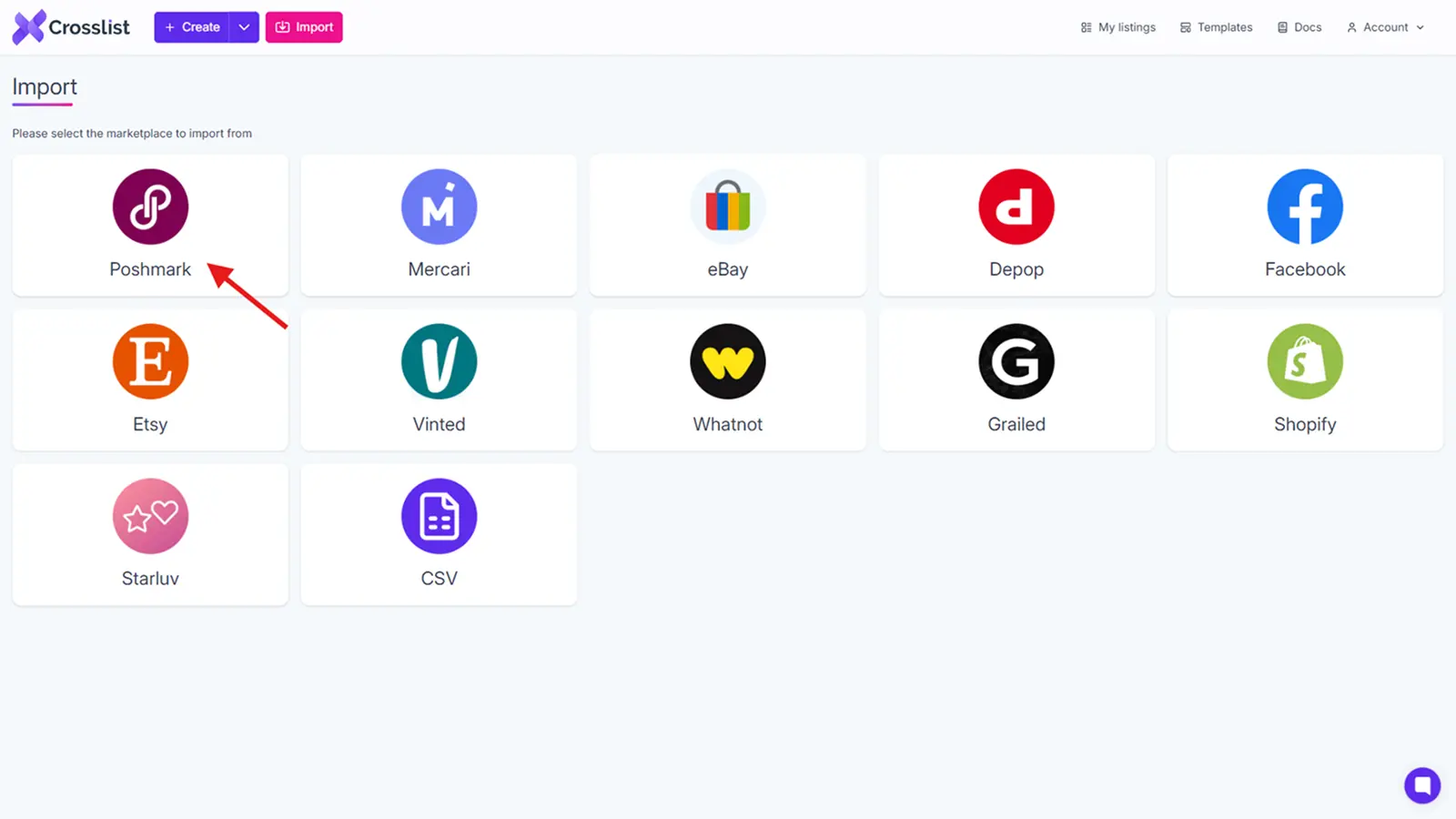
Once you sign up to Crosslist, open the dashboard and click on the import button you see at the top left corner.

You’ll see a screen pop up with all of the marketplaces that Crosslist supports.
Since we’re going to be bringing in your Poshmark inventory, that’s the marketplace you should select.
A new yellow sync icon will appear at the top to let you know that your inventory is being prepared to be imported. If you have a large volume of listings, give it a few minutes.
Once the syncing is complete, your listings are ready to be transferred. You can do this one of two ways:
Import your entire Poshmark inventory at once (be it 50 listings or 250)
Import only certain listings that fit specific criteria (by searching for and selecting them through Crosslist’s advanced search bar)
We always recommend going for the first option as it’s easier to have all of your inventory in one place.
Even if a few of your items are out of stock, you can exclude those while relisting. It’s also easier to relist them directly from Crosslist once the products are back in stock.
Another bonus of having your entire inventory is that if you ever decide to sell on multiple platforms, you can easily cross post your listings from Crosslist.
Whether you import, cross post, or relist, Crosslist helps you get everything done in bulk!
📝 Want to import your Poshmark listings in batches? You can do that, too (in batches of 100). To prevent any duplicates, just toggle the “Only show listings not yet imported” button.
The second option will be ideal for sellers who no longer sell certain items on their inventory, or those who have made lots of changes to certain existing products that it would be better to create a new listing altogether.
In this case, use the search bar to select the listings you want to import.
After you’ve made your choices, hit that import button to bring your inventory into Crosslist.
Step 2: Navigate to the listing overview on Crosslist
Also known as the dashboard. This is where you’ll find information about all of your listings — both the ones created directly on Crosslist, and the ones you imported from elsewhere.
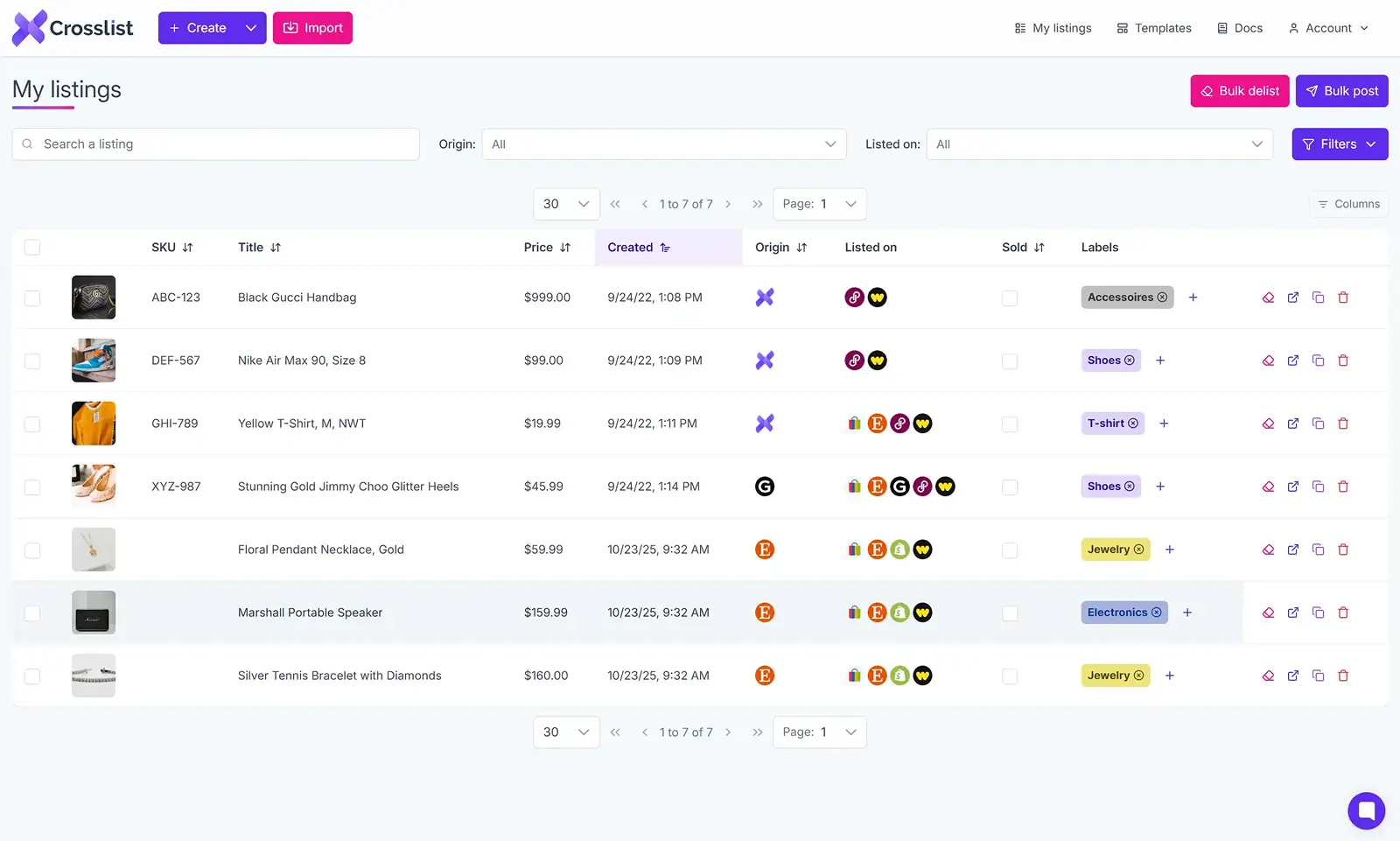
Since we’re only relisting your Poshmark listings now, you’re only going to want to see the listings posted there.
If you just imported your listings by following the instructions from Step 1, use the Origin tab to select the listings originated from Poshmark alone.
If you’ve already been using Crosslist, use the Listed on tab to show the items listed on Poshmark alone.
💡 If you want to update or edit your listings before you repost, now is the time. You could refine your product descriptions, update your prices, remove the backgrounds from your photos, or add video listings.
Expert tips:
Want to mark up or mark down the prices of your products in bulk? Use Crosslist’s bulk price mark-up feature. Go to Account Settings → Price Markup, and enter the percentage you want in the box near Poshmark.
If you want to update your titles and product descriptions, you can use Crosslist’s AI add-on to generate them for you and then tweak it yourself.
To bulk edit your listings, you can use Crosslist’s bulk editor or use a listing template to apply the same changes to multiple listings at once.
Step 3: Select the listings you want to relist on Poshmark
From the listing overview, select all the Poshmark listings you want to delist and relist.
If it has been a while and your plan is to do a full refresh of your entire Poshmark inventory, just select all of the listings at once by clicking the check mark at the top of the box.
Before you ask: yes, you can bulk delist and relist everything at once with Crosslist.
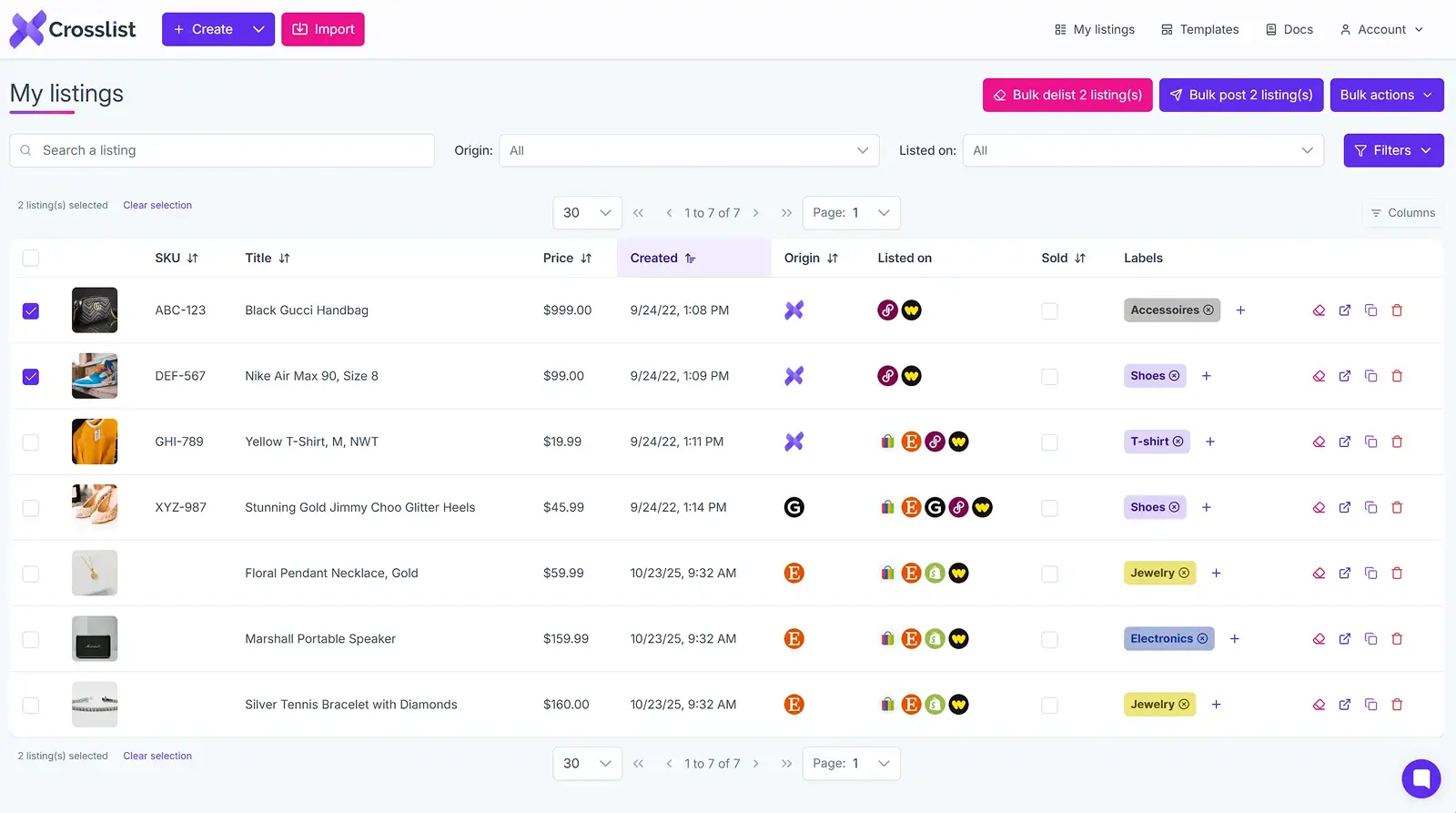
Once you’ve selected, click on the Bulk post (x) listings button at the top right corner of the page. (You don’t have to worry about delisting as Crosslist will do that automatically for you.)
Once again, you’ll see a page pop up with all the 11 marketplaces that Crosslist supports. Select the Poshmark option.
Step 4: Click the “Relist” button
Now, the final step. See that Relist button at the bottom of the pop up screen? Click that.
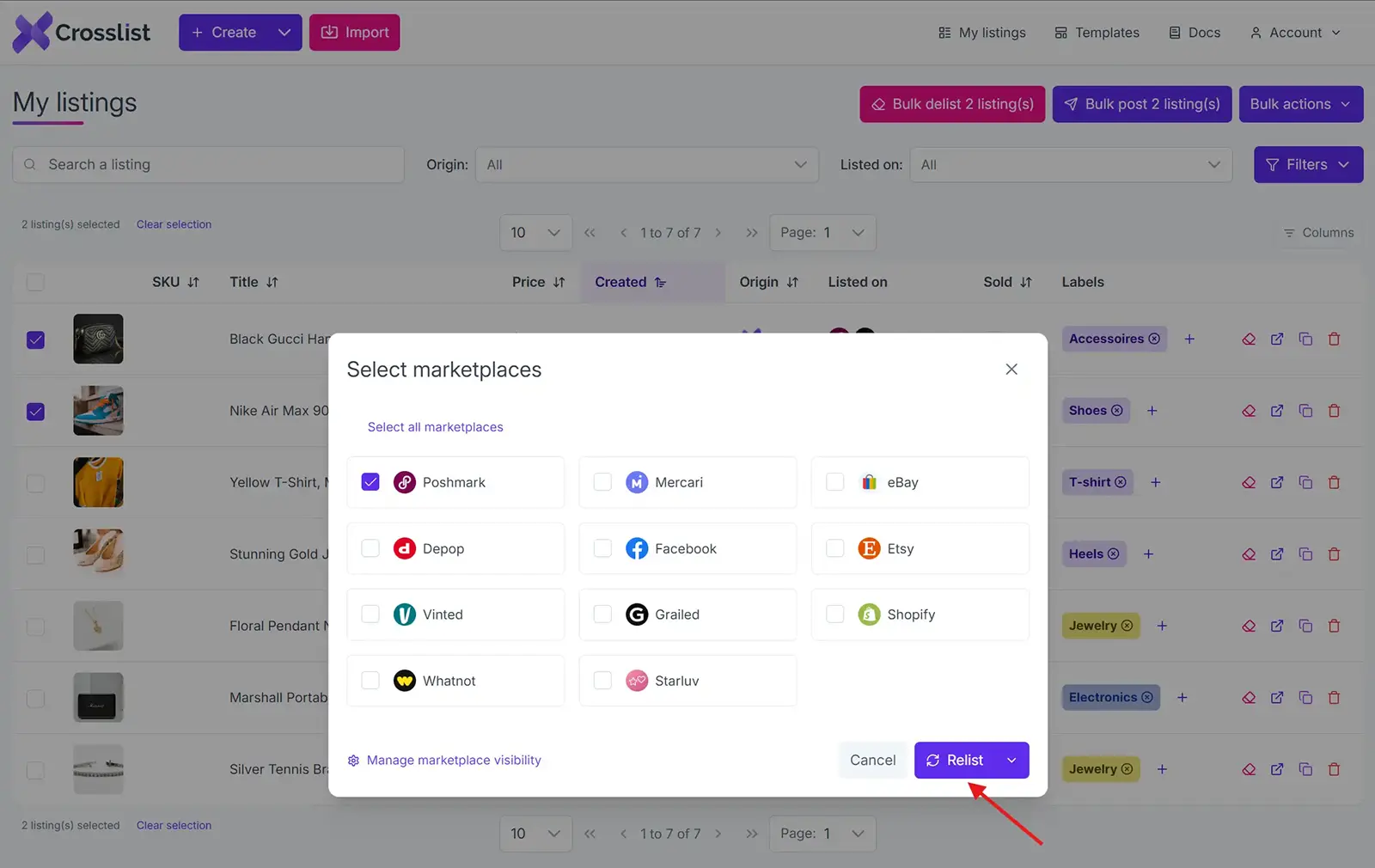
And your job is all done! Crosslist will now automatically delete all of your Poshmark listings and replace them with the additions and changes you made (if any).
There’s also nothing more needed from your side. Crosslist will autopost your listings in the background. This means no double-checking or hitting submit on each listing needed.
The other great thing about Crosslist is that it uses a queuing system to distribute your listings periodically, saving your Poshmark account from becoming vulnerable to rate limits.
Your computer won’t slow down, either, so you can continue using it while Crosslist carries out the bulk relisting process in the background.
Relisting a single listing on Poshmark
The above method is ideal for relisting in bulk. Can you use it to relist a single Poshmark listing? Absolutely.
But, there’s an easier way to do that.
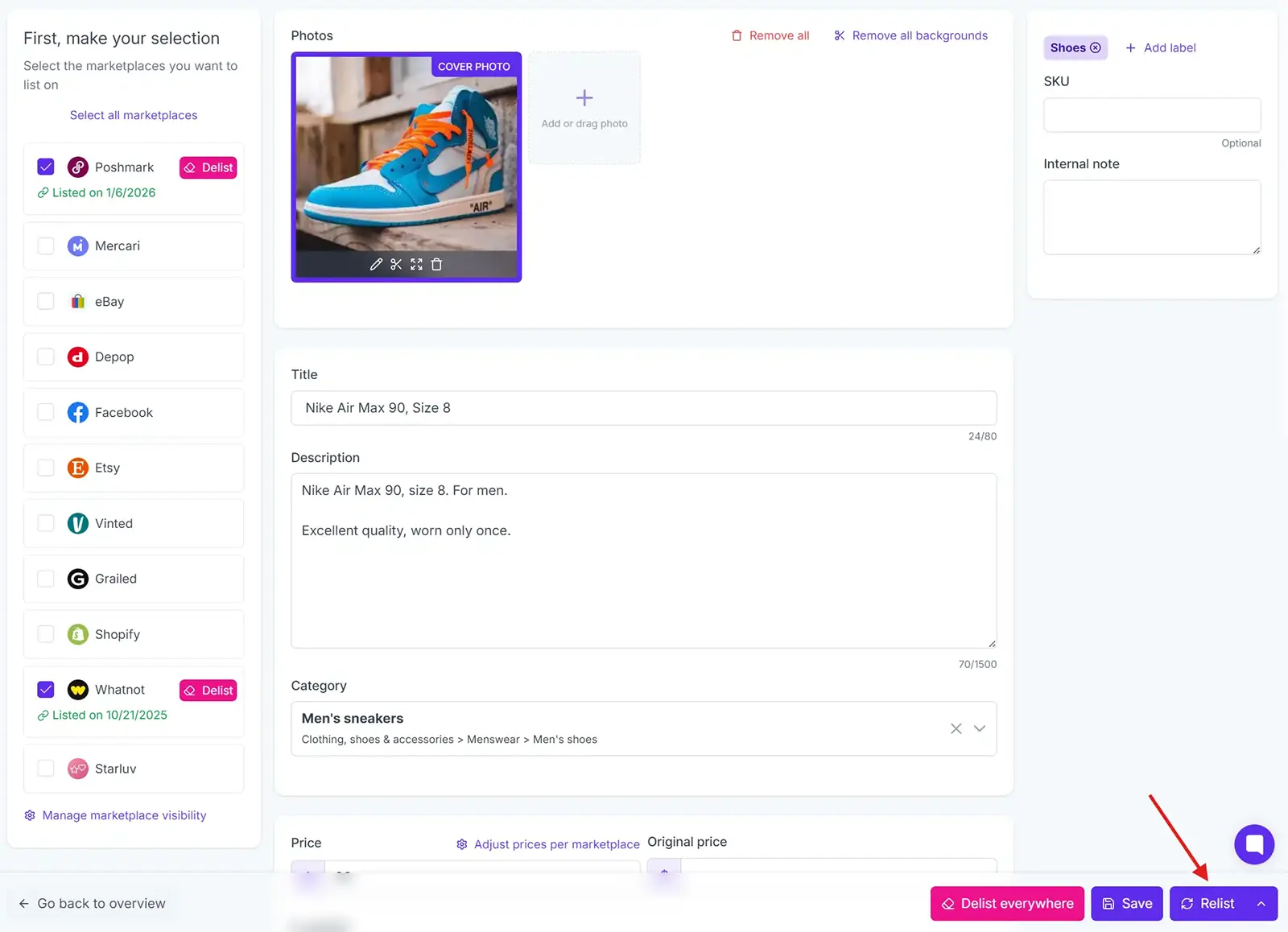
Go to the listing overview page on Crosslist and search for (and select) the specific listing you want to relist.
The listing form for that page will open up with all the details. You can take a look to make sure all of them are accurate.
On the left side, you’ll see a list of all the marketplaces supported by Crosslist. Here, select Poshmark.
Select the Relist button at the bottom of the page. And that’s it! Your product will be delisted and relisted on Poshmark.
Best practices for relisting on Poshmark
📈 We said this before, and we’ll say it again. Don’t relist your items too frequently. Wait for a minimum of 60 days (as per Poshmark’s relisting rules) so that your account doesn’t get flagged for violating their terms and conditions.
📈 Have a relisting strategy in place. Let’s say you sell 20 items. You can relist 10 items the first month and relist the other 10 in the next month. Continue this process. This way, you’ll have some refreshed listings every month without being too excessive and frequent.
📈 Every time you relist, give your listing details a once-over to make sure all the info is up-to-date.
Poshmark relisting tool: why Crosslist?
Crosslist is more than a Poshmark relisting tool. It handles the repetitive work of relisting in bulk so you can focus on sourcing and selling, and it does a lot more once you're set up.
Fill out one dynamic form and post to every major marketplace at once. No separate form per platform, the way most cross listing apps still make you do it.
Relist, edit, and manage your inventory straight from your phone with the mobile app. Source items in the morning, relist them on the bus, check your sales over coffee.
When an item sells on any connected marketplace, Crosslist detects the sale and removes the listing everywhere else with autodelist. No double-selling, no cancelled orders, no refunds you didn't see coming.
Don't feel like rewriting descriptions during a relist? Upload your photos and Crosslist generates complete listings with AI, including titles, descriptions, condition, and competitive pricing. The AI photo editor cleans up images and removes backgrounds in bulk, with unlimited removals on every plan.
And because Crosslist supports the US, UK, Canada, and Australia, you can expand into regional marketplace variants most competitors can't reliably handle.
Here's what sellers say:
“This is a game changer. Keeps all inventory in one place, easy to delist and relist. Not just for huge resellers, it has saved me so much time and increased my sales. It pays for itself many times over.”
— Lorraine F., Trustpilot
Relisting is just one way to keep your Poshmark sales moving. Try Crosslist risk-free with our 3-day money-back guarantee.
Some months, your e-commerce sales graph is a straight line reaching the sky, while on some others it looks as flat as a pancake. This is a cycle that every online seller goes through.
That doesn't mean you have to sit back and accept the slow seasons, though. There are some things you can do to get your revenue graph slowly inching upwards.
In this guide, we cover how to relist on Poshmark, why it works, when to do it, and how to relist your whole closet in bulk with Crosslist.
Keep reading to learn what relisting is, how it benefits you, and how you can relist through Crosslist.
Key takeaways
Relisting on Poshmark replaces old listings with fresh ones, boosting them in search results and “Just In” feeds.
Poshmark’s policy: you can only relist items that are at least 60 days old. If you relist sooner, your account could get flagged.
With Crosslist, you can bulk relist your entire Poshmark inventory in minutes instead of hours.
Before relisting, consider updating your photos, descriptions, and prices to maximize the freshness boost.
What is Poshmark relisting?
Poshmark relisting is the process of deleting an old, stagnant listing and posting the same item again as a fresh one. The new copy gets a new listing date, so it resurfaces at the top of your closet, in followers' feeds, and in the "Just In" section, the same way a brand-new listing would.
Think of your closet like a physical shop. Your newest items sit at the front where everyone sees them, but over time your older stock drifts to the back and stops getting noticed. Relisting is how you pull those older pieces back to the front, dust them off, and put them in front of buyers again, without changing the item itself.
It matters more on Poshmark than on most platforms because the feed and search reward freshness. A listing that's been sitting untouched for weeks barely surfaces, while a relisted version behaves like new inventory.
You can relist on Poshmark manually or use a Poshmark relisting tool like Crosslist to do it in bulk, but more on that below.
Benefits of relisting on Poshmark
Relisting is when you delete your existing listing (known as delisting) and replace it with a fresher listing for the same product. Think of it as taking an unsold product from the back of your shelves, dusting it off, and placing it in the front.
While relisting can boost visibility and sales, doing it manually can be time-consuming, which is why many sellers use a Poshmark relisting tool to automate the process and stay consistent.
If you want to see how the options stack up, our roundup of the best Poshmark tools compares the most popular relisting and automation apps.
Relisting on Poshmark actually has a ton of benefits.
Gives your listings a boost: Poshmark prioritizes fresh listings over old ones (and so do potential buyers). So, when you delist and relist an old listing, Poshmark will consider it a new listing and promote it on people’s newsfeeds as well as under search results.
Enhances visibility: Poshmark users who follow your closet and have your profile alerts on will get a notification about any new item you add, which could spur on sales.
Freshens up your listings: Any old listings that have been gathering dust at the back of your profile will not be displayed at the front. They will be the first thing anybody who visits your profile will see, meaning there’s a bigger chance of you making a sale.
Another thing to note is that nobody goes digging through old product listings to purchase something.
Think about it. When you see products stacked on the shelves of stores, do you pick the one at the front or the one that’s at the very back?
Our brains are wired to think that newer listings = newer and better quality products. So, by putting your old product front and center, relisting helps you make more sales.
It's easy to mix up relisting with sharing. Sharing just bumps your existing listing back to the top of your followers' feeds without creating anything new, so it's a quick daily habit.
Relisting creates a brand-new listing with a fresh timestamp, which is the bigger reset you save for stale items. You want both in your routine, but they do different jobs.
When should you relist on Poshmark?
This is where using a product relister for Poshmark can make a huge difference, helping you relist items quickly without repeating the same manual steps.
Fresher listings mean more eyeballs on your products, which lead to more sales, so it’s a good idea to relist if:
Your old listings have gone unsold for more than 2 months and have become stale
Your listings have stopped getting any attention (likes, comments, offers)
You've made some serious changes to your products and want to list them anew (it's always a good idea to relist rather than just update the old listing, because relisting comes with more viewers)
You just want to freshen up your listings with more attractive titles, product descriptions, or photos
You're selling seasonal products and want to target holiday shoppers
How often should you relist on Poshmark?
Poshmark has a policy against excessive relisting, meaning you can only relist your items once 60 days have passed since the original posting date.
This is just to make sure that the newsfeed and search results aren’t being taken up by the same old listings.
By restricting relisting to once in two months, Poshmark makes sure that shoppers are given enough new choices, keeping the platform relevant.
If you break this rule, your account might get flagged and suspended, or even deleted permanently.
Even without this rule, we generally recommend waiting for 50-60 days before you relist to avoid repetition and redundancy. If you keep relisting too frequently, shoppers might think you have nothing new to offer and stay away from you.
On the other hand, if you never relist, your products will just sit there, unsold. So, do it once every two months.
How to relist on Poshmark manually
If you only have a handful of listings, you can relist them right in the Poshmark app or on the website. Here's the quick version:
Open the listing you want to refresh and tap the Copy Listing option. This creates a fresh duplicate with a new timestamp.
Review the copy, update the title, photos, or price if you want, then post it.
Delete the original listing so you're not left with two of the same item.
That's it. The new copy behaves like a brand-new post, so it drops back to the top of search and into the "Just In" feed.
The catch is that doing this by hand gets old fast once you're past a few items, and Poshmark watches for too much delete-and-relist activity. That's where doing it in bulk comes in.
Autodelist: what happens when an item sells?
One thing many relisting guides don’t talk about is what happens after an item sells on Poshmark.
If you’re selling the same item across multiple marketplaces, a sale on one platform does not automatically remove it from the others. Until you manually delist the item everywhere else, it can still be purchased by another buyer, without you noticing.
If it happens, you've double-sold. You’re forced to cancel an order, issue a refund, and potentially deal with negative feedback or marketplace penalties. The more platforms you sell on, the easier it becomes to lose track of inventory manually.
This is why autodelist exists. Cross listing tools like Crosslist can detect when an item sells on any connected marketplace and automatically remove the listing from every other platform. That means less manual checking, fewer mistakes, and a much lower risk of double-selling.
Note: for some marketplaces, this requires your desktop app or browser extension to be running in the background.
These solve two different problems: relisting refreshes stale inventory to boost visibility, and autodelist protects sold inventory from double-selling. If you're selling on more than one marketplace, you need both.
How to relist on Poshmark in bulk (with Crosslist)
If you only have 5-10 Poshmark listings? You could easily create a relisting strategy and carry out the delisting and relisting process manually.
But, what if you have 25 listings? 50? 100? Deleting your old listings and creating duplicates of them will end up taking almost all of your time. Not to mention all the unintentional errors that could happen.
This is where cross listing and relisting tools like Crosslist come in!
Relisting manually | Relisting with Crosslist |
Will eat up hours of your time | Only takes minutes |
Prone to errors | Error-free process |
Energy intensive | Is an automated process |
Difficult to keep track | Easy to track with Crosslist’s dashboard |
One thing to know before you start: relisting is always a two-step process that involves delisting first.
You can only create a listing in an old one's place once the original is deleted.
With Crosslist you don't have to think about this, because the tool automatically delists each item before relisting it.
Step 1: Import your existing Poshmark inventory into Crosslist
This step is for you if:
You don’t have a Crosslist subscription yet, or
You do have a subscription, but haven’t imported your Poshmark inventory here
[Sign up for a Crosslist subscription]
If you have completed both of the above steps, skip right on ahead to step 2.
Once you sign up to Crosslist, open the dashboard and click on the import button you see at the top left corner.
You’ll see a screen pop up with all of the marketplaces that Crosslist supports.
Since we’re going to be bringing in your Poshmark inventory, that’s the marketplace you should select.
A new yellow sync icon will appear at the top to let you know that your inventory is being prepared to be imported. If you have a large volume of listings, give it a few minutes.
Once the syncing is complete, your listings are ready to be transferred. You can do this one of two ways:
Import your entire Poshmark inventory at once (be it 50 listings or 250)
Import only certain listings that fit specific criteria (by searching for and selecting them through Crosslist’s advanced search bar)
We always recommend going for the first option as it’s easier to have all of your inventory in one place.
Even if a few of your items are out of stock, you can exclude those while relisting. It’s also easier to relist them directly from Crosslist once the products are back in stock.
Another bonus of having your entire inventory is that if you ever decide to sell on multiple platforms, you can easily cross post your listings from Crosslist.
Whether you import, cross post, or relist, Crosslist helps you get everything done in bulk!
📝 Want to import your Poshmark listings in batches? You can do that, too (in batches of 100). To prevent any duplicates, just toggle the “Only show listings not yet imported” button.
The second option will be ideal for sellers who no longer sell certain items on their inventory, or those who have made lots of changes to certain existing products that it would be better to create a new listing altogether.
In this case, use the search bar to select the listings you want to import.
After you’ve made your choices, hit that import button to bring your inventory into Crosslist.
Step 2: Navigate to the listing overview on Crosslist
Also known as the dashboard. This is where you’ll find information about all of your listings — both the ones created directly on Crosslist, and the ones you imported from elsewhere.
Since we’re only relisting your Poshmark listings now, you’re only going to want to see the listings posted there.
If you just imported your listings by following the instructions from Step 1, use the Origin tab to select the listings originated from Poshmark alone.
If you’ve already been using Crosslist, use the Listed on tab to show the items listed on Poshmark alone.
💡 If you want to update or edit your listings before you repost, now is the time. You could refine your product descriptions, update your prices, remove the backgrounds from your photos, or add video listings.
Expert tips:
Want to mark up or mark down the prices of your products in bulk? Use Crosslist’s bulk price mark-up feature. Go to Account Settings → Price Markup, and enter the percentage you want in the box near Poshmark.
If you want to update your titles and product descriptions, you can use Crosslist’s AI add-on to generate them for you and then tweak it yourself.
To bulk edit your listings, you can use Crosslist’s bulk editor or use a listing template to apply the same changes to multiple listings at once.
Step 3: Select the listings you want to relist on Poshmark
From the listing overview, select all the Poshmark listings you want to delist and relist.
If it has been a while and your plan is to do a full refresh of your entire Poshmark inventory, just select all of the listings at once by clicking the check mark at the top of the box.
Before you ask: yes, you can bulk delist and relist everything at once with Crosslist.
Once you’ve selected, click on the Bulk post (x) listings button at the top right corner of the page. (You don’t have to worry about delisting as Crosslist will do that automatically for you.)
Once again, you’ll see a page pop up with all the 11 marketplaces that Crosslist supports. Select the Poshmark option.
Step 4: Click the “Relist” button
Now, the final step. See that Relist button at the bottom of the pop up screen? Click that.
And your job is all done! Crosslist will now automatically delete all of your Poshmark listings and replace them with the additions and changes you made (if any).
There’s also nothing more needed from your side. Crosslist will autopost your listings in the background. This means no double-checking or hitting submit on each listing needed.
The other great thing about Crosslist is that it uses a queuing system to distribute your listings periodically, saving your Poshmark account from becoming vulnerable to rate limits.
Your computer won’t slow down, either, so you can continue using it while Crosslist carries out the bulk relisting process in the background.
Relisting a single listing on Poshmark
The above method is ideal for relisting in bulk. Can you use it to relist a single Poshmark listing? Absolutely.
But, there’s an easier way to do that.
Go to the listing overview page on Crosslist and search for (and select) the specific listing you want to relist.
The listing form for that page will open up with all the details. You can take a look to make sure all of them are accurate.
On the left side, you’ll see a list of all the marketplaces supported by Crosslist. Here, select Poshmark.
Select the Relist button at the bottom of the page. And that’s it! Your product will be delisted and relisted on Poshmark.
Best practices for relisting on Poshmark
📈 We said this before, and we’ll say it again. Don’t relist your items too frequently. Wait for a minimum of 60 days (as per Poshmark’s relisting rules) so that your account doesn’t get flagged for violating their terms and conditions.
📈 Have a relisting strategy in place. Let’s say you sell 20 items. You can relist 10 items the first month and relist the other 10 in the next month. Continue this process. This way, you’ll have some refreshed listings every month without being too excessive and frequent.
📈 Every time you relist, give your listing details a once-over to make sure all the info is up-to-date.
Poshmark relisting tool: why Crosslist?
Crosslist is more than a Poshmark relisting tool. It handles the repetitive work of relisting in bulk so you can focus on sourcing and selling, and it does a lot more once you're set up.
Fill out one dynamic form and post to every major marketplace at once. No separate form per platform, the way most cross listing apps still make you do it.
Relist, edit, and manage your inventory straight from your phone with the mobile app. Source items in the morning, relist them on the bus, check your sales over coffee.
When an item sells on any connected marketplace, Crosslist detects the sale and removes the listing everywhere else with autodelist. No double-selling, no cancelled orders, no refunds you didn't see coming.
Don't feel like rewriting descriptions during a relist? Upload your photos and Crosslist generates complete listings with AI, including titles, descriptions, condition, and competitive pricing. The AI photo editor cleans up images and removes backgrounds in bulk, with unlimited removals on every plan.
And because Crosslist supports the US, UK, Canada, and Australia, you can expand into regional marketplace variants most competitors can't reliably handle.
Here's what sellers say:
“This is a game changer. Keeps all inventory in one place, easy to delist and relist. Not just for huge resellers, it has saved me so much time and increased my sales. It pays for itself many times over.”
— Lorraine F., Trustpilot
Relisting is just one way to keep your Poshmark sales moving. Try Crosslist risk-free with our 3-day money-back guarantee.
Some months, your e-commerce sales graph is a straight line reaching the sky, while on some others it looks as flat as a pancake. This is a cycle that every online seller goes through.
That doesn't mean you have to sit back and accept the slow seasons, though. There are some things you can do to get your revenue graph slowly inching upwards.
In this guide, we cover how to relist on Poshmark, why it works, when to do it, and how to relist your whole closet in bulk with Crosslist.
Keep reading to learn what relisting is, how it benefits you, and how you can relist through Crosslist.
Key takeaways
Relisting on Poshmark replaces old listings with fresh ones, boosting them in search results and “Just In” feeds.
Poshmark’s policy: you can only relist items that are at least 60 days old. If you relist sooner, your account could get flagged.
With Crosslist, you can bulk relist your entire Poshmark inventory in minutes instead of hours.
Before relisting, consider updating your photos, descriptions, and prices to maximize the freshness boost.
What is Poshmark relisting?
Poshmark relisting is the process of deleting an old, stagnant listing and posting the same item again as a fresh one. The new copy gets a new listing date, so it resurfaces at the top of your closet, in followers' feeds, and in the "Just In" section, the same way a brand-new listing would.
Think of your closet like a physical shop. Your newest items sit at the front where everyone sees them, but over time your older stock drifts to the back and stops getting noticed. Relisting is how you pull those older pieces back to the front, dust them off, and put them in front of buyers again, without changing the item itself.
It matters more on Poshmark than on most platforms because the feed and search reward freshness. A listing that's been sitting untouched for weeks barely surfaces, while a relisted version behaves like new inventory.
You can relist on Poshmark manually or use a Poshmark relisting tool like Crosslist to do it in bulk, but more on that below.
Benefits of relisting on Poshmark
Relisting is when you delete your existing listing (known as delisting) and replace it with a fresher listing for the same product. Think of it as taking an unsold product from the back of your shelves, dusting it off, and placing it in the front.
While relisting can boost visibility and sales, doing it manually can be time-consuming, which is why many sellers use a Poshmark relisting tool to automate the process and stay consistent.
If you want to see how the options stack up, our roundup of the best Poshmark tools compares the most popular relisting and automation apps.
Relisting on Poshmark actually has a ton of benefits.
Gives your listings a boost: Poshmark prioritizes fresh listings over old ones (and so do potential buyers). So, when you delist and relist an old listing, Poshmark will consider it a new listing and promote it on people’s newsfeeds as well as under search results.
Enhances visibility: Poshmark users who follow your closet and have your profile alerts on will get a notification about any new item you add, which could spur on sales.
Freshens up your listings: Any old listings that have been gathering dust at the back of your profile will not be displayed at the front. They will be the first thing anybody who visits your profile will see, meaning there’s a bigger chance of you making a sale.
Another thing to note is that nobody goes digging through old product listings to purchase something.
Think about it. When you see products stacked on the shelves of stores, do you pick the one at the front or the one that’s at the very back?
Our brains are wired to think that newer listings = newer and better quality products. So, by putting your old product front and center, relisting helps you make more sales.
It's easy to mix up relisting with sharing. Sharing just bumps your existing listing back to the top of your followers' feeds without creating anything new, so it's a quick daily habit.
Relisting creates a brand-new listing with a fresh timestamp, which is the bigger reset you save for stale items. You want both in your routine, but they do different jobs.
When should you relist on Poshmark?
This is where using a product relister for Poshmark can make a huge difference, helping you relist items quickly without repeating the same manual steps.
Fresher listings mean more eyeballs on your products, which lead to more sales, so it’s a good idea to relist if:
Your old listings have gone unsold for more than 2 months and have become stale
Your listings have stopped getting any attention (likes, comments, offers)
You've made some serious changes to your products and want to list them anew (it's always a good idea to relist rather than just update the old listing, because relisting comes with more viewers)
You just want to freshen up your listings with more attractive titles, product descriptions, or photos
You're selling seasonal products and want to target holiday shoppers
How often should you relist on Poshmark?
Poshmark has a policy against excessive relisting, meaning you can only relist your items once 60 days have passed since the original posting date.
This is just to make sure that the newsfeed and search results aren’t being taken up by the same old listings.
By restricting relisting to once in two months, Poshmark makes sure that shoppers are given enough new choices, keeping the platform relevant.
If you break this rule, your account might get flagged and suspended, or even deleted permanently.
Even without this rule, we generally recommend waiting for 50-60 days before you relist to avoid repetition and redundancy. If you keep relisting too frequently, shoppers might think you have nothing new to offer and stay away from you.
On the other hand, if you never relist, your products will just sit there, unsold. So, do it once every two months.
How to relist on Poshmark manually
If you only have a handful of listings, you can relist them right in the Poshmark app or on the website. Here's the quick version:
Open the listing you want to refresh and tap the Copy Listing option. This creates a fresh duplicate with a new timestamp.
Review the copy, update the title, photos, or price if you want, then post it.
Delete the original listing so you're not left with two of the same item.
That's it. The new copy behaves like a brand-new post, so it drops back to the top of search and into the "Just In" feed.
The catch is that doing this by hand gets old fast once you're past a few items, and Poshmark watches for too much delete-and-relist activity. That's where doing it in bulk comes in.
Autodelist: what happens when an item sells?
One thing many relisting guides don’t talk about is what happens after an item sells on Poshmark.
If you’re selling the same item across multiple marketplaces, a sale on one platform does not automatically remove it from the others. Until you manually delist the item everywhere else, it can still be purchased by another buyer, without you noticing.
If it happens, you've double-sold. You’re forced to cancel an order, issue a refund, and potentially deal with negative feedback or marketplace penalties. The more platforms you sell on, the easier it becomes to lose track of inventory manually.
This is why autodelist exists. Cross listing tools like Crosslist can detect when an item sells on any connected marketplace and automatically remove the listing from every other platform. That means less manual checking, fewer mistakes, and a much lower risk of double-selling.
Note: for some marketplaces, this requires your desktop app or browser extension to be running in the background.
These solve two different problems: relisting refreshes stale inventory to boost visibility, and autodelist protects sold inventory from double-selling. If you're selling on more than one marketplace, you need both.
How to relist on Poshmark in bulk (with Crosslist)
If you only have 5-10 Poshmark listings? You could easily create a relisting strategy and carry out the delisting and relisting process manually.
But, what if you have 25 listings? 50? 100? Deleting your old listings and creating duplicates of them will end up taking almost all of your time. Not to mention all the unintentional errors that could happen.
This is where cross listing and relisting tools like Crosslist come in!
Relisting manually | Relisting with Crosslist |
Will eat up hours of your time | Only takes minutes |
Prone to errors | Error-free process |
Energy intensive | Is an automated process |
Difficult to keep track | Easy to track with Crosslist’s dashboard |
One thing to know before you start: relisting is always a two-step process that involves delisting first.
You can only create a listing in an old one's place once the original is deleted.
With Crosslist you don't have to think about this, because the tool automatically delists each item before relisting it.
Step 1: Import your existing Poshmark inventory into Crosslist
This step is for you if:
You don’t have a Crosslist subscription yet, or
You do have a subscription, but haven’t imported your Poshmark inventory here
[Sign up for a Crosslist subscription]
If you have completed both of the above steps, skip right on ahead to step 2.
Once you sign up to Crosslist, open the dashboard and click on the import button you see at the top left corner.
You’ll see a screen pop up with all of the marketplaces that Crosslist supports.
Since we’re going to be bringing in your Poshmark inventory, that’s the marketplace you should select.
A new yellow sync icon will appear at the top to let you know that your inventory is being prepared to be imported. If you have a large volume of listings, give it a few minutes.
Once the syncing is complete, your listings are ready to be transferred. You can do this one of two ways:
Import your entire Poshmark inventory at once (be it 50 listings or 250)
Import only certain listings that fit specific criteria (by searching for and selecting them through Crosslist’s advanced search bar)
We always recommend going for the first option as it’s easier to have all of your inventory in one place.
Even if a few of your items are out of stock, you can exclude those while relisting. It’s also easier to relist them directly from Crosslist once the products are back in stock.
Another bonus of having your entire inventory is that if you ever decide to sell on multiple platforms, you can easily cross post your listings from Crosslist.
Whether you import, cross post, or relist, Crosslist helps you get everything done in bulk!
📝 Want to import your Poshmark listings in batches? You can do that, too (in batches of 100). To prevent any duplicates, just toggle the “Only show listings not yet imported” button.
The second option will be ideal for sellers who no longer sell certain items on their inventory, or those who have made lots of changes to certain existing products that it would be better to create a new listing altogether.
In this case, use the search bar to select the listings you want to import.
After you’ve made your choices, hit that import button to bring your inventory into Crosslist.
Step 2: Navigate to the listing overview on Crosslist
Also known as the dashboard. This is where you’ll find information about all of your listings — both the ones created directly on Crosslist, and the ones you imported from elsewhere.
Since we’re only relisting your Poshmark listings now, you’re only going to want to see the listings posted there.
If you just imported your listings by following the instructions from Step 1, use the Origin tab to select the listings originated from Poshmark alone.
If you’ve already been using Crosslist, use the Listed on tab to show the items listed on Poshmark alone.
💡 If you want to update or edit your listings before you repost, now is the time. You could refine your product descriptions, update your prices, remove the backgrounds from your photos, or add video listings.
Expert tips:
Want to mark up or mark down the prices of your products in bulk? Use Crosslist’s bulk price mark-up feature. Go to Account Settings → Price Markup, and enter the percentage you want in the box near Poshmark.
If you want to update your titles and product descriptions, you can use Crosslist’s AI add-on to generate them for you and then tweak it yourself.
To bulk edit your listings, you can use Crosslist’s bulk editor or use a listing template to apply the same changes to multiple listings at once.
Step 3: Select the listings you want to relist on Poshmark
From the listing overview, select all the Poshmark listings you want to delist and relist.
If it has been a while and your plan is to do a full refresh of your entire Poshmark inventory, just select all of the listings at once by clicking the check mark at the top of the box.
Before you ask: yes, you can bulk delist and relist everything at once with Crosslist.
Once you’ve selected, click on the Bulk post (x) listings button at the top right corner of the page. (You don’t have to worry about delisting as Crosslist will do that automatically for you.)
Once again, you’ll see a page pop up with all the 11 marketplaces that Crosslist supports. Select the Poshmark option.
Step 4: Click the “Relist” button
Now, the final step. See that Relist button at the bottom of the pop up screen? Click that.
And your job is all done! Crosslist will now automatically delete all of your Poshmark listings and replace them with the additions and changes you made (if any).
There’s also nothing more needed from your side. Crosslist will autopost your listings in the background. This means no double-checking or hitting submit on each listing needed.
The other great thing about Crosslist is that it uses a queuing system to distribute your listings periodically, saving your Poshmark account from becoming vulnerable to rate limits.
Your computer won’t slow down, either, so you can continue using it while Crosslist carries out the bulk relisting process in the background.
Relisting a single listing on Poshmark
The above method is ideal for relisting in bulk. Can you use it to relist a single Poshmark listing? Absolutely.
But, there’s an easier way to do that.
Go to the listing overview page on Crosslist and search for (and select) the specific listing you want to relist.
The listing form for that page will open up with all the details. You can take a look to make sure all of them are accurate.
On the left side, you’ll see a list of all the marketplaces supported by Crosslist. Here, select Poshmark.
Select the Relist button at the bottom of the page. And that’s it! Your product will be delisted and relisted on Poshmark.
Best practices for relisting on Poshmark
📈 We said this before, and we’ll say it again. Don’t relist your items too frequently. Wait for a minimum of 60 days (as per Poshmark’s relisting rules) so that your account doesn’t get flagged for violating their terms and conditions.
📈 Have a relisting strategy in place. Let’s say you sell 20 items. You can relist 10 items the first month and relist the other 10 in the next month. Continue this process. This way, you’ll have some refreshed listings every month without being too excessive and frequent.
📈 Every time you relist, give your listing details a once-over to make sure all the info is up-to-date.
Poshmark relisting tool: why Crosslist?
Crosslist is more than a Poshmark relisting tool. It handles the repetitive work of relisting in bulk so you can focus on sourcing and selling, and it does a lot more once you're set up.
Fill out one dynamic form and post to every major marketplace at once. No separate form per platform, the way most cross listing apps still make you do it.
Relist, edit, and manage your inventory straight from your phone with the mobile app. Source items in the morning, relist them on the bus, check your sales over coffee.
When an item sells on any connected marketplace, Crosslist detects the sale and removes the listing everywhere else with autodelist. No double-selling, no cancelled orders, no refunds you didn't see coming.
Don't feel like rewriting descriptions during a relist? Upload your photos and Crosslist generates complete listings with AI, including titles, descriptions, condition, and competitive pricing. The AI photo editor cleans up images and removes backgrounds in bulk, with unlimited removals on every plan.
And because Crosslist supports the US, UK, Canada, and Australia, you can expand into regional marketplace variants most competitors can't reliably handle.
Here's what sellers say:
“This is a game changer. Keeps all inventory in one place, easy to delist and relist. Not just for huge resellers, it has saved me so much time and increased my sales. It pays for itself many times over.”
— Lorraine F., Trustpilot
Relisting is just one way to keep your Poshmark sales moving. Try Crosslist risk-free with our 3-day money-back guarantee.
Some months, your e-commerce sales graph is a straight line reaching the sky, while on some others it looks as flat as a pancake. This is a cycle that every online seller goes through.
That doesn't mean you have to sit back and accept the slow seasons, though. There are some things you can do to get your revenue graph slowly inching upwards.
In this guide, we cover how to relist on Poshmark, why it works, when to do it, and how to relist your whole closet in bulk with Crosslist.
Keep reading to learn what relisting is, how it benefits you, and how you can relist through Crosslist.
Key takeaways
Relisting on Poshmark replaces old listings with fresh ones, boosting them in search results and “Just In” feeds.
Poshmark’s policy: you can only relist items that are at least 60 days old. If you relist sooner, your account could get flagged.
With Crosslist, you can bulk relist your entire Poshmark inventory in minutes instead of hours.
Before relisting, consider updating your photos, descriptions, and prices to maximize the freshness boost.
What is Poshmark relisting?
Poshmark relisting is the process of deleting an old, stagnant listing and posting the same item again as a fresh one. The new copy gets a new listing date, so it resurfaces at the top of your closet, in followers' feeds, and in the "Just In" section, the same way a brand-new listing would.
Think of your closet like a physical shop. Your newest items sit at the front where everyone sees them, but over time your older stock drifts to the back and stops getting noticed. Relisting is how you pull those older pieces back to the front, dust them off, and put them in front of buyers again, without changing the item itself.
It matters more on Poshmark than on most platforms because the feed and search reward freshness. A listing that's been sitting untouched for weeks barely surfaces, while a relisted version behaves like new inventory.
You can relist on Poshmark manually or use a Poshmark relisting tool like Crosslist to do it in bulk, but more on that below.
Benefits of relisting on Poshmark
Relisting is when you delete your existing listing (known as delisting) and replace it with a fresher listing for the same product. Think of it as taking an unsold product from the back of your shelves, dusting it off, and placing it in the front.
While relisting can boost visibility and sales, doing it manually can be time-consuming, which is why many sellers use a Poshmark relisting tool to automate the process and stay consistent.
If you want to see how the options stack up, our roundup of the best Poshmark tools compares the most popular relisting and automation apps.
Relisting on Poshmark actually has a ton of benefits.
Gives your listings a boost: Poshmark prioritizes fresh listings over old ones (and so do potential buyers). So, when you delist and relist an old listing, Poshmark will consider it a new listing and promote it on people’s newsfeeds as well as under search results.
Enhances visibility: Poshmark users who follow your closet and have your profile alerts on will get a notification about any new item you add, which could spur on sales.
Freshens up your listings: Any old listings that have been gathering dust at the back of your profile will not be displayed at the front. They will be the first thing anybody who visits your profile will see, meaning there’s a bigger chance of you making a sale.
Another thing to note is that nobody goes digging through old product listings to purchase something.
Think about it. When you see products stacked on the shelves of stores, do you pick the one at the front or the one that’s at the very back?
Our brains are wired to think that newer listings = newer and better quality products. So, by putting your old product front and center, relisting helps you make more sales.
It's easy to mix up relisting with sharing. Sharing just bumps your existing listing back to the top of your followers' feeds without creating anything new, so it's a quick daily habit.
Relisting creates a brand-new listing with a fresh timestamp, which is the bigger reset you save for stale items. You want both in your routine, but they do different jobs.
When should you relist on Poshmark?
This is where using a product relister for Poshmark can make a huge difference, helping you relist items quickly without repeating the same manual steps.
Fresher listings mean more eyeballs on your products, which lead to more sales, so it’s a good idea to relist if:
Your old listings have gone unsold for more than 2 months and have become stale
Your listings have stopped getting any attention (likes, comments, offers)
You've made some serious changes to your products and want to list them anew (it's always a good idea to relist rather than just update the old listing, because relisting comes with more viewers)
You just want to freshen up your listings with more attractive titles, product descriptions, or photos
You're selling seasonal products and want to target holiday shoppers
How often should you relist on Poshmark?
Poshmark has a policy against excessive relisting, meaning you can only relist your items once 60 days have passed since the original posting date.
This is just to make sure that the newsfeed and search results aren’t being taken up by the same old listings.
By restricting relisting to once in two months, Poshmark makes sure that shoppers are given enough new choices, keeping the platform relevant.
If you break this rule, your account might get flagged and suspended, or even deleted permanently.
Even without this rule, we generally recommend waiting for 50-60 days before you relist to avoid repetition and redundancy. If you keep relisting too frequently, shoppers might think you have nothing new to offer and stay away from you.
On the other hand, if you never relist, your products will just sit there, unsold. So, do it once every two months.
How to relist on Poshmark manually
If you only have a handful of listings, you can relist them right in the Poshmark app or on the website. Here's the quick version:
Open the listing you want to refresh and tap the Copy Listing option. This creates a fresh duplicate with a new timestamp.
Review the copy, update the title, photos, or price if you want, then post it.
Delete the original listing so you're not left with two of the same item.
That's it. The new copy behaves like a brand-new post, so it drops back to the top of search and into the "Just In" feed.
The catch is that doing this by hand gets old fast once you're past a few items, and Poshmark watches for too much delete-and-relist activity. That's where doing it in bulk comes in.
Autodelist: what happens when an item sells?
One thing many relisting guides don’t talk about is what happens after an item sells on Poshmark.
If you’re selling the same item across multiple marketplaces, a sale on one platform does not automatically remove it from the others. Until you manually delist the item everywhere else, it can still be purchased by another buyer, without you noticing.
If it happens, you've double-sold. You’re forced to cancel an order, issue a refund, and potentially deal with negative feedback or marketplace penalties. The more platforms you sell on, the easier it becomes to lose track of inventory manually.
This is why autodelist exists. Cross listing tools like Crosslist can detect when an item sells on any connected marketplace and automatically remove the listing from every other platform. That means less manual checking, fewer mistakes, and a much lower risk of double-selling.
Note: for some marketplaces, this requires your desktop app or browser extension to be running in the background.
These solve two different problems: relisting refreshes stale inventory to boost visibility, and autodelist protects sold inventory from double-selling. If you're selling on more than one marketplace, you need both.
How to relist on Poshmark in bulk (with Crosslist)
If you only have 5-10 Poshmark listings? You could easily create a relisting strategy and carry out the delisting and relisting process manually.
But, what if you have 25 listings? 50? 100? Deleting your old listings and creating duplicates of them will end up taking almost all of your time. Not to mention all the unintentional errors that could happen.
This is where cross listing and relisting tools like Crosslist come in!
Relisting manually | Relisting with Crosslist |
Will eat up hours of your time | Only takes minutes |
Prone to errors | Error-free process |
Energy intensive | Is an automated process |
Difficult to keep track | Easy to track with Crosslist’s dashboard |
One thing to know before you start: relisting is always a two-step process that involves delisting first.
You can only create a listing in an old one's place once the original is deleted.
With Crosslist you don't have to think about this, because the tool automatically delists each item before relisting it.
Step 1: Import your existing Poshmark inventory into Crosslist
This step is for you if:
You don’t have a Crosslist subscription yet, or
You do have a subscription, but haven’t imported your Poshmark inventory here
[Sign up for a Crosslist subscription]
If you have completed both of the above steps, skip right on ahead to step 2.
Once you sign up to Crosslist, open the dashboard and click on the import button you see at the top left corner.
You’ll see a screen pop up with all of the marketplaces that Crosslist supports.
Since we’re going to be bringing in your Poshmark inventory, that’s the marketplace you should select.
A new yellow sync icon will appear at the top to let you know that your inventory is being prepared to be imported. If you have a large volume of listings, give it a few minutes.
Once the syncing is complete, your listings are ready to be transferred. You can do this one of two ways:
Import your entire Poshmark inventory at once (be it 50 listings or 250)
Import only certain listings that fit specific criteria (by searching for and selecting them through Crosslist’s advanced search bar)
We always recommend going for the first option as it’s easier to have all of your inventory in one place.
Even if a few of your items are out of stock, you can exclude those while relisting. It’s also easier to relist them directly from Crosslist once the products are back in stock.
Another bonus of having your entire inventory is that if you ever decide to sell on multiple platforms, you can easily cross post your listings from Crosslist.
Whether you import, cross post, or relist, Crosslist helps you get everything done in bulk!
📝 Want to import your Poshmark listings in batches? You can do that, too (in batches of 100). To prevent any duplicates, just toggle the “Only show listings not yet imported” button.
The second option will be ideal for sellers who no longer sell certain items on their inventory, or those who have made lots of changes to certain existing products that it would be better to create a new listing altogether.
In this case, use the search bar to select the listings you want to import.
After you’ve made your choices, hit that import button to bring your inventory into Crosslist.
Step 2: Navigate to the listing overview on Crosslist
Also known as the dashboard. This is where you’ll find information about all of your listings — both the ones created directly on Crosslist, and the ones you imported from elsewhere.
Since we’re only relisting your Poshmark listings now, you’re only going to want to see the listings posted there.
If you just imported your listings by following the instructions from Step 1, use the Origin tab to select the listings originated from Poshmark alone.
If you’ve already been using Crosslist, use the Listed on tab to show the items listed on Poshmark alone.
💡 If you want to update or edit your listings before you repost, now is the time. You could refine your product descriptions, update your prices, remove the backgrounds from your photos, or add video listings.
Expert tips:
Want to mark up or mark down the prices of your products in bulk? Use Crosslist’s bulk price mark-up feature. Go to Account Settings → Price Markup, and enter the percentage you want in the box near Poshmark.
If you want to update your titles and product descriptions, you can use Crosslist’s AI add-on to generate them for you and then tweak it yourself.
To bulk edit your listings, you can use Crosslist’s bulk editor or use a listing template to apply the same changes to multiple listings at once.
Step 3: Select the listings you want to relist on Poshmark
From the listing overview, select all the Poshmark listings you want to delist and relist.
If it has been a while and your plan is to do a full refresh of your entire Poshmark inventory, just select all of the listings at once by clicking the check mark at the top of the box.
Before you ask: yes, you can bulk delist and relist everything at once with Crosslist.
Once you’ve selected, click on the Bulk post (x) listings button at the top right corner of the page. (You don’t have to worry about delisting as Crosslist will do that automatically for you.)
Once again, you’ll see a page pop up with all the 11 marketplaces that Crosslist supports. Select the Poshmark option.
Step 4: Click the “Relist” button
Now, the final step. See that Relist button at the bottom of the pop up screen? Click that.
And your job is all done! Crosslist will now automatically delete all of your Poshmark listings and replace them with the additions and changes you made (if any).
There’s also nothing more needed from your side. Crosslist will autopost your listings in the background. This means no double-checking or hitting submit on each listing needed.
The other great thing about Crosslist is that it uses a queuing system to distribute your listings periodically, saving your Poshmark account from becoming vulnerable to rate limits.
Your computer won’t slow down, either, so you can continue using it while Crosslist carries out the bulk relisting process in the background.
Relisting a single listing on Poshmark
The above method is ideal for relisting in bulk. Can you use it to relist a single Poshmark listing? Absolutely.
But, there’s an easier way to do that.
Go to the listing overview page on Crosslist and search for (and select) the specific listing you want to relist.
The listing form for that page will open up with all the details. You can take a look to make sure all of them are accurate.
On the left side, you’ll see a list of all the marketplaces supported by Crosslist. Here, select Poshmark.
Select the Relist button at the bottom of the page. And that’s it! Your product will be delisted and relisted on Poshmark.
Best practices for relisting on Poshmark
📈 We said this before, and we’ll say it again. Don’t relist your items too frequently. Wait for a minimum of 60 days (as per Poshmark’s relisting rules) so that your account doesn’t get flagged for violating their terms and conditions.
📈 Have a relisting strategy in place. Let’s say you sell 20 items. You can relist 10 items the first month and relist the other 10 in the next month. Continue this process. This way, you’ll have some refreshed listings every month without being too excessive and frequent.
📈 Every time you relist, give your listing details a once-over to make sure all the info is up-to-date.
Poshmark relisting tool: why Crosslist?
Crosslist is more than a Poshmark relisting tool. It handles the repetitive work of relisting in bulk so you can focus on sourcing and selling, and it does a lot more once you're set up.
Fill out one dynamic form and post to every major marketplace at once. No separate form per platform, the way most cross listing apps still make you do it.
Relist, edit, and manage your inventory straight from your phone with the mobile app. Source items in the morning, relist them on the bus, check your sales over coffee.
When an item sells on any connected marketplace, Crosslist detects the sale and removes the listing everywhere else with autodelist. No double-selling, no cancelled orders, no refunds you didn't see coming.
Don't feel like rewriting descriptions during a relist? Upload your photos and Crosslist generates complete listings with AI, including titles, descriptions, condition, and competitive pricing. The AI photo editor cleans up images and removes backgrounds in bulk, with unlimited removals on every plan.
And because Crosslist supports the US, UK, Canada, and Australia, you can expand into regional marketplace variants most competitors can't reliably handle.
Here's what sellers say:
“This is a game changer. Keeps all inventory in one place, easy to delist and relist. Not just for huge resellers, it has saved me so much time and increased my sales. It pays for itself many times over.”
— Lorraine F., Trustpilot
Relisting is just one way to keep your Poshmark sales moving. Try Crosslist risk-free with our 3-day money-back guarantee.