


Can we get real for a second and talk about how the cross listing space doesn’t really cater to UK sellers?
I mean, take a look at pretty much any popular cross listing app, and you’ll find that they only support US-based sellers.
There are a few exceptions to this, of course.
For example, Crosslist, Nifty, and Vendoo support UK sellers. And there are a few lesser-known tools that also support UK variants of marketplaces.
But overall? There really are slim pickings out there.
So we put together this list to help you find the best cross listing app UK sellers can actually rely on.
Key takeaways
Crosslist is the best all-round option for UK sellers, with one universal form, background autoposting, and a native mobile app.
Most of the popular cross listing apps, with the exception of Crosslist, Nifty, and Vendoo, don’t support UK sellers.
Nifty and Voolist are good choices for sellers who can’t use a browser extension and need a cloud-based cross listing app.
Vendoo and Zipsale are ideal for hobbyist UK sellers who could get the job done with a free plan, while SellerAider is best for those who want a budget-friendly no-frills app.
Fluf Connect is ideal for sellers who sell on local UK marketplaces and niche websites that aren’t supported by other apps.
Cross listing apps that support UK sellers vs. ones that don’t
It's important to know which cross listing apps support UK sellers. What's equally important is knowing which ones don't.
When you do a quick Google search (or ask ChatGPT) for the best cross listing apps, here are the ones that will pop up. Let's see which ones work for UK resellers.
Cross listing app | Support for UK sellers |
Crosslist | ✔️ |
❌ | |
✔️ | |
❌ | |
❌ | |
✔️ | |
❌ |
As you can see, more than half of them are designed only for US sellers, which means that as a UK seller, you’re left with very few options.
So, which cross listing apps actually do support UK users? Let’s go through them one by one.
Crosslist
Pricing: Starts at $29.99/month (with a 10% discount on quarterly plans, or 2 months free on annual plans)
Free trial: 3-day money-back guarantee if you create 20 or fewer listings
Best for: UK sellers of all kinds
Crosslist is the #1 cross listing app for UK sellers, and for good reason.
For starters, our tool supports a total of 11+ marketplaces (and their UK variants, if available).
So, as a UK seller, you’ll be able to cross list to the following marketplaces with Crosslist:
eBay
Etsy
Grailed
Depop
Shopify
Whatnot
Facebook Marketplace
WooCommerce
Automatic domain mapping and size conversions: When you choose UK as your region, Crosslist will automatically publish your listings to the UK variants of marketplaces, such as ebay.co.uk instead of ebay.com.
Our tool also automatically converts your measurements from imperial to metric and vice versa.
We’ll look at Crosslist’s other standout features in detail.
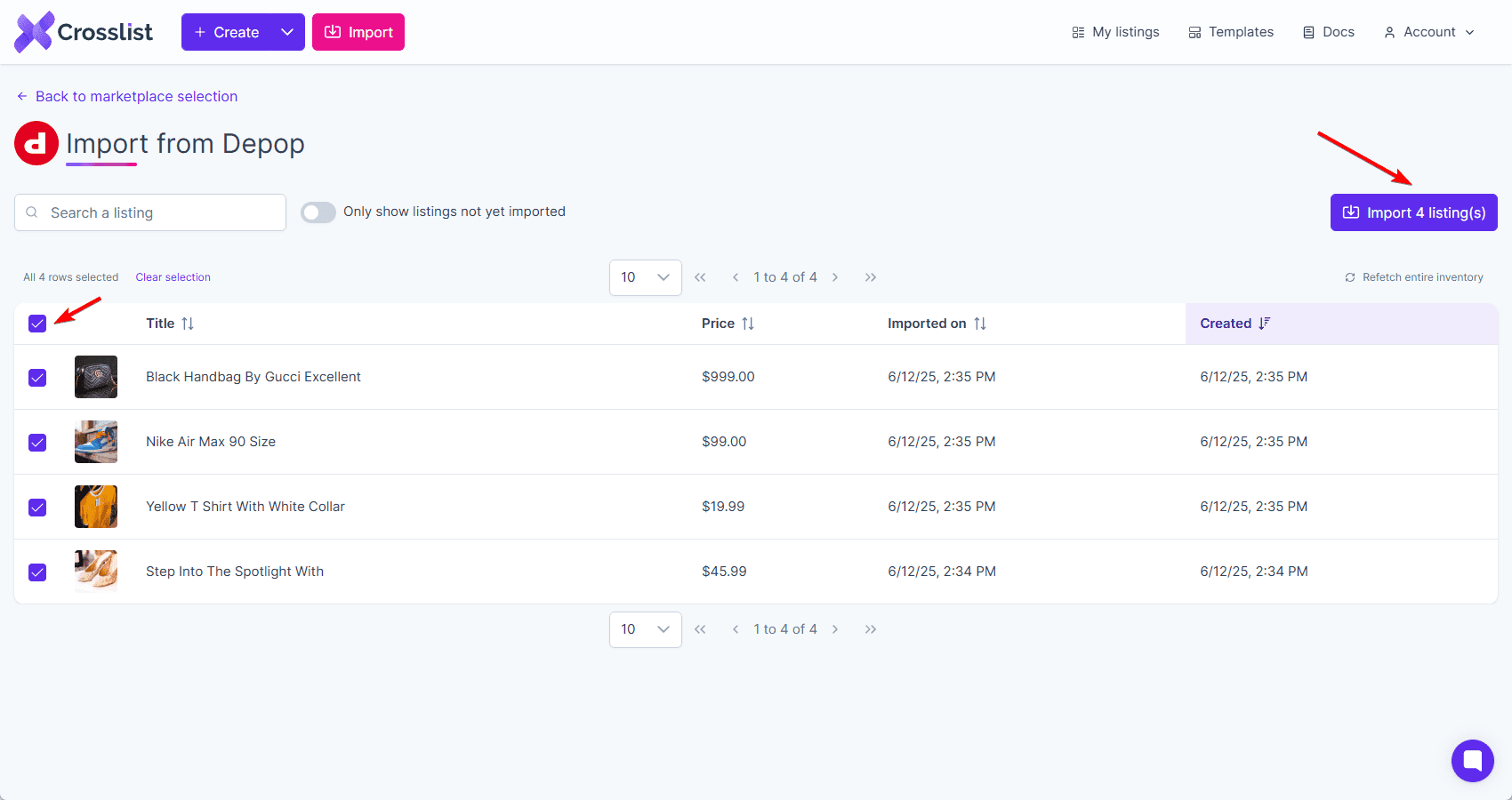
If you already have existing inventory, you can import all of it to Crosslist (no matter how large) in a single click within minutes.
Single, dynamic listing form: Regardless of how many marketplaces you want to post your listings to, you’ll only ever have to fill a single, universal form on Crosslist.
This form contains all the possible listing information required by the 11+ supported marketplaces.
Once you’ve filled out the form, simply select all the marketplaces you would like to list it on, and your work is done! Crosslist will automatically post the listings in the background.
You won’t have to fill out any additional platform-specific forms, or review the listings and publish them manually.
This method will save you more than 10 hours every week, and isn’t available on most of the other cross listing apps.
Background autoposting: After you submit your listing form, Crosslist automatically publishes it to the relevant marketplaces (by opening a single tab for each marketplace).
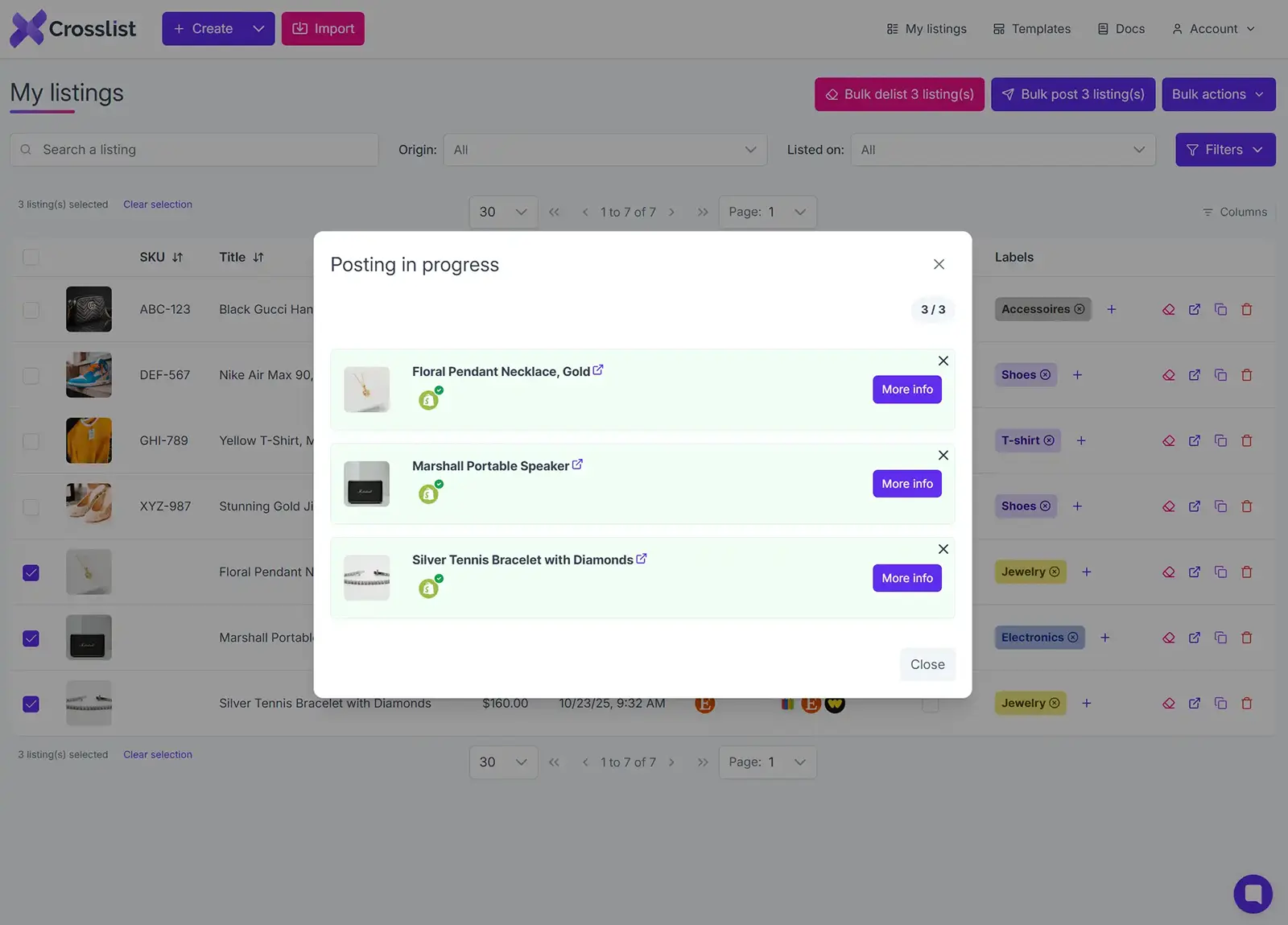
Unlike the apps that use form-filling software, you don't have to review the listing details, add in missing details (there won't be any), or manually publish each listing yourself.
How does this help you? You can submit the listing and go about your day, without having to spend the next two hours in front of your desktop manually reviewing everything.
AI-generated listings: Crosslist is designed to save you time every step of the way, which is what our AI add-on does.
All you need to do is upload your product images and let the AI do its thing. It generates every single listing detail, including product condition, color, size, and brand.
The AI tool also comes in handy when you’re listing a huge amount of products at once.
You can upload a bunch of photos, and let the AI tool turn each product photo into a separate listing.
What used to take hours can now be completed in minutes!
The AI add-on also crawls through the internet, analyzes market trends, and suggests the most competitive prices for your products.
This will be a lifesaver for you if you struggle with pricing your items accurately.
Autodelisting: Crosslist automatically detects any time you make a sale and delists the item from the other connected marketplaces.
This prevents you from double-selling the same products, which often leads to canceled orders, account restrictions, and a lower seller rating.
You can sleep peacefully without worrying about monitoring your sales and manually delisting your items.
Mobile app: Crosslist has a fully functional mobile app that lets you carry your reselling business with you wherever you go.
Unlike desktop-dependent cross listing tools, Crosslist's mobile app gives you the freedom to create listings during your commute or check on your sales while you're waiting in line at the coffee shop.
Bulk actions: Want to import all of your existing inventory to Crosslist?
Maybe you want to cross list those items to other marketplaces in bulk, too. Crosslist makes everything possible.
You can carry out the following bulk actions:
Import
Cross list
Export via CSV
Edit
Change prices
Delete
Clone
Delist and relist
Editing and cloning alone can be done only on a maximum of 100 listings at a time.
The other bulk actions don't have a limit, which means you can apply them to as many listings as you would like.
AI-powered photo editing and background remover:
Powered by Nano Banana, Crosslist’s AI-powered photo editing feature helps you take unpolished photos and enhance them to professional-level quality in seconds.
You can fix shadows, add mannequins, and even generate stock images of your products if you’re running short.
There are a few manual photo editing features as well for when you want more control over the tweaking.
You can add filters, blur sensitive information, or annotate on your photos.
Crosslist also has a background removal tool that can clean up the backgrounds of all of your product photos at once.
Custom prices for each marketplace: To keep your prices competitive, Crosslist lets you set a different price for the same item across marketplaces.
You can either do this in bulk or one by one.

Running a sale, or revising your prices and want to increase them across all listings at once? Use the price markup feature.
You can either set a fixed markup or markdown or use percentages. To mark down your prices, use negative values.
Updating listings without relisting: When you find a tiny error on one of your published listings, or just want to tweak the description a bit after a listing is already live, you no longer have to delist and relist.
Crosslist lets you update your listings from within the tool and pushes the updates to your live listings automatically. And you can do this in bulk, too!
Whether you’re selling Pokemon cards on eBay or handcrafted scarves on Etsy, Crosslist is the best cross listing tool for UK sellers!
Crosslist pros:
Supports 11+ marketplaces and their UK variants (whenever available)
Uses the “one form, many marketplaces” approach which actually saves you time
Has autoposting of listings in the background, so no manual intervention needed from you
Supports bulk actions, such as importing, cross listing, delisting and relisting, and editing
Has an AI add-on that generates product descriptions and suggests optimal prices for you
Lets you set custom prices for each marketplace
Has the option of marking prices up or down in bulk
Ability to set default shipping options
Has a fully functional mobile app
Automatically detects your sales and autodelists your listings
Lets you update your listings without having to delist and relist
Gives you detailed sales analytics
AI-powered photo editing and bulk background removal
Instant answers from Crossly, our AI support chatbot, plus a support team that replies within one business day
Affordable, with discounted quarterly and annual plans
Crosslist cons:
The browser extension needs to be active periodically for autodelisting to work on some marketplaces
Bottom line: Crosslist is the best cross listing software out there as it offers the most bang for the buck. Not only is it affordable, it also frees up hours of your time every week.
The tool also has plans that offer unlimited cross listing, so it’s suitable for sellers of all types, from hobbyists to enterprise level sellers.
Put your listing process on autopilot and use your precious time to actually grow your business by using Crosslist. [Sign up now]
Nifty
Pricing: Cross listing plans alone start at $39.99/month; automation plans alone start at $39.99/month; bundle plans start at $69.99/month
Free trial: 7 days
Best for: Sellers who want a cloud-based app
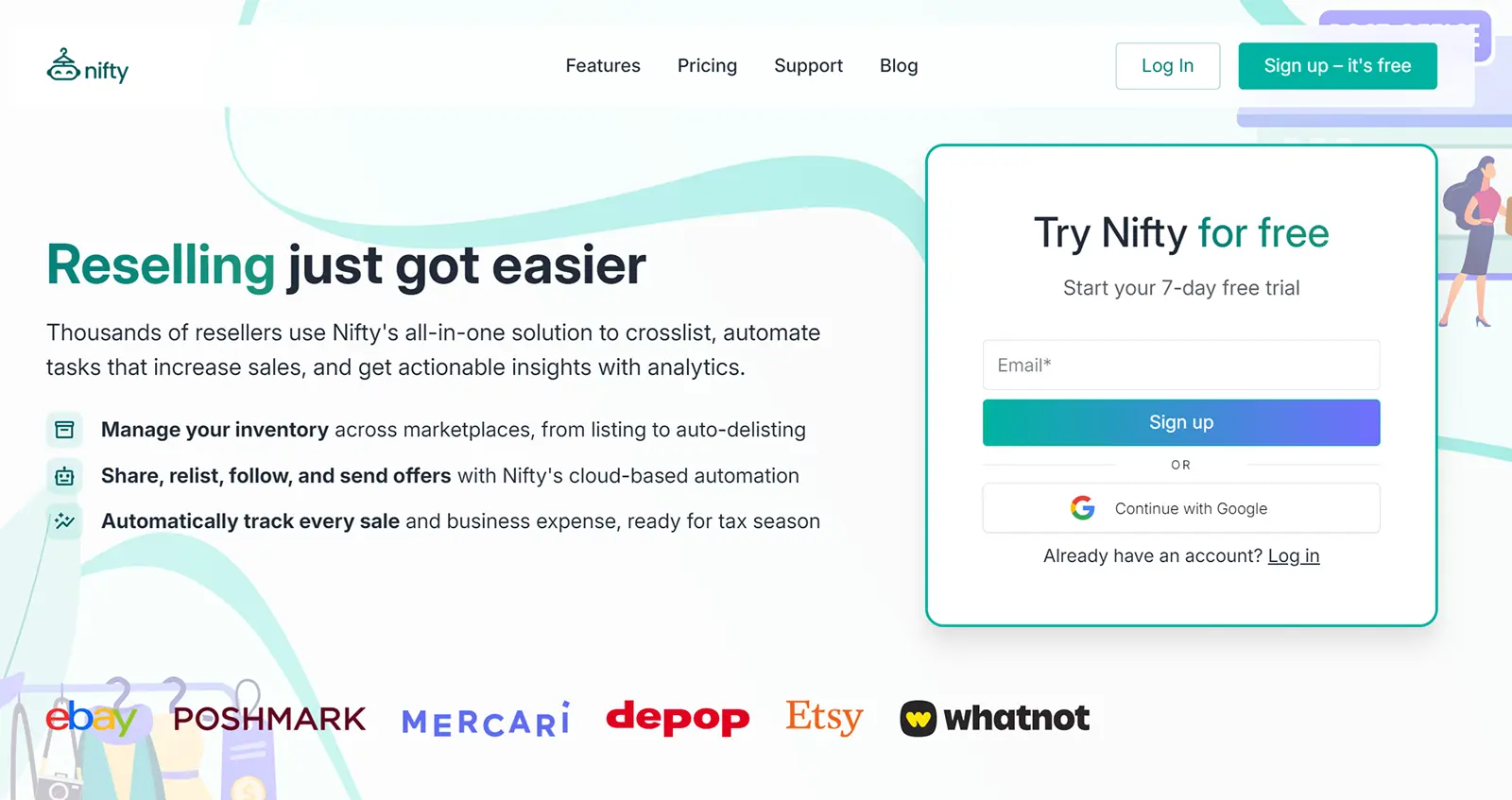
Technically, Nifty, a cross listing + automation tool, supports a total of 6 marketplaces. But only 4 of those extend to UK sellers, namely eBay, Etsy, Whatnot, and Depop.
The tool has separate pricing plans for automation and cross listing, so you can choose depending on the feature you need the most.
There’s also a bundle option that combines both the features, but, at $69.99/month, it’s very expensive.
We’ll look at Nifty’s best features below.
Listing form with marketplace sub-sections: To create a listing on Nifty, you have to fill in the attributes common to all marketplaces first.
This typically covers 90% of the details needed by the listing form.
Then, you have to scroll down and fill in any missing details in the marketplace-specific sub-sections.
Background autoposting: Once you select all the relevant marketplaces and submit the listing form, Nifty will automatically publish your listings.
AI-generated listings: This pretty much works similarly to Crosslist’s AI-generated listings. Upload product photos and the entire listing is generated for you.
The only thing that’s different is you may have to fill in the product price yourself.
Autodelisting: Again, like Crosslist, Nifty monitors your sales and automatically delists items from the other marketplaces once they’re sold out.
This only applies to single-quantity items, though. If you have multiple quantities listed, Nifty changes the unit amount.
Nifty is cloud-based, so the autodelist function will work even when you don’t have your computer or browser open.
AI-powered edits: You can use the Photoroom-powered AI editor to add flatlays, create mannequins, tweak shadows, or even generate an image of a virtual model modeling your products.
Nifty also has a background remover that makes all the background clutter in your photos go away.
Bulk actions: Nifty supports a few bulk actions, although you can only apply them to a maximum of 25 listings at a time. And all of those listings must be on the same page.
Here are the bulk actions supported:
Editing (but only for the product details that are common across all marketplaces)
Cross listing
Delist and relist
Refresh
Verify
Send offers
Nifty also turns a bunch of product photos into separate incomplete drafts for you to work on later.
Ability to set pricing rules: You can set different prices for different marketplaces by putting some pricing rules in place.
Select a marketplace, add the prices of the products yourself, and set that as your base price.
Now, you get to set up rules around that base price for the other marketplaces. For example, the pricing rule for Whatnot could be: +10% of the base prices.
Nifty pros:
Automatically publishes your listings without needing any more manual intervention
Has AI-generated listings and an AI-powered editor
Ability to set default shipping profiles
Is cloud-based, so autodelisting works 24/7, even when your device is off
Lets you set pricing rules
Supports bulk actions
Has automation-related features for those who need it
Nifty cons:
Very limited marketplace support
Hefty cost, especially for the bundle plans
Base plans only let you hold a maximum of 1,500 active listings in your closet
No true universal listing form
No native mobile app (mobile browser only)
Bulk actions can only be applied to a maximum of 25 listings at a time
Vendoo
Pricing: Starts at £16.99/month (or $22.46/month)
Free trial: No; has a very limited free plan
Best for: Sellers with a limited inventory, or hobbyists who want a free plan

If you’re familiar with Vendoo, then you should know that Vendoo UK is pretty limited when compared to its US counterpart.
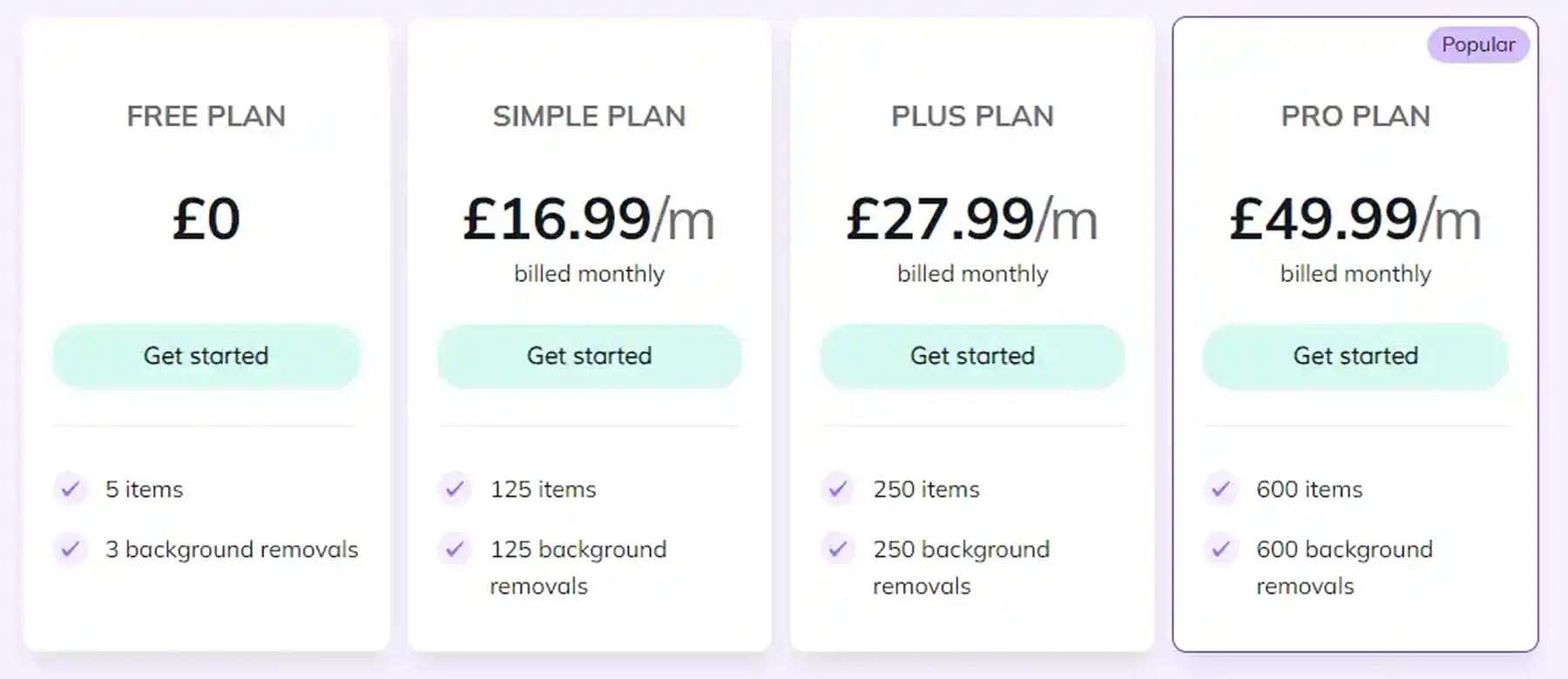
Firstly, the cross listing tool only supports the UK variants of 5 marketplaces.
Secondly, none of the subscriptions let you create unlimited listings. Yep, not even the most expensive Pro Plan which costs £49.99/month (or $66.11/month).
The Pro Plan actually caps you at 600 listings per month, so if you’re a high-volume seller, you’re out of luck.
We’ll explore a few of Vendoo UK’s features below.
Vendoo form: To cross list on Vendoo, you first need to fill out a common listing form called the “Vendoo form.”
Then, you have to select all of the marketplaces you want to post that listing to.
Now, Vendoo will open a separate form for each marketplace you selected, prompting you to fill in platform-specific information.
Free subscription plan: Vendoo UK has a limited free plan that lets you create a maximum of 5 listings per month.
Though this is nowhere near enough for resellers, it’s a great option for hobbyists who only list a couple of items a month.
Autodelisting: Vendoo UK does automatically delist your items when you make a sale, but this feature only works for three marketplaces: Whatnot, Depop, and eBay.
For the other two marketplaces, you'll have to keep an eye on your sales and delist the items yourself.
Listing templates: You can use listing templates to list similar products faster.
Vendoo UK pros:
Background autoposting
Free subscription plan
Autodelisting (for 3 marketplaces)
Profit and analytics
Background removals
Unlimited cross listing
Bulk features, such as delisting and relisting
Vendoo UK cons:
No single, universal listing form. You have to fill out a common form + a separate form for each marketplace you're listing to
Limited marketplace support
No subscription plan supports the creation of unlimited listings
No mobile app
AI only writes descriptions, not full listings from photos
Voolist
Pricing: Starts at $19.99/month
Free trial: 14-day money-back guarantee
Best for: Sellers looking for a BigCommerce integration
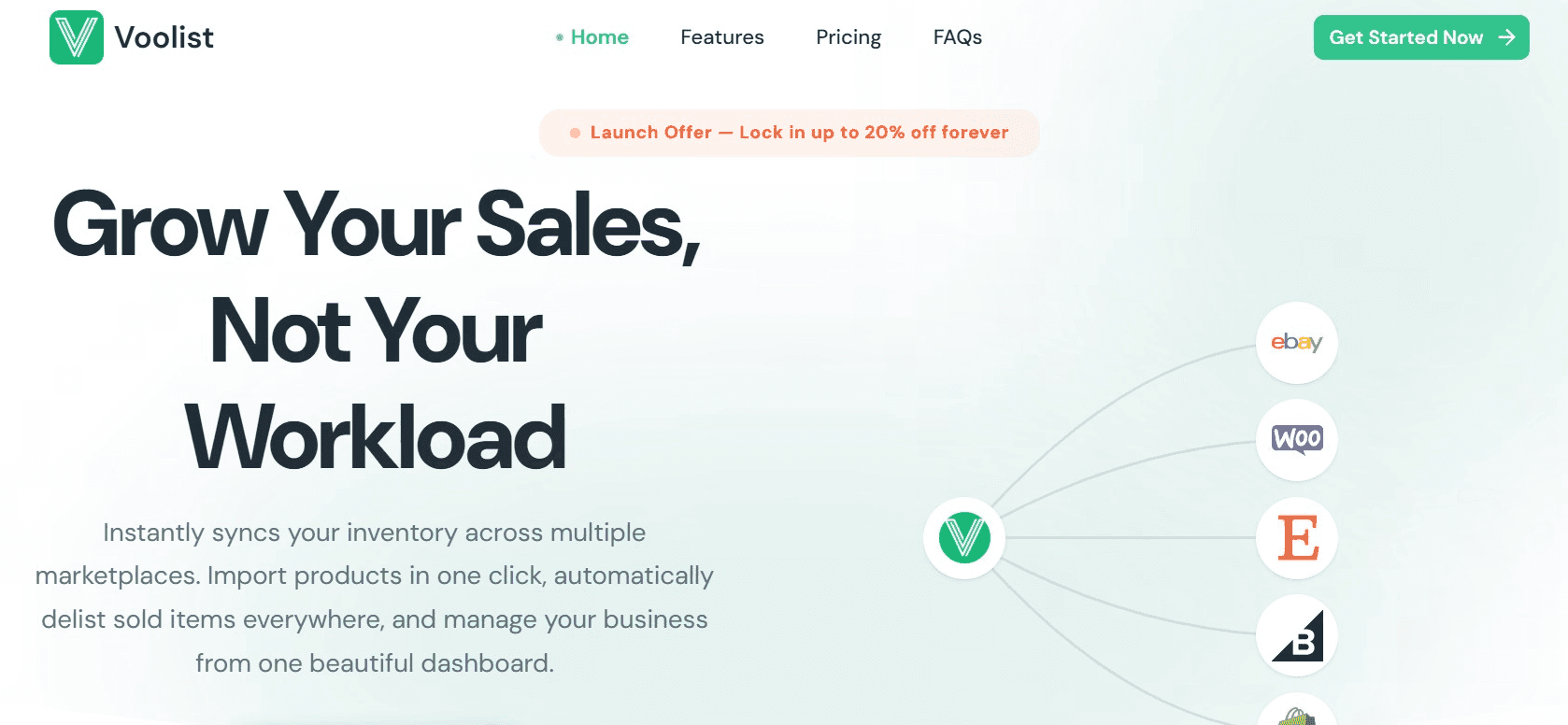
Voolist’s strengths are its cloud-based design and its BigCommerce integration. Including BigCommerce, the tool supports 7 marketplaces.
The cross listing app shares many features similar to Crosslist, so we’ll simply list them below:
The “one form, all platforms” approach
Background autoposting. The only place where it differs from Crosslist is that it doesn’t open a tab for each marketplace. It’s cloud-based, so the publishing happens in the background
One-click import function to bring in any existing inventory. You can import all of your listings at once, no matter the volume
Bulk cross listing (although Voolist only lets you cross list a maximum of 100 listings at a time)
Autodelisting
Ability to edit listings within Voolist and have it automatically synced to the live listings without having to delist and relist
AI-generated listings
Ability to set different prices per platform
Default shipping profiles
We’ll briefly look at some of the features that make Voolist different.
Default payment profiles and return policies: Like shipping profiles, you can set default payment profiles and return policies for each marketplace.
This prevents you from having to set your preferred payment methods or add a return policy every time you create a new listing.
Per-platform titles and descriptions: You can set custom titles and product descriptions for the same listing across different platforms.
Voolist pros:
Supports cross listings for sellers who have their own e-commerce stores on BigCommerce
Is cloud-based, so works even when the browser extension isn’t on
Uses the super easy “one form, all platforms” approach, so you won’t be stuck filling out form after listing form
Lets you import and cross list your listings in bulk
Creates AI-generated listings for you
Automatically tracks your sales and syncs your inventory and delists items when sold out
Gives you store performance analytics
Offers free hosting for all of your product images
Lets you set default shipping, returns, and payment policies
Allows for customizations of currencies and measurement units
Voolist cons:
Limited marketplace support
Lacks a background remover
Even the most expensive plan limits you to 2,000 active listings in your closet
Bulk actions only work on a maximum of 100 listings at a time
No mobile app
The base plan only lets you create 25 AI-generated listings per month
SellerAider
Pricing: Automation plans start at $18/month; cross listing plans start at $12.99/month
Free trial: 14 days
Best for: Beginner sellers who want a cheap, basic plan

SellerAider is an automated cross listing app that boasts the support of 13 marketplaces, Shpock, Instagram (with partial support), and Vestiaire Collective.
SellerAider works by copying your listing details from one marketplace to another.
So, if you want to cross list your listings from Depop to eBay, you’ll first have to install the SellerAider extension, log in to your Depop account, and click on the “Crosslist” widget you see.
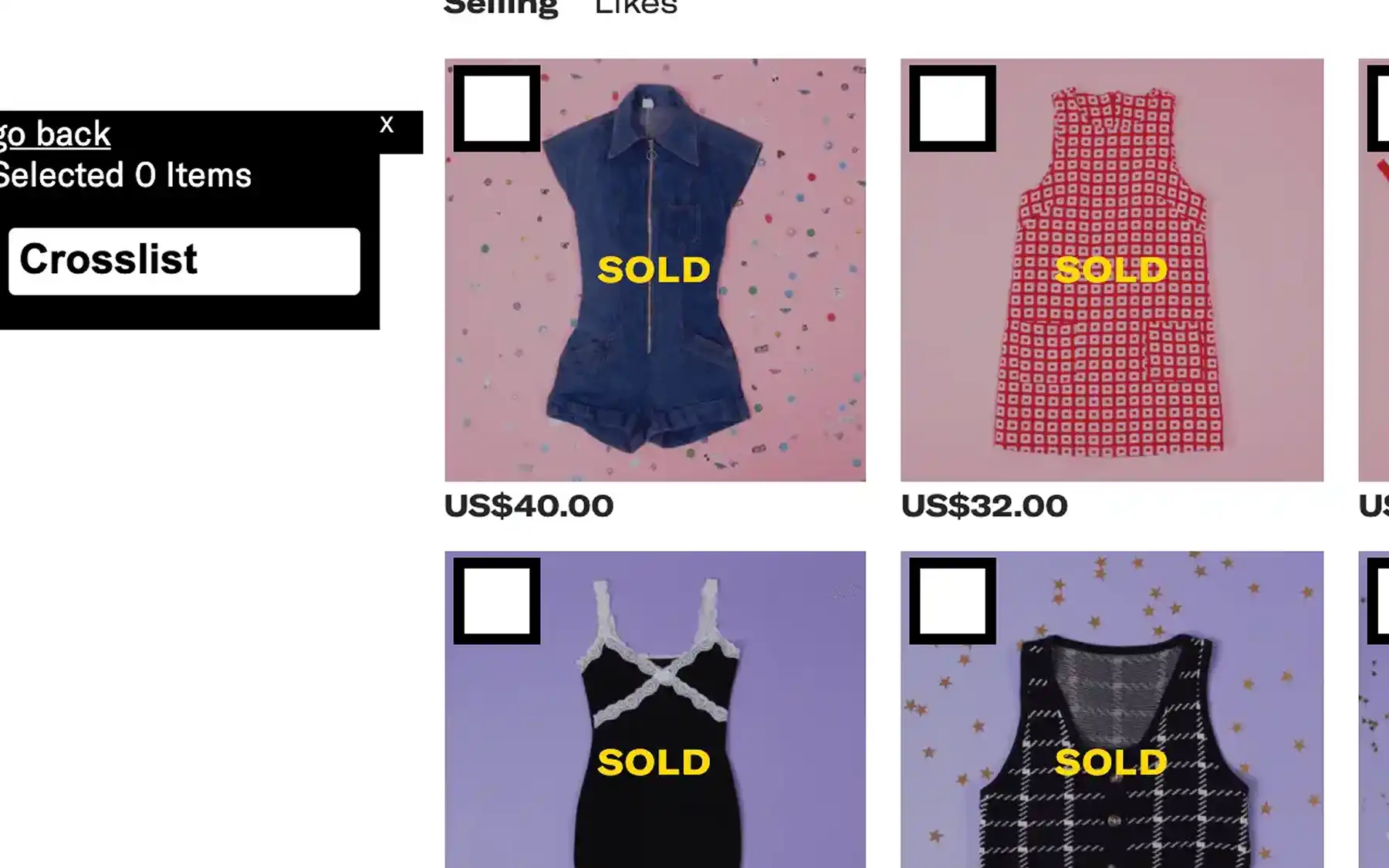
Next, you’ll have to select the listings you want to cross list and pick the platform you want to post it to.
SellerAider will open a new tab for each listing, and copy the listing data over from Depop.
It’s now on you to review each listing for errors, fill out the missing field attributes, and post it.
While SellerAider does save you some time by copying all the listing data over, it’s missing a crucial feature: automatic posting of the listings.
You still have to go in and manually check each of the listings, which can eat up a good chunk of your time.
We’ll look at a few of SellerAider’s pros.
Affordable: SellerAider is one of the most affordable cross listing apps out there.
Even the most expensive Crosslister Pro plan is priced at $29.99/month and lets you access the automation features available under “Grow” as well.
AI-generated listings: The app does have an AI tool that generates your listings for you, but it’s limited to generating the title and description only. Everything else needs to be entered manually by you.
You can also:
Update listings without having to relist
Get pricing suggestions
Optimize your listings for SEO
Bulk edit
Get sold items autodelisted
SellerAider pros:
Supports some lesser-known marketplaces, such as Shpock
Autodelists your sold items
Ability to update listings without relisting
Pricing suggestions and optimization tools
Supports AI-generated listings
Allows for the grouping of product variants
Affordable
SellerAider cons:
Doesn’t have a single, universal listing form
Doesn’t have background autoposting of listings
AI-generated listings only create title and descriptions
No mobile app
Zipsale
Pricing: Starts at £15/month + VAT (or $19.82/month + VAT)
Free trial: No; has a limited free plan that lets you create 10 items per month
Best for: UK sellers who want a no-frills cross listing app

Zipsale is a cross listing tool specifically designed for UK sellers that supports a total of 8 marketplaces, including ASOS.
While it does have a free plan, and its basic paid plan is under $20, the two plans are very limited in terms of the number of items you can create.
Zipsale’s other subscription plans can get a bit expensive.
Zipsale has a dashboard where you can manage all of your listings. The app also shows whether a particular item has been listed on your connected marketplaces or not.
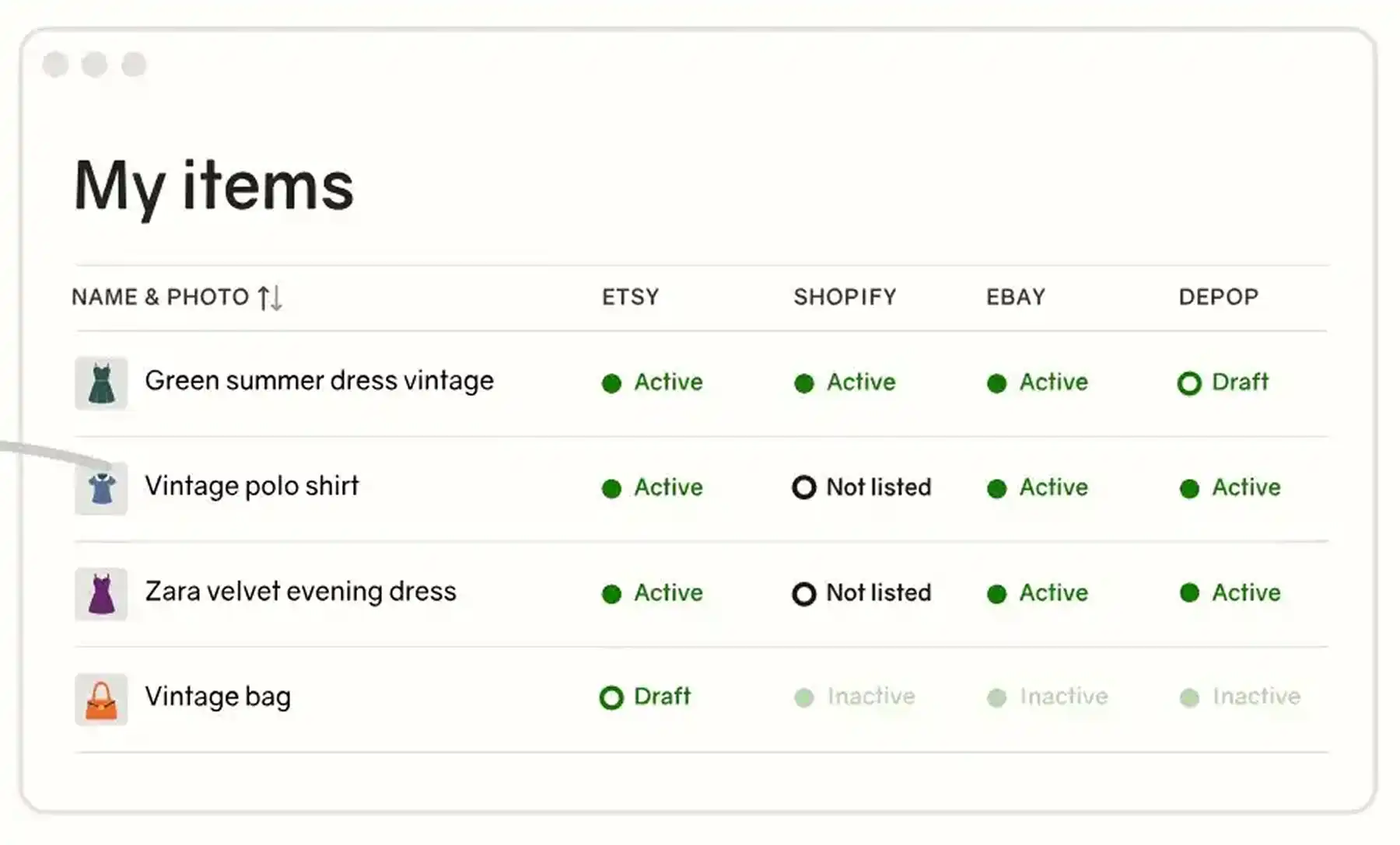
If you want to cross list a listing, just locate the listing and click on the List button available under the marketplace you want to post it to.
Zipsale will automatically list the product.
However, auto listing is available only for certain marketplaces (indicated by a purple List button).
If you want to list from Vinted to eBay, this won’t be possible as eBay requires more listing information than Vinted.
In such cases, you’ll have to click the Edit to List button. Zipsale will now open a listing form with all the existing data copied over.
You’ll have to manually fill in all the missing information and post the listing.
Add-ons: Zipsale features a few add-ons, ranging from £10/month + VAT ($13.21/month + VAT) to £19/month + VAT ($25.10/month + VAT).
Here are the various add-ons available to you:
Automatic relisting add-ons (with a separate add-on needed for each marketplace)
Auto offers add-on (with a separate add-on needed for each marketplace)
Bulk price edit add-on
Scheduled listings add-on
Add-on that turns your product photos into publish-ready listings
Even if you pick one single add-on, your monthly subscription price goes way up, so this model really isn’t feasible.
“Sell similar” feature: This speeds up your listing creation process.
If you sell handmade pottery, you can select a random pottery listing, bring it into Zipsale, and edit it to match your item.
Zipsale pros:
Designed specifically for UK sellers
Easy to import, cross list, edit, delist and relist in bulk (for the most part)
Has background autoposting of listings
Autodelists sold items to prevent accidental double-selling
Has a “sell similar” feature to help you create listings easily
Lets you buy listing credits instead of a full-blown subscription
Zipsale cons:
Cannot be used by sellers based out of the UK
Manual intervention required when cross listing to marketplaces that have additional listing field attributes
Doesn’t support multi-variant listings
Lacks intuitive features, such as AI-generated listings
Can’t be used on mobile
Some essential features, such as bulk price edits and scheduled listings, require extra add-ons which can get very expensive very fast
Fluf Connect
Pricing: Starts at £9/month (or $11.91/month)
Free trial: No; but you can get the app for 7 days for £1
Best for: Sellers who need integrations to niche marketplaces

Fluf Connect is one of the only cross listing tools that connects to 60+ marketplaces, including some local UK-based and niche ones, like Tilt, Temu, Gumtree UK, Bidzzy, or Wallapop.
Like Crosslist, Fluf Connect also lets you fill out a single listing form and simply select all the marketplaces you want to post it to.
You can also set platform-specific info (such as custom prices, etc.) if you want to.
The app also has AI-powered listing creations, supports bulk actions of all kinds, and syncs the edits you make within the app automatically to the published listings.
It also offers automations on all subscription plans except for the base plan.
Automatic currency and language conversions: One of Fluf Connect’s standout features for international sellers is that the tool automatically adapts your product listings to the viewers.
This means sizes, currencies, and languages are changed to match the destination.
Fluf Connect pros:
Follows the “one form, many marketplaces” approach that makes cross listing easy
Supports several niche and local UK marketplaces
Has AI-generated listings
Has a smart relisting feature that relists a portion of your closet every day to keep the inventory fresh
Autodelists and syncs your inventory for you
Has smart automations that save time
Analyzes your sales
Has a mobile app
Converts sizes, currencies, and languages to fit your buyer’s locations
Fluf Connect cons:
Limits the number of AI-generated listings you can create
Has a learning curve
Doesn’t support real-time inventory sync or automatic relisting for many of the supported marketplaces
Verdict: What is the best cross listing app UK sellers can use?
Crosslist is, undoubtedly, the best cross listing app for UK sellers. It's one of the few cross listing tools that combines:
Supports the most number of marketplaces for UK sellers
Truly reduces friction from your e-commerce business through its single, dynamic listing form approach
Lets you create and hold unlimited active listings
Automates the listing process without any manual intervention needed from your side
Is affordable
Here’s what our users have to say about us:
“Fantastic service saving me hours of relisting and cross listing manual. Very easy and user friendly, a must for any selling business.”
— Damian, Trustpilot
“The platform is intuitive and logical to use. It has made a dramatic difference to the amount of time I need to invest in admin. It is also a very capable system for easily managing your inventory.”
— David Thorp, Trustpilot
“I love the app and the experience their team is building. Updates are continuous to improve performance, the app works as described.
Good value, good feature functionality and responsive support. Not sure what else I could ask for.”
— Rosa, Trustpilot
Sign up to Crosslist now and say goodbye to the stress of listing on multiple marketplaces. [Get your subscription here]
Can we get real for a second and talk about how the cross listing space doesn’t really cater to UK sellers?
I mean, take a look at pretty much any popular cross listing app, and you’ll find that they only support US-based sellers.
There are a few exceptions to this, of course.
For example, Crosslist, Nifty, and Vendoo support UK sellers. And there are a few lesser-known tools that also support UK variants of marketplaces.
But overall? There really are slim pickings out there.
So we put together this list to help you find the best cross listing app UK sellers can actually rely on.
Key takeaways
Crosslist is the best all-round option for UK sellers, with one universal form, background autoposting, and a native mobile app.
Most of the popular cross listing apps, with the exception of Crosslist, Nifty, and Vendoo, don’t support UK sellers.
Nifty and Voolist are good choices for sellers who can’t use a browser extension and need a cloud-based cross listing app.
Vendoo and Zipsale are ideal for hobbyist UK sellers who could get the job done with a free plan, while SellerAider is best for those who want a budget-friendly no-frills app.
Fluf Connect is ideal for sellers who sell on local UK marketplaces and niche websites that aren’t supported by other apps.
Cross listing apps that support UK sellers vs. ones that don’t
It's important to know which cross listing apps support UK sellers. What's equally important is knowing which ones don't.
When you do a quick Google search (or ask ChatGPT) for the best cross listing apps, here are the ones that will pop up. Let's see which ones work for UK resellers.
Cross listing app | Support for UK sellers |
Crosslist | ✔️ |
❌ | |
✔️ | |
❌ | |
❌ | |
✔️ | |
❌ |
As you can see, more than half of them are designed only for US sellers, which means that as a UK seller, you’re left with very few options.
So, which cross listing apps actually do support UK users? Let’s go through them one by one.
Crosslist
Pricing: Starts at $29.99/month (with a 10% discount on quarterly plans, or 2 months free on annual plans)
Free trial: 3-day money-back guarantee if you create 20 or fewer listings
Best for: UK sellers of all kinds
Crosslist is the #1 cross listing app for UK sellers, and for good reason.
For starters, our tool supports a total of 11+ marketplaces (and their UK variants, if available).
So, as a UK seller, you’ll be able to cross list to the following marketplaces with Crosslist:
eBay
Etsy
Grailed
Depop
Shopify
Whatnot
Facebook Marketplace
WooCommerce
Automatic domain mapping and size conversions: When you choose UK as your region, Crosslist will automatically publish your listings to the UK variants of marketplaces, such as ebay.co.uk instead of ebay.com.
Our tool also automatically converts your measurements from imperial to metric and vice versa.
We’ll look at Crosslist’s other standout features in detail.
If you already have existing inventory, you can import all of it to Crosslist (no matter how large) in a single click within minutes.
Single, dynamic listing form: Regardless of how many marketplaces you want to post your listings to, you’ll only ever have to fill a single, universal form on Crosslist.
This form contains all the possible listing information required by the 11+ supported marketplaces.
Once you’ve filled out the form, simply select all the marketplaces you would like to list it on, and your work is done! Crosslist will automatically post the listings in the background.
You won’t have to fill out any additional platform-specific forms, or review the listings and publish them manually.
This method will save you more than 10 hours every week, and isn’t available on most of the other cross listing apps.
Background autoposting: After you submit your listing form, Crosslist automatically publishes it to the relevant marketplaces (by opening a single tab for each marketplace).
Unlike the apps that use form-filling software, you don't have to review the listing details, add in missing details (there won't be any), or manually publish each listing yourself.
How does this help you? You can submit the listing and go about your day, without having to spend the next two hours in front of your desktop manually reviewing everything.
AI-generated listings: Crosslist is designed to save you time every step of the way, which is what our AI add-on does.
All you need to do is upload your product images and let the AI do its thing. It generates every single listing detail, including product condition, color, size, and brand.
The AI tool also comes in handy when you’re listing a huge amount of products at once.
You can upload a bunch of photos, and let the AI tool turn each product photo into a separate listing.
What used to take hours can now be completed in minutes!
The AI add-on also crawls through the internet, analyzes market trends, and suggests the most competitive prices for your products.
This will be a lifesaver for you if you struggle with pricing your items accurately.
Autodelisting: Crosslist automatically detects any time you make a sale and delists the item from the other connected marketplaces.
This prevents you from double-selling the same products, which often leads to canceled orders, account restrictions, and a lower seller rating.
You can sleep peacefully without worrying about monitoring your sales and manually delisting your items.
Mobile app: Crosslist has a fully functional mobile app that lets you carry your reselling business with you wherever you go.
Unlike desktop-dependent cross listing tools, Crosslist's mobile app gives you the freedom to create listings during your commute or check on your sales while you're waiting in line at the coffee shop.
Bulk actions: Want to import all of your existing inventory to Crosslist?
Maybe you want to cross list those items to other marketplaces in bulk, too. Crosslist makes everything possible.
You can carry out the following bulk actions:
Import
Cross list
Export via CSV
Edit
Change prices
Delete
Clone
Delist and relist
Editing and cloning alone can be done only on a maximum of 100 listings at a time.
The other bulk actions don't have a limit, which means you can apply them to as many listings as you would like.
AI-powered photo editing and background remover:
Powered by Nano Banana, Crosslist’s AI-powered photo editing feature helps you take unpolished photos and enhance them to professional-level quality in seconds.
You can fix shadows, add mannequins, and even generate stock images of your products if you’re running short.
There are a few manual photo editing features as well for when you want more control over the tweaking.
You can add filters, blur sensitive information, or annotate on your photos.
Crosslist also has a background removal tool that can clean up the backgrounds of all of your product photos at once.
Custom prices for each marketplace: To keep your prices competitive, Crosslist lets you set a different price for the same item across marketplaces.
You can either do this in bulk or one by one.
Running a sale, or revising your prices and want to increase them across all listings at once? Use the price markup feature.
You can either set a fixed markup or markdown or use percentages. To mark down your prices, use negative values.
Updating listings without relisting: When you find a tiny error on one of your published listings, or just want to tweak the description a bit after a listing is already live, you no longer have to delist and relist.
Crosslist lets you update your listings from within the tool and pushes the updates to your live listings automatically. And you can do this in bulk, too!
Whether you’re selling Pokemon cards on eBay or handcrafted scarves on Etsy, Crosslist is the best cross listing tool for UK sellers!
Crosslist pros:
Supports 11+ marketplaces and their UK variants (whenever available)
Uses the “one form, many marketplaces” approach which actually saves you time
Has autoposting of listings in the background, so no manual intervention needed from you
Supports bulk actions, such as importing, cross listing, delisting and relisting, and editing
Has an AI add-on that generates product descriptions and suggests optimal prices for you
Lets you set custom prices for each marketplace
Has the option of marking prices up or down in bulk
Ability to set default shipping options
Has a fully functional mobile app
Automatically detects your sales and autodelists your listings
Lets you update your listings without having to delist and relist
Gives you detailed sales analytics
AI-powered photo editing and bulk background removal
Instant answers from Crossly, our AI support chatbot, plus a support team that replies within one business day
Affordable, with discounted quarterly and annual plans
Crosslist cons:
The browser extension needs to be active periodically for autodelisting to work on some marketplaces
Bottom line: Crosslist is the best cross listing software out there as it offers the most bang for the buck. Not only is it affordable, it also frees up hours of your time every week.
The tool also has plans that offer unlimited cross listing, so it’s suitable for sellers of all types, from hobbyists to enterprise level sellers.
Put your listing process on autopilot and use your precious time to actually grow your business by using Crosslist. [Sign up now]
Nifty
Pricing: Cross listing plans alone start at $39.99/month; automation plans alone start at $39.99/month; bundle plans start at $69.99/month
Free trial: 7 days
Best for: Sellers who want a cloud-based app
Technically, Nifty, a cross listing + automation tool, supports a total of 6 marketplaces. But only 4 of those extend to UK sellers, namely eBay, Etsy, Whatnot, and Depop.
The tool has separate pricing plans for automation and cross listing, so you can choose depending on the feature you need the most.
There’s also a bundle option that combines both the features, but, at $69.99/month, it’s very expensive.
We’ll look at Nifty’s best features below.
Listing form with marketplace sub-sections: To create a listing on Nifty, you have to fill in the attributes common to all marketplaces first.
This typically covers 90% of the details needed by the listing form.
Then, you have to scroll down and fill in any missing details in the marketplace-specific sub-sections.
Background autoposting: Once you select all the relevant marketplaces and submit the listing form, Nifty will automatically publish your listings.
AI-generated listings: This pretty much works similarly to Crosslist’s AI-generated listings. Upload product photos and the entire listing is generated for you.
The only thing that’s different is you may have to fill in the product price yourself.
Autodelisting: Again, like Crosslist, Nifty monitors your sales and automatically delists items from the other marketplaces once they’re sold out.
This only applies to single-quantity items, though. If you have multiple quantities listed, Nifty changes the unit amount.
Nifty is cloud-based, so the autodelist function will work even when you don’t have your computer or browser open.
AI-powered edits: You can use the Photoroom-powered AI editor to add flatlays, create mannequins, tweak shadows, or even generate an image of a virtual model modeling your products.
Nifty also has a background remover that makes all the background clutter in your photos go away.
Bulk actions: Nifty supports a few bulk actions, although you can only apply them to a maximum of 25 listings at a time. And all of those listings must be on the same page.
Here are the bulk actions supported:
Editing (but only for the product details that are common across all marketplaces)
Cross listing
Delist and relist
Refresh
Verify
Send offers
Nifty also turns a bunch of product photos into separate incomplete drafts for you to work on later.
Ability to set pricing rules: You can set different prices for different marketplaces by putting some pricing rules in place.
Select a marketplace, add the prices of the products yourself, and set that as your base price.
Now, you get to set up rules around that base price for the other marketplaces. For example, the pricing rule for Whatnot could be: +10% of the base prices.
Nifty pros:
Automatically publishes your listings without needing any more manual intervention
Has AI-generated listings and an AI-powered editor
Ability to set default shipping profiles
Is cloud-based, so autodelisting works 24/7, even when your device is off
Lets you set pricing rules
Supports bulk actions
Has automation-related features for those who need it
Nifty cons:
Very limited marketplace support
Hefty cost, especially for the bundle plans
Base plans only let you hold a maximum of 1,500 active listings in your closet
No true universal listing form
No native mobile app (mobile browser only)
Bulk actions can only be applied to a maximum of 25 listings at a time
Vendoo
Pricing: Starts at £16.99/month (or $22.46/month)
Free trial: No; has a very limited free plan
Best for: Sellers with a limited inventory, or hobbyists who want a free plan
If you’re familiar with Vendoo, then you should know that Vendoo UK is pretty limited when compared to its US counterpart.
Firstly, the cross listing tool only supports the UK variants of 5 marketplaces.
Secondly, none of the subscriptions let you create unlimited listings. Yep, not even the most expensive Pro Plan which costs £49.99/month (or $66.11/month).
The Pro Plan actually caps you at 600 listings per month, so if you’re a high-volume seller, you’re out of luck.
We’ll explore a few of Vendoo UK’s features below.
Vendoo form: To cross list on Vendoo, you first need to fill out a common listing form called the “Vendoo form.”
Then, you have to select all of the marketplaces you want to post that listing to.
Now, Vendoo will open a separate form for each marketplace you selected, prompting you to fill in platform-specific information.
Free subscription plan: Vendoo UK has a limited free plan that lets you create a maximum of 5 listings per month.
Though this is nowhere near enough for resellers, it’s a great option for hobbyists who only list a couple of items a month.
Autodelisting: Vendoo UK does automatically delist your items when you make a sale, but this feature only works for three marketplaces: Whatnot, Depop, and eBay.
For the other two marketplaces, you'll have to keep an eye on your sales and delist the items yourself.
Listing templates: You can use listing templates to list similar products faster.
Vendoo UK pros:
Background autoposting
Free subscription plan
Autodelisting (for 3 marketplaces)
Profit and analytics
Background removals
Unlimited cross listing
Bulk features, such as delisting and relisting
Vendoo UK cons:
No single, universal listing form. You have to fill out a common form + a separate form for each marketplace you're listing to
Limited marketplace support
No subscription plan supports the creation of unlimited listings
No mobile app
AI only writes descriptions, not full listings from photos
Voolist
Pricing: Starts at $19.99/month
Free trial: 14-day money-back guarantee
Best for: Sellers looking for a BigCommerce integration
Voolist’s strengths are its cloud-based design and its BigCommerce integration. Including BigCommerce, the tool supports 7 marketplaces.
The cross listing app shares many features similar to Crosslist, so we’ll simply list them below:
The “one form, all platforms” approach
Background autoposting. The only place where it differs from Crosslist is that it doesn’t open a tab for each marketplace. It’s cloud-based, so the publishing happens in the background
One-click import function to bring in any existing inventory. You can import all of your listings at once, no matter the volume
Bulk cross listing (although Voolist only lets you cross list a maximum of 100 listings at a time)
Autodelisting
Ability to edit listings within Voolist and have it automatically synced to the live listings without having to delist and relist
AI-generated listings
Ability to set different prices per platform
Default shipping profiles
We’ll briefly look at some of the features that make Voolist different.
Default payment profiles and return policies: Like shipping profiles, you can set default payment profiles and return policies for each marketplace.
This prevents you from having to set your preferred payment methods or add a return policy every time you create a new listing.
Per-platform titles and descriptions: You can set custom titles and product descriptions for the same listing across different platforms.
Voolist pros:
Supports cross listings for sellers who have their own e-commerce stores on BigCommerce
Is cloud-based, so works even when the browser extension isn’t on
Uses the super easy “one form, all platforms” approach, so you won’t be stuck filling out form after listing form
Lets you import and cross list your listings in bulk
Creates AI-generated listings for you
Automatically tracks your sales and syncs your inventory and delists items when sold out
Gives you store performance analytics
Offers free hosting for all of your product images
Lets you set default shipping, returns, and payment policies
Allows for customizations of currencies and measurement units
Voolist cons:
Limited marketplace support
Lacks a background remover
Even the most expensive plan limits you to 2,000 active listings in your closet
Bulk actions only work on a maximum of 100 listings at a time
No mobile app
The base plan only lets you create 25 AI-generated listings per month
SellerAider
Pricing: Automation plans start at $18/month; cross listing plans start at $12.99/month
Free trial: 14 days
Best for: Beginner sellers who want a cheap, basic plan
SellerAider is an automated cross listing app that boasts the support of 13 marketplaces, Shpock, Instagram (with partial support), and Vestiaire Collective.
SellerAider works by copying your listing details from one marketplace to another.
So, if you want to cross list your listings from Depop to eBay, you’ll first have to install the SellerAider extension, log in to your Depop account, and click on the “Crosslist” widget you see.
Next, you’ll have to select the listings you want to cross list and pick the platform you want to post it to.
SellerAider will open a new tab for each listing, and copy the listing data over from Depop.
It’s now on you to review each listing for errors, fill out the missing field attributes, and post it.
While SellerAider does save you some time by copying all the listing data over, it’s missing a crucial feature: automatic posting of the listings.
You still have to go in and manually check each of the listings, which can eat up a good chunk of your time.
We’ll look at a few of SellerAider’s pros.
Affordable: SellerAider is one of the most affordable cross listing apps out there.
Even the most expensive Crosslister Pro plan is priced at $29.99/month and lets you access the automation features available under “Grow” as well.
AI-generated listings: The app does have an AI tool that generates your listings for you, but it’s limited to generating the title and description only. Everything else needs to be entered manually by you.
You can also:
Update listings without having to relist
Get pricing suggestions
Optimize your listings for SEO
Bulk edit
Get sold items autodelisted
SellerAider pros:
Supports some lesser-known marketplaces, such as Shpock
Autodelists your sold items
Ability to update listings without relisting
Pricing suggestions and optimization tools
Supports AI-generated listings
Allows for the grouping of product variants
Affordable
SellerAider cons:
Doesn’t have a single, universal listing form
Doesn’t have background autoposting of listings
AI-generated listings only create title and descriptions
No mobile app
Zipsale
Pricing: Starts at £15/month + VAT (or $19.82/month + VAT)
Free trial: No; has a limited free plan that lets you create 10 items per month
Best for: UK sellers who want a no-frills cross listing app
Zipsale is a cross listing tool specifically designed for UK sellers that supports a total of 8 marketplaces, including ASOS.
While it does have a free plan, and its basic paid plan is under $20, the two plans are very limited in terms of the number of items you can create.
Zipsale’s other subscription plans can get a bit expensive.
Zipsale has a dashboard where you can manage all of your listings. The app also shows whether a particular item has been listed on your connected marketplaces or not.
If you want to cross list a listing, just locate the listing and click on the List button available under the marketplace you want to post it to.
Zipsale will automatically list the product.
However, auto listing is available only for certain marketplaces (indicated by a purple List button).
If you want to list from Vinted to eBay, this won’t be possible as eBay requires more listing information than Vinted.
In such cases, you’ll have to click the Edit to List button. Zipsale will now open a listing form with all the existing data copied over.
You’ll have to manually fill in all the missing information and post the listing.
Add-ons: Zipsale features a few add-ons, ranging from £10/month + VAT ($13.21/month + VAT) to £19/month + VAT ($25.10/month + VAT).
Here are the various add-ons available to you:
Automatic relisting add-ons (with a separate add-on needed for each marketplace)
Auto offers add-on (with a separate add-on needed for each marketplace)
Bulk price edit add-on
Scheduled listings add-on
Add-on that turns your product photos into publish-ready listings
Even if you pick one single add-on, your monthly subscription price goes way up, so this model really isn’t feasible.
“Sell similar” feature: This speeds up your listing creation process.
If you sell handmade pottery, you can select a random pottery listing, bring it into Zipsale, and edit it to match your item.
Zipsale pros:
Designed specifically for UK sellers
Easy to import, cross list, edit, delist and relist in bulk (for the most part)
Has background autoposting of listings
Autodelists sold items to prevent accidental double-selling
Has a “sell similar” feature to help you create listings easily
Lets you buy listing credits instead of a full-blown subscription
Zipsale cons:
Cannot be used by sellers based out of the UK
Manual intervention required when cross listing to marketplaces that have additional listing field attributes
Doesn’t support multi-variant listings
Lacks intuitive features, such as AI-generated listings
Can’t be used on mobile
Some essential features, such as bulk price edits and scheduled listings, require extra add-ons which can get very expensive very fast
Fluf Connect
Pricing: Starts at £9/month (or $11.91/month)
Free trial: No; but you can get the app for 7 days for £1
Best for: Sellers who need integrations to niche marketplaces
Fluf Connect is one of the only cross listing tools that connects to 60+ marketplaces, including some local UK-based and niche ones, like Tilt, Temu, Gumtree UK, Bidzzy, or Wallapop.
Like Crosslist, Fluf Connect also lets you fill out a single listing form and simply select all the marketplaces you want to post it to.
You can also set platform-specific info (such as custom prices, etc.) if you want to.
The app also has AI-powered listing creations, supports bulk actions of all kinds, and syncs the edits you make within the app automatically to the published listings.
It also offers automations on all subscription plans except for the base plan.
Automatic currency and language conversions: One of Fluf Connect’s standout features for international sellers is that the tool automatically adapts your product listings to the viewers.
This means sizes, currencies, and languages are changed to match the destination.
Fluf Connect pros:
Follows the “one form, many marketplaces” approach that makes cross listing easy
Supports several niche and local UK marketplaces
Has AI-generated listings
Has a smart relisting feature that relists a portion of your closet every day to keep the inventory fresh
Autodelists and syncs your inventory for you
Has smart automations that save time
Analyzes your sales
Has a mobile app
Converts sizes, currencies, and languages to fit your buyer’s locations
Fluf Connect cons:
Limits the number of AI-generated listings you can create
Has a learning curve
Doesn’t support real-time inventory sync or automatic relisting for many of the supported marketplaces
Verdict: What is the best cross listing app UK sellers can use?
Crosslist is, undoubtedly, the best cross listing app for UK sellers. It's one of the few cross listing tools that combines:
Supports the most number of marketplaces for UK sellers
Truly reduces friction from your e-commerce business through its single, dynamic listing form approach
Lets you create and hold unlimited active listings
Automates the listing process without any manual intervention needed from your side
Is affordable
Here’s what our users have to say about us:
“Fantastic service saving me hours of relisting and cross listing manual. Very easy and user friendly, a must for any selling business.”
— Damian, Trustpilot
“The platform is intuitive and logical to use. It has made a dramatic difference to the amount of time I need to invest in admin. It is also a very capable system for easily managing your inventory.”
— David Thorp, Trustpilot
“I love the app and the experience their team is building. Updates are continuous to improve performance, the app works as described.
Good value, good feature functionality and responsive support. Not sure what else I could ask for.”
— Rosa, Trustpilot
Sign up to Crosslist now and say goodbye to the stress of listing on multiple marketplaces. [Get your subscription here]
Can we get real for a second and talk about how the cross listing space doesn’t really cater to UK sellers?
I mean, take a look at pretty much any popular cross listing app, and you’ll find that they only support US-based sellers.
There are a few exceptions to this, of course.
For example, Crosslist, Nifty, and Vendoo support UK sellers. And there are a few lesser-known tools that also support UK variants of marketplaces.
But overall? There really are slim pickings out there.
So we put together this list to help you find the best cross listing app UK sellers can actually rely on.
Key takeaways
Crosslist is the best all-round option for UK sellers, with one universal form, background autoposting, and a native mobile app.
Most of the popular cross listing apps, with the exception of Crosslist, Nifty, and Vendoo, don’t support UK sellers.
Nifty and Voolist are good choices for sellers who can’t use a browser extension and need a cloud-based cross listing app.
Vendoo and Zipsale are ideal for hobbyist UK sellers who could get the job done with a free plan, while SellerAider is best for those who want a budget-friendly no-frills app.
Fluf Connect is ideal for sellers who sell on local UK marketplaces and niche websites that aren’t supported by other apps.
Cross listing apps that support UK sellers vs. ones that don’t
It's important to know which cross listing apps support UK sellers. What's equally important is knowing which ones don't.
When you do a quick Google search (or ask ChatGPT) for the best cross listing apps, here are the ones that will pop up. Let's see which ones work for UK resellers.
Cross listing app | Support for UK sellers |
Crosslist | ✔️ |
❌ | |
✔️ | |
❌ | |
❌ | |
✔️ | |
❌ |
As you can see, more than half of them are designed only for US sellers, which means that as a UK seller, you’re left with very few options.
So, which cross listing apps actually do support UK users? Let’s go through them one by one.
Crosslist
Pricing: Starts at $29.99/month (with a 10% discount on quarterly plans, or 2 months free on annual plans)
Free trial: 3-day money-back guarantee if you create 20 or fewer listings
Best for: UK sellers of all kinds
Crosslist is the #1 cross listing app for UK sellers, and for good reason.
For starters, our tool supports a total of 11+ marketplaces (and their UK variants, if available).
So, as a UK seller, you’ll be able to cross list to the following marketplaces with Crosslist:
eBay
Etsy
Grailed
Depop
Shopify
Whatnot
Facebook Marketplace
WooCommerce
Automatic domain mapping and size conversions: When you choose UK as your region, Crosslist will automatically publish your listings to the UK variants of marketplaces, such as ebay.co.uk instead of ebay.com.
Our tool also automatically converts your measurements from imperial to metric and vice versa.
We’ll look at Crosslist’s other standout features in detail.
If you already have existing inventory, you can import all of it to Crosslist (no matter how large) in a single click within minutes.
Single, dynamic listing form: Regardless of how many marketplaces you want to post your listings to, you’ll only ever have to fill a single, universal form on Crosslist.
This form contains all the possible listing information required by the 11+ supported marketplaces.
Once you’ve filled out the form, simply select all the marketplaces you would like to list it on, and your work is done! Crosslist will automatically post the listings in the background.
You won’t have to fill out any additional platform-specific forms, or review the listings and publish them manually.
This method will save you more than 10 hours every week, and isn’t available on most of the other cross listing apps.
Background autoposting: After you submit your listing form, Crosslist automatically publishes it to the relevant marketplaces (by opening a single tab for each marketplace).
Unlike the apps that use form-filling software, you don't have to review the listing details, add in missing details (there won't be any), or manually publish each listing yourself.
How does this help you? You can submit the listing and go about your day, without having to spend the next two hours in front of your desktop manually reviewing everything.
AI-generated listings: Crosslist is designed to save you time every step of the way, which is what our AI add-on does.
All you need to do is upload your product images and let the AI do its thing. It generates every single listing detail, including product condition, color, size, and brand.
The AI tool also comes in handy when you’re listing a huge amount of products at once.
You can upload a bunch of photos, and let the AI tool turn each product photo into a separate listing.
What used to take hours can now be completed in minutes!
The AI add-on also crawls through the internet, analyzes market trends, and suggests the most competitive prices for your products.
This will be a lifesaver for you if you struggle with pricing your items accurately.
Autodelisting: Crosslist automatically detects any time you make a sale and delists the item from the other connected marketplaces.
This prevents you from double-selling the same products, which often leads to canceled orders, account restrictions, and a lower seller rating.
You can sleep peacefully without worrying about monitoring your sales and manually delisting your items.
Mobile app: Crosslist has a fully functional mobile app that lets you carry your reselling business with you wherever you go.
Unlike desktop-dependent cross listing tools, Crosslist's mobile app gives you the freedom to create listings during your commute or check on your sales while you're waiting in line at the coffee shop.
Bulk actions: Want to import all of your existing inventory to Crosslist?
Maybe you want to cross list those items to other marketplaces in bulk, too. Crosslist makes everything possible.
You can carry out the following bulk actions:
Import
Cross list
Export via CSV
Edit
Change prices
Delete
Clone
Delist and relist
Editing and cloning alone can be done only on a maximum of 100 listings at a time.
The other bulk actions don't have a limit, which means you can apply them to as many listings as you would like.
AI-powered photo editing and background remover:
Powered by Nano Banana, Crosslist’s AI-powered photo editing feature helps you take unpolished photos and enhance them to professional-level quality in seconds.
You can fix shadows, add mannequins, and even generate stock images of your products if you’re running short.
There are a few manual photo editing features as well for when you want more control over the tweaking.
You can add filters, blur sensitive information, or annotate on your photos.
Crosslist also has a background removal tool that can clean up the backgrounds of all of your product photos at once.
Custom prices for each marketplace: To keep your prices competitive, Crosslist lets you set a different price for the same item across marketplaces.
You can either do this in bulk or one by one.
Running a sale, or revising your prices and want to increase them across all listings at once? Use the price markup feature.
You can either set a fixed markup or markdown or use percentages. To mark down your prices, use negative values.
Updating listings without relisting: When you find a tiny error on one of your published listings, or just want to tweak the description a bit after a listing is already live, you no longer have to delist and relist.
Crosslist lets you update your listings from within the tool and pushes the updates to your live listings automatically. And you can do this in bulk, too!
Whether you’re selling Pokemon cards on eBay or handcrafted scarves on Etsy, Crosslist is the best cross listing tool for UK sellers!
Crosslist pros:
Supports 11+ marketplaces and their UK variants (whenever available)
Uses the “one form, many marketplaces” approach which actually saves you time
Has autoposting of listings in the background, so no manual intervention needed from you
Supports bulk actions, such as importing, cross listing, delisting and relisting, and editing
Has an AI add-on that generates product descriptions and suggests optimal prices for you
Lets you set custom prices for each marketplace
Has the option of marking prices up or down in bulk
Ability to set default shipping options
Has a fully functional mobile app
Automatically detects your sales and autodelists your listings
Lets you update your listings without having to delist and relist
Gives you detailed sales analytics
AI-powered photo editing and bulk background removal
Instant answers from Crossly, our AI support chatbot, plus a support team that replies within one business day
Affordable, with discounted quarterly and annual plans
Crosslist cons:
The browser extension needs to be active periodically for autodelisting to work on some marketplaces
Bottom line: Crosslist is the best cross listing software out there as it offers the most bang for the buck. Not only is it affordable, it also frees up hours of your time every week.
The tool also has plans that offer unlimited cross listing, so it’s suitable for sellers of all types, from hobbyists to enterprise level sellers.
Put your listing process on autopilot and use your precious time to actually grow your business by using Crosslist. [Sign up now]
Nifty
Pricing: Cross listing plans alone start at $39.99/month; automation plans alone start at $39.99/month; bundle plans start at $69.99/month
Free trial: 7 days
Best for: Sellers who want a cloud-based app
Technically, Nifty, a cross listing + automation tool, supports a total of 6 marketplaces. But only 4 of those extend to UK sellers, namely eBay, Etsy, Whatnot, and Depop.
The tool has separate pricing plans for automation and cross listing, so you can choose depending on the feature you need the most.
There’s also a bundle option that combines both the features, but, at $69.99/month, it’s very expensive.
We’ll look at Nifty’s best features below.
Listing form with marketplace sub-sections: To create a listing on Nifty, you have to fill in the attributes common to all marketplaces first.
This typically covers 90% of the details needed by the listing form.
Then, you have to scroll down and fill in any missing details in the marketplace-specific sub-sections.
Background autoposting: Once you select all the relevant marketplaces and submit the listing form, Nifty will automatically publish your listings.
AI-generated listings: This pretty much works similarly to Crosslist’s AI-generated listings. Upload product photos and the entire listing is generated for you.
The only thing that’s different is you may have to fill in the product price yourself.
Autodelisting: Again, like Crosslist, Nifty monitors your sales and automatically delists items from the other marketplaces once they’re sold out.
This only applies to single-quantity items, though. If you have multiple quantities listed, Nifty changes the unit amount.
Nifty is cloud-based, so the autodelist function will work even when you don’t have your computer or browser open.
AI-powered edits: You can use the Photoroom-powered AI editor to add flatlays, create mannequins, tweak shadows, or even generate an image of a virtual model modeling your products.
Nifty also has a background remover that makes all the background clutter in your photos go away.
Bulk actions: Nifty supports a few bulk actions, although you can only apply them to a maximum of 25 listings at a time. And all of those listings must be on the same page.
Here are the bulk actions supported:
Editing (but only for the product details that are common across all marketplaces)
Cross listing
Delist and relist
Refresh
Verify
Send offers
Nifty also turns a bunch of product photos into separate incomplete drafts for you to work on later.
Ability to set pricing rules: You can set different prices for different marketplaces by putting some pricing rules in place.
Select a marketplace, add the prices of the products yourself, and set that as your base price.
Now, you get to set up rules around that base price for the other marketplaces. For example, the pricing rule for Whatnot could be: +10% of the base prices.
Nifty pros:
Automatically publishes your listings without needing any more manual intervention
Has AI-generated listings and an AI-powered editor
Ability to set default shipping profiles
Is cloud-based, so autodelisting works 24/7, even when your device is off
Lets you set pricing rules
Supports bulk actions
Has automation-related features for those who need it
Nifty cons:
Very limited marketplace support
Hefty cost, especially for the bundle plans
Base plans only let you hold a maximum of 1,500 active listings in your closet
No true universal listing form
No native mobile app (mobile browser only)
Bulk actions can only be applied to a maximum of 25 listings at a time
Vendoo
Pricing: Starts at £16.99/month (or $22.46/month)
Free trial: No; has a very limited free plan
Best for: Sellers with a limited inventory, or hobbyists who want a free plan
If you’re familiar with Vendoo, then you should know that Vendoo UK is pretty limited when compared to its US counterpart.
Firstly, the cross listing tool only supports the UK variants of 5 marketplaces.
Secondly, none of the subscriptions let you create unlimited listings. Yep, not even the most expensive Pro Plan which costs £49.99/month (or $66.11/month).
The Pro Plan actually caps you at 600 listings per month, so if you’re a high-volume seller, you’re out of luck.
We’ll explore a few of Vendoo UK’s features below.
Vendoo form: To cross list on Vendoo, you first need to fill out a common listing form called the “Vendoo form.”
Then, you have to select all of the marketplaces you want to post that listing to.
Now, Vendoo will open a separate form for each marketplace you selected, prompting you to fill in platform-specific information.
Free subscription plan: Vendoo UK has a limited free plan that lets you create a maximum of 5 listings per month.
Though this is nowhere near enough for resellers, it’s a great option for hobbyists who only list a couple of items a month.
Autodelisting: Vendoo UK does automatically delist your items when you make a sale, but this feature only works for three marketplaces: Whatnot, Depop, and eBay.
For the other two marketplaces, you'll have to keep an eye on your sales and delist the items yourself.
Listing templates: You can use listing templates to list similar products faster.
Vendoo UK pros:
Background autoposting
Free subscription plan
Autodelisting (for 3 marketplaces)
Profit and analytics
Background removals
Unlimited cross listing
Bulk features, such as delisting and relisting
Vendoo UK cons:
No single, universal listing form. You have to fill out a common form + a separate form for each marketplace you're listing to
Limited marketplace support
No subscription plan supports the creation of unlimited listings
No mobile app
AI only writes descriptions, not full listings from photos
Voolist
Pricing: Starts at $19.99/month
Free trial: 14-day money-back guarantee
Best for: Sellers looking for a BigCommerce integration
Voolist’s strengths are its cloud-based design and its BigCommerce integration. Including BigCommerce, the tool supports 7 marketplaces.
The cross listing app shares many features similar to Crosslist, so we’ll simply list them below:
The “one form, all platforms” approach
Background autoposting. The only place where it differs from Crosslist is that it doesn’t open a tab for each marketplace. It’s cloud-based, so the publishing happens in the background
One-click import function to bring in any existing inventory. You can import all of your listings at once, no matter the volume
Bulk cross listing (although Voolist only lets you cross list a maximum of 100 listings at a time)
Autodelisting
Ability to edit listings within Voolist and have it automatically synced to the live listings without having to delist and relist
AI-generated listings
Ability to set different prices per platform
Default shipping profiles
We’ll briefly look at some of the features that make Voolist different.
Default payment profiles and return policies: Like shipping profiles, you can set default payment profiles and return policies for each marketplace.
This prevents you from having to set your preferred payment methods or add a return policy every time you create a new listing.
Per-platform titles and descriptions: You can set custom titles and product descriptions for the same listing across different platforms.
Voolist pros:
Supports cross listings for sellers who have their own e-commerce stores on BigCommerce
Is cloud-based, so works even when the browser extension isn’t on
Uses the super easy “one form, all platforms” approach, so you won’t be stuck filling out form after listing form
Lets you import and cross list your listings in bulk
Creates AI-generated listings for you
Automatically tracks your sales and syncs your inventory and delists items when sold out
Gives you store performance analytics
Offers free hosting for all of your product images
Lets you set default shipping, returns, and payment policies
Allows for customizations of currencies and measurement units
Voolist cons:
Limited marketplace support
Lacks a background remover
Even the most expensive plan limits you to 2,000 active listings in your closet
Bulk actions only work on a maximum of 100 listings at a time
No mobile app
The base plan only lets you create 25 AI-generated listings per month
SellerAider
Pricing: Automation plans start at $18/month; cross listing plans start at $12.99/month
Free trial: 14 days
Best for: Beginner sellers who want a cheap, basic plan
SellerAider is an automated cross listing app that boasts the support of 13 marketplaces, Shpock, Instagram (with partial support), and Vestiaire Collective.
SellerAider works by copying your listing details from one marketplace to another.
So, if you want to cross list your listings from Depop to eBay, you’ll first have to install the SellerAider extension, log in to your Depop account, and click on the “Crosslist” widget you see.
Next, you’ll have to select the listings you want to cross list and pick the platform you want to post it to.
SellerAider will open a new tab for each listing, and copy the listing data over from Depop.
It’s now on you to review each listing for errors, fill out the missing field attributes, and post it.
While SellerAider does save you some time by copying all the listing data over, it’s missing a crucial feature: automatic posting of the listings.
You still have to go in and manually check each of the listings, which can eat up a good chunk of your time.
We’ll look at a few of SellerAider’s pros.
Affordable: SellerAider is one of the most affordable cross listing apps out there.
Even the most expensive Crosslister Pro plan is priced at $29.99/month and lets you access the automation features available under “Grow” as well.
AI-generated listings: The app does have an AI tool that generates your listings for you, but it’s limited to generating the title and description only. Everything else needs to be entered manually by you.
You can also:
Update listings without having to relist
Get pricing suggestions
Optimize your listings for SEO
Bulk edit
Get sold items autodelisted
SellerAider pros:
Supports some lesser-known marketplaces, such as Shpock
Autodelists your sold items
Ability to update listings without relisting
Pricing suggestions and optimization tools
Supports AI-generated listings
Allows for the grouping of product variants
Affordable
SellerAider cons:
Doesn’t have a single, universal listing form
Doesn’t have background autoposting of listings
AI-generated listings only create title and descriptions
No mobile app
Zipsale
Pricing: Starts at £15/month + VAT (or $19.82/month + VAT)
Free trial: No; has a limited free plan that lets you create 10 items per month
Best for: UK sellers who want a no-frills cross listing app
Zipsale is a cross listing tool specifically designed for UK sellers that supports a total of 8 marketplaces, including ASOS.
While it does have a free plan, and its basic paid plan is under $20, the two plans are very limited in terms of the number of items you can create.
Zipsale’s other subscription plans can get a bit expensive.
Zipsale has a dashboard where you can manage all of your listings. The app also shows whether a particular item has been listed on your connected marketplaces or not.
If you want to cross list a listing, just locate the listing and click on the List button available under the marketplace you want to post it to.
Zipsale will automatically list the product.
However, auto listing is available only for certain marketplaces (indicated by a purple List button).
If you want to list from Vinted to eBay, this won’t be possible as eBay requires more listing information than Vinted.
In such cases, you’ll have to click the Edit to List button. Zipsale will now open a listing form with all the existing data copied over.
You’ll have to manually fill in all the missing information and post the listing.
Add-ons: Zipsale features a few add-ons, ranging from £10/month + VAT ($13.21/month + VAT) to £19/month + VAT ($25.10/month + VAT).
Here are the various add-ons available to you:
Automatic relisting add-ons (with a separate add-on needed for each marketplace)
Auto offers add-on (with a separate add-on needed for each marketplace)
Bulk price edit add-on
Scheduled listings add-on
Add-on that turns your product photos into publish-ready listings
Even if you pick one single add-on, your monthly subscription price goes way up, so this model really isn’t feasible.
“Sell similar” feature: This speeds up your listing creation process.
If you sell handmade pottery, you can select a random pottery listing, bring it into Zipsale, and edit it to match your item.
Zipsale pros:
Designed specifically for UK sellers
Easy to import, cross list, edit, delist and relist in bulk (for the most part)
Has background autoposting of listings
Autodelists sold items to prevent accidental double-selling
Has a “sell similar” feature to help you create listings easily
Lets you buy listing credits instead of a full-blown subscription
Zipsale cons:
Cannot be used by sellers based out of the UK
Manual intervention required when cross listing to marketplaces that have additional listing field attributes
Doesn’t support multi-variant listings
Lacks intuitive features, such as AI-generated listings
Can’t be used on mobile
Some essential features, such as bulk price edits and scheduled listings, require extra add-ons which can get very expensive very fast
Fluf Connect
Pricing: Starts at £9/month (or $11.91/month)
Free trial: No; but you can get the app for 7 days for £1
Best for: Sellers who need integrations to niche marketplaces
Fluf Connect is one of the only cross listing tools that connects to 60+ marketplaces, including some local UK-based and niche ones, like Tilt, Temu, Gumtree UK, Bidzzy, or Wallapop.
Like Crosslist, Fluf Connect also lets you fill out a single listing form and simply select all the marketplaces you want to post it to.
You can also set platform-specific info (such as custom prices, etc.) if you want to.
The app also has AI-powered listing creations, supports bulk actions of all kinds, and syncs the edits you make within the app automatically to the published listings.
It also offers automations on all subscription plans except for the base plan.
Automatic currency and language conversions: One of Fluf Connect’s standout features for international sellers is that the tool automatically adapts your product listings to the viewers.
This means sizes, currencies, and languages are changed to match the destination.
Fluf Connect pros:
Follows the “one form, many marketplaces” approach that makes cross listing easy
Supports several niche and local UK marketplaces
Has AI-generated listings
Has a smart relisting feature that relists a portion of your closet every day to keep the inventory fresh
Autodelists and syncs your inventory for you
Has smart automations that save time
Analyzes your sales
Has a mobile app
Converts sizes, currencies, and languages to fit your buyer’s locations
Fluf Connect cons:
Limits the number of AI-generated listings you can create
Has a learning curve
Doesn’t support real-time inventory sync or automatic relisting for many of the supported marketplaces
Verdict: What is the best cross listing app UK sellers can use?
Crosslist is, undoubtedly, the best cross listing app for UK sellers. It's one of the few cross listing tools that combines:
Supports the most number of marketplaces for UK sellers
Truly reduces friction from your e-commerce business through its single, dynamic listing form approach
Lets you create and hold unlimited active listings
Automates the listing process without any manual intervention needed from your side
Is affordable
Here’s what our users have to say about us:
“Fantastic service saving me hours of relisting and cross listing manual. Very easy and user friendly, a must for any selling business.”
— Damian, Trustpilot
“The platform is intuitive and logical to use. It has made a dramatic difference to the amount of time I need to invest in admin. It is also a very capable system for easily managing your inventory.”
— David Thorp, Trustpilot
“I love the app and the experience their team is building. Updates are continuous to improve performance, the app works as described.
Good value, good feature functionality and responsive support. Not sure what else I could ask for.”
— Rosa, Trustpilot
Sign up to Crosslist now and say goodbye to the stress of listing on multiple marketplaces. [Get your subscription here]
Can we get real for a second and talk about how the cross listing space doesn’t really cater to UK sellers?
I mean, take a look at pretty much any popular cross listing app, and you’ll find that they only support US-based sellers.
There are a few exceptions to this, of course.
For example, Crosslist, Nifty, and Vendoo support UK sellers. And there are a few lesser-known tools that also support UK variants of marketplaces.
But overall? There really are slim pickings out there.
So we put together this list to help you find the best cross listing app UK sellers can actually rely on.
Key takeaways
Crosslist is the best all-round option for UK sellers, with one universal form, background autoposting, and a native mobile app.
Most of the popular cross listing apps, with the exception of Crosslist, Nifty, and Vendoo, don’t support UK sellers.
Nifty and Voolist are good choices for sellers who can’t use a browser extension and need a cloud-based cross listing app.
Vendoo and Zipsale are ideal for hobbyist UK sellers who could get the job done with a free plan, while SellerAider is best for those who want a budget-friendly no-frills app.
Fluf Connect is ideal for sellers who sell on local UK marketplaces and niche websites that aren’t supported by other apps.
Cross listing apps that support UK sellers vs. ones that don’t
It's important to know which cross listing apps support UK sellers. What's equally important is knowing which ones don't.
When you do a quick Google search (or ask ChatGPT) for the best cross listing apps, here are the ones that will pop up. Let's see which ones work for UK resellers.
Cross listing app | Support for UK sellers |
Crosslist | ✔️ |
❌ | |
✔️ | |
❌ | |
❌ | |
✔️ | |
❌ |
As you can see, more than half of them are designed only for US sellers, which means that as a UK seller, you’re left with very few options.
So, which cross listing apps actually do support UK users? Let’s go through them one by one.
Crosslist
Pricing: Starts at $29.99/month (with a 10% discount on quarterly plans, or 2 months free on annual plans)
Free trial: 3-day money-back guarantee if you create 20 or fewer listings
Best for: UK sellers of all kinds
Crosslist is the #1 cross listing app for UK sellers, and for good reason.
For starters, our tool supports a total of 11+ marketplaces (and their UK variants, if available).
So, as a UK seller, you’ll be able to cross list to the following marketplaces with Crosslist:
eBay
Etsy
Grailed
Depop
Shopify
Whatnot
Facebook Marketplace
WooCommerce
Automatic domain mapping and size conversions: When you choose UK as your region, Crosslist will automatically publish your listings to the UK variants of marketplaces, such as ebay.co.uk instead of ebay.com.
Our tool also automatically converts your measurements from imperial to metric and vice versa.
We’ll look at Crosslist’s other standout features in detail.
If you already have existing inventory, you can import all of it to Crosslist (no matter how large) in a single click within minutes.
Single, dynamic listing form: Regardless of how many marketplaces you want to post your listings to, you’ll only ever have to fill a single, universal form on Crosslist.
This form contains all the possible listing information required by the 11+ supported marketplaces.
Once you’ve filled out the form, simply select all the marketplaces you would like to list it on, and your work is done! Crosslist will automatically post the listings in the background.
You won’t have to fill out any additional platform-specific forms, or review the listings and publish them manually.
This method will save you more than 10 hours every week, and isn’t available on most of the other cross listing apps.
Background autoposting: After you submit your listing form, Crosslist automatically publishes it to the relevant marketplaces (by opening a single tab for each marketplace).
Unlike the apps that use form-filling software, you don't have to review the listing details, add in missing details (there won't be any), or manually publish each listing yourself.
How does this help you? You can submit the listing and go about your day, without having to spend the next two hours in front of your desktop manually reviewing everything.
AI-generated listings: Crosslist is designed to save you time every step of the way, which is what our AI add-on does.
All you need to do is upload your product images and let the AI do its thing. It generates every single listing detail, including product condition, color, size, and brand.
The AI tool also comes in handy when you’re listing a huge amount of products at once.
You can upload a bunch of photos, and let the AI tool turn each product photo into a separate listing.
What used to take hours can now be completed in minutes!
The AI add-on also crawls through the internet, analyzes market trends, and suggests the most competitive prices for your products.
This will be a lifesaver for you if you struggle with pricing your items accurately.
Autodelisting: Crosslist automatically detects any time you make a sale and delists the item from the other connected marketplaces.
This prevents you from double-selling the same products, which often leads to canceled orders, account restrictions, and a lower seller rating.
You can sleep peacefully without worrying about monitoring your sales and manually delisting your items.
Mobile app: Crosslist has a fully functional mobile app that lets you carry your reselling business with you wherever you go.
Unlike desktop-dependent cross listing tools, Crosslist's mobile app gives you the freedom to create listings during your commute or check on your sales while you're waiting in line at the coffee shop.
Bulk actions: Want to import all of your existing inventory to Crosslist?
Maybe you want to cross list those items to other marketplaces in bulk, too. Crosslist makes everything possible.
You can carry out the following bulk actions:
Import
Cross list
Export via CSV
Edit
Change prices
Delete
Clone
Delist and relist
Editing and cloning alone can be done only on a maximum of 100 listings at a time.
The other bulk actions don't have a limit, which means you can apply them to as many listings as you would like.
AI-powered photo editing and background remover:
Powered by Nano Banana, Crosslist’s AI-powered photo editing feature helps you take unpolished photos and enhance them to professional-level quality in seconds.
You can fix shadows, add mannequins, and even generate stock images of your products if you’re running short.
There are a few manual photo editing features as well for when you want more control over the tweaking.
You can add filters, blur sensitive information, or annotate on your photos.
Crosslist also has a background removal tool that can clean up the backgrounds of all of your product photos at once.
Custom prices for each marketplace: To keep your prices competitive, Crosslist lets you set a different price for the same item across marketplaces.
You can either do this in bulk or one by one.
Running a sale, or revising your prices and want to increase them across all listings at once? Use the price markup feature.
You can either set a fixed markup or markdown or use percentages. To mark down your prices, use negative values.
Updating listings without relisting: When you find a tiny error on one of your published listings, or just want to tweak the description a bit after a listing is already live, you no longer have to delist and relist.
Crosslist lets you update your listings from within the tool and pushes the updates to your live listings automatically. And you can do this in bulk, too!
Whether you’re selling Pokemon cards on eBay or handcrafted scarves on Etsy, Crosslist is the best cross listing tool for UK sellers!
Crosslist pros:
Supports 11+ marketplaces and their UK variants (whenever available)
Uses the “one form, many marketplaces” approach which actually saves you time
Has autoposting of listings in the background, so no manual intervention needed from you
Supports bulk actions, such as importing, cross listing, delisting and relisting, and editing
Has an AI add-on that generates product descriptions and suggests optimal prices for you
Lets you set custom prices for each marketplace
Has the option of marking prices up or down in bulk
Ability to set default shipping options
Has a fully functional mobile app
Automatically detects your sales and autodelists your listings
Lets you update your listings without having to delist and relist
Gives you detailed sales analytics
AI-powered photo editing and bulk background removal
Instant answers from Crossly, our AI support chatbot, plus a support team that replies within one business day
Affordable, with discounted quarterly and annual plans
Crosslist cons:
The browser extension needs to be active periodically for autodelisting to work on some marketplaces
Bottom line: Crosslist is the best cross listing software out there as it offers the most bang for the buck. Not only is it affordable, it also frees up hours of your time every week.
The tool also has plans that offer unlimited cross listing, so it’s suitable for sellers of all types, from hobbyists to enterprise level sellers.
Put your listing process on autopilot and use your precious time to actually grow your business by using Crosslist. [Sign up now]
Nifty
Pricing: Cross listing plans alone start at $39.99/month; automation plans alone start at $39.99/month; bundle plans start at $69.99/month
Free trial: 7 days
Best for: Sellers who want a cloud-based app
Technically, Nifty, a cross listing + automation tool, supports a total of 6 marketplaces. But only 4 of those extend to UK sellers, namely eBay, Etsy, Whatnot, and Depop.
The tool has separate pricing plans for automation and cross listing, so you can choose depending on the feature you need the most.
There’s also a bundle option that combines both the features, but, at $69.99/month, it’s very expensive.
We’ll look at Nifty’s best features below.
Listing form with marketplace sub-sections: To create a listing on Nifty, you have to fill in the attributes common to all marketplaces first.
This typically covers 90% of the details needed by the listing form.
Then, you have to scroll down and fill in any missing details in the marketplace-specific sub-sections.
Background autoposting: Once you select all the relevant marketplaces and submit the listing form, Nifty will automatically publish your listings.
AI-generated listings: This pretty much works similarly to Crosslist’s AI-generated listings. Upload product photos and the entire listing is generated for you.
The only thing that’s different is you may have to fill in the product price yourself.
Autodelisting: Again, like Crosslist, Nifty monitors your sales and automatically delists items from the other marketplaces once they’re sold out.
This only applies to single-quantity items, though. If you have multiple quantities listed, Nifty changes the unit amount.
Nifty is cloud-based, so the autodelist function will work even when you don’t have your computer or browser open.
AI-powered edits: You can use the Photoroom-powered AI editor to add flatlays, create mannequins, tweak shadows, or even generate an image of a virtual model modeling your products.
Nifty also has a background remover that makes all the background clutter in your photos go away.
Bulk actions: Nifty supports a few bulk actions, although you can only apply them to a maximum of 25 listings at a time. And all of those listings must be on the same page.
Here are the bulk actions supported:
Editing (but only for the product details that are common across all marketplaces)
Cross listing
Delist and relist
Refresh
Verify
Send offers
Nifty also turns a bunch of product photos into separate incomplete drafts for you to work on later.
Ability to set pricing rules: You can set different prices for different marketplaces by putting some pricing rules in place.
Select a marketplace, add the prices of the products yourself, and set that as your base price.
Now, you get to set up rules around that base price for the other marketplaces. For example, the pricing rule for Whatnot could be: +10% of the base prices.
Nifty pros:
Automatically publishes your listings without needing any more manual intervention
Has AI-generated listings and an AI-powered editor
Ability to set default shipping profiles
Is cloud-based, so autodelisting works 24/7, even when your device is off
Lets you set pricing rules
Supports bulk actions
Has automation-related features for those who need it
Nifty cons:
Very limited marketplace support
Hefty cost, especially for the bundle plans
Base plans only let you hold a maximum of 1,500 active listings in your closet
No true universal listing form
No native mobile app (mobile browser only)
Bulk actions can only be applied to a maximum of 25 listings at a time
Vendoo
Pricing: Starts at £16.99/month (or $22.46/month)
Free trial: No; has a very limited free plan
Best for: Sellers with a limited inventory, or hobbyists who want a free plan
If you’re familiar with Vendoo, then you should know that Vendoo UK is pretty limited when compared to its US counterpart.
Firstly, the cross listing tool only supports the UK variants of 5 marketplaces.
Secondly, none of the subscriptions let you create unlimited listings. Yep, not even the most expensive Pro Plan which costs £49.99/month (or $66.11/month).
The Pro Plan actually caps you at 600 listings per month, so if you’re a high-volume seller, you’re out of luck.
We’ll explore a few of Vendoo UK’s features below.
Vendoo form: To cross list on Vendoo, you first need to fill out a common listing form called the “Vendoo form.”
Then, you have to select all of the marketplaces you want to post that listing to.
Now, Vendoo will open a separate form for each marketplace you selected, prompting you to fill in platform-specific information.
Free subscription plan: Vendoo UK has a limited free plan that lets you create a maximum of 5 listings per month.
Though this is nowhere near enough for resellers, it’s a great option for hobbyists who only list a couple of items a month.
Autodelisting: Vendoo UK does automatically delist your items when you make a sale, but this feature only works for three marketplaces: Whatnot, Depop, and eBay.
For the other two marketplaces, you'll have to keep an eye on your sales and delist the items yourself.
Listing templates: You can use listing templates to list similar products faster.
Vendoo UK pros:
Background autoposting
Free subscription plan
Autodelisting (for 3 marketplaces)
Profit and analytics
Background removals
Unlimited cross listing
Bulk features, such as delisting and relisting
Vendoo UK cons:
No single, universal listing form. You have to fill out a common form + a separate form for each marketplace you're listing to
Limited marketplace support
No subscription plan supports the creation of unlimited listings
No mobile app
AI only writes descriptions, not full listings from photos
Voolist
Pricing: Starts at $19.99/month
Free trial: 14-day money-back guarantee
Best for: Sellers looking for a BigCommerce integration
Voolist’s strengths are its cloud-based design and its BigCommerce integration. Including BigCommerce, the tool supports 7 marketplaces.
The cross listing app shares many features similar to Crosslist, so we’ll simply list them below:
The “one form, all platforms” approach
Background autoposting. The only place where it differs from Crosslist is that it doesn’t open a tab for each marketplace. It’s cloud-based, so the publishing happens in the background
One-click import function to bring in any existing inventory. You can import all of your listings at once, no matter the volume
Bulk cross listing (although Voolist only lets you cross list a maximum of 100 listings at a time)
Autodelisting
Ability to edit listings within Voolist and have it automatically synced to the live listings without having to delist and relist
AI-generated listings
Ability to set different prices per platform
Default shipping profiles
We’ll briefly look at some of the features that make Voolist different.
Default payment profiles and return policies: Like shipping profiles, you can set default payment profiles and return policies for each marketplace.
This prevents you from having to set your preferred payment methods or add a return policy every time you create a new listing.
Per-platform titles and descriptions: You can set custom titles and product descriptions for the same listing across different platforms.
Voolist pros:
Supports cross listings for sellers who have their own e-commerce stores on BigCommerce
Is cloud-based, so works even when the browser extension isn’t on
Uses the super easy “one form, all platforms” approach, so you won’t be stuck filling out form after listing form
Lets you import and cross list your listings in bulk
Creates AI-generated listings for you
Automatically tracks your sales and syncs your inventory and delists items when sold out
Gives you store performance analytics
Offers free hosting for all of your product images
Lets you set default shipping, returns, and payment policies
Allows for customizations of currencies and measurement units
Voolist cons:
Limited marketplace support
Lacks a background remover
Even the most expensive plan limits you to 2,000 active listings in your closet
Bulk actions only work on a maximum of 100 listings at a time
No mobile app
The base plan only lets you create 25 AI-generated listings per month
SellerAider
Pricing: Automation plans start at $18/month; cross listing plans start at $12.99/month
Free trial: 14 days
Best for: Beginner sellers who want a cheap, basic plan
SellerAider is an automated cross listing app that boasts the support of 13 marketplaces, Shpock, Instagram (with partial support), and Vestiaire Collective.
SellerAider works by copying your listing details from one marketplace to another.
So, if you want to cross list your listings from Depop to eBay, you’ll first have to install the SellerAider extension, log in to your Depop account, and click on the “Crosslist” widget you see.
Next, you’ll have to select the listings you want to cross list and pick the platform you want to post it to.
SellerAider will open a new tab for each listing, and copy the listing data over from Depop.
It’s now on you to review each listing for errors, fill out the missing field attributes, and post it.
While SellerAider does save you some time by copying all the listing data over, it’s missing a crucial feature: automatic posting of the listings.
You still have to go in and manually check each of the listings, which can eat up a good chunk of your time.
We’ll look at a few of SellerAider’s pros.
Affordable: SellerAider is one of the most affordable cross listing apps out there.
Even the most expensive Crosslister Pro plan is priced at $29.99/month and lets you access the automation features available under “Grow” as well.
AI-generated listings: The app does have an AI tool that generates your listings for you, but it’s limited to generating the title and description only. Everything else needs to be entered manually by you.
You can also:
Update listings without having to relist
Get pricing suggestions
Optimize your listings for SEO
Bulk edit
Get sold items autodelisted
SellerAider pros:
Supports some lesser-known marketplaces, such as Shpock
Autodelists your sold items
Ability to update listings without relisting
Pricing suggestions and optimization tools
Supports AI-generated listings
Allows for the grouping of product variants
Affordable
SellerAider cons:
Doesn’t have a single, universal listing form
Doesn’t have background autoposting of listings
AI-generated listings only create title and descriptions
No mobile app
Zipsale
Pricing: Starts at £15/month + VAT (or $19.82/month + VAT)
Free trial: No; has a limited free plan that lets you create 10 items per month
Best for: UK sellers who want a no-frills cross listing app
Zipsale is a cross listing tool specifically designed for UK sellers that supports a total of 8 marketplaces, including ASOS.
While it does have a free plan, and its basic paid plan is under $20, the two plans are very limited in terms of the number of items you can create.
Zipsale’s other subscription plans can get a bit expensive.
Zipsale has a dashboard where you can manage all of your listings. The app also shows whether a particular item has been listed on your connected marketplaces or not.
If you want to cross list a listing, just locate the listing and click on the List button available under the marketplace you want to post it to.
Zipsale will automatically list the product.
However, auto listing is available only for certain marketplaces (indicated by a purple List button).
If you want to list from Vinted to eBay, this won’t be possible as eBay requires more listing information than Vinted.
In such cases, you’ll have to click the Edit to List button. Zipsale will now open a listing form with all the existing data copied over.
You’ll have to manually fill in all the missing information and post the listing.
Add-ons: Zipsale features a few add-ons, ranging from £10/month + VAT ($13.21/month + VAT) to £19/month + VAT ($25.10/month + VAT).
Here are the various add-ons available to you:
Automatic relisting add-ons (with a separate add-on needed for each marketplace)
Auto offers add-on (with a separate add-on needed for each marketplace)
Bulk price edit add-on
Scheduled listings add-on
Add-on that turns your product photos into publish-ready listings
Even if you pick one single add-on, your monthly subscription price goes way up, so this model really isn’t feasible.
“Sell similar” feature: This speeds up your listing creation process.
If you sell handmade pottery, you can select a random pottery listing, bring it into Zipsale, and edit it to match your item.
Zipsale pros:
Designed specifically for UK sellers
Easy to import, cross list, edit, delist and relist in bulk (for the most part)
Has background autoposting of listings
Autodelists sold items to prevent accidental double-selling
Has a “sell similar” feature to help you create listings easily
Lets you buy listing credits instead of a full-blown subscription
Zipsale cons:
Cannot be used by sellers based out of the UK
Manual intervention required when cross listing to marketplaces that have additional listing field attributes
Doesn’t support multi-variant listings
Lacks intuitive features, such as AI-generated listings
Can’t be used on mobile
Some essential features, such as bulk price edits and scheduled listings, require extra add-ons which can get very expensive very fast
Fluf Connect
Pricing: Starts at £9/month (or $11.91/month)
Free trial: No; but you can get the app for 7 days for £1
Best for: Sellers who need integrations to niche marketplaces
Fluf Connect is one of the only cross listing tools that connects to 60+ marketplaces, including some local UK-based and niche ones, like Tilt, Temu, Gumtree UK, Bidzzy, or Wallapop.
Like Crosslist, Fluf Connect also lets you fill out a single listing form and simply select all the marketplaces you want to post it to.
You can also set platform-specific info (such as custom prices, etc.) if you want to.
The app also has AI-powered listing creations, supports bulk actions of all kinds, and syncs the edits you make within the app automatically to the published listings.
It also offers automations on all subscription plans except for the base plan.
Automatic currency and language conversions: One of Fluf Connect’s standout features for international sellers is that the tool automatically adapts your product listings to the viewers.
This means sizes, currencies, and languages are changed to match the destination.
Fluf Connect pros:
Follows the “one form, many marketplaces” approach that makes cross listing easy
Supports several niche and local UK marketplaces
Has AI-generated listings
Has a smart relisting feature that relists a portion of your closet every day to keep the inventory fresh
Autodelists and syncs your inventory for you
Has smart automations that save time
Analyzes your sales
Has a mobile app
Converts sizes, currencies, and languages to fit your buyer’s locations
Fluf Connect cons:
Limits the number of AI-generated listings you can create
Has a learning curve
Doesn’t support real-time inventory sync or automatic relisting for many of the supported marketplaces
Verdict: What is the best cross listing app UK sellers can use?
Crosslist is, undoubtedly, the best cross listing app for UK sellers. It's one of the few cross listing tools that combines:
Supports the most number of marketplaces for UK sellers
Truly reduces friction from your e-commerce business through its single, dynamic listing form approach
Lets you create and hold unlimited active listings
Automates the listing process without any manual intervention needed from your side
Is affordable
Here’s what our users have to say about us:
“Fantastic service saving me hours of relisting and cross listing manual. Very easy and user friendly, a must for any selling business.”
— Damian, Trustpilot
“The platform is intuitive and logical to use. It has made a dramatic difference to the amount of time I need to invest in admin. It is also a very capable system for easily managing your inventory.”
— David Thorp, Trustpilot
“I love the app and the experience their team is building. Updates are continuous to improve performance, the app works as described.
Good value, good feature functionality and responsive support. Not sure what else I could ask for.”
— Rosa, Trustpilot
Sign up to Crosslist now and say goodbye to the stress of listing on multiple marketplaces. [Get your subscription here]