

You love the feeling of scoring a great deal and a convenient buy, right?
So does every other shopper on the planet, including your Poshmark customers. It's nice to find a pair of like-new secondhand designer jeans, but it's even better to snag a whole outfit for one combined price.
That's exactly what bundles are for. And as a seller, you don't have to wait around hoping a buyer figures them out on their own.
You can put a bundle together for them, send it as an offer, and turn a few likes into a single, bigger sale.
Here's everything you need to know about creating a bundle for someone on Poshmark.
Key takeaways
A Poshmark bundle lets a buyer purchase multiple items from your closet in one order, with combined shipping and any bundle discount applied.
As a seller, you can proactively build a bundle for anyone who's liked your items, then send them an offer, you don't have to wait for the buyer to start it.
Set a Bundle Discount in your seller tools to automatically reward multi-item purchases.
Bundles ship together in one package, which saves the buyer on shipping and helps you move more inventory per sale.
The more items you have listed, the more bundle opportunities you create. A cross listing tool like Crosslist helps you keep a full closet across every marketplace.
How do bundles work on Poshmark?
If you're wondering how bundles work on Poshmark, the idea is simple: a bundle is a package of multiple items sold together in one order, usually at a discount.
On Poshmark, a bundle lets a buyer purchase several pieces from the same closet in a single checkout, with everything shipped together.
Instead of buying one top, then separately buying the matching skirt, then the belt, a buyer can grab all three at once.
They save on shipping, you make a bigger sale, and everyone walks away happy.
An entire ready-to-wear outfit is far more tempting than a single item on its own, and bundling is how you package that temptation.
Why bundle on Poshmark?
It's simple: buyers love bundles, and so should you.
You're much more likely to sell a put-together outfit if you offer it as a bundle than if you list the top, jeans, and accessories separately and hope someone buys all three.
Buyers love two things above all, a good deal and convenience, and bundles deliver both.
Bundling also helps you:
Move inventory faster. Selling three items in one order clears your closet quicker than selling them one at a time.
Increase your average sale. Bundles boost the amount per transaction, which means more budget for sourcing your next haul.
Build buyer loyalty. When you put together the perfect package for someone, or surprise them with an exclusive bundle offer, it creates goodwill that turns one-time shoppers into repeat customers.
What makes a good Poshmark bundle?
The best bundles are cohesive sets of items that are:
Similar enough to make sense together, and
Easy to package and ship safely in one box.
A coordinated outfit, a set of same-sized tops, or a group of matching accessories all make great bundles.
On the other hand, it's not a great idea to bundle items in wildly different sizes or fragile pieces that are hard to ship together.
Think about it from the buyer's perspective: nobody wants a bundle of clothes that mixes XS crop tops with XXL coats. Keep it coherent, and keep it shippable.
How to create a bundle for someone on Poshmark
Here's the part a lot of sellers miss: you can build a bundle for a buyer who has liked your items, without waiting for them to start one themselves.
If someone has liked two or more pieces in your closet, that's your signal to put a bundle together and send an offer.
From the Poshmark app
Go to your Me tab (or check your likers under your listings).
Select Bundles
Choose Switch to Sell View to see everything they've liked from your closet.
Locate the Bundle and select View Bundle
Once the items are in their bundle, the buyer gets a notification, and you can follow up with an offer (more on that below).
From a computer
The process is similar on the web:
Click your profile photo at the top right of the page.
Select My Bundles.
Choose Sell from the menu.
Find the buyer's bundle and click View Bundle.
From there, you can add items to the bundle, dismiss it, or send a private offer.
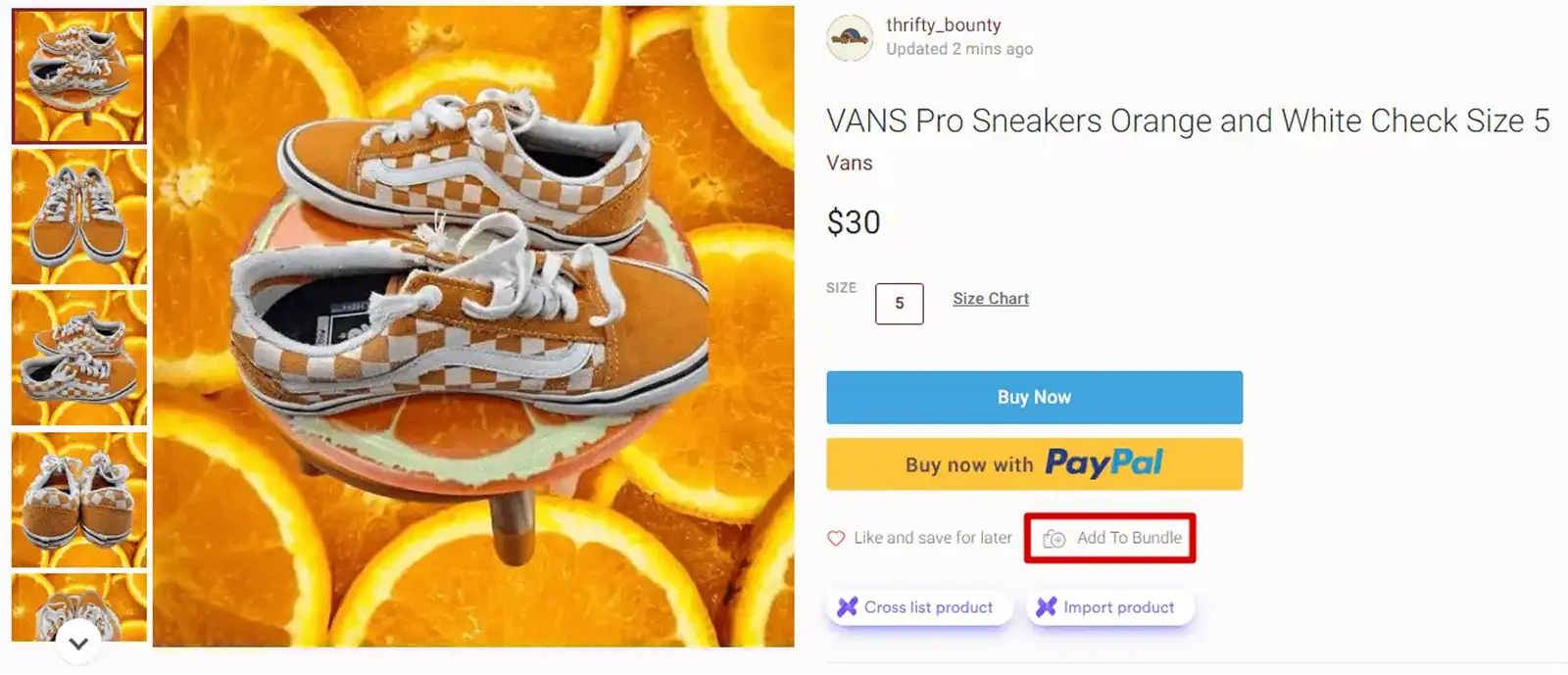
Tip: A buyer can also start a bundle themselves by opening a listing in your closet and tapping Add to Bundle. Either way works, but you don't have to sit and wait for them to do it.
How to set a bundle discount on Poshmark
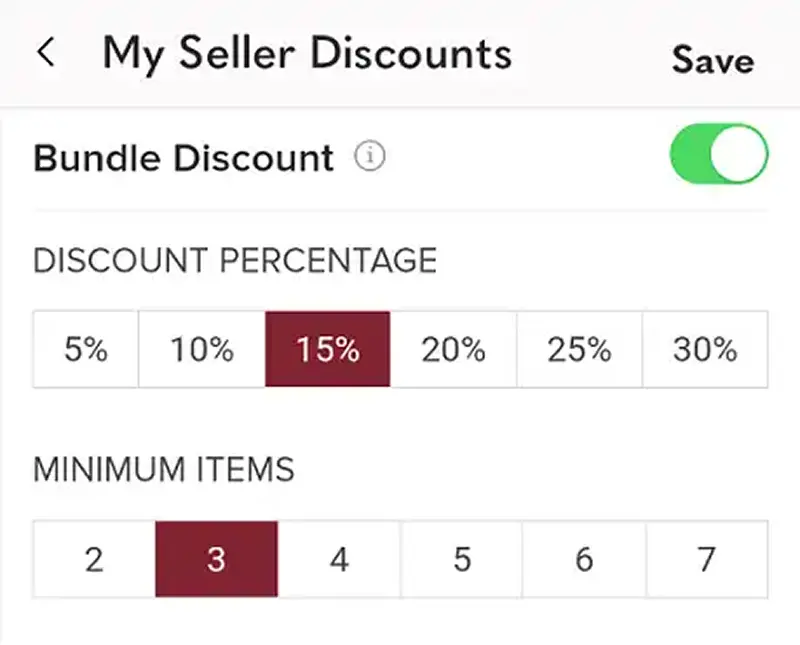
If you want to sweeten the deal automatically, use Poshmark's Bundle Discount feature. Rather than manually adjusting prices, you set a discount percentage and Poshmark applies it to every qualifying bundle.
Here's how to set one up from the app:
Tap your profile photo at the top of the screen.
Go to My Seller Tools.
Tap My Seller Discount.
Choose Bundle Discount and set your percentage.
On a computer:
Click your profile photo at the top right.
Go to Account Settings.
Click My Seller Discounts.
Turn on Bundle Discount and set your percentage.
From then on, the discount applies automatically whenever a buyer purchases a qualifying bundle. It's a set-it-and-forget-it way to reward people for buying more.
How to style a buyer's bundle (Style Me requests)
Sometimes a buyer will start a bundle and ask you to fill it with pieces that go well together. This is called a Style Me request, and it's a great chance to show off your eye and make a bigger sale.
To style a buyer's bundle, just add items to it the same way you would normally: open the listing you want to add, tap Share, and choose the buyer who asked to be styled. Add a few coordinating pieces, and you've turned one request into a full outfit.
How to send a bundle offer to a buyer
Here's where bundles really earn their keep. You can send an exclusive offer on a bundle a buyer has going, a discounted price just for them.
It's a perfect nudge for someone who's been eyeing your items or a reward for a loyal repeat buyer.
To send a bundle offer from the app:
Tap your profile photo at the top right.
Select My Bundles.
Choose Sell.
Tap View Bundle on the buyer's bundle.
Select Make an Offer.
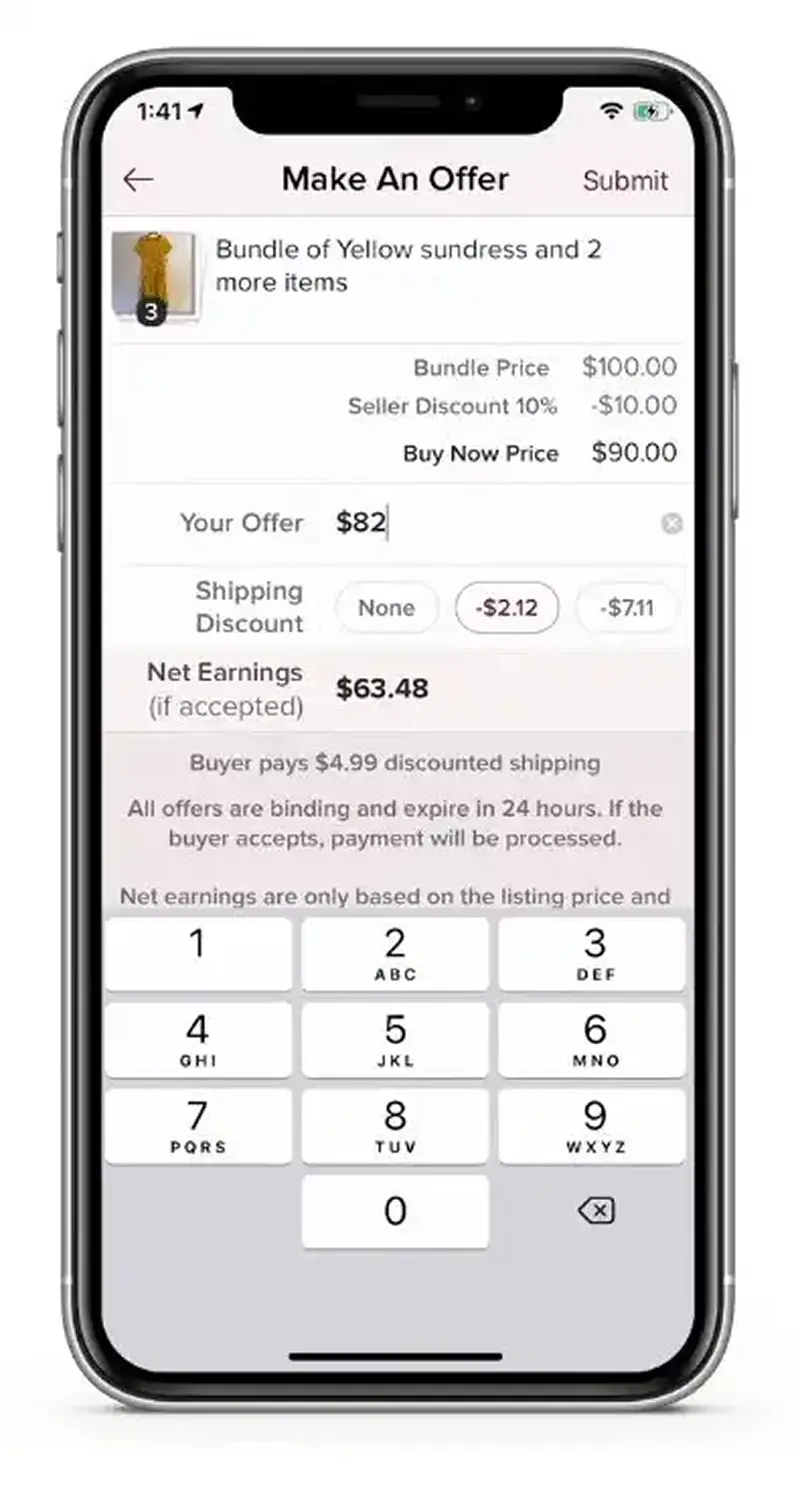
The process is the same on the web, head to your account menu, open My Bundles, choose Sell, view the bundle, and make your offer.
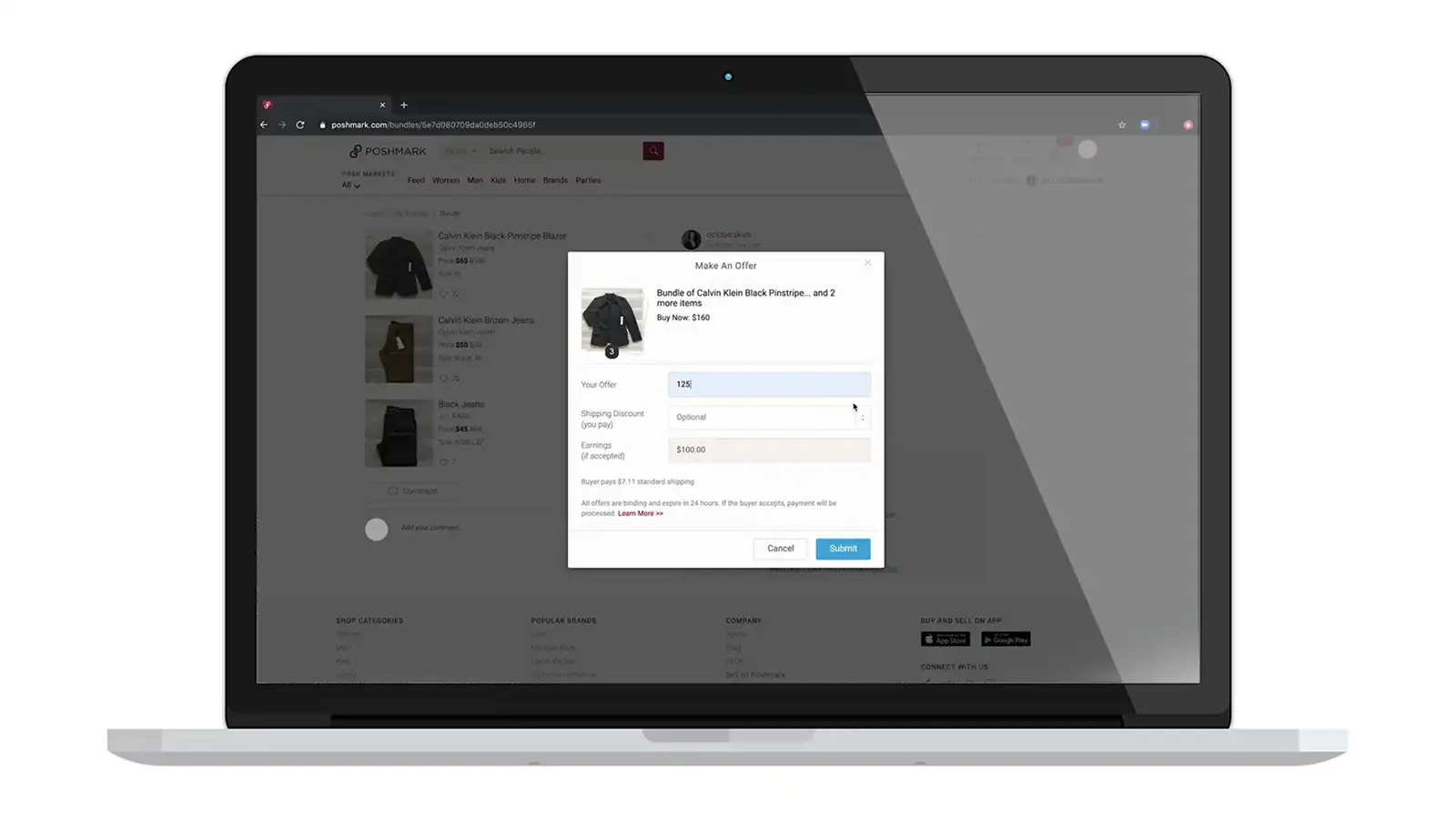
When you send the offer, the buyer gets notified and can accept, counter, or pass.
Even a single liked item is enough to send a bundle offer, so don't overlook smaller closets, a well-timed offer can be the difference between a like and a sale.
Tips for better Poshmark bundles
The resale market is competitive, so a little strategy goes a long way:
Keep bundles cohesive. Pair items that genuinely go together, a dress with a complementary bag and shoes, not a random mix.
Offer a worthwhile discount. Make the savings real enough to push buyers over the line, but still profitable for you.
Spell out the value. Remind buyers they're saving on shipping by combining items, it's a real perk.
Make your photos shine. Show bundle items both together and separately, and write clear, keyword-rich descriptions. (Need help? See our guide on how to write a great product description.)
Cross-promote. Mention in individual listings that bundle discounts are available.
Lean into the seasons. Build bundles around what people are shopping for right now, cozy layers in fall, lightweight pieces in spring.
Above all, be flexible and friendly. Savvy buyers know bundling is an option, so you'll get messages asking you to put items together. Treat each one as a chance to make a sale and win a repeat customer.
Build a fuller closet with Crosslist
Bundles only work when you've got multiple items a buyer wants, so the fuller your closet, the more bundle opportunities you create.
With a cross listing tool like Crosslist, you can cross list your whole inventory across Poshmark, Mercari, eBay, and more from one universal form and keep everything in sync.
When an item sells anywhere, autodelist clears it from the other marketplaces automatically, so you never double-sell a piece that's part of a bundle.
Selling on Mercari too? Here's our guide on how to bundle on Mercari.
Try Crosslist risk-free with the 3-day money-back guarantee.
You love the feeling of scoring a great deal and a convenient buy, right?
So does every other shopper on the planet, including your Poshmark customers. It's nice to find a pair of like-new secondhand designer jeans, but it's even better to snag a whole outfit for one combined price.
That's exactly what bundles are for. And as a seller, you don't have to wait around hoping a buyer figures them out on their own.
You can put a bundle together for them, send it as an offer, and turn a few likes into a single, bigger sale.
Here's everything you need to know about creating a bundle for someone on Poshmark.
Key takeaways
A Poshmark bundle lets a buyer purchase multiple items from your closet in one order, with combined shipping and any bundle discount applied.
As a seller, you can proactively build a bundle for anyone who's liked your items, then send them an offer, you don't have to wait for the buyer to start it.
Set a Bundle Discount in your seller tools to automatically reward multi-item purchases.
Bundles ship together in one package, which saves the buyer on shipping and helps you move more inventory per sale.
The more items you have listed, the more bundle opportunities you create. A cross listing tool like Crosslist helps you keep a full closet across every marketplace.
How do bundles work on Poshmark?
If you're wondering how bundles work on Poshmark, the idea is simple: a bundle is a package of multiple items sold together in one order, usually at a discount.
On Poshmark, a bundle lets a buyer purchase several pieces from the same closet in a single checkout, with everything shipped together.
Instead of buying one top, then separately buying the matching skirt, then the belt, a buyer can grab all three at once.
They save on shipping, you make a bigger sale, and everyone walks away happy.
An entire ready-to-wear outfit is far more tempting than a single item on its own, and bundling is how you package that temptation.
Why bundle on Poshmark?
It's simple: buyers love bundles, and so should you.
You're much more likely to sell a put-together outfit if you offer it as a bundle than if you list the top, jeans, and accessories separately and hope someone buys all three.
Buyers love two things above all, a good deal and convenience, and bundles deliver both.
Bundling also helps you:
Move inventory faster. Selling three items in one order clears your closet quicker than selling them one at a time.
Increase your average sale. Bundles boost the amount per transaction, which means more budget for sourcing your next haul.
Build buyer loyalty. When you put together the perfect package for someone, or surprise them with an exclusive bundle offer, it creates goodwill that turns one-time shoppers into repeat customers.
What makes a good Poshmark bundle?
The best bundles are cohesive sets of items that are:
Similar enough to make sense together, and
Easy to package and ship safely in one box.
A coordinated outfit, a set of same-sized tops, or a group of matching accessories all make great bundles.
On the other hand, it's not a great idea to bundle items in wildly different sizes or fragile pieces that are hard to ship together.
Think about it from the buyer's perspective: nobody wants a bundle of clothes that mixes XS crop tops with XXL coats. Keep it coherent, and keep it shippable.
How to create a bundle for someone on Poshmark
Here's the part a lot of sellers miss: you can build a bundle for a buyer who has liked your items, without waiting for them to start one themselves.
If someone has liked two or more pieces in your closet, that's your signal to put a bundle together and send an offer.
From the Poshmark app
Go to your Me tab (or check your likers under your listings).
Select Bundles
Choose Switch to Sell View to see everything they've liked from your closet.
Locate the Bundle and select View Bundle
Once the items are in their bundle, the buyer gets a notification, and you can follow up with an offer (more on that below).
From a computer
The process is similar on the web:
Click your profile photo at the top right of the page.
Select My Bundles.
Choose Sell from the menu.
Find the buyer's bundle and click View Bundle.
From there, you can add items to the bundle, dismiss it, or send a private offer.
Tip: A buyer can also start a bundle themselves by opening a listing in your closet and tapping Add to Bundle. Either way works, but you don't have to sit and wait for them to do it.
How to set a bundle discount on Poshmark
If you want to sweeten the deal automatically, use Poshmark's Bundle Discount feature. Rather than manually adjusting prices, you set a discount percentage and Poshmark applies it to every qualifying bundle.
Here's how to set one up from the app:
Tap your profile photo at the top of the screen.
Go to My Seller Tools.
Tap My Seller Discount.
Choose Bundle Discount and set your percentage.
On a computer:
Click your profile photo at the top right.
Go to Account Settings.
Click My Seller Discounts.
Turn on Bundle Discount and set your percentage.
From then on, the discount applies automatically whenever a buyer purchases a qualifying bundle. It's a set-it-and-forget-it way to reward people for buying more.
How to style a buyer's bundle (Style Me requests)
Sometimes a buyer will start a bundle and ask you to fill it with pieces that go well together. This is called a Style Me request, and it's a great chance to show off your eye and make a bigger sale.
To style a buyer's bundle, just add items to it the same way you would normally: open the listing you want to add, tap Share, and choose the buyer who asked to be styled. Add a few coordinating pieces, and you've turned one request into a full outfit.
How to send a bundle offer to a buyer
Here's where bundles really earn their keep. You can send an exclusive offer on a bundle a buyer has going, a discounted price just for them.
It's a perfect nudge for someone who's been eyeing your items or a reward for a loyal repeat buyer.
To send a bundle offer from the app:
Tap your profile photo at the top right.
Select My Bundles.
Choose Sell.
Tap View Bundle on the buyer's bundle.
Select Make an Offer.
The process is the same on the web, head to your account menu, open My Bundles, choose Sell, view the bundle, and make your offer.
When you send the offer, the buyer gets notified and can accept, counter, or pass.
Even a single liked item is enough to send a bundle offer, so don't overlook smaller closets, a well-timed offer can be the difference between a like and a sale.
Tips for better Poshmark bundles
The resale market is competitive, so a little strategy goes a long way:
Keep bundles cohesive. Pair items that genuinely go together, a dress with a complementary bag and shoes, not a random mix.
Offer a worthwhile discount. Make the savings real enough to push buyers over the line, but still profitable for you.
Spell out the value. Remind buyers they're saving on shipping by combining items, it's a real perk.
Make your photos shine. Show bundle items both together and separately, and write clear, keyword-rich descriptions. (Need help? See our guide on how to write a great product description.)
Cross-promote. Mention in individual listings that bundle discounts are available.
Lean into the seasons. Build bundles around what people are shopping for right now, cozy layers in fall, lightweight pieces in spring.
Above all, be flexible and friendly. Savvy buyers know bundling is an option, so you'll get messages asking you to put items together. Treat each one as a chance to make a sale and win a repeat customer.
Build a fuller closet with Crosslist
Bundles only work when you've got multiple items a buyer wants, so the fuller your closet, the more bundle opportunities you create.
With a cross listing tool like Crosslist, you can cross list your whole inventory across Poshmark, Mercari, eBay, and more from one universal form and keep everything in sync.
When an item sells anywhere, autodelist clears it from the other marketplaces automatically, so you never double-sell a piece that's part of a bundle.
Selling on Mercari too? Here's our guide on how to bundle on Mercari.
Try Crosslist risk-free with the 3-day money-back guarantee.
You love the feeling of scoring a great deal and a convenient buy, right?
So does every other shopper on the planet, including your Poshmark customers. It's nice to find a pair of like-new secondhand designer jeans, but it's even better to snag a whole outfit for one combined price.
That's exactly what bundles are for. And as a seller, you don't have to wait around hoping a buyer figures them out on their own.
You can put a bundle together for them, send it as an offer, and turn a few likes into a single, bigger sale.
Here's everything you need to know about creating a bundle for someone on Poshmark.
Key takeaways
A Poshmark bundle lets a buyer purchase multiple items from your closet in one order, with combined shipping and any bundle discount applied.
As a seller, you can proactively build a bundle for anyone who's liked your items, then send them an offer, you don't have to wait for the buyer to start it.
Set a Bundle Discount in your seller tools to automatically reward multi-item purchases.
Bundles ship together in one package, which saves the buyer on shipping and helps you move more inventory per sale.
The more items you have listed, the more bundle opportunities you create. A cross listing tool like Crosslist helps you keep a full closet across every marketplace.
How do bundles work on Poshmark?
If you're wondering how bundles work on Poshmark, the idea is simple: a bundle is a package of multiple items sold together in one order, usually at a discount.
On Poshmark, a bundle lets a buyer purchase several pieces from the same closet in a single checkout, with everything shipped together.
Instead of buying one top, then separately buying the matching skirt, then the belt, a buyer can grab all three at once.
They save on shipping, you make a bigger sale, and everyone walks away happy.
An entire ready-to-wear outfit is far more tempting than a single item on its own, and bundling is how you package that temptation.
Why bundle on Poshmark?
It's simple: buyers love bundles, and so should you.
You're much more likely to sell a put-together outfit if you offer it as a bundle than if you list the top, jeans, and accessories separately and hope someone buys all three.
Buyers love two things above all, a good deal and convenience, and bundles deliver both.
Bundling also helps you:
Move inventory faster. Selling three items in one order clears your closet quicker than selling them one at a time.
Increase your average sale. Bundles boost the amount per transaction, which means more budget for sourcing your next haul.
Build buyer loyalty. When you put together the perfect package for someone, or surprise them with an exclusive bundle offer, it creates goodwill that turns one-time shoppers into repeat customers.
What makes a good Poshmark bundle?
The best bundles are cohesive sets of items that are:
Similar enough to make sense together, and
Easy to package and ship safely in one box.
A coordinated outfit, a set of same-sized tops, or a group of matching accessories all make great bundles.
On the other hand, it's not a great idea to bundle items in wildly different sizes or fragile pieces that are hard to ship together.
Think about it from the buyer's perspective: nobody wants a bundle of clothes that mixes XS crop tops with XXL coats. Keep it coherent, and keep it shippable.
How to create a bundle for someone on Poshmark
Here's the part a lot of sellers miss: you can build a bundle for a buyer who has liked your items, without waiting for them to start one themselves.
If someone has liked two or more pieces in your closet, that's your signal to put a bundle together and send an offer.
From the Poshmark app
Go to your Me tab (or check your likers under your listings).
Select Bundles
Choose Switch to Sell View to see everything they've liked from your closet.
Locate the Bundle and select View Bundle
Once the items are in their bundle, the buyer gets a notification, and you can follow up with an offer (more on that below).
From a computer
The process is similar on the web:
Click your profile photo at the top right of the page.
Select My Bundles.
Choose Sell from the menu.
Find the buyer's bundle and click View Bundle.
From there, you can add items to the bundle, dismiss it, or send a private offer.
Tip: A buyer can also start a bundle themselves by opening a listing in your closet and tapping Add to Bundle. Either way works, but you don't have to sit and wait for them to do it.
How to set a bundle discount on Poshmark
If you want to sweeten the deal automatically, use Poshmark's Bundle Discount feature. Rather than manually adjusting prices, you set a discount percentage and Poshmark applies it to every qualifying bundle.
Here's how to set one up from the app:
Tap your profile photo at the top of the screen.
Go to My Seller Tools.
Tap My Seller Discount.
Choose Bundle Discount and set your percentage.
On a computer:
Click your profile photo at the top right.
Go to Account Settings.
Click My Seller Discounts.
Turn on Bundle Discount and set your percentage.
From then on, the discount applies automatically whenever a buyer purchases a qualifying bundle. It's a set-it-and-forget-it way to reward people for buying more.
How to style a buyer's bundle (Style Me requests)
Sometimes a buyer will start a bundle and ask you to fill it with pieces that go well together. This is called a Style Me request, and it's a great chance to show off your eye and make a bigger sale.
To style a buyer's bundle, just add items to it the same way you would normally: open the listing you want to add, tap Share, and choose the buyer who asked to be styled. Add a few coordinating pieces, and you've turned one request into a full outfit.
How to send a bundle offer to a buyer
Here's where bundles really earn their keep. You can send an exclusive offer on a bundle a buyer has going, a discounted price just for them.
It's a perfect nudge for someone who's been eyeing your items or a reward for a loyal repeat buyer.
To send a bundle offer from the app:
Tap your profile photo at the top right.
Select My Bundles.
Choose Sell.
Tap View Bundle on the buyer's bundle.
Select Make an Offer.
The process is the same on the web, head to your account menu, open My Bundles, choose Sell, view the bundle, and make your offer.
When you send the offer, the buyer gets notified and can accept, counter, or pass.
Even a single liked item is enough to send a bundle offer, so don't overlook smaller closets, a well-timed offer can be the difference between a like and a sale.
Tips for better Poshmark bundles
The resale market is competitive, so a little strategy goes a long way:
Keep bundles cohesive. Pair items that genuinely go together, a dress with a complementary bag and shoes, not a random mix.
Offer a worthwhile discount. Make the savings real enough to push buyers over the line, but still profitable for you.
Spell out the value. Remind buyers they're saving on shipping by combining items, it's a real perk.
Make your photos shine. Show bundle items both together and separately, and write clear, keyword-rich descriptions. (Need help? See our guide on how to write a great product description.)
Cross-promote. Mention in individual listings that bundle discounts are available.
Lean into the seasons. Build bundles around what people are shopping for right now, cozy layers in fall, lightweight pieces in spring.
Above all, be flexible and friendly. Savvy buyers know bundling is an option, so you'll get messages asking you to put items together. Treat each one as a chance to make a sale and win a repeat customer.
Build a fuller closet with Crosslist
Bundles only work when you've got multiple items a buyer wants, so the fuller your closet, the more bundle opportunities you create.
With a cross listing tool like Crosslist, you can cross list your whole inventory across Poshmark, Mercari, eBay, and more from one universal form and keep everything in sync.
When an item sells anywhere, autodelist clears it from the other marketplaces automatically, so you never double-sell a piece that's part of a bundle.
Selling on Mercari too? Here's our guide on how to bundle on Mercari.
Try Crosslist risk-free with the 3-day money-back guarantee.
You love the feeling of scoring a great deal and a convenient buy, right?
So does every other shopper on the planet, including your Poshmark customers. It's nice to find a pair of like-new secondhand designer jeans, but it's even better to snag a whole outfit for one combined price.
That's exactly what bundles are for. And as a seller, you don't have to wait around hoping a buyer figures them out on their own.
You can put a bundle together for them, send it as an offer, and turn a few likes into a single, bigger sale.
Here's everything you need to know about creating a bundle for someone on Poshmark.
Key takeaways
A Poshmark bundle lets a buyer purchase multiple items from your closet in one order, with combined shipping and any bundle discount applied.
As a seller, you can proactively build a bundle for anyone who's liked your items, then send them an offer, you don't have to wait for the buyer to start it.
Set a Bundle Discount in your seller tools to automatically reward multi-item purchases.
Bundles ship together in one package, which saves the buyer on shipping and helps you move more inventory per sale.
The more items you have listed, the more bundle opportunities you create. A cross listing tool like Crosslist helps you keep a full closet across every marketplace.
How do bundles work on Poshmark?
If you're wondering how bundles work on Poshmark, the idea is simple: a bundle is a package of multiple items sold together in one order, usually at a discount.
On Poshmark, a bundle lets a buyer purchase several pieces from the same closet in a single checkout, with everything shipped together.
Instead of buying one top, then separately buying the matching skirt, then the belt, a buyer can grab all three at once.
They save on shipping, you make a bigger sale, and everyone walks away happy.
An entire ready-to-wear outfit is far more tempting than a single item on its own, and bundling is how you package that temptation.
Why bundle on Poshmark?
It's simple: buyers love bundles, and so should you.
You're much more likely to sell a put-together outfit if you offer it as a bundle than if you list the top, jeans, and accessories separately and hope someone buys all three.
Buyers love two things above all, a good deal and convenience, and bundles deliver both.
Bundling also helps you:
Move inventory faster. Selling three items in one order clears your closet quicker than selling them one at a time.
Increase your average sale. Bundles boost the amount per transaction, which means more budget for sourcing your next haul.
Build buyer loyalty. When you put together the perfect package for someone, or surprise them with an exclusive bundle offer, it creates goodwill that turns one-time shoppers into repeat customers.
What makes a good Poshmark bundle?
The best bundles are cohesive sets of items that are:
Similar enough to make sense together, and
Easy to package and ship safely in one box.
A coordinated outfit, a set of same-sized tops, or a group of matching accessories all make great bundles.
On the other hand, it's not a great idea to bundle items in wildly different sizes or fragile pieces that are hard to ship together.
Think about it from the buyer's perspective: nobody wants a bundle of clothes that mixes XS crop tops with XXL coats. Keep it coherent, and keep it shippable.
How to create a bundle for someone on Poshmark
Here's the part a lot of sellers miss: you can build a bundle for a buyer who has liked your items, without waiting for them to start one themselves.
If someone has liked two or more pieces in your closet, that's your signal to put a bundle together and send an offer.
From the Poshmark app
Go to your Me tab (or check your likers under your listings).
Select Bundles
Choose Switch to Sell View to see everything they've liked from your closet.
Locate the Bundle and select View Bundle
Once the items are in their bundle, the buyer gets a notification, and you can follow up with an offer (more on that below).
From a computer
The process is similar on the web:
Click your profile photo at the top right of the page.
Select My Bundles.
Choose Sell from the menu.
Find the buyer's bundle and click View Bundle.
From there, you can add items to the bundle, dismiss it, or send a private offer.
Tip: A buyer can also start a bundle themselves by opening a listing in your closet and tapping Add to Bundle. Either way works, but you don't have to sit and wait for them to do it.
How to set a bundle discount on Poshmark
If you want to sweeten the deal automatically, use Poshmark's Bundle Discount feature. Rather than manually adjusting prices, you set a discount percentage and Poshmark applies it to every qualifying bundle.
Here's how to set one up from the app:
Tap your profile photo at the top of the screen.
Go to My Seller Tools.
Tap My Seller Discount.
Choose Bundle Discount and set your percentage.
On a computer:
Click your profile photo at the top right.
Go to Account Settings.
Click My Seller Discounts.
Turn on Bundle Discount and set your percentage.
From then on, the discount applies automatically whenever a buyer purchases a qualifying bundle. It's a set-it-and-forget-it way to reward people for buying more.
How to style a buyer's bundle (Style Me requests)
Sometimes a buyer will start a bundle and ask you to fill it with pieces that go well together. This is called a Style Me request, and it's a great chance to show off your eye and make a bigger sale.
To style a buyer's bundle, just add items to it the same way you would normally: open the listing you want to add, tap Share, and choose the buyer who asked to be styled. Add a few coordinating pieces, and you've turned one request into a full outfit.
How to send a bundle offer to a buyer
Here's where bundles really earn their keep. You can send an exclusive offer on a bundle a buyer has going, a discounted price just for them.
It's a perfect nudge for someone who's been eyeing your items or a reward for a loyal repeat buyer.
To send a bundle offer from the app:
Tap your profile photo at the top right.
Select My Bundles.
Choose Sell.
Tap View Bundle on the buyer's bundle.
Select Make an Offer.
The process is the same on the web, head to your account menu, open My Bundles, choose Sell, view the bundle, and make your offer.
When you send the offer, the buyer gets notified and can accept, counter, or pass.
Even a single liked item is enough to send a bundle offer, so don't overlook smaller closets, a well-timed offer can be the difference between a like and a sale.
Tips for better Poshmark bundles
The resale market is competitive, so a little strategy goes a long way:
Keep bundles cohesive. Pair items that genuinely go together, a dress with a complementary bag and shoes, not a random mix.
Offer a worthwhile discount. Make the savings real enough to push buyers over the line, but still profitable for you.
Spell out the value. Remind buyers they're saving on shipping by combining items, it's a real perk.
Make your photos shine. Show bundle items both together and separately, and write clear, keyword-rich descriptions. (Need help? See our guide on how to write a great product description.)
Cross-promote. Mention in individual listings that bundle discounts are available.
Lean into the seasons. Build bundles around what people are shopping for right now, cozy layers in fall, lightweight pieces in spring.
Above all, be flexible and friendly. Savvy buyers know bundling is an option, so you'll get messages asking you to put items together. Treat each one as a chance to make a sale and win a repeat customer.
Build a fuller closet with Crosslist
Bundles only work when you've got multiple items a buyer wants, so the fuller your closet, the more bundle opportunities you create.
With a cross listing tool like Crosslist, you can cross list your whole inventory across Poshmark, Mercari, eBay, and more from one universal form and keep everything in sync.
When an item sells anywhere, autodelist clears it from the other marketplaces automatically, so you never double-sell a piece that's part of a bundle.
Selling on Mercari too? Here's our guide on how to bundle on Mercari.
Try Crosslist risk-free with the 3-day money-back guarantee.