

Maybe you’re a new reseller who’s shopping around for a cross listing app that can automate the tedious and repetitive listing process for you.
Or, maybe you’ve been around the cross listing block a few times, and are looking for a new one that actually saves you some time.
No matter the reason, if you're on the market for a cross listing tool, you've come to the right place.
Here, we explore the features of Nifty vs. List Perfectly, and see how they compare to Crosslist. By the end, you'll be able to pick out the right tool for your business.
Key takeaways:
With its clunky interface, form-filling software, and lack of support for several features on the cheaper tiers, List Perfectly ranks last among the 3 cross listing apps.
Nifty shares many of Crosslist’s features, but it lacks a mobile app, doesn’t have a true universal listing form, and only lets you hold 1,500 active items in your closet (unless you upgrade to more expensive plans). Not to mention that Nifty is super expensive.
Crosslist is the best cross listing app out of the 3 because it has a single, universal listing form, is affordable, and has a fully-functional mobile app. It’s also the only cross listing app that actually automates your listing process.
Nifty vs. List Perfectly vs. Crosslist: An in-depth comparison
When you stack Nifty, List Perfectly, and Crosslist against each other, you’ll find that the core function of all 3 is the same: to make it quicker for you to list the same items across multiple marketplaces.
To be more specific, all 3 cross listing tools help you turn a single listing into several published listings without you having to type in the same details again and again.
But the tools differ from one another in the way this feature is made available to you.
Some of them regularly help you save upwards of 10 hours on listing every week. Others… not so much.
Let’s take a closer look at all the features that these cross listing apps have to offer, and see which ones are the actually useful ones.
Supported marketplaces
Nifty supports only 6 marketplaces, with some giants like Facebook Marketplace and Grailed missing in action, which is nowhere near enough for sellers who like to cast a wider net.
List Perfectly supports 12 marketplaces, including Instagram, but cross listing to the social media platform isn’t as straightforward as posting your listings to other marketplaces.
If you want to post your listings to Instagram, you need to follow a separate process.
So, you can essentially only cross list to the other 11 platforms simultaneously.
📝 Note: List Perfectly doesn’t support Shopify or Instagram on its most basic Simple plan.
LP also gives you the option of adding custom marketplaces that aren’t supported by the tool, such as Amazon.
However, this is purely for inventory purposes, so you won’t be able to cross list to them.
Crosslist supports 11+ marketplaces, including Shopify, Whatnot, WooCommerce, TikTok Shop and more.
You’ll be hard-pressed to find WooCommerce support on any other cross listing app.
Unlike List Perfectly, all of Crosslist’s marketplaces are available to all users regardless of the subscription plan they’re on.
No gatekeeping to force you to upgrade to a higher tier.
Verdict: Crosslist and List Perfectly > Nifty
Listing form
Nifty has a single listing form for all 6 marketplaces, albeit with separate sub-sections for each platform. So, it’s not a true universal listing form.
To create a listing on Nifty, you first have to select the marketplaces you want to list to and fill out the common section of the listing form.
This form contains all the listing attributes needed by all 6 marketplaces. This will be your usual details such as title, size, and so on.
Next, scroll down and you’ll see a separate sub-section for each marketplace. Nifty automatically populates the details you entered in the common space.
But, you need to review each section and add any missing details.
For instance, some marketplaces such as Poshmark and eBay need additional information. This is where you’ll enter those.
Once you’re done, submit the form and Nifty will publish your listings.
List Perfectly also has a common form for all the marketplaces. But, it uses form-filling software, which is tedious and long.
1. The form-filling software time-suck: List Perfectly uses form-filling software, which means that the listing form asks you to fill out the details that are common across all marketplaces.
Once you fill out and submit the listing form, List Perfectly will open a new tab for each listing on each marketplace and simply populate the details you’ve already entered. That’s it.
You need to review each form, enter all the other missing details, and publish each listing yourself.
It may not seem like a big deal for the first few listings, but imagine doing this for 10, 15, 20 listings, especially when you cross list each of them to 5+ marketplaces.
2. The restriction on available listing fields: Unless you’re on List Perfectly’s expensive Pro or Pro Plus plans, the number of listing fields supported by the listing form is very limited.
Case in point: the most basic Simple plan only supports 4 listing details on the form, namely images, title, description, and price.
If you guessed that you’ll have to enter pretty much every other listing detail manually for each listing on each marketplace, then you’re absolutely right.
All in all, not a very efficient listing process.
Crosslist, on the other hand, truly helps you automate the listing process, thanks to its single, dynamic, universal listing form.
This form contains all the listing attributes needed to publish on all 11+ marketplaces, so you won’t have to add in any missing details.
All you have to do is fill out the form once, select the marketplaces you want to publish to, and submit the form. That’s it.
No marketplace-specific sub-sections for you to double-check, or form-filling software to take up your time and energy.
Our process is fast, efficient, and, more importantly, less prone to error.
Verdict: Crosslist > Nifty > List Perfectly
Autoposting in the background
First things first: autoposting refers to when a cross listing app automatically publishes your listings to the relevant marketplaces without waiting for a final check-and-submit by you.
So, when a cross listing tool supports background autoposting, your work is essentially finished once you fill out the listing forms and submit them.
Since List Perfectly uses form-filling software, it doesn’t have autoposting. You have to manually check and publish each and every listing.
Both Nifty and Crosslist have background autoposting, but Nifty makes you review each marketplace-specific section of the listing form and add in any missing details before you submit it.
This creates an extra step for you, slowing down your workflow.
Crosslist doesn’t need you to manually check anything.
You just have to fill out a single, dynamic form, submit it, and let Crosslist take care of the publishing part.
This is a real boon when you’re juggling multiple listings at once.
Verdict: Crosslist > Nifty > List Perfectly
AI-generated listings
All 3 cross listing apps let you generate full listings with AI, and they work the same way (more or less).
You upload your product photos from all angles, and the AI tool captures all the necessary information from it to generate the full listing.
📝 Note: List Perfectly also lets you scan your item’s barcode instead of uploading photos to generate the listing.
And when we say “the full listing,” we mean that all 3 tools will generate the title, description, brand, condition, color, and size.
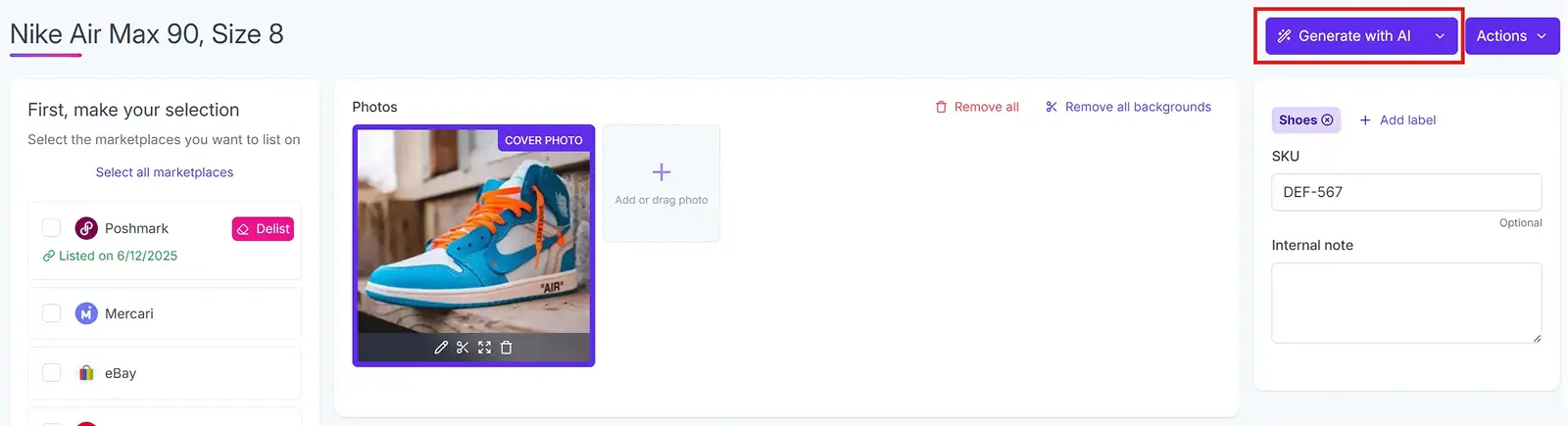
You can set the tone of the generated description, tweak the length, or even add your own custom prompts to personalize the listing.
📝 Note: The option to customize the way AI generates your listing is available only on the most expensive List Perfectly plan.
Nifty and Crosslist also suggest optimal prices for your products based on market trends. However, as user @vtglog notes here, Nifty’s pricing suggestions feature is new and not very accurate.
List Perfectly also has a Google Lens pricing feature where you can run your product photos through Google Lens to get insights on the current going rate.
But, this is a separate feature, and isn’t part of List Perfectly’s AI generation.
In addition to these, Crosslist’s AI generation feature can optimize your listings to be marketplace-specific.
Only want the tool to generate a few listing details while you enter the others manually? Completely possible!
If you’re listing a host of items at once, you can upload all of the photos at once instead of listing each product one by one.
The AI bulk creation feature will turn each product photo into a separate listing for you.
Watch a demo of our AI tool in action:
Crosslist and Nifty also use something called smart credits or AI credits as currency to generate listings with AI. Each subscription plan gives you a certain number of AI credits (more on this later).
Both the tools consume 1 AI credit per 1 listing generation.
Verdict: It’s mostly a tie, but we wanted to highlight the fact that Crosslist’s AI generation feature has no bugs or glitches.
Bulk actions
Once again, all 3 tools support bulk actions, but with some differences.
Nifty supports all the usual bulk actions, such as delisting and relisting, verification, price updates, bulk generation (where each product photo you upload is turned into a separate draft), cross listing, and editing.
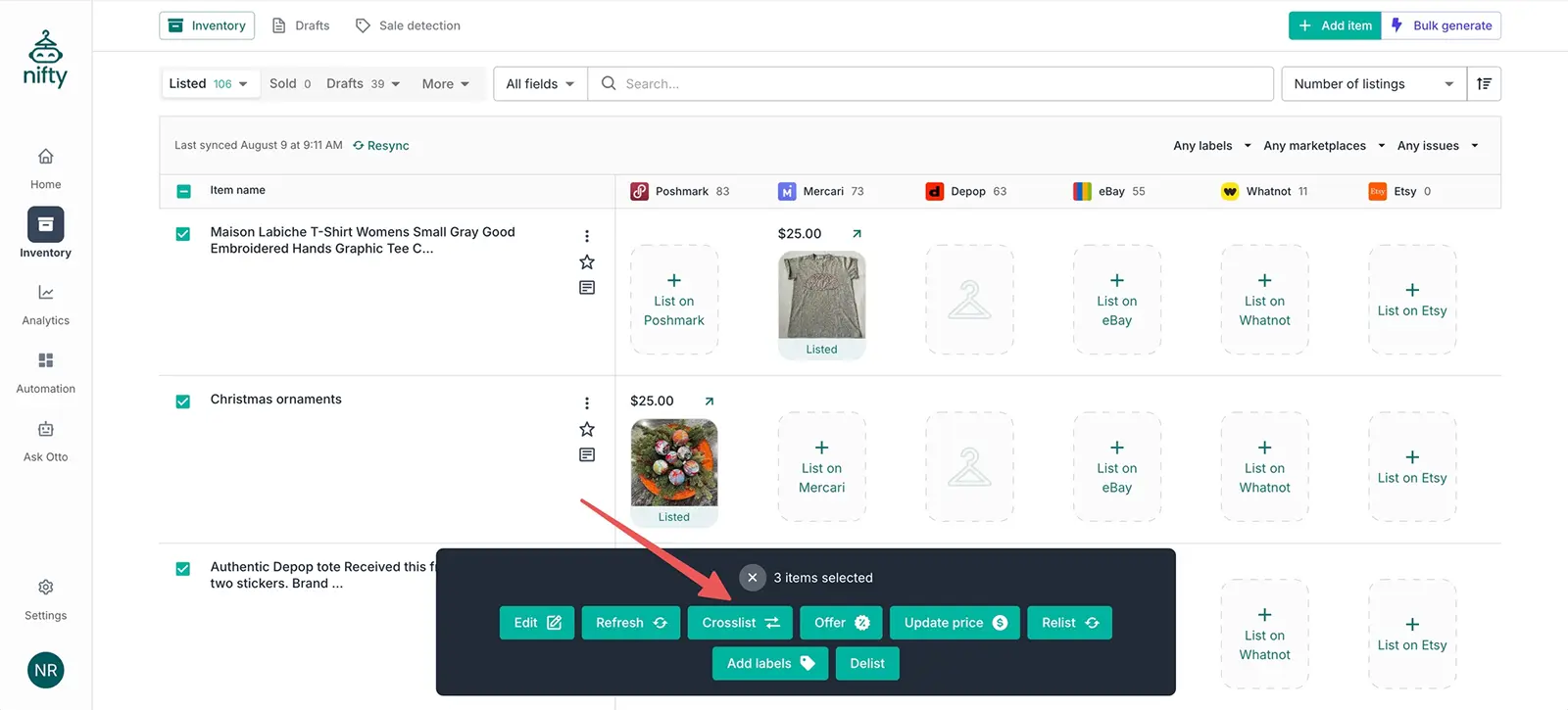
Source: Nifty
But there are a few caveats. When bulk editing, you can only edit the listing field attributes that are common across all 6 marketplaces. This means that you won’t be able to edit Poshmark-specific info in bulk.
It’s also worth highlighting that since Nifty requires a manual check of each marketplace-specific sub-section on the listing form.
Plus the addition of missing details, bulk cross listing may end up taking more time than you anticipated.
Another downside of Nifty’s bulk actions is that you can only apply them to a maximum of 25 listings at a time, provided they’re all on the same page.
You can’t choose a few listings from page 4 and a few others from page 7 to apply bulk actions to.
List Perfectly also supports all the bulk actions you might need, including importing, updating, cross listing, etc.
But, the restrictions here come in the form of the subscription plans that support these bulk actions.
This is to say that some of List Perfectly’s bulk actions are paywalled behind more expensive tiers.
List Perfectly’s bulk actions | Plans that don’t support the bulk actions |
Bulk import | Simple plan |
Bulk edit | Simple plan |
Bulk cross list | Simple plan |
Autodelist | Simple, Business, and Pro plans |
Auto sales detection | Simple and Business plans |
Bottom line: If you’re on the basic Simple plan, you can pretty much forget about any bulk actions because they won’t be available to you.
Let’s also talk about how bulk cross listing will work on List Perfectly. Say you select 20 listings to cross list them to 7 marketplaces each.
Since List Perfectly uses form-filling software, the app will simply open a million tabs (20*7 = 140 tabs, to be exact) and auto-populate a few measly listing details.
You’ll have to go through each of the tabs, fill out the missing details, and publish the listings.
Not very “bulk cross listing” of it.
Crosslist has none of the problems and restrictions you would encounter with Nifty and List Perfectly.
You can perform all types of bulk actions (importing, editing, cross listing, delisting and relisting, deleting, etc.) with no limits on the amount of listings you can apply them to.
(The only exception is that you can only clone or edit up to 100 listings at once.)
Crosslist also doesn’t paywall any of the bulk actions, so they’re available to you right from the most affordable Bronze plan.
Since Crosslist uses a single, dynamic form and has background autoposting, cross listing several items in bulk is quite easy and doesn’t need any manual intervention from your side.
Just select the listings you want to cross list in bulk, select the marketplaces you want to publish them to, and carry on with your day.
Our tool will get the job done for you.
Verdict: Crosslist > Nifty > List Perfectly
Updating listings (and prices) without relisting
Nifty, Crosslist, and List Perfectly all let you make changes to your published listings from within the apps without having you delist, update, and relist.
The changes you make within the tools are automatically reflected in your published listings.
You can update your listings in bulk on all 3 tools. But, keep in mind that Nifty only lets you update the attributes that are shared across all marketplaces.
Any other changes need to be done directly on the published listings.
On Crosslist and List Perfectly, you can either edit listings through the edit button, or add your changes to a template and apply it to the relevant listings. (Nifty doesn’t have a template feature at all.)
📝 Note: You can’t edit several listings at once on List Perfectly’s basic Simple plan. You can use the template method as a work-around to this.
Once again, all 3 cross listing apps let you set different prices for different marketplaces. But the method slightly differs.
Nifty does this through pricing rules. You set a primary marketplace and decide the prices for the items you list there.
Then, you set a pricing rule based on this base price for every other marketplace. Nifty will automatically add the product prices for other marketplaces based on these pricing rules.
If your primary marketplace is Etsy, you’ll set the prices for all Etsy listings. If you also post to Poshmark, you’ll set a pricing rule for it.
Something like +2% of Etsy prices. Nifty will calculate the amount by applying your pricing rule.
List Perfectly doesn’t have a separate feature that lets you set unique prices for each marketplace.
You’ll have to make the pricing changes to templates and apply them to the relevant listings. It’s a bit tedious and long.
Crosslist lets you change the price-across-marketplaces both for a single listing alone, and for multiple listings together.
To change the prices for a single listing, click on it and select Adjust prices per marketplace. Enter a different price for each marketplace, and you’re good to go!
To do this across all of your listings (for when you’re running a sale or overhauling the pricing of your full inventory), go to Account settings → Price markup and enter a number or percentage in the box beside each marketplace.
When you enter positive numbers or percentages, the prices of your listings will be increased by that dollar value or percentage.
When you enter negative numbers or percentages, the value decreases.
Verdict: Crosslist > Nifty > List Perfectly
Sales detection and autodelisting
All 3 cross listing tools offer a sales detection and autodelisting feature, where the tools automatically detect any sales you make and delist that product from the other connected marketplaces.
Nifty takes 15 minutes to detect a sale and delist it, so it’s not exactly instant despite the whole operation being cloud-based.
If your product is in demand, and you somehow happen to double-sell it in the 15 minutes it takes Nifty to notice, then you’re out of luck.
Nifty only delists single-quantity items. For multi-quantity listings, Nifty will adjust the available quantity after detecting a sale.
Since Nifty runs on the cloud, you don’t need to have your device, browser, or marketplaces on for the sale detection and autodelisting to happen.
List Perfectly lets you set a preferred scanning speed or frequency for the sale detection.
This means that List Perfectly can scan for any sales every single minute.
The sale detection might be instant, but the autodelist feature is far from reliable (as this user on Reddit points out).
List Perfectly also autodelists your listings only if the item quantity is set to 1.
📝Note: Auto sales detection is only available on the Pro and Pro Plus plans of List Perfectly, while autodelisting is only available on Pro Plus.
Unlike Nifty, for List Perfectly to detect a sale and autodelist, your computer and the browser extension of the tool should be open, and you should be signed in to all of the marketplaces.
Is it realistic to require you to keep your devices on 24/7?
Crosslist’s sale detection and autodelisting is instant.
Our tool also uses server-side tracking for 4 of the marketplaces, so your computer doesn’t need to be on for Crosslist to autodelist from these platforms.
For the other platforms, though, your browser should be periodically active.
📝 Autodelist is available only for the Gold and Diamond subscription plans on Crosslist.
Verdict: Crosslist and Nifty > List Perfectly
Image editor and background removal
You’ll find image editing and background removal capabilities on all 3 cross listing tools.
List Perfectly has a very basic image editor that only performs simple functions, such as crop, rotate, add filters, etc.
And even this is restricted for users on the Simple plan. On this cheapest plan, you can’t add filters, or adjust the brightness, saturation, and contrast.
List Perfectly also automatically resizes your images to fit marketplace requirements.
You can remove the backgrounds from your photos and add a plain, colored background.
But, the number of background removals you can carry out in a month is severely limited.
Here are the details of how many background removals you’re allowed on each plan:
Simple plan: 25/month
Business plan: 50/month
Pro plan: 1,500/month
Pro Plus plan: Starts at 3,000/month
Even if you create only 10 listings per month with 7 photos each, the Simple and Business plans severely fall short.
Crosslist and Nifty both have AI-powered editing tools with manual editing features also built in.
You can enhance your images with AI in seconds, and nobody will be able to guess that you used your smartphone for the pictures.
Both tools let you fix shadows and lighting, add mannequins to your product photos, and generate images.
You can remove the clutter-filled backgrounds of your photos easily as well.
Crosslist also automatically resizes your photos (without cutting anything off) to fit each marketplace’s sizing requirements.
Editing with AI costs you AI credits on both Crosslist and Nifty.
On Nifty, each background removal = 1 smart credit, while you’ll be using 5 smart credits for each photo when you apply AI edits.
On Crosslist, background removals are free, while each AI edit = 2 AI credits.
Verdict: Crosslist and Nifty > List Perfectly
Mobile app
Nifty doesn’t have a mobile app, so you’re forced to be dependent on your computer and browser to use the tool.
While you can create a shortcut of the app on your mobile and use it, there will be limitations since it’s not an app.
List Perfectly also doesn’t have a mobile app. You can use the tool through your mobile browser, but it’s very limited in terms of what it can do.
You can only create drafts, manage product images, and use the pricing tools. That’s it. Everything else needs a desktop browser.
Crosslist has a fully functional mobile app that can do everything the browser version can do.
Create listings, cross list in bulk, edit, relist, and have our tool autodelist for you, you name it, the Crosslist app can do it.
Any changes you make on the mobile will be automatically synced to the desktop browser and vice versa.
Download the Crosslist mobile app and manage your entire online business from wherever you are.
Shipping profiles
List Perfectly doesn’t let you save your default shipping preferences for each marketplace. So, you have to enter this manually every time you create a listing.
Crosslist and Nifty have the option of letting you create shipping profiles for each marketplace.
You can add your preferred shipping methods and carriers, and also set default weights, dimensions, and prices.

These preferences will automatically be applied to any new listings you create.
On Nifty alone, you’ll have to select which of the shipping profiles you want to apply to the new listing(s) you create.
Verdict: Crosslist > Nifty > List Perfectly
Multi-region support
List Perfectly only supports US marketplaces, while both Crosslist and Nifty support US, UK, CA, and AU marketplaces.
Crosslist makes things easier for you by automatically converting measurements from imperial to metric and vice versa.
Our tool also automatically publishes your listings to the correct domain based on your region.
For example, if you’re from Canada, Crosslist will automatically publish your listings to the Canadian domains of the marketplaces you choose.
Verdict: Crosslist > Nifty > List Perfectly
Pricing plans
Nifty’s pricing plans include separate subscriptions for cross listing and automation, and a couple of plans that combine both. Here, we’ll talk only about the plans that offer cross listing.
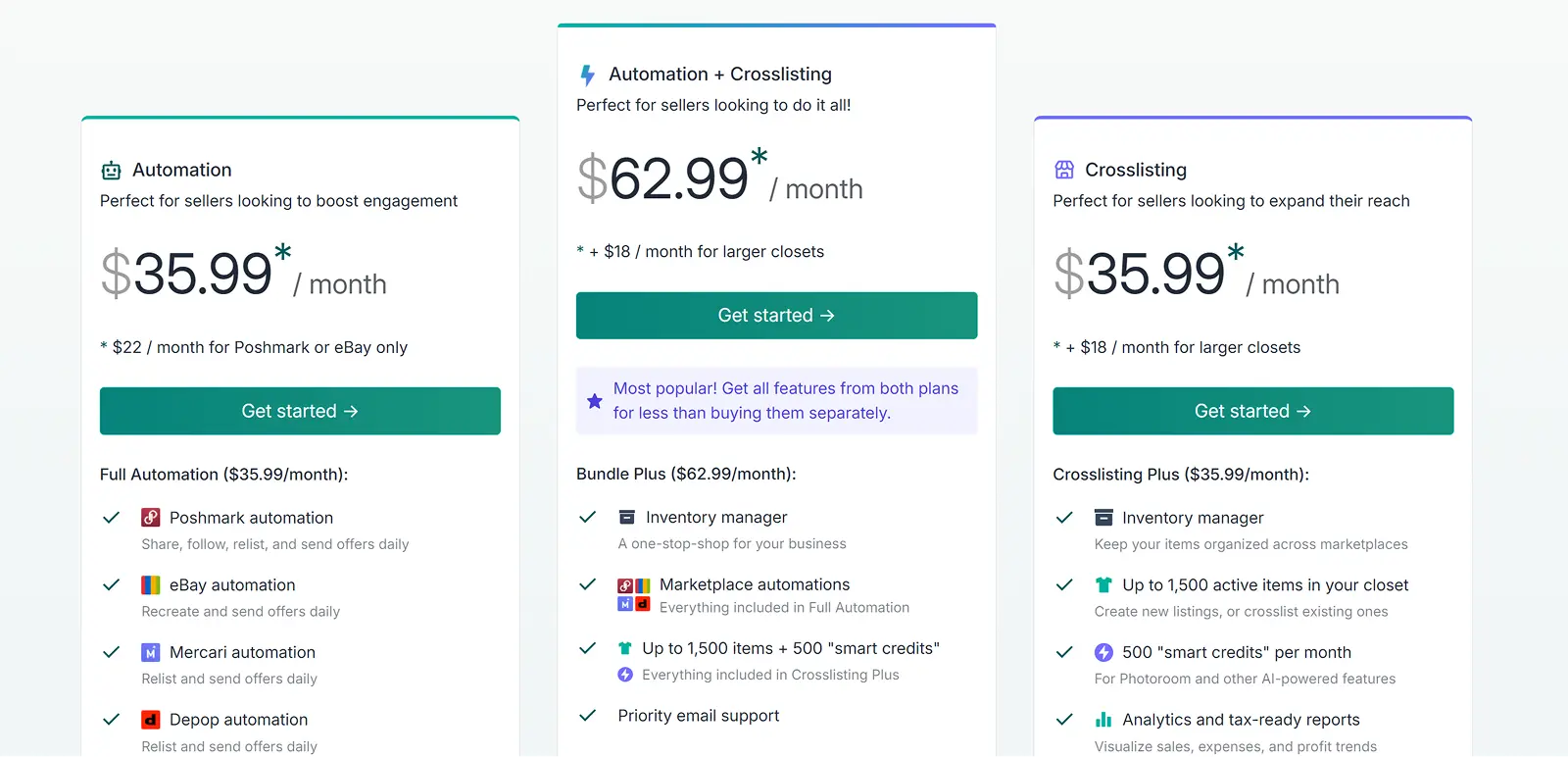
Nifty’s cross listing plans include:
Cross listing plus: $39.99/month. You get 500 AI smart credits, and a closet space of 1,500 active listings (yep, you read that right. You can’t hold more than 1,500 active listings at once)
Cross listing pro: $59.99/month. You get an additional 500 smart credits, for a total of 1,000 smart credits, and a closet space of 1,500+ active listings
Nifty’s bundle plans (which include cross listing + automation features) include:
Bundle plus: $69.99/month. You get support for marketplace automations for eBay, Poshmark, Mercari, and Depop, 500 AI smart credits, and a closet space of 1,500 active listings
Bundle pro: $89.99/month. You get support for marketplace automations for eBay, Poshmark, Mercari, and Depop, an additional 500 credits for a total of 1,000 AI smart credits, and a closet space of 1,500+ active listings
You should know that Nifty uses smart credits for every single AI feature. You also need to pay 1 smart credit per item when you’re cross listing in bulk (!).
All of this means that you’ll run out of smart credits pretty fast. But don’t worry. You can buy 200 more for $5.
Nifty also gives you a 7-day free trial, which comes with 50 smart credits at your disposal.
List Perfectly has 4 pricing plans ranging from $29/month to $99+/month. If you think the initial price is not too expensive, think again, because the Simple plan is severely limited.
Both the Simple ($29/month) and Business ($49/month) plans lack several essential features.
On the Simple plan, you get:
❌ No bulk actions
❌ Only 4 listing attributes supported
❌ No Shopify or Instagram support
❌ No sales analytics
The Business plan supports bulk actions, Shopify, and Instagram, and also lets you access sales analytics. But it’s still very limiting. On this plan, you get:
❌ Only 9 listing attributes supported
❌ No draft listings
❌ No auto sales detection or autodelist
❌ No inventory labels
Of course, it goes without saying that anything not available on the Business plan isn’t available on the Simple plan as well.
If you want some attractive features that will truly make your listing process easier, your only choices are the expensive Pro ($69/month) and Pro Plus plans ($99+/month).
In fact, only the Pro Plus plan supports all listing field attributes and autodelisting. Talk about gatekeeping features behind a very hefty price tag.
List Perfectly has a 100 free listings money-back guarantee.
Crosslist has 4 pricing plans, ranging from $29.99/month to $44.99/month, making it the most affordable cross listing app out of the 3.
All of Crosslist’s core features are available to all users right from the Bronze plan.
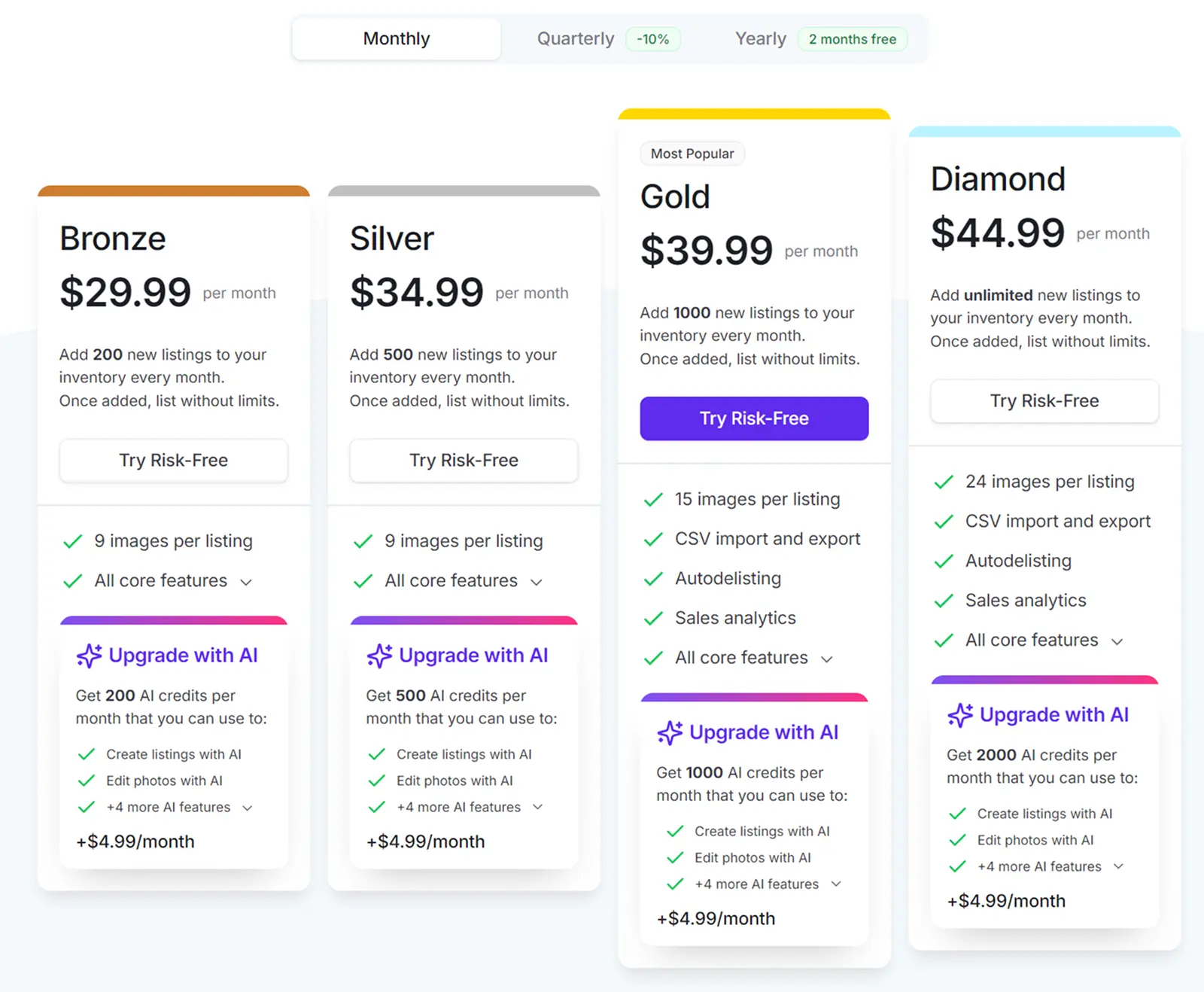
Autodelisting and sales analytics are the only exceptions, with these features only available on the Gold and Diamond plans.
Both of these plans are far more affordable than anything Nifty or List Perfectly have to offer.
Here’s an overview of Crosslist’s monthly pricing plans:
Plan | Price | New listings you can create per month | Number of images you can store per listing |
Bronze | $29.99 | 200 | 9 |
Silver | $34.99 | 500 | 9 |
Gold | $39.99 | 1000 | 15 |
Diamond | $44.99 | Unlimited | 24 |
To save even more money, opt for one of Crosslist’s annual plans. You’ll get a total of 2 months free.
Here’s how much the annual plans cost per month (and how much you’ll save):
Plan | Price per month | New listings you can create per month | Number of images you can store per listing | Amount saved per year |
Bronze | $24.99 | 200 | 9 | $60 |
Silver | $28.99 | 500 | 9 | $72 |
Gold | $32.99 | 1000 | 15 | $84 |
Diamond | $36.99 | Unlimited | 24 | $96 |
If you’re not sure about locking in your subscription for a year, but still want something more affordable than our monthly price tags, we have something for you too: our quarterly plans.
With these, you get a 10% discount.
View the details below:
Plan | Price per month | New listings you can create per month | Number of images you can store per listing | Amount saved per quarter |
Bronze | $26.99 | 200 | 9 | $9 |
Silver | $31.49 | 500 | 9 | $10.5 |
Gold | $35.99 | 1000 | 15 | $12 |
Diamond | $40.49 | Unlimited | 24 | $13.5 |
Crosslist also has only one nice-to-have but non-essential feature as an add-on: the AI listing generation feature. It costs a flat $4.99/month no matter which plan you’re on.
However, the number of AI credits you receive differs with each subscription.
Plan | Number of AI credits per month |
Bronze | 200 |
Silver | 500 |
Gold | 1,000 |
Diamond | 2,000 |
Crosslist offers a 3-day money-back guarantee, but only if you haven’t created more than 20 listings.
It’s clear that not only is Crosslist the most affordable out of the three, it’s also the tool that gives you the most value for your money.
Verdict: Crosslist > Nifty and List Perfectly
List Perfectly vs. Nifty limitations
Feature | Crosslist | Nifty | List Perfectly |
Supported marketplaces | 11+ | 6 | 12 |
Pricing | Starts at $29.99/month | Starts at $39.99/month | Starts at $29/month |
Free trial | 3-day money back guarantee as long as you’ve created 20 or fewer new listings | 7 days | 100 free listings money-back guarantee |
Listing form | Just one dynamic form to cross post your listings on all 11+ marketplaces | A common form with separate sub-sections for each marketplace. You have to review each sub-section and fill out any missing details | A common form for all marketplaces, but uses form-filling software, so you have to manually check, add in missing details, and publish each listing |
Autoposting | Yes, in bulk | Yes | No |
Mobile app | Yes; fully functional | No | No |
AI-generated listings | Yes; generates images + suggests prices, too | Yes | Yes |
Autodelist | Yes | Yes | Yes |
Bulk features | Yes; available for all plans | Yes | Yes, but not available on the basic Simple plan |
Image editor | Yes; state-of-the-art with AI-powered editing | Yes, with AI-powered editing features | Yes; very basic |
Background remover | Yes | Yes | Yes, but the number of background removals allowed on the Simple and Business plan is very limited |
Updating listings without relisting | Yes, in bulk | Yes | Yes |
Set different prices for marketplaces | Yes, in bulk | Yes, through pricing rules | Can be done through templates; doesn’t have a separate feature for this |
Set shipping preferences | Yes | Yes | No |
Multi-country support | Supports US, UK, CA, and AU marketplaces | Supports US, UK, CA, and AU marketplaces | Supports only US |
Crosslist is the best cross listing app out of the 3 because it contains several features (lacking in the other 2) that truly make your listing process smoother and faster:
Support for WooCommerce
A true universal, dynamic listing form. No manual checks or intervention needed from you
Ability to easily cross list in bulk (since the other two apps need manual checks + use form-filling software, bulk cross listing will get delayed)
Fully-functional mobile app
Unlimited closet space
Which cross listing app should you choose?
Nifty may be better at cloud automation than Crosslist, and List Perfectly may support Instagram, too, but Crosslist beats the other two apps in every other way.
Crosslist is affordable, intuitively anticipates your needs and solves them at every turn, has a mobile app that lets you cross list on the go, and, most importantly, automates your listing process, owing to its universal form.
If you want to actually save your time and energy, Crosslist is the best cross listing app for you.
Maybe you’re a new reseller who’s shopping around for a cross listing app that can automate the tedious and repetitive listing process for you.
Or, maybe you’ve been around the cross listing block a few times, and are looking for a new one that actually saves you some time.
No matter the reason, if you're on the market for a cross listing tool, you've come to the right place.
Here, we explore the features of Nifty vs. List Perfectly, and see how they compare to Crosslist. By the end, you'll be able to pick out the right tool for your business.
Key takeaways:
With its clunky interface, form-filling software, and lack of support for several features on the cheaper tiers, List Perfectly ranks last among the 3 cross listing apps.
Nifty shares many of Crosslist’s features, but it lacks a mobile app, doesn’t have a true universal listing form, and only lets you hold 1,500 active items in your closet (unless you upgrade to more expensive plans). Not to mention that Nifty is super expensive.
Crosslist is the best cross listing app out of the 3 because it has a single, universal listing form, is affordable, and has a fully-functional mobile app. It’s also the only cross listing app that actually automates your listing process.
Nifty vs. List Perfectly vs. Crosslist: An in-depth comparison
When you stack Nifty, List Perfectly, and Crosslist against each other, you’ll find that the core function of all 3 is the same: to make it quicker for you to list the same items across multiple marketplaces.
To be more specific, all 3 cross listing tools help you turn a single listing into several published listings without you having to type in the same details again and again.
But the tools differ from one another in the way this feature is made available to you.
Some of them regularly help you save upwards of 10 hours on listing every week. Others… not so much.
Let’s take a closer look at all the features that these cross listing apps have to offer, and see which ones are the actually useful ones.
Supported marketplaces
Nifty supports only 6 marketplaces, with some giants like Facebook Marketplace and Grailed missing in action, which is nowhere near enough for sellers who like to cast a wider net.
List Perfectly supports 12 marketplaces, including Instagram, but cross listing to the social media platform isn’t as straightforward as posting your listings to other marketplaces.
If you want to post your listings to Instagram, you need to follow a separate process.
So, you can essentially only cross list to the other 11 platforms simultaneously.
📝 Note: List Perfectly doesn’t support Shopify or Instagram on its most basic Simple plan.
LP also gives you the option of adding custom marketplaces that aren’t supported by the tool, such as Amazon.
However, this is purely for inventory purposes, so you won’t be able to cross list to them.
Crosslist supports 11+ marketplaces, including Shopify, Whatnot, WooCommerce, TikTok Shop and more.
You’ll be hard-pressed to find WooCommerce support on any other cross listing app.
Unlike List Perfectly, all of Crosslist’s marketplaces are available to all users regardless of the subscription plan they’re on.
No gatekeeping to force you to upgrade to a higher tier.
Verdict: Crosslist and List Perfectly > Nifty
Listing form
Nifty has a single listing form for all 6 marketplaces, albeit with separate sub-sections for each platform. So, it’s not a true universal listing form.
To create a listing on Nifty, you first have to select the marketplaces you want to list to and fill out the common section of the listing form.
This form contains all the listing attributes needed by all 6 marketplaces. This will be your usual details such as title, size, and so on.
Next, scroll down and you’ll see a separate sub-section for each marketplace. Nifty automatically populates the details you entered in the common space.
But, you need to review each section and add any missing details.
For instance, some marketplaces such as Poshmark and eBay need additional information. This is where you’ll enter those.
Once you’re done, submit the form and Nifty will publish your listings.
List Perfectly also has a common form for all the marketplaces. But, it uses form-filling software, which is tedious and long.
1. The form-filling software time-suck: List Perfectly uses form-filling software, which means that the listing form asks you to fill out the details that are common across all marketplaces.
Once you fill out and submit the listing form, List Perfectly will open a new tab for each listing on each marketplace and simply populate the details you’ve already entered. That’s it.
You need to review each form, enter all the other missing details, and publish each listing yourself.
It may not seem like a big deal for the first few listings, but imagine doing this for 10, 15, 20 listings, especially when you cross list each of them to 5+ marketplaces.
2. The restriction on available listing fields: Unless you’re on List Perfectly’s expensive Pro or Pro Plus plans, the number of listing fields supported by the listing form is very limited.
Case in point: the most basic Simple plan only supports 4 listing details on the form, namely images, title, description, and price.
If you guessed that you’ll have to enter pretty much every other listing detail manually for each listing on each marketplace, then you’re absolutely right.
All in all, not a very efficient listing process.
Crosslist, on the other hand, truly helps you automate the listing process, thanks to its single, dynamic, universal listing form.
This form contains all the listing attributes needed to publish on all 11+ marketplaces, so you won’t have to add in any missing details.
All you have to do is fill out the form once, select the marketplaces you want to publish to, and submit the form. That’s it.
No marketplace-specific sub-sections for you to double-check, or form-filling software to take up your time and energy.
Our process is fast, efficient, and, more importantly, less prone to error.
Verdict: Crosslist > Nifty > List Perfectly
Autoposting in the background
First things first: autoposting refers to when a cross listing app automatically publishes your listings to the relevant marketplaces without waiting for a final check-and-submit by you.
So, when a cross listing tool supports background autoposting, your work is essentially finished once you fill out the listing forms and submit them.
Since List Perfectly uses form-filling software, it doesn’t have autoposting. You have to manually check and publish each and every listing.
Both Nifty and Crosslist have background autoposting, but Nifty makes you review each marketplace-specific section of the listing form and add in any missing details before you submit it.
This creates an extra step for you, slowing down your workflow.
Crosslist doesn’t need you to manually check anything.
You just have to fill out a single, dynamic form, submit it, and let Crosslist take care of the publishing part.
This is a real boon when you’re juggling multiple listings at once.
Verdict: Crosslist > Nifty > List Perfectly
AI-generated listings
All 3 cross listing apps let you generate full listings with AI, and they work the same way (more or less).
You upload your product photos from all angles, and the AI tool captures all the necessary information from it to generate the full listing.
📝 Note: List Perfectly also lets you scan your item’s barcode instead of uploading photos to generate the listing.
And when we say “the full listing,” we mean that all 3 tools will generate the title, description, brand, condition, color, and size.
You can set the tone of the generated description, tweak the length, or even add your own custom prompts to personalize the listing.
📝 Note: The option to customize the way AI generates your listing is available only on the most expensive List Perfectly plan.
Nifty and Crosslist also suggest optimal prices for your products based on market trends. However, as user @vtglog notes here, Nifty’s pricing suggestions feature is new and not very accurate.
List Perfectly also has a Google Lens pricing feature where you can run your product photos through Google Lens to get insights on the current going rate.
But, this is a separate feature, and isn’t part of List Perfectly’s AI generation.
In addition to these, Crosslist’s AI generation feature can optimize your listings to be marketplace-specific.
Only want the tool to generate a few listing details while you enter the others manually? Completely possible!
If you’re listing a host of items at once, you can upload all of the photos at once instead of listing each product one by one.
The AI bulk creation feature will turn each product photo into a separate listing for you.
Watch a demo of our AI tool in action:
Crosslist and Nifty also use something called smart credits or AI credits as currency to generate listings with AI. Each subscription plan gives you a certain number of AI credits (more on this later).
Both the tools consume 1 AI credit per 1 listing generation.
Verdict: It’s mostly a tie, but we wanted to highlight the fact that Crosslist’s AI generation feature has no bugs or glitches.
Bulk actions
Once again, all 3 tools support bulk actions, but with some differences.
Nifty supports all the usual bulk actions, such as delisting and relisting, verification, price updates, bulk generation (where each product photo you upload is turned into a separate draft), cross listing, and editing.
Source: Nifty
But there are a few caveats. When bulk editing, you can only edit the listing field attributes that are common across all 6 marketplaces. This means that you won’t be able to edit Poshmark-specific info in bulk.
It’s also worth highlighting that since Nifty requires a manual check of each marketplace-specific sub-section on the listing form.
Plus the addition of missing details, bulk cross listing may end up taking more time than you anticipated.
Another downside of Nifty’s bulk actions is that you can only apply them to a maximum of 25 listings at a time, provided they’re all on the same page.
You can’t choose a few listings from page 4 and a few others from page 7 to apply bulk actions to.
List Perfectly also supports all the bulk actions you might need, including importing, updating, cross listing, etc.
But, the restrictions here come in the form of the subscription plans that support these bulk actions.
This is to say that some of List Perfectly’s bulk actions are paywalled behind more expensive tiers.
List Perfectly’s bulk actions | Plans that don’t support the bulk actions |
Bulk import | Simple plan |
Bulk edit | Simple plan |
Bulk cross list | Simple plan |
Autodelist | Simple, Business, and Pro plans |
Auto sales detection | Simple and Business plans |
Bottom line: If you’re on the basic Simple plan, you can pretty much forget about any bulk actions because they won’t be available to you.
Let’s also talk about how bulk cross listing will work on List Perfectly. Say you select 20 listings to cross list them to 7 marketplaces each.
Since List Perfectly uses form-filling software, the app will simply open a million tabs (20*7 = 140 tabs, to be exact) and auto-populate a few measly listing details.
You’ll have to go through each of the tabs, fill out the missing details, and publish the listings.
Not very “bulk cross listing” of it.
Crosslist has none of the problems and restrictions you would encounter with Nifty and List Perfectly.
You can perform all types of bulk actions (importing, editing, cross listing, delisting and relisting, deleting, etc.) with no limits on the amount of listings you can apply them to.
(The only exception is that you can only clone or edit up to 100 listings at once.)
Crosslist also doesn’t paywall any of the bulk actions, so they’re available to you right from the most affordable Bronze plan.
Since Crosslist uses a single, dynamic form and has background autoposting, cross listing several items in bulk is quite easy and doesn’t need any manual intervention from your side.
Just select the listings you want to cross list in bulk, select the marketplaces you want to publish them to, and carry on with your day.
Our tool will get the job done for you.
Verdict: Crosslist > Nifty > List Perfectly
Updating listings (and prices) without relisting
Nifty, Crosslist, and List Perfectly all let you make changes to your published listings from within the apps without having you delist, update, and relist.
The changes you make within the tools are automatically reflected in your published listings.
You can update your listings in bulk on all 3 tools. But, keep in mind that Nifty only lets you update the attributes that are shared across all marketplaces.
Any other changes need to be done directly on the published listings.
On Crosslist and List Perfectly, you can either edit listings through the edit button, or add your changes to a template and apply it to the relevant listings. (Nifty doesn’t have a template feature at all.)
📝 Note: You can’t edit several listings at once on List Perfectly’s basic Simple plan. You can use the template method as a work-around to this.
Once again, all 3 cross listing apps let you set different prices for different marketplaces. But the method slightly differs.
Nifty does this through pricing rules. You set a primary marketplace and decide the prices for the items you list there.
Then, you set a pricing rule based on this base price for every other marketplace. Nifty will automatically add the product prices for other marketplaces based on these pricing rules.
If your primary marketplace is Etsy, you’ll set the prices for all Etsy listings. If you also post to Poshmark, you’ll set a pricing rule for it.
Something like +2% of Etsy prices. Nifty will calculate the amount by applying your pricing rule.
List Perfectly doesn’t have a separate feature that lets you set unique prices for each marketplace.
You’ll have to make the pricing changes to templates and apply them to the relevant listings. It’s a bit tedious and long.
Crosslist lets you change the price-across-marketplaces both for a single listing alone, and for multiple listings together.
To change the prices for a single listing, click on it and select Adjust prices per marketplace. Enter a different price for each marketplace, and you’re good to go!
To do this across all of your listings (for when you’re running a sale or overhauling the pricing of your full inventory), go to Account settings → Price markup and enter a number or percentage in the box beside each marketplace.
When you enter positive numbers or percentages, the prices of your listings will be increased by that dollar value or percentage.
When you enter negative numbers or percentages, the value decreases.
Verdict: Crosslist > Nifty > List Perfectly
Sales detection and autodelisting
All 3 cross listing tools offer a sales detection and autodelisting feature, where the tools automatically detect any sales you make and delist that product from the other connected marketplaces.
Nifty takes 15 minutes to detect a sale and delist it, so it’s not exactly instant despite the whole operation being cloud-based.
If your product is in demand, and you somehow happen to double-sell it in the 15 minutes it takes Nifty to notice, then you’re out of luck.
Nifty only delists single-quantity items. For multi-quantity listings, Nifty will adjust the available quantity after detecting a sale.
Since Nifty runs on the cloud, you don’t need to have your device, browser, or marketplaces on for the sale detection and autodelisting to happen.
List Perfectly lets you set a preferred scanning speed or frequency for the sale detection.
This means that List Perfectly can scan for any sales every single minute.
The sale detection might be instant, but the autodelist feature is far from reliable (as this user on Reddit points out).
List Perfectly also autodelists your listings only if the item quantity is set to 1.
📝Note: Auto sales detection is only available on the Pro and Pro Plus plans of List Perfectly, while autodelisting is only available on Pro Plus.
Unlike Nifty, for List Perfectly to detect a sale and autodelist, your computer and the browser extension of the tool should be open, and you should be signed in to all of the marketplaces.
Is it realistic to require you to keep your devices on 24/7?
Crosslist’s sale detection and autodelisting is instant.
Our tool also uses server-side tracking for 4 of the marketplaces, so your computer doesn’t need to be on for Crosslist to autodelist from these platforms.
For the other platforms, though, your browser should be periodically active.
📝 Autodelist is available only for the Gold and Diamond subscription plans on Crosslist.
Verdict: Crosslist and Nifty > List Perfectly
Image editor and background removal
You’ll find image editing and background removal capabilities on all 3 cross listing tools.
List Perfectly has a very basic image editor that only performs simple functions, such as crop, rotate, add filters, etc.
And even this is restricted for users on the Simple plan. On this cheapest plan, you can’t add filters, or adjust the brightness, saturation, and contrast.
List Perfectly also automatically resizes your images to fit marketplace requirements.
You can remove the backgrounds from your photos and add a plain, colored background.
But, the number of background removals you can carry out in a month is severely limited.
Here are the details of how many background removals you’re allowed on each plan:
Simple plan: 25/month
Business plan: 50/month
Pro plan: 1,500/month
Pro Plus plan: Starts at 3,000/month
Even if you create only 10 listings per month with 7 photos each, the Simple and Business plans severely fall short.
Crosslist and Nifty both have AI-powered editing tools with manual editing features also built in.
You can enhance your images with AI in seconds, and nobody will be able to guess that you used your smartphone for the pictures.
Both tools let you fix shadows and lighting, add mannequins to your product photos, and generate images.
You can remove the clutter-filled backgrounds of your photos easily as well.
Crosslist also automatically resizes your photos (without cutting anything off) to fit each marketplace’s sizing requirements.
Editing with AI costs you AI credits on both Crosslist and Nifty.
On Nifty, each background removal = 1 smart credit, while you’ll be using 5 smart credits for each photo when you apply AI edits.
On Crosslist, background removals are free, while each AI edit = 2 AI credits.
Verdict: Crosslist and Nifty > List Perfectly
Mobile app
Nifty doesn’t have a mobile app, so you’re forced to be dependent on your computer and browser to use the tool.
While you can create a shortcut of the app on your mobile and use it, there will be limitations since it’s not an app.
List Perfectly also doesn’t have a mobile app. You can use the tool through your mobile browser, but it’s very limited in terms of what it can do.
You can only create drafts, manage product images, and use the pricing tools. That’s it. Everything else needs a desktop browser.
Crosslist has a fully functional mobile app that can do everything the browser version can do.
Create listings, cross list in bulk, edit, relist, and have our tool autodelist for you, you name it, the Crosslist app can do it.
Any changes you make on the mobile will be automatically synced to the desktop browser and vice versa.
Download the Crosslist mobile app and manage your entire online business from wherever you are.
Shipping profiles
List Perfectly doesn’t let you save your default shipping preferences for each marketplace. So, you have to enter this manually every time you create a listing.
Crosslist and Nifty have the option of letting you create shipping profiles for each marketplace.
You can add your preferred shipping methods and carriers, and also set default weights, dimensions, and prices.
These preferences will automatically be applied to any new listings you create.
On Nifty alone, you’ll have to select which of the shipping profiles you want to apply to the new listing(s) you create.
Verdict: Crosslist > Nifty > List Perfectly
Multi-region support
List Perfectly only supports US marketplaces, while both Crosslist and Nifty support US, UK, CA, and AU marketplaces.
Crosslist makes things easier for you by automatically converting measurements from imperial to metric and vice versa.
Our tool also automatically publishes your listings to the correct domain based on your region.
For example, if you’re from Canada, Crosslist will automatically publish your listings to the Canadian domains of the marketplaces you choose.
Verdict: Crosslist > Nifty > List Perfectly
Pricing plans
Nifty’s pricing plans include separate subscriptions for cross listing and automation, and a couple of plans that combine both. Here, we’ll talk only about the plans that offer cross listing.
Nifty’s cross listing plans include:
Cross listing plus: $39.99/month. You get 500 AI smart credits, and a closet space of 1,500 active listings (yep, you read that right. You can’t hold more than 1,500 active listings at once)
Cross listing pro: $59.99/month. You get an additional 500 smart credits, for a total of 1,000 smart credits, and a closet space of 1,500+ active listings
Nifty’s bundle plans (which include cross listing + automation features) include:
Bundle plus: $69.99/month. You get support for marketplace automations for eBay, Poshmark, Mercari, and Depop, 500 AI smart credits, and a closet space of 1,500 active listings
Bundle pro: $89.99/month. You get support for marketplace automations for eBay, Poshmark, Mercari, and Depop, an additional 500 credits for a total of 1,000 AI smart credits, and a closet space of 1,500+ active listings
You should know that Nifty uses smart credits for every single AI feature. You also need to pay 1 smart credit per item when you’re cross listing in bulk (!).
All of this means that you’ll run out of smart credits pretty fast. But don’t worry. You can buy 200 more for $5.
Nifty also gives you a 7-day free trial, which comes with 50 smart credits at your disposal.
List Perfectly has 4 pricing plans ranging from $29/month to $99+/month. If you think the initial price is not too expensive, think again, because the Simple plan is severely limited.
Both the Simple ($29/month) and Business ($49/month) plans lack several essential features.
On the Simple plan, you get:
❌ No bulk actions
❌ Only 4 listing attributes supported
❌ No Shopify or Instagram support
❌ No sales analytics
The Business plan supports bulk actions, Shopify, and Instagram, and also lets you access sales analytics. But it’s still very limiting. On this plan, you get:
❌ Only 9 listing attributes supported
❌ No draft listings
❌ No auto sales detection or autodelist
❌ No inventory labels
Of course, it goes without saying that anything not available on the Business plan isn’t available on the Simple plan as well.
If you want some attractive features that will truly make your listing process easier, your only choices are the expensive Pro ($69/month) and Pro Plus plans ($99+/month).
In fact, only the Pro Plus plan supports all listing field attributes and autodelisting. Talk about gatekeeping features behind a very hefty price tag.
List Perfectly has a 100 free listings money-back guarantee.
Crosslist has 4 pricing plans, ranging from $29.99/month to $44.99/month, making it the most affordable cross listing app out of the 3.
All of Crosslist’s core features are available to all users right from the Bronze plan.
Autodelisting and sales analytics are the only exceptions, with these features only available on the Gold and Diamond plans.
Both of these plans are far more affordable than anything Nifty or List Perfectly have to offer.
Here’s an overview of Crosslist’s monthly pricing plans:
Plan | Price | New listings you can create per month | Number of images you can store per listing |
Bronze | $29.99 | 200 | 9 |
Silver | $34.99 | 500 | 9 |
Gold | $39.99 | 1000 | 15 |
Diamond | $44.99 | Unlimited | 24 |
To save even more money, opt for one of Crosslist’s annual plans. You’ll get a total of 2 months free.
Here’s how much the annual plans cost per month (and how much you’ll save):
Plan | Price per month | New listings you can create per month | Number of images you can store per listing | Amount saved per year |
Bronze | $24.99 | 200 | 9 | $60 |
Silver | $28.99 | 500 | 9 | $72 |
Gold | $32.99 | 1000 | 15 | $84 |
Diamond | $36.99 | Unlimited | 24 | $96 |
If you’re not sure about locking in your subscription for a year, but still want something more affordable than our monthly price tags, we have something for you too: our quarterly plans.
With these, you get a 10% discount.
View the details below:
Plan | Price per month | New listings you can create per month | Number of images you can store per listing | Amount saved per quarter |
Bronze | $26.99 | 200 | 9 | $9 |
Silver | $31.49 | 500 | 9 | $10.5 |
Gold | $35.99 | 1000 | 15 | $12 |
Diamond | $40.49 | Unlimited | 24 | $13.5 |
Crosslist also has only one nice-to-have but non-essential feature as an add-on: the AI listing generation feature. It costs a flat $4.99/month no matter which plan you’re on.
However, the number of AI credits you receive differs with each subscription.
Plan | Number of AI credits per month |
Bronze | 200 |
Silver | 500 |
Gold | 1,000 |
Diamond | 2,000 |
Crosslist offers a 3-day money-back guarantee, but only if you haven’t created more than 20 listings.
It’s clear that not only is Crosslist the most affordable out of the three, it’s also the tool that gives you the most value for your money.
Verdict: Crosslist > Nifty and List Perfectly
List Perfectly vs. Nifty limitations
Feature | Crosslist | Nifty | List Perfectly |
Supported marketplaces | 11+ | 6 | 12 |
Pricing | Starts at $29.99/month | Starts at $39.99/month | Starts at $29/month |
Free trial | 3-day money back guarantee as long as you’ve created 20 or fewer new listings | 7 days | 100 free listings money-back guarantee |
Listing form | Just one dynamic form to cross post your listings on all 11+ marketplaces | A common form with separate sub-sections for each marketplace. You have to review each sub-section and fill out any missing details | A common form for all marketplaces, but uses form-filling software, so you have to manually check, add in missing details, and publish each listing |
Autoposting | Yes, in bulk | Yes | No |
Mobile app | Yes; fully functional | No | No |
AI-generated listings | Yes; generates images + suggests prices, too | Yes | Yes |
Autodelist | Yes | Yes | Yes |
Bulk features | Yes; available for all plans | Yes | Yes, but not available on the basic Simple plan |
Image editor | Yes; state-of-the-art with AI-powered editing | Yes, with AI-powered editing features | Yes; very basic |
Background remover | Yes | Yes | Yes, but the number of background removals allowed on the Simple and Business plan is very limited |
Updating listings without relisting | Yes, in bulk | Yes | Yes |
Set different prices for marketplaces | Yes, in bulk | Yes, through pricing rules | Can be done through templates; doesn’t have a separate feature for this |
Set shipping preferences | Yes | Yes | No |
Multi-country support | Supports US, UK, CA, and AU marketplaces | Supports US, UK, CA, and AU marketplaces | Supports only US |
Crosslist is the best cross listing app out of the 3 because it contains several features (lacking in the other 2) that truly make your listing process smoother and faster:
Support for WooCommerce
A true universal, dynamic listing form. No manual checks or intervention needed from you
Ability to easily cross list in bulk (since the other two apps need manual checks + use form-filling software, bulk cross listing will get delayed)
Fully-functional mobile app
Unlimited closet space
Which cross listing app should you choose?
Nifty may be better at cloud automation than Crosslist, and List Perfectly may support Instagram, too, but Crosslist beats the other two apps in every other way.
Crosslist is affordable, intuitively anticipates your needs and solves them at every turn, has a mobile app that lets you cross list on the go, and, most importantly, automates your listing process, owing to its universal form.
If you want to actually save your time and energy, Crosslist is the best cross listing app for you.
Maybe you’re a new reseller who’s shopping around for a cross listing app that can automate the tedious and repetitive listing process for you.
Or, maybe you’ve been around the cross listing block a few times, and are looking for a new one that actually saves you some time.
No matter the reason, if you're on the market for a cross listing tool, you've come to the right place.
Here, we explore the features of Nifty vs. List Perfectly, and see how they compare to Crosslist. By the end, you'll be able to pick out the right tool for your business.
Key takeaways:
With its clunky interface, form-filling software, and lack of support for several features on the cheaper tiers, List Perfectly ranks last among the 3 cross listing apps.
Nifty shares many of Crosslist’s features, but it lacks a mobile app, doesn’t have a true universal listing form, and only lets you hold 1,500 active items in your closet (unless you upgrade to more expensive plans). Not to mention that Nifty is super expensive.
Crosslist is the best cross listing app out of the 3 because it has a single, universal listing form, is affordable, and has a fully-functional mobile app. It’s also the only cross listing app that actually automates your listing process.
Nifty vs. List Perfectly vs. Crosslist: An in-depth comparison
When you stack Nifty, List Perfectly, and Crosslist against each other, you’ll find that the core function of all 3 is the same: to make it quicker for you to list the same items across multiple marketplaces.
To be more specific, all 3 cross listing tools help you turn a single listing into several published listings without you having to type in the same details again and again.
But the tools differ from one another in the way this feature is made available to you.
Some of them regularly help you save upwards of 10 hours on listing every week. Others… not so much.
Let’s take a closer look at all the features that these cross listing apps have to offer, and see which ones are the actually useful ones.
Supported marketplaces
Nifty supports only 6 marketplaces, with some giants like Facebook Marketplace and Grailed missing in action, which is nowhere near enough for sellers who like to cast a wider net.
List Perfectly supports 12 marketplaces, including Instagram, but cross listing to the social media platform isn’t as straightforward as posting your listings to other marketplaces.
If you want to post your listings to Instagram, you need to follow a separate process.
So, you can essentially only cross list to the other 11 platforms simultaneously.
📝 Note: List Perfectly doesn’t support Shopify or Instagram on its most basic Simple plan.
LP also gives you the option of adding custom marketplaces that aren’t supported by the tool, such as Amazon.
However, this is purely for inventory purposes, so you won’t be able to cross list to them.
Crosslist supports 11+ marketplaces, including Shopify, Whatnot, WooCommerce, TikTok Shop and more.
You’ll be hard-pressed to find WooCommerce support on any other cross listing app.
Unlike List Perfectly, all of Crosslist’s marketplaces are available to all users regardless of the subscription plan they’re on.
No gatekeeping to force you to upgrade to a higher tier.
Verdict: Crosslist and List Perfectly > Nifty
Listing form
Nifty has a single listing form for all 6 marketplaces, albeit with separate sub-sections for each platform. So, it’s not a true universal listing form.
To create a listing on Nifty, you first have to select the marketplaces you want to list to and fill out the common section of the listing form.
This form contains all the listing attributes needed by all 6 marketplaces. This will be your usual details such as title, size, and so on.
Next, scroll down and you’ll see a separate sub-section for each marketplace. Nifty automatically populates the details you entered in the common space.
But, you need to review each section and add any missing details.
For instance, some marketplaces such as Poshmark and eBay need additional information. This is where you’ll enter those.
Once you’re done, submit the form and Nifty will publish your listings.
List Perfectly also has a common form for all the marketplaces. But, it uses form-filling software, which is tedious and long.
1. The form-filling software time-suck: List Perfectly uses form-filling software, which means that the listing form asks you to fill out the details that are common across all marketplaces.
Once you fill out and submit the listing form, List Perfectly will open a new tab for each listing on each marketplace and simply populate the details you’ve already entered. That’s it.
You need to review each form, enter all the other missing details, and publish each listing yourself.
It may not seem like a big deal for the first few listings, but imagine doing this for 10, 15, 20 listings, especially when you cross list each of them to 5+ marketplaces.
2. The restriction on available listing fields: Unless you’re on List Perfectly’s expensive Pro or Pro Plus plans, the number of listing fields supported by the listing form is very limited.
Case in point: the most basic Simple plan only supports 4 listing details on the form, namely images, title, description, and price.
If you guessed that you’ll have to enter pretty much every other listing detail manually for each listing on each marketplace, then you’re absolutely right.
All in all, not a very efficient listing process.
Crosslist, on the other hand, truly helps you automate the listing process, thanks to its single, dynamic, universal listing form.
This form contains all the listing attributes needed to publish on all 11+ marketplaces, so you won’t have to add in any missing details.
All you have to do is fill out the form once, select the marketplaces you want to publish to, and submit the form. That’s it.
No marketplace-specific sub-sections for you to double-check, or form-filling software to take up your time and energy.
Our process is fast, efficient, and, more importantly, less prone to error.
Verdict: Crosslist > Nifty > List Perfectly
Autoposting in the background
First things first: autoposting refers to when a cross listing app automatically publishes your listings to the relevant marketplaces without waiting for a final check-and-submit by you.
So, when a cross listing tool supports background autoposting, your work is essentially finished once you fill out the listing forms and submit them.
Since List Perfectly uses form-filling software, it doesn’t have autoposting. You have to manually check and publish each and every listing.
Both Nifty and Crosslist have background autoposting, but Nifty makes you review each marketplace-specific section of the listing form and add in any missing details before you submit it.
This creates an extra step for you, slowing down your workflow.
Crosslist doesn’t need you to manually check anything.
You just have to fill out a single, dynamic form, submit it, and let Crosslist take care of the publishing part.
This is a real boon when you’re juggling multiple listings at once.
Verdict: Crosslist > Nifty > List Perfectly
AI-generated listings
All 3 cross listing apps let you generate full listings with AI, and they work the same way (more or less).
You upload your product photos from all angles, and the AI tool captures all the necessary information from it to generate the full listing.
📝 Note: List Perfectly also lets you scan your item’s barcode instead of uploading photos to generate the listing.
And when we say “the full listing,” we mean that all 3 tools will generate the title, description, brand, condition, color, and size.
You can set the tone of the generated description, tweak the length, or even add your own custom prompts to personalize the listing.
📝 Note: The option to customize the way AI generates your listing is available only on the most expensive List Perfectly plan.
Nifty and Crosslist also suggest optimal prices for your products based on market trends. However, as user @vtglog notes here, Nifty’s pricing suggestions feature is new and not very accurate.
List Perfectly also has a Google Lens pricing feature where you can run your product photos through Google Lens to get insights on the current going rate.
But, this is a separate feature, and isn’t part of List Perfectly’s AI generation.
In addition to these, Crosslist’s AI generation feature can optimize your listings to be marketplace-specific.
Only want the tool to generate a few listing details while you enter the others manually? Completely possible!
If you’re listing a host of items at once, you can upload all of the photos at once instead of listing each product one by one.
The AI bulk creation feature will turn each product photo into a separate listing for you.
Watch a demo of our AI tool in action:
Crosslist and Nifty also use something called smart credits or AI credits as currency to generate listings with AI. Each subscription plan gives you a certain number of AI credits (more on this later).
Both the tools consume 1 AI credit per 1 listing generation.
Verdict: It’s mostly a tie, but we wanted to highlight the fact that Crosslist’s AI generation feature has no bugs or glitches.
Bulk actions
Once again, all 3 tools support bulk actions, but with some differences.
Nifty supports all the usual bulk actions, such as delisting and relisting, verification, price updates, bulk generation (where each product photo you upload is turned into a separate draft), cross listing, and editing.
Source: Nifty
But there are a few caveats. When bulk editing, you can only edit the listing field attributes that are common across all 6 marketplaces. This means that you won’t be able to edit Poshmark-specific info in bulk.
It’s also worth highlighting that since Nifty requires a manual check of each marketplace-specific sub-section on the listing form.
Plus the addition of missing details, bulk cross listing may end up taking more time than you anticipated.
Another downside of Nifty’s bulk actions is that you can only apply them to a maximum of 25 listings at a time, provided they’re all on the same page.
You can’t choose a few listings from page 4 and a few others from page 7 to apply bulk actions to.
List Perfectly also supports all the bulk actions you might need, including importing, updating, cross listing, etc.
But, the restrictions here come in the form of the subscription plans that support these bulk actions.
This is to say that some of List Perfectly’s bulk actions are paywalled behind more expensive tiers.
List Perfectly’s bulk actions | Plans that don’t support the bulk actions |
Bulk import | Simple plan |
Bulk edit | Simple plan |
Bulk cross list | Simple plan |
Autodelist | Simple, Business, and Pro plans |
Auto sales detection | Simple and Business plans |
Bottom line: If you’re on the basic Simple plan, you can pretty much forget about any bulk actions because they won’t be available to you.
Let’s also talk about how bulk cross listing will work on List Perfectly. Say you select 20 listings to cross list them to 7 marketplaces each.
Since List Perfectly uses form-filling software, the app will simply open a million tabs (20*7 = 140 tabs, to be exact) and auto-populate a few measly listing details.
You’ll have to go through each of the tabs, fill out the missing details, and publish the listings.
Not very “bulk cross listing” of it.
Crosslist has none of the problems and restrictions you would encounter with Nifty and List Perfectly.
You can perform all types of bulk actions (importing, editing, cross listing, delisting and relisting, deleting, etc.) with no limits on the amount of listings you can apply them to.
(The only exception is that you can only clone or edit up to 100 listings at once.)
Crosslist also doesn’t paywall any of the bulk actions, so they’re available to you right from the most affordable Bronze plan.
Since Crosslist uses a single, dynamic form and has background autoposting, cross listing several items in bulk is quite easy and doesn’t need any manual intervention from your side.
Just select the listings you want to cross list in bulk, select the marketplaces you want to publish them to, and carry on with your day.
Our tool will get the job done for you.
Verdict: Crosslist > Nifty > List Perfectly
Updating listings (and prices) without relisting
Nifty, Crosslist, and List Perfectly all let you make changes to your published listings from within the apps without having you delist, update, and relist.
The changes you make within the tools are automatically reflected in your published listings.
You can update your listings in bulk on all 3 tools. But, keep in mind that Nifty only lets you update the attributes that are shared across all marketplaces.
Any other changes need to be done directly on the published listings.
On Crosslist and List Perfectly, you can either edit listings through the edit button, or add your changes to a template and apply it to the relevant listings. (Nifty doesn’t have a template feature at all.)
📝 Note: You can’t edit several listings at once on List Perfectly’s basic Simple plan. You can use the template method as a work-around to this.
Once again, all 3 cross listing apps let you set different prices for different marketplaces. But the method slightly differs.
Nifty does this through pricing rules. You set a primary marketplace and decide the prices for the items you list there.
Then, you set a pricing rule based on this base price for every other marketplace. Nifty will automatically add the product prices for other marketplaces based on these pricing rules.
If your primary marketplace is Etsy, you’ll set the prices for all Etsy listings. If you also post to Poshmark, you’ll set a pricing rule for it.
Something like +2% of Etsy prices. Nifty will calculate the amount by applying your pricing rule.
List Perfectly doesn’t have a separate feature that lets you set unique prices for each marketplace.
You’ll have to make the pricing changes to templates and apply them to the relevant listings. It’s a bit tedious and long.
Crosslist lets you change the price-across-marketplaces both for a single listing alone, and for multiple listings together.
To change the prices for a single listing, click on it and select Adjust prices per marketplace. Enter a different price for each marketplace, and you’re good to go!
To do this across all of your listings (for when you’re running a sale or overhauling the pricing of your full inventory), go to Account settings → Price markup and enter a number or percentage in the box beside each marketplace.
When you enter positive numbers or percentages, the prices of your listings will be increased by that dollar value or percentage.
When you enter negative numbers or percentages, the value decreases.
Verdict: Crosslist > Nifty > List Perfectly
Sales detection and autodelisting
All 3 cross listing tools offer a sales detection and autodelisting feature, where the tools automatically detect any sales you make and delist that product from the other connected marketplaces.
Nifty takes 15 minutes to detect a sale and delist it, so it’s not exactly instant despite the whole operation being cloud-based.
If your product is in demand, and you somehow happen to double-sell it in the 15 minutes it takes Nifty to notice, then you’re out of luck.
Nifty only delists single-quantity items. For multi-quantity listings, Nifty will adjust the available quantity after detecting a sale.
Since Nifty runs on the cloud, you don’t need to have your device, browser, or marketplaces on for the sale detection and autodelisting to happen.
List Perfectly lets you set a preferred scanning speed or frequency for the sale detection.
This means that List Perfectly can scan for any sales every single minute.
The sale detection might be instant, but the autodelist feature is far from reliable (as this user on Reddit points out).
List Perfectly also autodelists your listings only if the item quantity is set to 1.
📝Note: Auto sales detection is only available on the Pro and Pro Plus plans of List Perfectly, while autodelisting is only available on Pro Plus.
Unlike Nifty, for List Perfectly to detect a sale and autodelist, your computer and the browser extension of the tool should be open, and you should be signed in to all of the marketplaces.
Is it realistic to require you to keep your devices on 24/7?
Crosslist’s sale detection and autodelisting is instant.
Our tool also uses server-side tracking for 4 of the marketplaces, so your computer doesn’t need to be on for Crosslist to autodelist from these platforms.
For the other platforms, though, your browser should be periodically active.
📝 Autodelist is available only for the Gold and Diamond subscription plans on Crosslist.
Verdict: Crosslist and Nifty > List Perfectly
Image editor and background removal
You’ll find image editing and background removal capabilities on all 3 cross listing tools.
List Perfectly has a very basic image editor that only performs simple functions, such as crop, rotate, add filters, etc.
And even this is restricted for users on the Simple plan. On this cheapest plan, you can’t add filters, or adjust the brightness, saturation, and contrast.
List Perfectly also automatically resizes your images to fit marketplace requirements.
You can remove the backgrounds from your photos and add a plain, colored background.
But, the number of background removals you can carry out in a month is severely limited.
Here are the details of how many background removals you’re allowed on each plan:
Simple plan: 25/month
Business plan: 50/month
Pro plan: 1,500/month
Pro Plus plan: Starts at 3,000/month
Even if you create only 10 listings per month with 7 photos each, the Simple and Business plans severely fall short.
Crosslist and Nifty both have AI-powered editing tools with manual editing features also built in.
You can enhance your images with AI in seconds, and nobody will be able to guess that you used your smartphone for the pictures.
Both tools let you fix shadows and lighting, add mannequins to your product photos, and generate images.
You can remove the clutter-filled backgrounds of your photos easily as well.
Crosslist also automatically resizes your photos (without cutting anything off) to fit each marketplace’s sizing requirements.
Editing with AI costs you AI credits on both Crosslist and Nifty.
On Nifty, each background removal = 1 smart credit, while you’ll be using 5 smart credits for each photo when you apply AI edits.
On Crosslist, background removals are free, while each AI edit = 2 AI credits.
Verdict: Crosslist and Nifty > List Perfectly
Mobile app
Nifty doesn’t have a mobile app, so you’re forced to be dependent on your computer and browser to use the tool.
While you can create a shortcut of the app on your mobile and use it, there will be limitations since it’s not an app.
List Perfectly also doesn’t have a mobile app. You can use the tool through your mobile browser, but it’s very limited in terms of what it can do.
You can only create drafts, manage product images, and use the pricing tools. That’s it. Everything else needs a desktop browser.
Crosslist has a fully functional mobile app that can do everything the browser version can do.
Create listings, cross list in bulk, edit, relist, and have our tool autodelist for you, you name it, the Crosslist app can do it.
Any changes you make on the mobile will be automatically synced to the desktop browser and vice versa.
Download the Crosslist mobile app and manage your entire online business from wherever you are.
Shipping profiles
List Perfectly doesn’t let you save your default shipping preferences for each marketplace. So, you have to enter this manually every time you create a listing.
Crosslist and Nifty have the option of letting you create shipping profiles for each marketplace.
You can add your preferred shipping methods and carriers, and also set default weights, dimensions, and prices.
These preferences will automatically be applied to any new listings you create.
On Nifty alone, you’ll have to select which of the shipping profiles you want to apply to the new listing(s) you create.
Verdict: Crosslist > Nifty > List Perfectly
Multi-region support
List Perfectly only supports US marketplaces, while both Crosslist and Nifty support US, UK, CA, and AU marketplaces.
Crosslist makes things easier for you by automatically converting measurements from imperial to metric and vice versa.
Our tool also automatically publishes your listings to the correct domain based on your region.
For example, if you’re from Canada, Crosslist will automatically publish your listings to the Canadian domains of the marketplaces you choose.
Verdict: Crosslist > Nifty > List Perfectly
Pricing plans
Nifty’s pricing plans include separate subscriptions for cross listing and automation, and a couple of plans that combine both. Here, we’ll talk only about the plans that offer cross listing.
Nifty’s cross listing plans include:
Cross listing plus: $39.99/month. You get 500 AI smart credits, and a closet space of 1,500 active listings (yep, you read that right. You can’t hold more than 1,500 active listings at once)
Cross listing pro: $59.99/month. You get an additional 500 smart credits, for a total of 1,000 smart credits, and a closet space of 1,500+ active listings
Nifty’s bundle plans (which include cross listing + automation features) include:
Bundle plus: $69.99/month. You get support for marketplace automations for eBay, Poshmark, Mercari, and Depop, 500 AI smart credits, and a closet space of 1,500 active listings
Bundle pro: $89.99/month. You get support for marketplace automations for eBay, Poshmark, Mercari, and Depop, an additional 500 credits for a total of 1,000 AI smart credits, and a closet space of 1,500+ active listings
You should know that Nifty uses smart credits for every single AI feature. You also need to pay 1 smart credit per item when you’re cross listing in bulk (!).
All of this means that you’ll run out of smart credits pretty fast. But don’t worry. You can buy 200 more for $5.
Nifty also gives you a 7-day free trial, which comes with 50 smart credits at your disposal.
List Perfectly has 4 pricing plans ranging from $29/month to $99+/month. If you think the initial price is not too expensive, think again, because the Simple plan is severely limited.
Both the Simple ($29/month) and Business ($49/month) plans lack several essential features.
On the Simple plan, you get:
❌ No bulk actions
❌ Only 4 listing attributes supported
❌ No Shopify or Instagram support
❌ No sales analytics
The Business plan supports bulk actions, Shopify, and Instagram, and also lets you access sales analytics. But it’s still very limiting. On this plan, you get:
❌ Only 9 listing attributes supported
❌ No draft listings
❌ No auto sales detection or autodelist
❌ No inventory labels
Of course, it goes without saying that anything not available on the Business plan isn’t available on the Simple plan as well.
If you want some attractive features that will truly make your listing process easier, your only choices are the expensive Pro ($69/month) and Pro Plus plans ($99+/month).
In fact, only the Pro Plus plan supports all listing field attributes and autodelisting. Talk about gatekeeping features behind a very hefty price tag.
List Perfectly has a 100 free listings money-back guarantee.
Crosslist has 4 pricing plans, ranging from $29.99/month to $44.99/month, making it the most affordable cross listing app out of the 3.
All of Crosslist’s core features are available to all users right from the Bronze plan.
Autodelisting and sales analytics are the only exceptions, with these features only available on the Gold and Diamond plans.
Both of these plans are far more affordable than anything Nifty or List Perfectly have to offer.
Here’s an overview of Crosslist’s monthly pricing plans:
Plan | Price | New listings you can create per month | Number of images you can store per listing |
Bronze | $29.99 | 200 | 9 |
Silver | $34.99 | 500 | 9 |
Gold | $39.99 | 1000 | 15 |
Diamond | $44.99 | Unlimited | 24 |
To save even more money, opt for one of Crosslist’s annual plans. You’ll get a total of 2 months free.
Here’s how much the annual plans cost per month (and how much you’ll save):
Plan | Price per month | New listings you can create per month | Number of images you can store per listing | Amount saved per year |
Bronze | $24.99 | 200 | 9 | $60 |
Silver | $28.99 | 500 | 9 | $72 |
Gold | $32.99 | 1000 | 15 | $84 |
Diamond | $36.99 | Unlimited | 24 | $96 |
If you’re not sure about locking in your subscription for a year, but still want something more affordable than our monthly price tags, we have something for you too: our quarterly plans.
With these, you get a 10% discount.
View the details below:
Plan | Price per month | New listings you can create per month | Number of images you can store per listing | Amount saved per quarter |
Bronze | $26.99 | 200 | 9 | $9 |
Silver | $31.49 | 500 | 9 | $10.5 |
Gold | $35.99 | 1000 | 15 | $12 |
Diamond | $40.49 | Unlimited | 24 | $13.5 |
Crosslist also has only one nice-to-have but non-essential feature as an add-on: the AI listing generation feature. It costs a flat $4.99/month no matter which plan you’re on.
However, the number of AI credits you receive differs with each subscription.
Plan | Number of AI credits per month |
Bronze | 200 |
Silver | 500 |
Gold | 1,000 |
Diamond | 2,000 |
Crosslist offers a 3-day money-back guarantee, but only if you haven’t created more than 20 listings.
It’s clear that not only is Crosslist the most affordable out of the three, it’s also the tool that gives you the most value for your money.
Verdict: Crosslist > Nifty and List Perfectly
List Perfectly vs. Nifty limitations
Feature | Crosslist | Nifty | List Perfectly |
Supported marketplaces | 11+ | 6 | 12 |
Pricing | Starts at $29.99/month | Starts at $39.99/month | Starts at $29/month |
Free trial | 3-day money back guarantee as long as you’ve created 20 or fewer new listings | 7 days | 100 free listings money-back guarantee |
Listing form | Just one dynamic form to cross post your listings on all 11+ marketplaces | A common form with separate sub-sections for each marketplace. You have to review each sub-section and fill out any missing details | A common form for all marketplaces, but uses form-filling software, so you have to manually check, add in missing details, and publish each listing |
Autoposting | Yes, in bulk | Yes | No |
Mobile app | Yes; fully functional | No | No |
AI-generated listings | Yes; generates images + suggests prices, too | Yes | Yes |
Autodelist | Yes | Yes | Yes |
Bulk features | Yes; available for all plans | Yes | Yes, but not available on the basic Simple plan |
Image editor | Yes; state-of-the-art with AI-powered editing | Yes, with AI-powered editing features | Yes; very basic |
Background remover | Yes | Yes | Yes, but the number of background removals allowed on the Simple and Business plan is very limited |
Updating listings without relisting | Yes, in bulk | Yes | Yes |
Set different prices for marketplaces | Yes, in bulk | Yes, through pricing rules | Can be done through templates; doesn’t have a separate feature for this |
Set shipping preferences | Yes | Yes | No |
Multi-country support | Supports US, UK, CA, and AU marketplaces | Supports US, UK, CA, and AU marketplaces | Supports only US |
Crosslist is the best cross listing app out of the 3 because it contains several features (lacking in the other 2) that truly make your listing process smoother and faster:
Support for WooCommerce
A true universal, dynamic listing form. No manual checks or intervention needed from you
Ability to easily cross list in bulk (since the other two apps need manual checks + use form-filling software, bulk cross listing will get delayed)
Fully-functional mobile app
Unlimited closet space
Which cross listing app should you choose?
Nifty may be better at cloud automation than Crosslist, and List Perfectly may support Instagram, too, but Crosslist beats the other two apps in every other way.
Crosslist is affordable, intuitively anticipates your needs and solves them at every turn, has a mobile app that lets you cross list on the go, and, most importantly, automates your listing process, owing to its universal form.
If you want to actually save your time and energy, Crosslist is the best cross listing app for you.
Maybe you’re a new reseller who’s shopping around for a cross listing app that can automate the tedious and repetitive listing process for you.
Or, maybe you’ve been around the cross listing block a few times, and are looking for a new one that actually saves you some time.
No matter the reason, if you're on the market for a cross listing tool, you've come to the right place.
Here, we explore the features of Nifty vs. List Perfectly, and see how they compare to Crosslist. By the end, you'll be able to pick out the right tool for your business.
Key takeaways:
With its clunky interface, form-filling software, and lack of support for several features on the cheaper tiers, List Perfectly ranks last among the 3 cross listing apps.
Nifty shares many of Crosslist’s features, but it lacks a mobile app, doesn’t have a true universal listing form, and only lets you hold 1,500 active items in your closet (unless you upgrade to more expensive plans). Not to mention that Nifty is super expensive.
Crosslist is the best cross listing app out of the 3 because it has a single, universal listing form, is affordable, and has a fully-functional mobile app. It’s also the only cross listing app that actually automates your listing process.
Nifty vs. List Perfectly vs. Crosslist: An in-depth comparison
When you stack Nifty, List Perfectly, and Crosslist against each other, you’ll find that the core function of all 3 is the same: to make it quicker for you to list the same items across multiple marketplaces.
To be more specific, all 3 cross listing tools help you turn a single listing into several published listings without you having to type in the same details again and again.
But the tools differ from one another in the way this feature is made available to you.
Some of them regularly help you save upwards of 10 hours on listing every week. Others… not so much.
Let’s take a closer look at all the features that these cross listing apps have to offer, and see which ones are the actually useful ones.
Supported marketplaces
Nifty supports only 6 marketplaces, with some giants like Facebook Marketplace and Grailed missing in action, which is nowhere near enough for sellers who like to cast a wider net.
List Perfectly supports 12 marketplaces, including Instagram, but cross listing to the social media platform isn’t as straightforward as posting your listings to other marketplaces.
If you want to post your listings to Instagram, you need to follow a separate process.
So, you can essentially only cross list to the other 11 platforms simultaneously.
📝 Note: List Perfectly doesn’t support Shopify or Instagram on its most basic Simple plan.
LP also gives you the option of adding custom marketplaces that aren’t supported by the tool, such as Amazon.
However, this is purely for inventory purposes, so you won’t be able to cross list to them.
Crosslist supports 11+ marketplaces, including Shopify, Whatnot, WooCommerce, TikTok Shop and more.
You’ll be hard-pressed to find WooCommerce support on any other cross listing app.
Unlike List Perfectly, all of Crosslist’s marketplaces are available to all users regardless of the subscription plan they’re on.
No gatekeeping to force you to upgrade to a higher tier.
Verdict: Crosslist and List Perfectly > Nifty
Listing form
Nifty has a single listing form for all 6 marketplaces, albeit with separate sub-sections for each platform. So, it’s not a true universal listing form.
To create a listing on Nifty, you first have to select the marketplaces you want to list to and fill out the common section of the listing form.
This form contains all the listing attributes needed by all 6 marketplaces. This will be your usual details such as title, size, and so on.
Next, scroll down and you’ll see a separate sub-section for each marketplace. Nifty automatically populates the details you entered in the common space.
But, you need to review each section and add any missing details.
For instance, some marketplaces such as Poshmark and eBay need additional information. This is where you’ll enter those.
Once you’re done, submit the form and Nifty will publish your listings.
List Perfectly also has a common form for all the marketplaces. But, it uses form-filling software, which is tedious and long.
1. The form-filling software time-suck: List Perfectly uses form-filling software, which means that the listing form asks you to fill out the details that are common across all marketplaces.
Once you fill out and submit the listing form, List Perfectly will open a new tab for each listing on each marketplace and simply populate the details you’ve already entered. That’s it.
You need to review each form, enter all the other missing details, and publish each listing yourself.
It may not seem like a big deal for the first few listings, but imagine doing this for 10, 15, 20 listings, especially when you cross list each of them to 5+ marketplaces.
2. The restriction on available listing fields: Unless you’re on List Perfectly’s expensive Pro or Pro Plus plans, the number of listing fields supported by the listing form is very limited.
Case in point: the most basic Simple plan only supports 4 listing details on the form, namely images, title, description, and price.
If you guessed that you’ll have to enter pretty much every other listing detail manually for each listing on each marketplace, then you’re absolutely right.
All in all, not a very efficient listing process.
Crosslist, on the other hand, truly helps you automate the listing process, thanks to its single, dynamic, universal listing form.
This form contains all the listing attributes needed to publish on all 11+ marketplaces, so you won’t have to add in any missing details.
All you have to do is fill out the form once, select the marketplaces you want to publish to, and submit the form. That’s it.
No marketplace-specific sub-sections for you to double-check, or form-filling software to take up your time and energy.
Our process is fast, efficient, and, more importantly, less prone to error.
Verdict: Crosslist > Nifty > List Perfectly
Autoposting in the background
First things first: autoposting refers to when a cross listing app automatically publishes your listings to the relevant marketplaces without waiting for a final check-and-submit by you.
So, when a cross listing tool supports background autoposting, your work is essentially finished once you fill out the listing forms and submit them.
Since List Perfectly uses form-filling software, it doesn’t have autoposting. You have to manually check and publish each and every listing.
Both Nifty and Crosslist have background autoposting, but Nifty makes you review each marketplace-specific section of the listing form and add in any missing details before you submit it.
This creates an extra step for you, slowing down your workflow.
Crosslist doesn’t need you to manually check anything.
You just have to fill out a single, dynamic form, submit it, and let Crosslist take care of the publishing part.
This is a real boon when you’re juggling multiple listings at once.
Verdict: Crosslist > Nifty > List Perfectly
AI-generated listings
All 3 cross listing apps let you generate full listings with AI, and they work the same way (more or less).
You upload your product photos from all angles, and the AI tool captures all the necessary information from it to generate the full listing.
📝 Note: List Perfectly also lets you scan your item’s barcode instead of uploading photos to generate the listing.
And when we say “the full listing,” we mean that all 3 tools will generate the title, description, brand, condition, color, and size.
You can set the tone of the generated description, tweak the length, or even add your own custom prompts to personalize the listing.
📝 Note: The option to customize the way AI generates your listing is available only on the most expensive List Perfectly plan.
Nifty and Crosslist also suggest optimal prices for your products based on market trends. However, as user @vtglog notes here, Nifty’s pricing suggestions feature is new and not very accurate.
List Perfectly also has a Google Lens pricing feature where you can run your product photos through Google Lens to get insights on the current going rate.
But, this is a separate feature, and isn’t part of List Perfectly’s AI generation.
In addition to these, Crosslist’s AI generation feature can optimize your listings to be marketplace-specific.
Only want the tool to generate a few listing details while you enter the others manually? Completely possible!
If you’re listing a host of items at once, you can upload all of the photos at once instead of listing each product one by one.
The AI bulk creation feature will turn each product photo into a separate listing for you.
Watch a demo of our AI tool in action:
Crosslist and Nifty also use something called smart credits or AI credits as currency to generate listings with AI. Each subscription plan gives you a certain number of AI credits (more on this later).
Both the tools consume 1 AI credit per 1 listing generation.
Verdict: It’s mostly a tie, but we wanted to highlight the fact that Crosslist’s AI generation feature has no bugs or glitches.
Bulk actions
Once again, all 3 tools support bulk actions, but with some differences.
Nifty supports all the usual bulk actions, such as delisting and relisting, verification, price updates, bulk generation (where each product photo you upload is turned into a separate draft), cross listing, and editing.
Source: Nifty
But there are a few caveats. When bulk editing, you can only edit the listing field attributes that are common across all 6 marketplaces. This means that you won’t be able to edit Poshmark-specific info in bulk.
It’s also worth highlighting that since Nifty requires a manual check of each marketplace-specific sub-section on the listing form.
Plus the addition of missing details, bulk cross listing may end up taking more time than you anticipated.
Another downside of Nifty’s bulk actions is that you can only apply them to a maximum of 25 listings at a time, provided they’re all on the same page.
You can’t choose a few listings from page 4 and a few others from page 7 to apply bulk actions to.
List Perfectly also supports all the bulk actions you might need, including importing, updating, cross listing, etc.
But, the restrictions here come in the form of the subscription plans that support these bulk actions.
This is to say that some of List Perfectly’s bulk actions are paywalled behind more expensive tiers.
List Perfectly’s bulk actions | Plans that don’t support the bulk actions |
Bulk import | Simple plan |
Bulk edit | Simple plan |
Bulk cross list | Simple plan |
Autodelist | Simple, Business, and Pro plans |
Auto sales detection | Simple and Business plans |
Bottom line: If you’re on the basic Simple plan, you can pretty much forget about any bulk actions because they won’t be available to you.
Let’s also talk about how bulk cross listing will work on List Perfectly. Say you select 20 listings to cross list them to 7 marketplaces each.
Since List Perfectly uses form-filling software, the app will simply open a million tabs (20*7 = 140 tabs, to be exact) and auto-populate a few measly listing details.
You’ll have to go through each of the tabs, fill out the missing details, and publish the listings.
Not very “bulk cross listing” of it.
Crosslist has none of the problems and restrictions you would encounter with Nifty and List Perfectly.
You can perform all types of bulk actions (importing, editing, cross listing, delisting and relisting, deleting, etc.) with no limits on the amount of listings you can apply them to.
(The only exception is that you can only clone or edit up to 100 listings at once.)
Crosslist also doesn’t paywall any of the bulk actions, so they’re available to you right from the most affordable Bronze plan.
Since Crosslist uses a single, dynamic form and has background autoposting, cross listing several items in bulk is quite easy and doesn’t need any manual intervention from your side.
Just select the listings you want to cross list in bulk, select the marketplaces you want to publish them to, and carry on with your day.
Our tool will get the job done for you.
Verdict: Crosslist > Nifty > List Perfectly
Updating listings (and prices) without relisting
Nifty, Crosslist, and List Perfectly all let you make changes to your published listings from within the apps without having you delist, update, and relist.
The changes you make within the tools are automatically reflected in your published listings.
You can update your listings in bulk on all 3 tools. But, keep in mind that Nifty only lets you update the attributes that are shared across all marketplaces.
Any other changes need to be done directly on the published listings.
On Crosslist and List Perfectly, you can either edit listings through the edit button, or add your changes to a template and apply it to the relevant listings. (Nifty doesn’t have a template feature at all.)
📝 Note: You can’t edit several listings at once on List Perfectly’s basic Simple plan. You can use the template method as a work-around to this.
Once again, all 3 cross listing apps let you set different prices for different marketplaces. But the method slightly differs.
Nifty does this through pricing rules. You set a primary marketplace and decide the prices for the items you list there.
Then, you set a pricing rule based on this base price for every other marketplace. Nifty will automatically add the product prices for other marketplaces based on these pricing rules.
If your primary marketplace is Etsy, you’ll set the prices for all Etsy listings. If you also post to Poshmark, you’ll set a pricing rule for it.
Something like +2% of Etsy prices. Nifty will calculate the amount by applying your pricing rule.
List Perfectly doesn’t have a separate feature that lets you set unique prices for each marketplace.
You’ll have to make the pricing changes to templates and apply them to the relevant listings. It’s a bit tedious and long.
Crosslist lets you change the price-across-marketplaces both for a single listing alone, and for multiple listings together.
To change the prices for a single listing, click on it and select Adjust prices per marketplace. Enter a different price for each marketplace, and you’re good to go!
To do this across all of your listings (for when you’re running a sale or overhauling the pricing of your full inventory), go to Account settings → Price markup and enter a number or percentage in the box beside each marketplace.
When you enter positive numbers or percentages, the prices of your listings will be increased by that dollar value or percentage.
When you enter negative numbers or percentages, the value decreases.
Verdict: Crosslist > Nifty > List Perfectly
Sales detection and autodelisting
All 3 cross listing tools offer a sales detection and autodelisting feature, where the tools automatically detect any sales you make and delist that product from the other connected marketplaces.
Nifty takes 15 minutes to detect a sale and delist it, so it’s not exactly instant despite the whole operation being cloud-based.
If your product is in demand, and you somehow happen to double-sell it in the 15 minutes it takes Nifty to notice, then you’re out of luck.
Nifty only delists single-quantity items. For multi-quantity listings, Nifty will adjust the available quantity after detecting a sale.
Since Nifty runs on the cloud, you don’t need to have your device, browser, or marketplaces on for the sale detection and autodelisting to happen.
List Perfectly lets you set a preferred scanning speed or frequency for the sale detection.
This means that List Perfectly can scan for any sales every single minute.
The sale detection might be instant, but the autodelist feature is far from reliable (as this user on Reddit points out).
List Perfectly also autodelists your listings only if the item quantity is set to 1.
📝Note: Auto sales detection is only available on the Pro and Pro Plus plans of List Perfectly, while autodelisting is only available on Pro Plus.
Unlike Nifty, for List Perfectly to detect a sale and autodelist, your computer and the browser extension of the tool should be open, and you should be signed in to all of the marketplaces.
Is it realistic to require you to keep your devices on 24/7?
Crosslist’s sale detection and autodelisting is instant.
Our tool also uses server-side tracking for 4 of the marketplaces, so your computer doesn’t need to be on for Crosslist to autodelist from these platforms.
For the other platforms, though, your browser should be periodically active.
📝 Autodelist is available only for the Gold and Diamond subscription plans on Crosslist.
Verdict: Crosslist and Nifty > List Perfectly
Image editor and background removal
You’ll find image editing and background removal capabilities on all 3 cross listing tools.
List Perfectly has a very basic image editor that only performs simple functions, such as crop, rotate, add filters, etc.
And even this is restricted for users on the Simple plan. On this cheapest plan, you can’t add filters, or adjust the brightness, saturation, and contrast.
List Perfectly also automatically resizes your images to fit marketplace requirements.
You can remove the backgrounds from your photos and add a plain, colored background.
But, the number of background removals you can carry out in a month is severely limited.
Here are the details of how many background removals you’re allowed on each plan:
Simple plan: 25/month
Business plan: 50/month
Pro plan: 1,500/month
Pro Plus plan: Starts at 3,000/month
Even if you create only 10 listings per month with 7 photos each, the Simple and Business plans severely fall short.
Crosslist and Nifty both have AI-powered editing tools with manual editing features also built in.
You can enhance your images with AI in seconds, and nobody will be able to guess that you used your smartphone for the pictures.
Both tools let you fix shadows and lighting, add mannequins to your product photos, and generate images.
You can remove the clutter-filled backgrounds of your photos easily as well.
Crosslist also automatically resizes your photos (without cutting anything off) to fit each marketplace’s sizing requirements.
Editing with AI costs you AI credits on both Crosslist and Nifty.
On Nifty, each background removal = 1 smart credit, while you’ll be using 5 smart credits for each photo when you apply AI edits.
On Crosslist, background removals are free, while each AI edit = 2 AI credits.
Verdict: Crosslist and Nifty > List Perfectly
Mobile app
Nifty doesn’t have a mobile app, so you’re forced to be dependent on your computer and browser to use the tool.
While you can create a shortcut of the app on your mobile and use it, there will be limitations since it’s not an app.
List Perfectly also doesn’t have a mobile app. You can use the tool through your mobile browser, but it’s very limited in terms of what it can do.
You can only create drafts, manage product images, and use the pricing tools. That’s it. Everything else needs a desktop browser.
Crosslist has a fully functional mobile app that can do everything the browser version can do.
Create listings, cross list in bulk, edit, relist, and have our tool autodelist for you, you name it, the Crosslist app can do it.
Any changes you make on the mobile will be automatically synced to the desktop browser and vice versa.
Download the Crosslist mobile app and manage your entire online business from wherever you are.
Shipping profiles
List Perfectly doesn’t let you save your default shipping preferences for each marketplace. So, you have to enter this manually every time you create a listing.
Crosslist and Nifty have the option of letting you create shipping profiles for each marketplace.
You can add your preferred shipping methods and carriers, and also set default weights, dimensions, and prices.
These preferences will automatically be applied to any new listings you create.
On Nifty alone, you’ll have to select which of the shipping profiles you want to apply to the new listing(s) you create.
Verdict: Crosslist > Nifty > List Perfectly
Multi-region support
List Perfectly only supports US marketplaces, while both Crosslist and Nifty support US, UK, CA, and AU marketplaces.
Crosslist makes things easier for you by automatically converting measurements from imperial to metric and vice versa.
Our tool also automatically publishes your listings to the correct domain based on your region.
For example, if you’re from Canada, Crosslist will automatically publish your listings to the Canadian domains of the marketplaces you choose.
Verdict: Crosslist > Nifty > List Perfectly
Pricing plans
Nifty’s pricing plans include separate subscriptions for cross listing and automation, and a couple of plans that combine both. Here, we’ll talk only about the plans that offer cross listing.
Nifty’s cross listing plans include:
Cross listing plus: $39.99/month. You get 500 AI smart credits, and a closet space of 1,500 active listings (yep, you read that right. You can’t hold more than 1,500 active listings at once)
Cross listing pro: $59.99/month. You get an additional 500 smart credits, for a total of 1,000 smart credits, and a closet space of 1,500+ active listings
Nifty’s bundle plans (which include cross listing + automation features) include:
Bundle plus: $69.99/month. You get support for marketplace automations for eBay, Poshmark, Mercari, and Depop, 500 AI smart credits, and a closet space of 1,500 active listings
Bundle pro: $89.99/month. You get support for marketplace automations for eBay, Poshmark, Mercari, and Depop, an additional 500 credits for a total of 1,000 AI smart credits, and a closet space of 1,500+ active listings
You should know that Nifty uses smart credits for every single AI feature. You also need to pay 1 smart credit per item when you’re cross listing in bulk (!).
All of this means that you’ll run out of smart credits pretty fast. But don’t worry. You can buy 200 more for $5.
Nifty also gives you a 7-day free trial, which comes with 50 smart credits at your disposal.
List Perfectly has 4 pricing plans ranging from $29/month to $99+/month. If you think the initial price is not too expensive, think again, because the Simple plan is severely limited.
Both the Simple ($29/month) and Business ($49/month) plans lack several essential features.
On the Simple plan, you get:
❌ No bulk actions
❌ Only 4 listing attributes supported
❌ No Shopify or Instagram support
❌ No sales analytics
The Business plan supports bulk actions, Shopify, and Instagram, and also lets you access sales analytics. But it’s still very limiting. On this plan, you get:
❌ Only 9 listing attributes supported
❌ No draft listings
❌ No auto sales detection or autodelist
❌ No inventory labels
Of course, it goes without saying that anything not available on the Business plan isn’t available on the Simple plan as well.
If you want some attractive features that will truly make your listing process easier, your only choices are the expensive Pro ($69/month) and Pro Plus plans ($99+/month).
In fact, only the Pro Plus plan supports all listing field attributes and autodelisting. Talk about gatekeeping features behind a very hefty price tag.
List Perfectly has a 100 free listings money-back guarantee.
Crosslist has 4 pricing plans, ranging from $29.99/month to $44.99/month, making it the most affordable cross listing app out of the 3.
All of Crosslist’s core features are available to all users right from the Bronze plan.
Autodelisting and sales analytics are the only exceptions, with these features only available on the Gold and Diamond plans.
Both of these plans are far more affordable than anything Nifty or List Perfectly have to offer.
Here’s an overview of Crosslist’s monthly pricing plans:
Plan | Price | New listings you can create per month | Number of images you can store per listing |
Bronze | $29.99 | 200 | 9 |
Silver | $34.99 | 500 | 9 |
Gold | $39.99 | 1000 | 15 |
Diamond | $44.99 | Unlimited | 24 |
To save even more money, opt for one of Crosslist’s annual plans. You’ll get a total of 2 months free.
Here’s how much the annual plans cost per month (and how much you’ll save):
Plan | Price per month | New listings you can create per month | Number of images you can store per listing | Amount saved per year |
Bronze | $24.99 | 200 | 9 | $60 |
Silver | $28.99 | 500 | 9 | $72 |
Gold | $32.99 | 1000 | 15 | $84 |
Diamond | $36.99 | Unlimited | 24 | $96 |
If you’re not sure about locking in your subscription for a year, but still want something more affordable than our monthly price tags, we have something for you too: our quarterly plans.
With these, you get a 10% discount.
View the details below:
Plan | Price per month | New listings you can create per month | Number of images you can store per listing | Amount saved per quarter |
Bronze | $26.99 | 200 | 9 | $9 |
Silver | $31.49 | 500 | 9 | $10.5 |
Gold | $35.99 | 1000 | 15 | $12 |
Diamond | $40.49 | Unlimited | 24 | $13.5 |
Crosslist also has only one nice-to-have but non-essential feature as an add-on: the AI listing generation feature. It costs a flat $4.99/month no matter which plan you’re on.
However, the number of AI credits you receive differs with each subscription.
Plan | Number of AI credits per month |
Bronze | 200 |
Silver | 500 |
Gold | 1,000 |
Diamond | 2,000 |
Crosslist offers a 3-day money-back guarantee, but only if you haven’t created more than 20 listings.
It’s clear that not only is Crosslist the most affordable out of the three, it’s also the tool that gives you the most value for your money.
Verdict: Crosslist > Nifty and List Perfectly
List Perfectly vs. Nifty limitations
Feature | Crosslist | Nifty | List Perfectly |
Supported marketplaces | 11+ | 6 | 12 |
Pricing | Starts at $29.99/month | Starts at $39.99/month | Starts at $29/month |
Free trial | 3-day money back guarantee as long as you’ve created 20 or fewer new listings | 7 days | 100 free listings money-back guarantee |
Listing form | Just one dynamic form to cross post your listings on all 11+ marketplaces | A common form with separate sub-sections for each marketplace. You have to review each sub-section and fill out any missing details | A common form for all marketplaces, but uses form-filling software, so you have to manually check, add in missing details, and publish each listing |
Autoposting | Yes, in bulk | Yes | No |
Mobile app | Yes; fully functional | No | No |
AI-generated listings | Yes; generates images + suggests prices, too | Yes | Yes |
Autodelist | Yes | Yes | Yes |
Bulk features | Yes; available for all plans | Yes | Yes, but not available on the basic Simple plan |
Image editor | Yes; state-of-the-art with AI-powered editing | Yes, with AI-powered editing features | Yes; very basic |
Background remover | Yes | Yes | Yes, but the number of background removals allowed on the Simple and Business plan is very limited |
Updating listings without relisting | Yes, in bulk | Yes | Yes |
Set different prices for marketplaces | Yes, in bulk | Yes, through pricing rules | Can be done through templates; doesn’t have a separate feature for this |
Set shipping preferences | Yes | Yes | No |
Multi-country support | Supports US, UK, CA, and AU marketplaces | Supports US, UK, CA, and AU marketplaces | Supports only US |
Crosslist is the best cross listing app out of the 3 because it contains several features (lacking in the other 2) that truly make your listing process smoother and faster:
Support for WooCommerce
A true universal, dynamic listing form. No manual checks or intervention needed from you
Ability to easily cross list in bulk (since the other two apps need manual checks + use form-filling software, bulk cross listing will get delayed)
Fully-functional mobile app
Unlimited closet space
Which cross listing app should you choose?
Nifty may be better at cloud automation than Crosslist, and List Perfectly may support Instagram, too, but Crosslist beats the other two apps in every other way.
Crosslist is affordable, intuitively anticipates your needs and solves them at every turn, has a mobile app that lets you cross list on the go, and, most importantly, automates your listing process, owing to its universal form.
If you want to actually save your time and energy, Crosslist is the best cross listing app for you.