

Not all cross listing tools are made the same. While some genuinely help you save your time and energy, others end up slowing down your workflow even more.
Not to mention the ones that cost an arm and a half.
And the thing is that you won’t know which category the cross listing app you picked falls into till you actually use it in full swing.
To help you cut through the noise and pick the cross listing app that actually solves your problems, we created this guide on Nifty vs. Vendoo vs. Crosslist.
We compare all the features of the tools side-by-side and really get down into the granular details to help you pick the right one for your reselling business.
Key takeaways:
While Nifty and Crosslist share several features, Nifty comes with a hefty price tag. Crosslist also has additional features missing in Nifty: a single, universal listing form, mobile app, and unlimited closet space to house your active listings.
Vendoo has a lower threshold for entry, with its prices starting from $14.99/month. But, it lacks in every other way when compared to Crosslist.
Crosslist is the #1 cross listing app. It supports the most number of marketplaces (11+), is very affordable, has a fully-functional mobile app, and truly puts your listing process on autopilot.
Nifty vs. Vendoo vs. Crosslist: A comparison
As cross listing apps, the core function of Nifty, Vendoo, and Crosslist is the same: to help you list multiple products across several marketplaces quickly; to, essentially, put your listing process on autopilot.
But, the way each cross listing tool goes about it is different, and so are the other features available to you, which makes all the difference when it comes to your workflow.
Below, we put each of the tools’ features under the magnifying lens to see which cross listing app is the best for your business.
Supported marketplaces
Nifty supports only 6 marketplaces, which is severely limiting for large-volume sellers, while Vendoo supports 10. Crosslist comes out on top with a total integration of 11+ marketplaces.
Vestiaire Collective is supported only by Vendoo, while WooCommerce is only supported by Crosslist.
Verdict: Crosslist > Vendoo > Nifty
Listing form
Nifty has a common listing form for all 6 of the marketplaces. But, if you scroll down, you’ll see separate sub-sections for each marketplace you’re posting to.
First, you’ll have to fill out the common area of the form with the listing details that are common across all the marketplaces.
Nifty automatically populates these details under the marketplace-specific areas.
However, you still need to review each sub-section and enter any marketplace-specific missing details. For example, eBay’s store categories.
Complete your review and submit the form to publish your listings to the relevant marketplaces.
Vendoo’s listing process is more cumbersome than it needs to be.
The cross listing tool has a common “Vendoo” form + separate forms for each marketplace you’re posting to.
If you’re posting a single listing to 8 marketplaces, this means you’ll be filling out a total of 9 forms, whew!
Like Nifty, you have to fill out the Vendoo form first with all the listing attributes that are common across marketplaces.
Then, you have to select the marketplaces you want to cross list to.
Each time you select a marketplace, Vendoo will present you with the form specific for that marketplace.
All the details you entered in the common Vendoo form will already be populated. But you have to fill in the rest.
Repeat this for each marketplace before finally clicking submit.
The problem with this approach is that it ends up creating more work for you, slowing down your workflow.
Filling up multiple forms for each listing isn’t what we have in mind when we pick a cross listing app to help us save time.
Crosslist is the only cross listing app out of the 3 that actually automates your listing process completely. You can list once and sell everywhere.
Our cross listing tool only ever asks you to fill out a single, dynamic listing form.
Select all the marketplaces you want to cross list to, and the universal listing form will show you all the attributes needed by every single one of the selected marketplaces.
Fill out the form and hit submit, and your work is done!
Crosslist will automatically capture the relevant details needed for each marketplace from the universal form and publish your listings.
You get to enjoy faster workflows without having to fill out separate marketplace-specific forms, or review marketplace-specific sub-sections.
Verdict: Crosslist > Nifty > Vendoo
Autoposting in the background
Autoposting is the feature where a cross listing tool automatically publishes your listings to the relevant marketplaces as soon as you hit submit on the listing form.
You’ll be surprised to know that many cross listing apps do not have this feature.
They just open a tab for each listing and populate the details, leaving you to review and publish each of them one by one.
Fortunately, Nifty, Vendoo, and Crosslist all have autoposting.
But, Nifty and Vendoo make you review and fill out extra marketplace-specific details, so even with autoposting, these apps slow you down.
You’ll get the fastest workflow only with Crosslist, as you’ll only be filling out the universal form once before our tool takes over the publishing reins.
No more manual intervention or extra steps needed from your side.
Verdict: Crosslist > Nifty and Vendoo
Mobile app
Nifty doesn’t have a mobile app, so you’re stuck with using a browser. You can open Nifty on your mobile browser and add a shortcut of the website to your homepage, but an app it is not.
Vendoo has a mobile app, but it has limited functionality. You can create fresh listings, delist and relist, and cross list your existing listings, but that’s about it.
You can’t carry out any bulk functions, so you’re forced to work on your listings one by one.
Vendoo’s mobile app also doesn’t autodelist your listings after you make a sale, so if you want to prevent overselling, you’re dependent on the desktop version.
Moreover, the mobile app doesn’t support Shopify or Facebook Marketplace. At all.
Crosslist has a fully-functional mobile app that’s basically a pocket-sized version of the browser extension.
Whatever you can do on the desktop, you can do on the mobile app.
All 11+ marketplaces supported? Check.
All functions, including bulk actions, importing, and editing, supported? Check.
Any changes automatically synced between the mobile and desktop versions? Check again.
With Crosslist’s mobile app, you won’t have to wait till you get home from the yard sale you just visited to post new listings of your finds. You can do it from wherever you are.
Who knows, by the time you get home, you may even have made a sale or two.
Image editor and background remover
Once again, all 3 cross listing tools offer image editing and background removal tools.
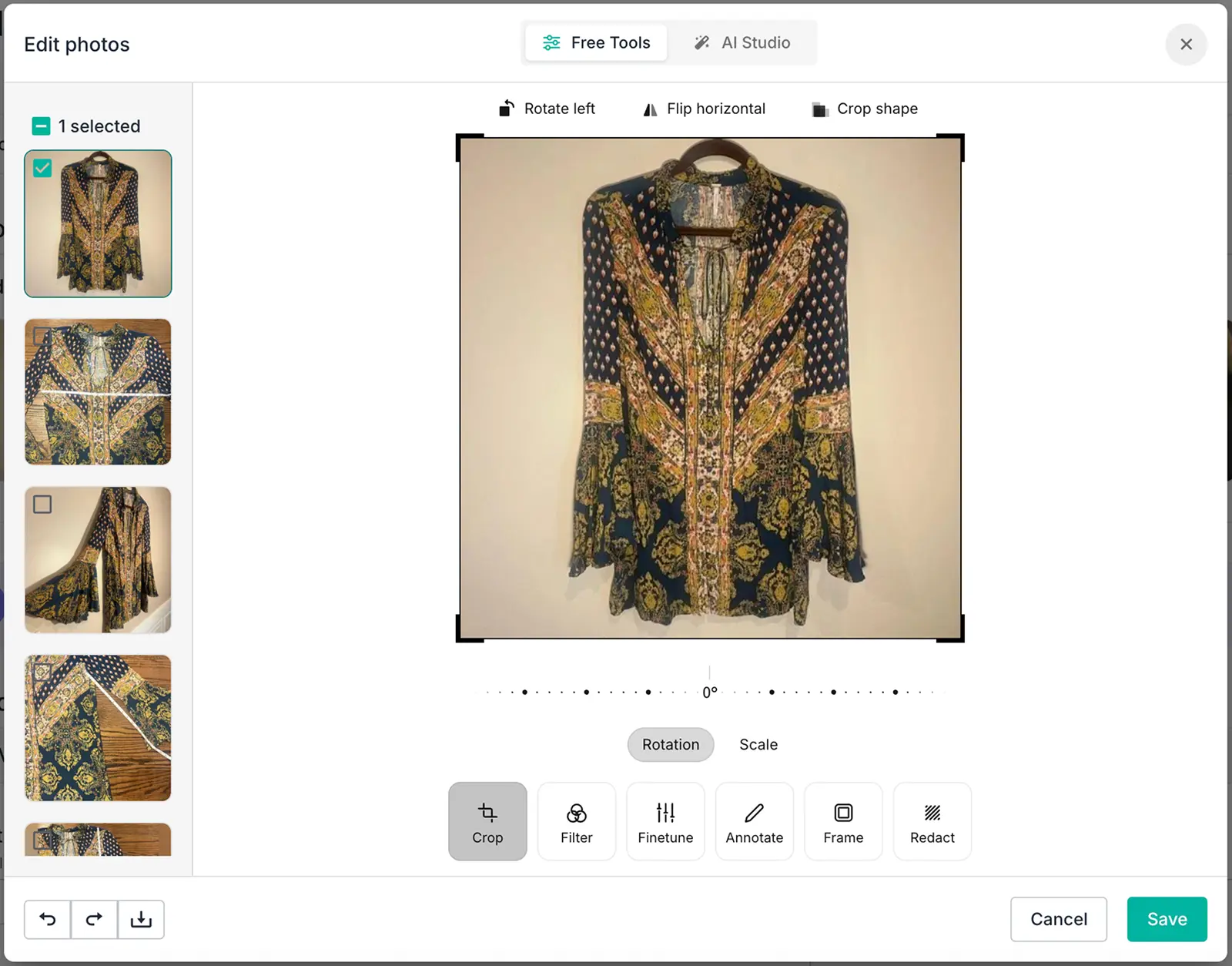
Nifty has both manual and AI-powered editing tools (supported by Photoroom).
Source: Nifty
The manual edits include what you would typically expect: crop, rotate, filter, annotate, and so on.
These edits are free (you’ll understand what we mean in just a minute), and can only be applied to one photo at a time.
The AI editing features let you remove your photo backgrounds (and replace them with neutral-colored backgrounds), and add mannequins, shadows, and flatlays to your pictures.
You can also generate an image where a virtual model is pictured wearing your products.
You can select a bunch of photos and add AI edits to them together.
These edits and background removals cost Nifty currency (also known as “smart credits”). Each background removal = 1 credit.
For the other AI edits, you’ll be paying 5 credits per photo (no matter how many types of AI edits you apply to them).
So, if you select 8 photos and add mannequins + shadows to all of them, you’ll pay a total of 8*5 = 40 smart credits.
Where do these smart credits come from? Each Nifty subscription plan gives you a certain number of credits (more on this under the pricing section).
Vendoo has a very basic editing tool, which lets you crop, rotate, and adjust brightness, saturation, and contrast.
The photo background removal functionality is available only for the Growth and Pro subscribers. You can either remove the backgrounds of your photos one by one, or all together.
Crosslist, like Nifty, has an AI-powered editor (supported by Nano banana) that also lets you carry out basic edits.
You can enhance your image in seconds, fix your photo’s shadows and lighting, or add mannequins to your product images.
Want to generate a new stock image of your product? Go right ahead!
You can remove the backgrounds from all of your photos with a single click, too.
Combine these AI edits with a little bit of manual fine-tuning (such as annotating important product details, or blurring sensitive information), and you’ve got a professional grade photo ready in seconds.
Like Nifty, Crosslist also uses AI credits for editing your photos with AI. Each AI photo editing request = 2 AI credits.
Crosslist also automatically resizes your photos (without cutting any part of it off) to fit in with the requirements of each marketplace.
For example, Poshmark only allows square images, so Crosslist takes care of that.
Verdict: Crosslist and Nifty > Vendoo
AI-generated listings
All 3 cross listing apps let you generate listings via AI.
Vendoo’s AI listing enhancement feature is available only on the expensive Growth and Pro plans.
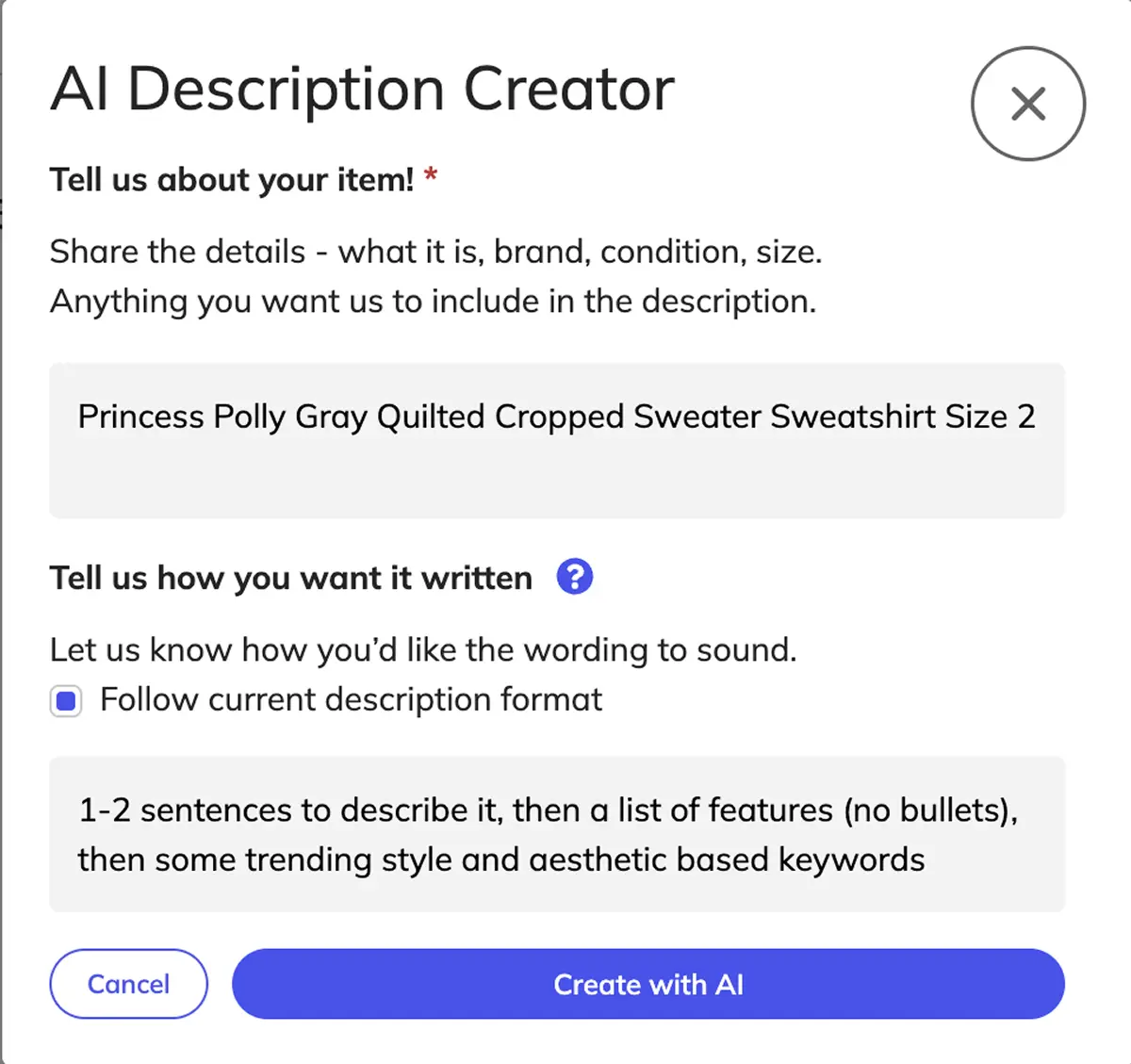
The feature works by having you describe the details that you want the AI to generate.
You also need to input your product details so that the AI tool can come up with an accurate description.
Source: Vendoo.
In short: you pretty much do all of the work, while the AI tool generates the product description alone — all after you describe how you want it written.
You can have the AI generate the details in full, or have it enhance your existing descriptions.
Crosslist and Nifty work similarly by generating your entire listing by capturing the product details through the photos you upload.
Both tools generate everything, including the title, description, tags, condition, brand, color, etc.
You can also set the tone you want for your description(s), adjust the length, or add your own custom prompts.
Both the tools consume 1 AI credit per listing generation.
If you want the AI tool to only generate a few details while you fill in the rest, Crosslist’s AI will do it for you!
Listing a big haul? You don't have to feed products in one at a time.
With AI bulk create, you just need to upload the photos for a whole batch and Crosslist turns each one into a complete listing at once.
Here’s a demo of our AI tool in action 👇:
As a bonus, Crosslist’s AI tool also gives you optimal pricing suggestions for your products based on current market trends (pulled from the internet).
Verdict: Crosslist > Nifty > Vendoo
Autodelist
All 3 tools automatically detect it once you make a sale and delist that product from the other connected marketplaces.
Nifty takes 15 minutes to detect a sale and autodelist, and there’s no way to shorten this time. So, if your product double-sells within that 15 minutes, tough luck.
Currently, Nifty only autodelists single-quantity items. For multi-quantity listings, the tool adjusts the available units.
For example, if you listed 5 units of a t-shirt and you make one sale, Nifty will adjust the quantity to 4.
Since Nifty is entirely cloud-based, your browser doesn’t need to be on for the sale detection and autodelisting to happen.
Vendoo’s autodelist works only across a total of 6 marketplaces.
To make sure that Vendoo actually detects your sales and autodelists them, you need to have Vendoo open (and logged in) on your desktop browser.
All of the marketplaces that you sell on should also be on.
Frankly, it’s just not possible to have your computer running 24/7 (with Vendoo and all the marketplaces logged in), so this feature isn’t very helpful with these limitations.
Crosslist’s sale detection and autodelisting works across all 11+ marketplaces.
Our tool also uses server-based automatic sales tracking for 4 marketplaces, so the sale detection and autodelisting will happen even when your computer is off.
For the other marketplaces, though, you do need to have your browser active periodically.
📝 Autodelist is available only for the Gold and Diamond subscription plans on Crosslist.
Verdict: Crosslist and Nifty > Vendoo
Bulk actions
While all 3 marketplaces let you carry out bulk actions to help you save time, they differ from one another in terms of the bulk actions you can perform and the maximum number of listings you can apply them to.
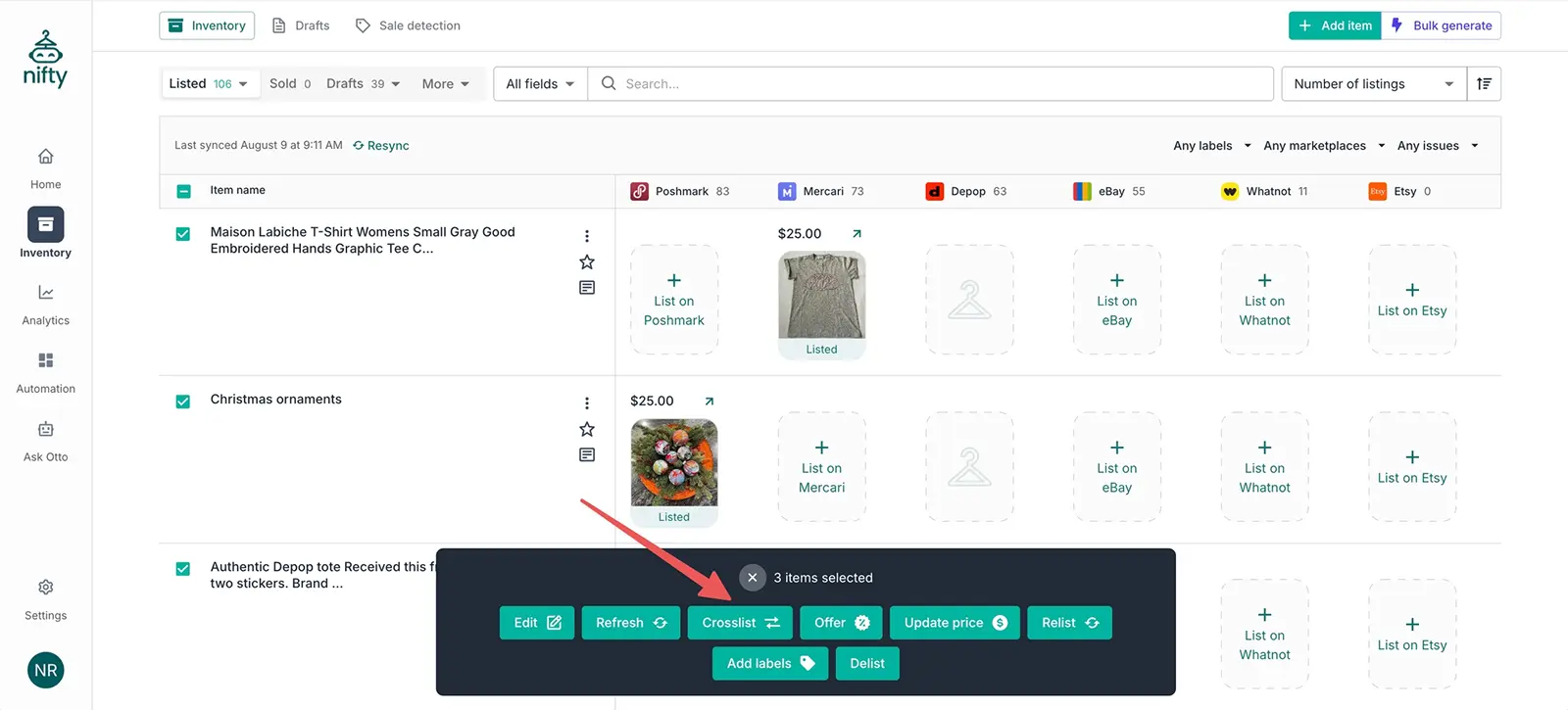
Nifty supports all the typical bulk actions you would expect from a cross listing tool: cross listing, delisting and relisting, price updates, and verification.
Source: Nifty
You can also bulk edit your listings on Nifty, but only the field attributes that are shared by all the marketplaces.
This means you won’t be able to edit eBay-specific product listing details in bulk.
There’s also a bulk generate feature, where you can add a bunch of different product photos to the cross listing tool, and it will turn each photo into an incomplete draft for you to fill up later.
But, the caveat with Nifty’s bulk actions is that you can only apply them to a maximum of 25 listings at a time. And all the listings you select must be on the same page view.
You can’t select 5 listings from page 1 and 10 listings from page 2 to apply your bulk actions to.
Vendoo doesn’t support any bulk actions unless you’re on the expensive Growth and Pro plans.
The tool also lets you apply your bulk actions only to a maximum of 240 listings at a time.
It supports all the same bulk actions as Nifty, except you can bulk edit your listings, too.
But, since Vendoo uses a Vendoo form + separate marketplace forms, you may experience delays while cross listing in bulk.
Crosslist lets you carry out any type of bulk action you want across as many listings as you want, no restrictions or limits, no matter which subscription plan you’re in.
You can cross list, edit, change the pricing, delist and relist, and delete to your heart’s content.
The only tiny limitation is that you can only clone or edit up to 100 listings at the same time.
Verdict: Crosslist > Nifty > Vendoo
Updating listings (and prices) without relisting
Both Nifty and Crosslist let you update your listings within the app and push the edits to the published listings.
All you have to do is click “edit,” make the changes, and then submit the form. You can edit in bulk as well.
Vendoo does not. Your only option on Vendoo is to delist the listings, make the changes within Vendoo, and relist them again.
Your other option is to make the changes directly on the marketplace(s) and edit your Vendoo inventory again. Talk about having to jump through hoops.
Crosslist and Nifty also let you set different prices for each marketplace to help you stay competitive and keep your profit margins consistent despite the varying fees.
On Nifty, you have to set a primary marketplace and decide the prices for that platform yourself.
Then, you set some pricing rules for the other marketplaces based on the primary marketplace.
If your primary marketplace is eBay, then your pricing rule could be that you increase the prices for every other marketplace by 2% or $2.
Nifty will use this rule to set the prices for the other marketplaces.
On Crosslist, you can set different prices for different marketplaces by heading to Account settings → Price markup.
Here, enter a positive or negative dollar amount or percentage near each marketplace.
If you enter $5 in the box beside Whatnot, Crosslist will automatically increase the prices of all of your Whatnot listings by $5. If you enter 10%, all the prices get increased by 10%.
To mark down your prices, enter negative numbers of percentages.
Verdict: Crosslist and Nifty > Vendoo
Shipping profiles
Crosslist and Nifty both let you create and set default shipping profiles for each marketplace.
You can set your preferred shipping method and carrier(s), along with default weight, dimensions, and prices.
Both the cross listing tools apply these shipping profiles to any new listings you create.
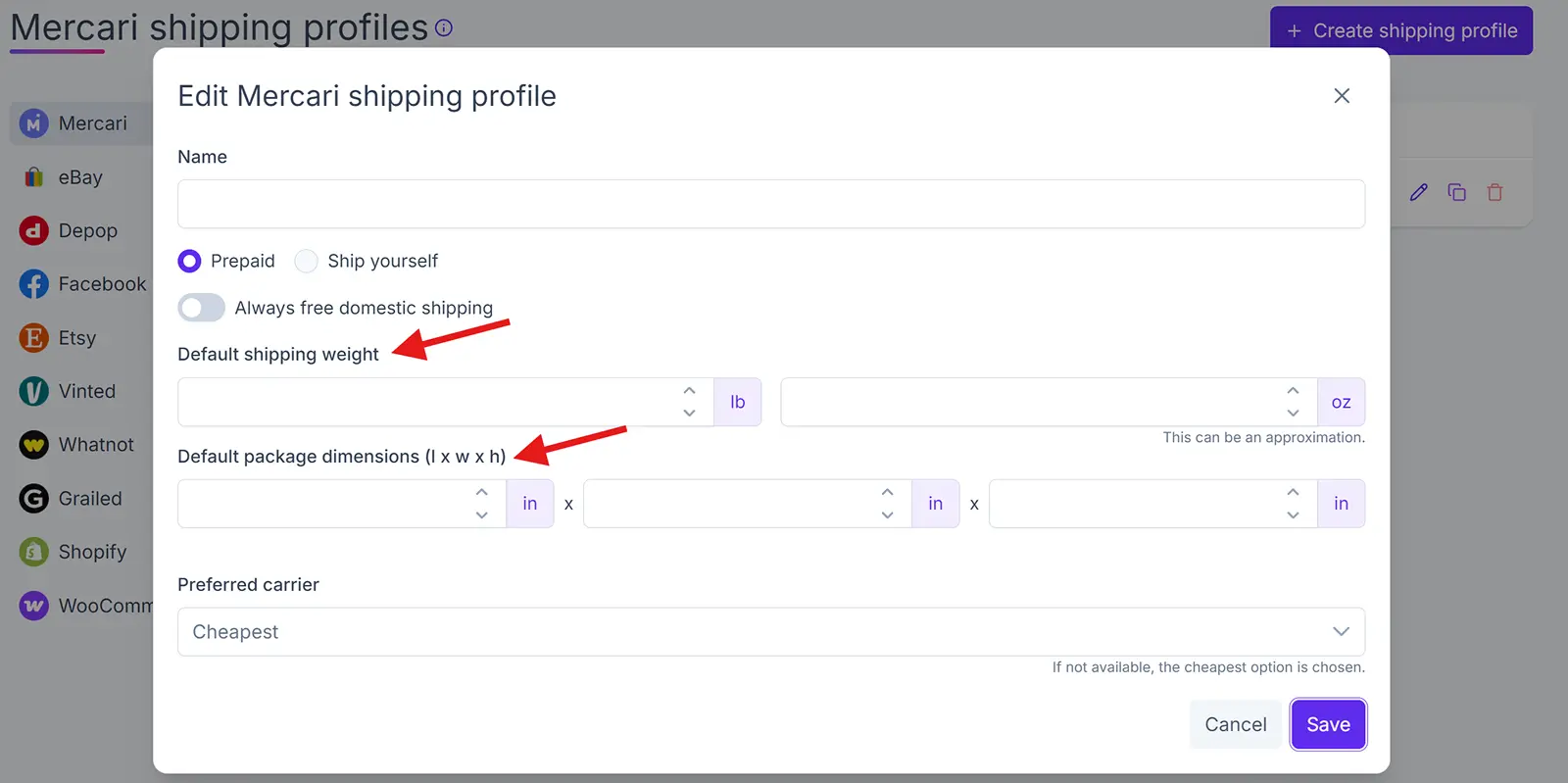
📝 Note: On the Nifty listing form, you’ll see a drop-down of your shipping profiles under the listing field for shipping.
You have to select the shipping profile you want to apply to that specific listing, which creates a teeny tiny extra step for you.
Vendoo doesn’t support the creation of any shipping profiles. Your only option is to set your preferences within the marketplaces and sync them to Vendoo.
Verdict: Crosslist > Nifty > Vendoo
Multi-country support
Crosslist and Nifty both support US, UK, CA, and AU-based versions of the marketplaces.
Crosslist goes one step further and automatically converts product sizes from imperial to metric and vice versa for you.
Our cross listing tool also publishes your listings to the correct domain based on your location.
For example, if you’re based in the UK, Crosslist will automatically publish your listings to ebay.co.uk as opposed to ebay.com.
Vendoo only supports US- and UK-based sellers.
Verdict: Crosslist > Nifty > Vendoo
Pricing plans
Nifty’s pricing plans include separate subscriptions for automations and cross listing. Here, we’ll focus only on the plans that offer cross listing as a feature.
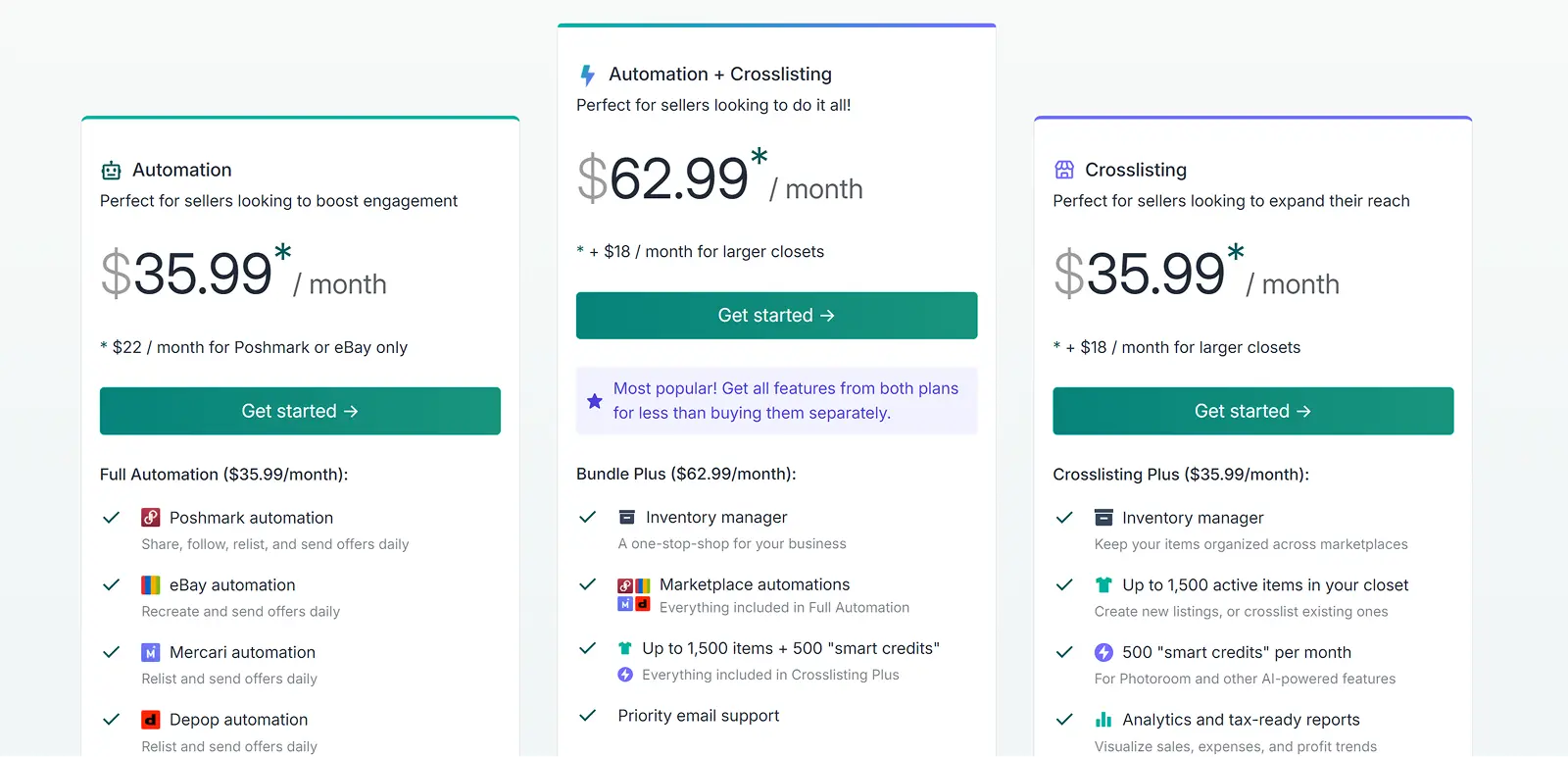
Nifty’s cross listing plans include:
Cross listing plus: $39.99/month. Gives you 500 AI smart credits, and a closet space of 1,500 active listings (yep, you read that right. Nifty only lets you hold 1,500 listings at once)
Cross listing pro: $59.99/month. Gives you 1,000 smart credits, and a closet space of 1,500+ active listings
Nifty’s bundle plans (which include cross listing + automation features) include:
Bundle plus: $69.99/month. Gives you marketplace automations for eBay, Poshmark, Mercari, and Depop, 500 AI smart credits, and a closet space of 1,500 active listings
Bundle pro: $89.99/month. Gives you marketplace automations for eBay, Poshmark, Mercari, and Depop, 1,000 AI smart credits, and a closet space of 1,500+ active listings
It’s worth noting that Nifty uses smart credits for every AI-powered functionality.
In addition to the AI photo editing features, you’ll pay 1 smart credit per AI listing generation, and 1 smart credit for each item when you cross list in bulk.
If you run out of your smart credits, you can buy 200 more for $5. Nifty also gives you a 7-day free trial.
As you can see, Nifty is quite expensive, especially when you can get all of its features and more for a very affordable price with Crosslist.
Vendoo has 3 different subscription plans, starting from $14.99 and going up to $59.99/month.
While the majority of Vendoo’s features are available across all the plans, a few essential ones are locked behind the higher tiers.
Here’s what all of the plans include:
Unlimited items
Support for all 10 marketplaces
Mobile app
Importing
Delisting and relisting
Autodelisting for 6 platforms
Listing templates
Analytics
The Growth plan adds: AI listing enhancement, bulk actions, and 300 background removals.
The Pro plan adds: 1500 background removals, listing videos, marketplace sharing for 3 platforms, and the auto sending of offers on 6+ platforms.
If you’re a large volume seller who regularly creates 1,000+ fresh listings every month, you’ll have to opt for the customized Enterprise plan. The pricing for this is not public.
Vendoo’s UK pricing, however, is a different story. Remember the old, complicated Vendoo pricing structure? The app still follows the same for UK sellers.
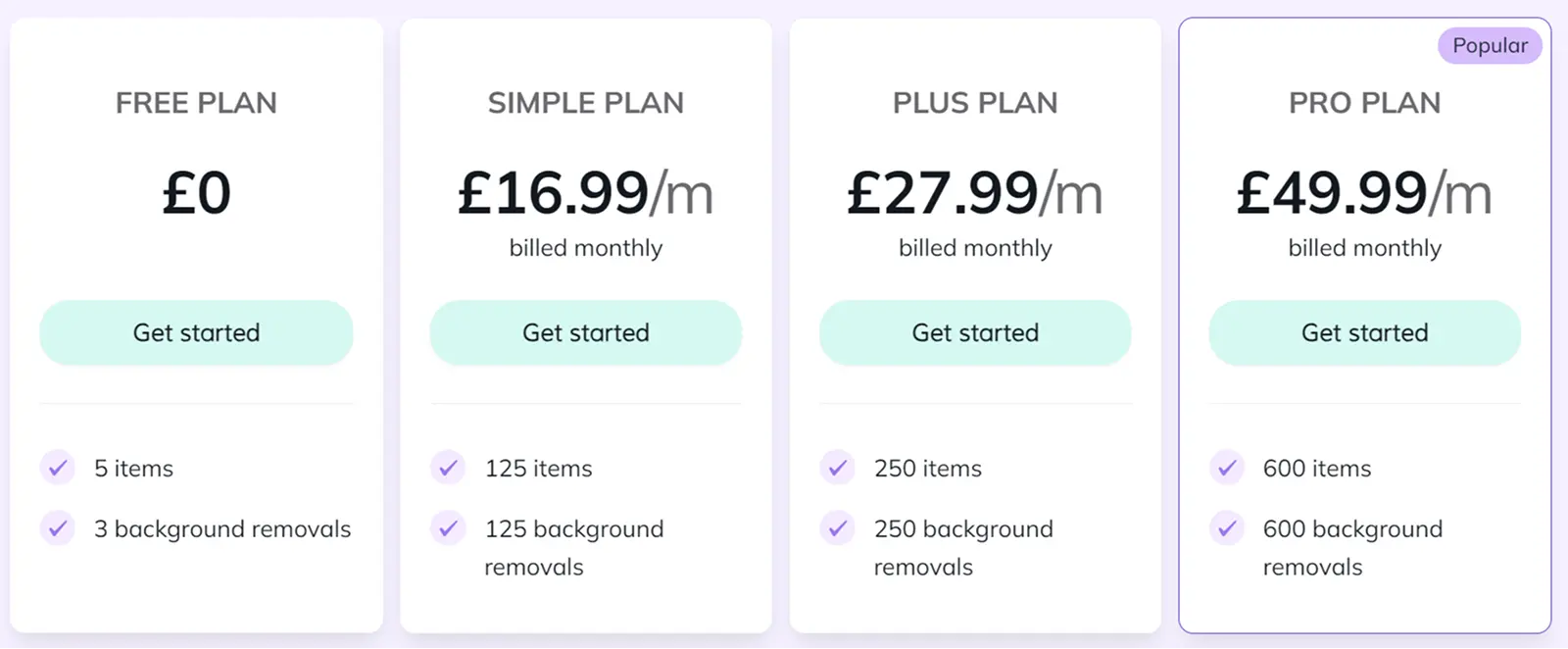
Even on the most expensive plan, you can only create 600 new listings per month. Vendoo UK also supports only 6 marketplaces.
All in all, you get very limited features for a hefty price tag.
Vendoo offers a 14-day free trial.
Crosslist, with its 4 different subscriptions, is the most affordable out of the three, with some pretty neat features for the prAll of Crosslist’s core features are available right from the Bronze plan.
The only exceptions are autodelisting and sales analytics, which are available only on the Gold and Diamond plans.
Here’s an overview of Crosslist’s monthly pricing plans:
Plan | Price | New listings you can create per month | Number of images you can store per listing |
Bronze | $29.99 | 200 | 9 |
Silver | $34.99 | 500 | 9 |
Gold | $39.99 | 1000 | 15 |
Diamond | $44.99 | Unlimited | 24 |
If you want something even more budget-friendly, go for Crosslist’s annual plans. You get a total of 2 months free!
Here are the details:
Plan | Price per month | New listings you can create per month | Number of images you can store per listing | Amount saved per year |
Bronze | $24.99 | 200 | 9 | $60 |
Silver | $28.99 | 500 | 9 | $72 |
Gold | $32.99 | 1000 | 15 | $84 |
Diamond | $36.99 | Unlimited | 24 | $96 |
If you’re not sure about locking in your subscription for an entire year, but still want something that’s cheaper than the monthly plans, our quarterly plans come to your rescue!
You’ll get a discount of 10%.
View the details below:
Plan | Price per month | New listings you can create per month | Number of images you can store per listing | Amount saved per quarter |
Bronze | $26.99 | 200 | 9 | $9 |
Silver | $31.49 | 500 | 9 | $10.5 |
Gold | $35.99 | 1000 | 15 | $12 |
Diamond | $40.49 | Unlimited | 24 | $13.5 |
Crosslist also has only one add-on: the AI-listing generator + pricing tool (which is a non-essential, but nice-to-have feature).
No matter which subscription plan you choose, the add-on costs a flat-fee of $4.99.
However, the number of AI credits you receive differs with each subscription.
Plan | Number of AI credits per month |
Bronze | 200 |
Silver | 500 |
Gold | 1,000 |
Diamond | 2,000 |
Crosslist also gives you a 3-day money-back guarantee, but only as long as you’ve created 20 or fewer listings.
Verdict: Crosslist > Vendoo > Nifty
Vendoo vs. Nifty limitations
Feature | Crosslist | Nifty | Vendoo |
Supported marketplaces | 11+ | 6 | 10 |
Pricing | Starts at $29.99/month | Starts at $39.99/month | Starts at $14.99/month |
Free trial | 3-day money back guarantee as long as you’ve created 20 or fewer new listings | 7 days | 14 days |
Listing form | Just one dynamic form to cross post your listings on all 11+ marketplaces | A common form with separate sub-sections for each marketplace. You have to review each sub-section and fill out any missing details | A common form + a separate form for each marketplace |
Autoposting | Yes, in bulk | Yes | Yes |
Mobile app | Yes; fully functional | No | Yes, but limited |
AI-generated listings | Yes; generates images + suggests prices, too | Yes | Yes, but only generates description |
Autodelist | Yes | Yes | Yes |
Bulk features | Yes; available for all plans | Yes | Yes, but only available on the Growth and Pro plans |
Image editor | Yes; state-of-the-art with AI-powered editing | Yes, with AI-powered editing features | Yes; very basic |
Background remover | Yes | Yes | Yes, but only available on the Growth and Pro plans |
Updating listings without relisting | Yes, in bulk | Yes | No; need to delist, update, and relist |
Set different prices for marketplaces | Yes, in bulk | Yes, through pricing rules | Yes, but not in bulk |
Set shipping preferences | Yes | Yes | No |
Multi-country support | Supports US, UK, CA, and AU marketplaces | Supports US, UK, CA, and AU marketplaces | Supports only US and UK |
Crosslist is the best cross listing app out of the 3 because it contains the following features that are absent in Vendoo and Nifty:
A single, dynamic listing form that needs no manual checks and reviews
Support for the most number of marketplaces (11+)
Ability to easily cross list in bulk (since the other two apps need manual checks + separate marketplace-specific forms, bulk cross listing will get delayed)
Fully-functional mobile app
Unlimited closet space
Which cross listing app should you choose?
Nifty wins on cloud automation, Vendoo on entry price. But on marketplace count, one universal form, and mobile, Crosslist takes both.
You should choose Crosslist, because it’s affordable, intuitive, and suitable for beginner resellers and enterprises alike.
Plus, each of the wide suite of features our cross listing app offers has been designed specifically with you in mind, so it genuinely makes your listing process easier.
Crosslist users regularly save 10+ hours on listing every week. Join them by signing up today.
Not all cross listing tools are made the same. While some genuinely help you save your time and energy, others end up slowing down your workflow even more.
Not to mention the ones that cost an arm and a half.
And the thing is that you won’t know which category the cross listing app you picked falls into till you actually use it in full swing.
To help you cut through the noise and pick the cross listing app that actually solves your problems, we created this guide on Nifty vs. Vendoo vs. Crosslist.
We compare all the features of the tools side-by-side and really get down into the granular details to help you pick the right one for your reselling business.
Key takeaways:
While Nifty and Crosslist share several features, Nifty comes with a hefty price tag. Crosslist also has additional features missing in Nifty: a single, universal listing form, mobile app, and unlimited closet space to house your active listings.
Vendoo has a lower threshold for entry, with its prices starting from $14.99/month. But, it lacks in every other way when compared to Crosslist.
Crosslist is the #1 cross listing app. It supports the most number of marketplaces (11+), is very affordable, has a fully-functional mobile app, and truly puts your listing process on autopilot.
Nifty vs. Vendoo vs. Crosslist: A comparison
As cross listing apps, the core function of Nifty, Vendoo, and Crosslist is the same: to help you list multiple products across several marketplaces quickly; to, essentially, put your listing process on autopilot.
But, the way each cross listing tool goes about it is different, and so are the other features available to you, which makes all the difference when it comes to your workflow.
Below, we put each of the tools’ features under the magnifying lens to see which cross listing app is the best for your business.
Supported marketplaces
Nifty supports only 6 marketplaces, which is severely limiting for large-volume sellers, while Vendoo supports 10. Crosslist comes out on top with a total integration of 11+ marketplaces.
Vestiaire Collective is supported only by Vendoo, while WooCommerce is only supported by Crosslist.
Verdict: Crosslist > Vendoo > Nifty
Listing form
Nifty has a common listing form for all 6 of the marketplaces. But, if you scroll down, you’ll see separate sub-sections for each marketplace you’re posting to.
First, you’ll have to fill out the common area of the form with the listing details that are common across all the marketplaces.
Nifty automatically populates these details under the marketplace-specific areas.
However, you still need to review each sub-section and enter any marketplace-specific missing details. For example, eBay’s store categories.
Complete your review and submit the form to publish your listings to the relevant marketplaces.
Vendoo’s listing process is more cumbersome than it needs to be.
The cross listing tool has a common “Vendoo” form + separate forms for each marketplace you’re posting to.
If you’re posting a single listing to 8 marketplaces, this means you’ll be filling out a total of 9 forms, whew!
Like Nifty, you have to fill out the Vendoo form first with all the listing attributes that are common across marketplaces.
Then, you have to select the marketplaces you want to cross list to.
Each time you select a marketplace, Vendoo will present you with the form specific for that marketplace.
All the details you entered in the common Vendoo form will already be populated. But you have to fill in the rest.
Repeat this for each marketplace before finally clicking submit.
The problem with this approach is that it ends up creating more work for you, slowing down your workflow.
Filling up multiple forms for each listing isn’t what we have in mind when we pick a cross listing app to help us save time.
Crosslist is the only cross listing app out of the 3 that actually automates your listing process completely. You can list once and sell everywhere.
Our cross listing tool only ever asks you to fill out a single, dynamic listing form.
Select all the marketplaces you want to cross list to, and the universal listing form will show you all the attributes needed by every single one of the selected marketplaces.
Fill out the form and hit submit, and your work is done!
Crosslist will automatically capture the relevant details needed for each marketplace from the universal form and publish your listings.
You get to enjoy faster workflows without having to fill out separate marketplace-specific forms, or review marketplace-specific sub-sections.
Verdict: Crosslist > Nifty > Vendoo
Autoposting in the background
Autoposting is the feature where a cross listing tool automatically publishes your listings to the relevant marketplaces as soon as you hit submit on the listing form.
You’ll be surprised to know that many cross listing apps do not have this feature.
They just open a tab for each listing and populate the details, leaving you to review and publish each of them one by one.
Fortunately, Nifty, Vendoo, and Crosslist all have autoposting.
But, Nifty and Vendoo make you review and fill out extra marketplace-specific details, so even with autoposting, these apps slow you down.
You’ll get the fastest workflow only with Crosslist, as you’ll only be filling out the universal form once before our tool takes over the publishing reins.
No more manual intervention or extra steps needed from your side.
Verdict: Crosslist > Nifty and Vendoo
Mobile app
Nifty doesn’t have a mobile app, so you’re stuck with using a browser. You can open Nifty on your mobile browser and add a shortcut of the website to your homepage, but an app it is not.
Vendoo has a mobile app, but it has limited functionality. You can create fresh listings, delist and relist, and cross list your existing listings, but that’s about it.
You can’t carry out any bulk functions, so you’re forced to work on your listings one by one.
Vendoo’s mobile app also doesn’t autodelist your listings after you make a sale, so if you want to prevent overselling, you’re dependent on the desktop version.
Moreover, the mobile app doesn’t support Shopify or Facebook Marketplace. At all.
Crosslist has a fully-functional mobile app that’s basically a pocket-sized version of the browser extension.
Whatever you can do on the desktop, you can do on the mobile app.
All 11+ marketplaces supported? Check.
All functions, including bulk actions, importing, and editing, supported? Check.
Any changes automatically synced between the mobile and desktop versions? Check again.
With Crosslist’s mobile app, you won’t have to wait till you get home from the yard sale you just visited to post new listings of your finds. You can do it from wherever you are.
Who knows, by the time you get home, you may even have made a sale or two.
Image editor and background remover
Once again, all 3 cross listing tools offer image editing and background removal tools.
Nifty has both manual and AI-powered editing tools (supported by Photoroom).
Source: Nifty
The manual edits include what you would typically expect: crop, rotate, filter, annotate, and so on.
These edits are free (you’ll understand what we mean in just a minute), and can only be applied to one photo at a time.
The AI editing features let you remove your photo backgrounds (and replace them with neutral-colored backgrounds), and add mannequins, shadows, and flatlays to your pictures.
You can also generate an image where a virtual model is pictured wearing your products.
You can select a bunch of photos and add AI edits to them together.
These edits and background removals cost Nifty currency (also known as “smart credits”). Each background removal = 1 credit.
For the other AI edits, you’ll be paying 5 credits per photo (no matter how many types of AI edits you apply to them).
So, if you select 8 photos and add mannequins + shadows to all of them, you’ll pay a total of 8*5 = 40 smart credits.
Where do these smart credits come from? Each Nifty subscription plan gives you a certain number of credits (more on this under the pricing section).
Vendoo has a very basic editing tool, which lets you crop, rotate, and adjust brightness, saturation, and contrast.
The photo background removal functionality is available only for the Growth and Pro subscribers. You can either remove the backgrounds of your photos one by one, or all together.
Crosslist, like Nifty, has an AI-powered editor (supported by Nano banana) that also lets you carry out basic edits.
You can enhance your image in seconds, fix your photo’s shadows and lighting, or add mannequins to your product images.
Want to generate a new stock image of your product? Go right ahead!
You can remove the backgrounds from all of your photos with a single click, too.
Combine these AI edits with a little bit of manual fine-tuning (such as annotating important product details, or blurring sensitive information), and you’ve got a professional grade photo ready in seconds.
Like Nifty, Crosslist also uses AI credits for editing your photos with AI. Each AI photo editing request = 2 AI credits.
Crosslist also automatically resizes your photos (without cutting any part of it off) to fit in with the requirements of each marketplace.
For example, Poshmark only allows square images, so Crosslist takes care of that.
Verdict: Crosslist and Nifty > Vendoo
AI-generated listings
All 3 cross listing apps let you generate listings via AI.
Vendoo’s AI listing enhancement feature is available only on the expensive Growth and Pro plans.
The feature works by having you describe the details that you want the AI to generate.
You also need to input your product details so that the AI tool can come up with an accurate description.
Source: Vendoo.
In short: you pretty much do all of the work, while the AI tool generates the product description alone — all after you describe how you want it written.
You can have the AI generate the details in full, or have it enhance your existing descriptions.
Crosslist and Nifty work similarly by generating your entire listing by capturing the product details through the photos you upload.
Both tools generate everything, including the title, description, tags, condition, brand, color, etc.
You can also set the tone you want for your description(s), adjust the length, or add your own custom prompts.
Both the tools consume 1 AI credit per listing generation.
If you want the AI tool to only generate a few details while you fill in the rest, Crosslist’s AI will do it for you!
Listing a big haul? You don't have to feed products in one at a time.
With AI bulk create, you just need to upload the photos for a whole batch and Crosslist turns each one into a complete listing at once.
Here’s a demo of our AI tool in action 👇:
As a bonus, Crosslist’s AI tool also gives you optimal pricing suggestions for your products based on current market trends (pulled from the internet).
Verdict: Crosslist > Nifty > Vendoo
Autodelist
All 3 tools automatically detect it once you make a sale and delist that product from the other connected marketplaces.
Nifty takes 15 minutes to detect a sale and autodelist, and there’s no way to shorten this time. So, if your product double-sells within that 15 minutes, tough luck.
Currently, Nifty only autodelists single-quantity items. For multi-quantity listings, the tool adjusts the available units.
For example, if you listed 5 units of a t-shirt and you make one sale, Nifty will adjust the quantity to 4.
Since Nifty is entirely cloud-based, your browser doesn’t need to be on for the sale detection and autodelisting to happen.
Vendoo’s autodelist works only across a total of 6 marketplaces.
To make sure that Vendoo actually detects your sales and autodelists them, you need to have Vendoo open (and logged in) on your desktop browser.
All of the marketplaces that you sell on should also be on.
Frankly, it’s just not possible to have your computer running 24/7 (with Vendoo and all the marketplaces logged in), so this feature isn’t very helpful with these limitations.
Crosslist’s sale detection and autodelisting works across all 11+ marketplaces.
Our tool also uses server-based automatic sales tracking for 4 marketplaces, so the sale detection and autodelisting will happen even when your computer is off.
For the other marketplaces, though, you do need to have your browser active periodically.
📝 Autodelist is available only for the Gold and Diamond subscription plans on Crosslist.
Verdict: Crosslist and Nifty > Vendoo
Bulk actions
While all 3 marketplaces let you carry out bulk actions to help you save time, they differ from one another in terms of the bulk actions you can perform and the maximum number of listings you can apply them to.
Nifty supports all the typical bulk actions you would expect from a cross listing tool: cross listing, delisting and relisting, price updates, and verification.
Source: Nifty
You can also bulk edit your listings on Nifty, but only the field attributes that are shared by all the marketplaces.
This means you won’t be able to edit eBay-specific product listing details in bulk.
There’s also a bulk generate feature, where you can add a bunch of different product photos to the cross listing tool, and it will turn each photo into an incomplete draft for you to fill up later.
But, the caveat with Nifty’s bulk actions is that you can only apply them to a maximum of 25 listings at a time. And all the listings you select must be on the same page view.
You can’t select 5 listings from page 1 and 10 listings from page 2 to apply your bulk actions to.
Vendoo doesn’t support any bulk actions unless you’re on the expensive Growth and Pro plans.
The tool also lets you apply your bulk actions only to a maximum of 240 listings at a time.
It supports all the same bulk actions as Nifty, except you can bulk edit your listings, too.
But, since Vendoo uses a Vendoo form + separate marketplace forms, you may experience delays while cross listing in bulk.
Crosslist lets you carry out any type of bulk action you want across as many listings as you want, no restrictions or limits, no matter which subscription plan you’re in.
You can cross list, edit, change the pricing, delist and relist, and delete to your heart’s content.
The only tiny limitation is that you can only clone or edit up to 100 listings at the same time.
Verdict: Crosslist > Nifty > Vendoo
Updating listings (and prices) without relisting
Both Nifty and Crosslist let you update your listings within the app and push the edits to the published listings.
All you have to do is click “edit,” make the changes, and then submit the form. You can edit in bulk as well.
Vendoo does not. Your only option on Vendoo is to delist the listings, make the changes within Vendoo, and relist them again.
Your other option is to make the changes directly on the marketplace(s) and edit your Vendoo inventory again. Talk about having to jump through hoops.
Crosslist and Nifty also let you set different prices for each marketplace to help you stay competitive and keep your profit margins consistent despite the varying fees.
On Nifty, you have to set a primary marketplace and decide the prices for that platform yourself.
Then, you set some pricing rules for the other marketplaces based on the primary marketplace.
If your primary marketplace is eBay, then your pricing rule could be that you increase the prices for every other marketplace by 2% or $2.
Nifty will use this rule to set the prices for the other marketplaces.
On Crosslist, you can set different prices for different marketplaces by heading to Account settings → Price markup.
Here, enter a positive or negative dollar amount or percentage near each marketplace.
If you enter $5 in the box beside Whatnot, Crosslist will automatically increase the prices of all of your Whatnot listings by $5. If you enter 10%, all the prices get increased by 10%.
To mark down your prices, enter negative numbers of percentages.
Verdict: Crosslist and Nifty > Vendoo
Shipping profiles
Crosslist and Nifty both let you create and set default shipping profiles for each marketplace.
You can set your preferred shipping method and carrier(s), along with default weight, dimensions, and prices.
Both the cross listing tools apply these shipping profiles to any new listings you create.
📝 Note: On the Nifty listing form, you’ll see a drop-down of your shipping profiles under the listing field for shipping.
You have to select the shipping profile you want to apply to that specific listing, which creates a teeny tiny extra step for you.
Vendoo doesn’t support the creation of any shipping profiles. Your only option is to set your preferences within the marketplaces and sync them to Vendoo.
Verdict: Crosslist > Nifty > Vendoo
Multi-country support
Crosslist and Nifty both support US, UK, CA, and AU-based versions of the marketplaces.
Crosslist goes one step further and automatically converts product sizes from imperial to metric and vice versa for you.
Our cross listing tool also publishes your listings to the correct domain based on your location.
For example, if you’re based in the UK, Crosslist will automatically publish your listings to ebay.co.uk as opposed to ebay.com.
Vendoo only supports US- and UK-based sellers.
Verdict: Crosslist > Nifty > Vendoo
Pricing plans
Nifty’s pricing plans include separate subscriptions for automations and cross listing. Here, we’ll focus only on the plans that offer cross listing as a feature.
Nifty’s cross listing plans include:
Cross listing plus: $39.99/month. Gives you 500 AI smart credits, and a closet space of 1,500 active listings (yep, you read that right. Nifty only lets you hold 1,500 listings at once)
Cross listing pro: $59.99/month. Gives you 1,000 smart credits, and a closet space of 1,500+ active listings
Nifty’s bundle plans (which include cross listing + automation features) include:
Bundle plus: $69.99/month. Gives you marketplace automations for eBay, Poshmark, Mercari, and Depop, 500 AI smart credits, and a closet space of 1,500 active listings
Bundle pro: $89.99/month. Gives you marketplace automations for eBay, Poshmark, Mercari, and Depop, 1,000 AI smart credits, and a closet space of 1,500+ active listings
It’s worth noting that Nifty uses smart credits for every AI-powered functionality.
In addition to the AI photo editing features, you’ll pay 1 smart credit per AI listing generation, and 1 smart credit for each item when you cross list in bulk.
If you run out of your smart credits, you can buy 200 more for $5. Nifty also gives you a 7-day free trial.
As you can see, Nifty is quite expensive, especially when you can get all of its features and more for a very affordable price with Crosslist.
Vendoo has 3 different subscription plans, starting from $14.99 and going up to $59.99/month.
While the majority of Vendoo’s features are available across all the plans, a few essential ones are locked behind the higher tiers.
Here’s what all of the plans include:
Unlimited items
Support for all 10 marketplaces
Mobile app
Importing
Delisting and relisting
Autodelisting for 6 platforms
Listing templates
Analytics
The Growth plan adds: AI listing enhancement, bulk actions, and 300 background removals.
The Pro plan adds: 1500 background removals, listing videos, marketplace sharing for 3 platforms, and the auto sending of offers on 6+ platforms.
If you’re a large volume seller who regularly creates 1,000+ fresh listings every month, you’ll have to opt for the customized Enterprise plan. The pricing for this is not public.
Vendoo’s UK pricing, however, is a different story. Remember the old, complicated Vendoo pricing structure? The app still follows the same for UK sellers.
Even on the most expensive plan, you can only create 600 new listings per month. Vendoo UK also supports only 6 marketplaces.
All in all, you get very limited features for a hefty price tag.
Vendoo offers a 14-day free trial.
Crosslist, with its 4 different subscriptions, is the most affordable out of the three, with some pretty neat features for the prAll of Crosslist’s core features are available right from the Bronze plan.
The only exceptions are autodelisting and sales analytics, which are available only on the Gold and Diamond plans.
Here’s an overview of Crosslist’s monthly pricing plans:
Plan | Price | New listings you can create per month | Number of images you can store per listing |
Bronze | $29.99 | 200 | 9 |
Silver | $34.99 | 500 | 9 |
Gold | $39.99 | 1000 | 15 |
Diamond | $44.99 | Unlimited | 24 |
If you want something even more budget-friendly, go for Crosslist’s annual plans. You get a total of 2 months free!
Here are the details:
Plan | Price per month | New listings you can create per month | Number of images you can store per listing | Amount saved per year |
Bronze | $24.99 | 200 | 9 | $60 |
Silver | $28.99 | 500 | 9 | $72 |
Gold | $32.99 | 1000 | 15 | $84 |
Diamond | $36.99 | Unlimited | 24 | $96 |
If you’re not sure about locking in your subscription for an entire year, but still want something that’s cheaper than the monthly plans, our quarterly plans come to your rescue!
You’ll get a discount of 10%.
View the details below:
Plan | Price per month | New listings you can create per month | Number of images you can store per listing | Amount saved per quarter |
Bronze | $26.99 | 200 | 9 | $9 |
Silver | $31.49 | 500 | 9 | $10.5 |
Gold | $35.99 | 1000 | 15 | $12 |
Diamond | $40.49 | Unlimited | 24 | $13.5 |
Crosslist also has only one add-on: the AI-listing generator + pricing tool (which is a non-essential, but nice-to-have feature).
No matter which subscription plan you choose, the add-on costs a flat-fee of $4.99.
However, the number of AI credits you receive differs with each subscription.
Plan | Number of AI credits per month |
Bronze | 200 |
Silver | 500 |
Gold | 1,000 |
Diamond | 2,000 |
Crosslist also gives you a 3-day money-back guarantee, but only as long as you’ve created 20 or fewer listings.
Verdict: Crosslist > Vendoo > Nifty
Vendoo vs. Nifty limitations
Feature | Crosslist | Nifty | Vendoo |
Supported marketplaces | 11+ | 6 | 10 |
Pricing | Starts at $29.99/month | Starts at $39.99/month | Starts at $14.99/month |
Free trial | 3-day money back guarantee as long as you’ve created 20 or fewer new listings | 7 days | 14 days |
Listing form | Just one dynamic form to cross post your listings on all 11+ marketplaces | A common form with separate sub-sections for each marketplace. You have to review each sub-section and fill out any missing details | A common form + a separate form for each marketplace |
Autoposting | Yes, in bulk | Yes | Yes |
Mobile app | Yes; fully functional | No | Yes, but limited |
AI-generated listings | Yes; generates images + suggests prices, too | Yes | Yes, but only generates description |
Autodelist | Yes | Yes | Yes |
Bulk features | Yes; available for all plans | Yes | Yes, but only available on the Growth and Pro plans |
Image editor | Yes; state-of-the-art with AI-powered editing | Yes, with AI-powered editing features | Yes; very basic |
Background remover | Yes | Yes | Yes, but only available on the Growth and Pro plans |
Updating listings without relisting | Yes, in bulk | Yes | No; need to delist, update, and relist |
Set different prices for marketplaces | Yes, in bulk | Yes, through pricing rules | Yes, but not in bulk |
Set shipping preferences | Yes | Yes | No |
Multi-country support | Supports US, UK, CA, and AU marketplaces | Supports US, UK, CA, and AU marketplaces | Supports only US and UK |
Crosslist is the best cross listing app out of the 3 because it contains the following features that are absent in Vendoo and Nifty:
A single, dynamic listing form that needs no manual checks and reviews
Support for the most number of marketplaces (11+)
Ability to easily cross list in bulk (since the other two apps need manual checks + separate marketplace-specific forms, bulk cross listing will get delayed)
Fully-functional mobile app
Unlimited closet space
Which cross listing app should you choose?
Nifty wins on cloud automation, Vendoo on entry price. But on marketplace count, one universal form, and mobile, Crosslist takes both.
You should choose Crosslist, because it’s affordable, intuitive, and suitable for beginner resellers and enterprises alike.
Plus, each of the wide suite of features our cross listing app offers has been designed specifically with you in mind, so it genuinely makes your listing process easier.
Crosslist users regularly save 10+ hours on listing every week. Join them by signing up today.
Not all cross listing tools are made the same. While some genuinely help you save your time and energy, others end up slowing down your workflow even more.
Not to mention the ones that cost an arm and a half.
And the thing is that you won’t know which category the cross listing app you picked falls into till you actually use it in full swing.
To help you cut through the noise and pick the cross listing app that actually solves your problems, we created this guide on Nifty vs. Vendoo vs. Crosslist.
We compare all the features of the tools side-by-side and really get down into the granular details to help you pick the right one for your reselling business.
Key takeaways:
While Nifty and Crosslist share several features, Nifty comes with a hefty price tag. Crosslist also has additional features missing in Nifty: a single, universal listing form, mobile app, and unlimited closet space to house your active listings.
Vendoo has a lower threshold for entry, with its prices starting from $14.99/month. But, it lacks in every other way when compared to Crosslist.
Crosslist is the #1 cross listing app. It supports the most number of marketplaces (11+), is very affordable, has a fully-functional mobile app, and truly puts your listing process on autopilot.
Nifty vs. Vendoo vs. Crosslist: A comparison
As cross listing apps, the core function of Nifty, Vendoo, and Crosslist is the same: to help you list multiple products across several marketplaces quickly; to, essentially, put your listing process on autopilot.
But, the way each cross listing tool goes about it is different, and so are the other features available to you, which makes all the difference when it comes to your workflow.
Below, we put each of the tools’ features under the magnifying lens to see which cross listing app is the best for your business.
Supported marketplaces
Nifty supports only 6 marketplaces, which is severely limiting for large-volume sellers, while Vendoo supports 10. Crosslist comes out on top with a total integration of 11+ marketplaces.
Vestiaire Collective is supported only by Vendoo, while WooCommerce is only supported by Crosslist.
Verdict: Crosslist > Vendoo > Nifty
Listing form
Nifty has a common listing form for all 6 of the marketplaces. But, if you scroll down, you’ll see separate sub-sections for each marketplace you’re posting to.
First, you’ll have to fill out the common area of the form with the listing details that are common across all the marketplaces.
Nifty automatically populates these details under the marketplace-specific areas.
However, you still need to review each sub-section and enter any marketplace-specific missing details. For example, eBay’s store categories.
Complete your review and submit the form to publish your listings to the relevant marketplaces.
Vendoo’s listing process is more cumbersome than it needs to be.
The cross listing tool has a common “Vendoo” form + separate forms for each marketplace you’re posting to.
If you’re posting a single listing to 8 marketplaces, this means you’ll be filling out a total of 9 forms, whew!
Like Nifty, you have to fill out the Vendoo form first with all the listing attributes that are common across marketplaces.
Then, you have to select the marketplaces you want to cross list to.
Each time you select a marketplace, Vendoo will present you with the form specific for that marketplace.
All the details you entered in the common Vendoo form will already be populated. But you have to fill in the rest.
Repeat this for each marketplace before finally clicking submit.
The problem with this approach is that it ends up creating more work for you, slowing down your workflow.
Filling up multiple forms for each listing isn’t what we have in mind when we pick a cross listing app to help us save time.
Crosslist is the only cross listing app out of the 3 that actually automates your listing process completely. You can list once and sell everywhere.
Our cross listing tool only ever asks you to fill out a single, dynamic listing form.
Select all the marketplaces you want to cross list to, and the universal listing form will show you all the attributes needed by every single one of the selected marketplaces.
Fill out the form and hit submit, and your work is done!
Crosslist will automatically capture the relevant details needed for each marketplace from the universal form and publish your listings.
You get to enjoy faster workflows without having to fill out separate marketplace-specific forms, or review marketplace-specific sub-sections.
Verdict: Crosslist > Nifty > Vendoo
Autoposting in the background
Autoposting is the feature where a cross listing tool automatically publishes your listings to the relevant marketplaces as soon as you hit submit on the listing form.
You’ll be surprised to know that many cross listing apps do not have this feature.
They just open a tab for each listing and populate the details, leaving you to review and publish each of them one by one.
Fortunately, Nifty, Vendoo, and Crosslist all have autoposting.
But, Nifty and Vendoo make you review and fill out extra marketplace-specific details, so even with autoposting, these apps slow you down.
You’ll get the fastest workflow only with Crosslist, as you’ll only be filling out the universal form once before our tool takes over the publishing reins.
No more manual intervention or extra steps needed from your side.
Verdict: Crosslist > Nifty and Vendoo
Mobile app
Nifty doesn’t have a mobile app, so you’re stuck with using a browser. You can open Nifty on your mobile browser and add a shortcut of the website to your homepage, but an app it is not.
Vendoo has a mobile app, but it has limited functionality. You can create fresh listings, delist and relist, and cross list your existing listings, but that’s about it.
You can’t carry out any bulk functions, so you’re forced to work on your listings one by one.
Vendoo’s mobile app also doesn’t autodelist your listings after you make a sale, so if you want to prevent overselling, you’re dependent on the desktop version.
Moreover, the mobile app doesn’t support Shopify or Facebook Marketplace. At all.
Crosslist has a fully-functional mobile app that’s basically a pocket-sized version of the browser extension.
Whatever you can do on the desktop, you can do on the mobile app.
All 11+ marketplaces supported? Check.
All functions, including bulk actions, importing, and editing, supported? Check.
Any changes automatically synced between the mobile and desktop versions? Check again.
With Crosslist’s mobile app, you won’t have to wait till you get home from the yard sale you just visited to post new listings of your finds. You can do it from wherever you are.
Who knows, by the time you get home, you may even have made a sale or two.
Image editor and background remover
Once again, all 3 cross listing tools offer image editing and background removal tools.
Nifty has both manual and AI-powered editing tools (supported by Photoroom).
Source: Nifty
The manual edits include what you would typically expect: crop, rotate, filter, annotate, and so on.
These edits are free (you’ll understand what we mean in just a minute), and can only be applied to one photo at a time.
The AI editing features let you remove your photo backgrounds (and replace them with neutral-colored backgrounds), and add mannequins, shadows, and flatlays to your pictures.
You can also generate an image where a virtual model is pictured wearing your products.
You can select a bunch of photos and add AI edits to them together.
These edits and background removals cost Nifty currency (also known as “smart credits”). Each background removal = 1 credit.
For the other AI edits, you’ll be paying 5 credits per photo (no matter how many types of AI edits you apply to them).
So, if you select 8 photos and add mannequins + shadows to all of them, you’ll pay a total of 8*5 = 40 smart credits.
Where do these smart credits come from? Each Nifty subscription plan gives you a certain number of credits (more on this under the pricing section).
Vendoo has a very basic editing tool, which lets you crop, rotate, and adjust brightness, saturation, and contrast.
The photo background removal functionality is available only for the Growth and Pro subscribers. You can either remove the backgrounds of your photos one by one, or all together.
Crosslist, like Nifty, has an AI-powered editor (supported by Nano banana) that also lets you carry out basic edits.
You can enhance your image in seconds, fix your photo’s shadows and lighting, or add mannequins to your product images.
Want to generate a new stock image of your product? Go right ahead!
You can remove the backgrounds from all of your photos with a single click, too.
Combine these AI edits with a little bit of manual fine-tuning (such as annotating important product details, or blurring sensitive information), and you’ve got a professional grade photo ready in seconds.
Like Nifty, Crosslist also uses AI credits for editing your photos with AI. Each AI photo editing request = 2 AI credits.
Crosslist also automatically resizes your photos (without cutting any part of it off) to fit in with the requirements of each marketplace.
For example, Poshmark only allows square images, so Crosslist takes care of that.
Verdict: Crosslist and Nifty > Vendoo
AI-generated listings
All 3 cross listing apps let you generate listings via AI.
Vendoo’s AI listing enhancement feature is available only on the expensive Growth and Pro plans.
The feature works by having you describe the details that you want the AI to generate.
You also need to input your product details so that the AI tool can come up with an accurate description.
Source: Vendoo.
In short: you pretty much do all of the work, while the AI tool generates the product description alone — all after you describe how you want it written.
You can have the AI generate the details in full, or have it enhance your existing descriptions.
Crosslist and Nifty work similarly by generating your entire listing by capturing the product details through the photos you upload.
Both tools generate everything, including the title, description, tags, condition, brand, color, etc.
You can also set the tone you want for your description(s), adjust the length, or add your own custom prompts.
Both the tools consume 1 AI credit per listing generation.
If you want the AI tool to only generate a few details while you fill in the rest, Crosslist’s AI will do it for you!
Listing a big haul? You don't have to feed products in one at a time.
With AI bulk create, you just need to upload the photos for a whole batch and Crosslist turns each one into a complete listing at once.
Here’s a demo of our AI tool in action 👇:
As a bonus, Crosslist’s AI tool also gives you optimal pricing suggestions for your products based on current market trends (pulled from the internet).
Verdict: Crosslist > Nifty > Vendoo
Autodelist
All 3 tools automatically detect it once you make a sale and delist that product from the other connected marketplaces.
Nifty takes 15 minutes to detect a sale and autodelist, and there’s no way to shorten this time. So, if your product double-sells within that 15 minutes, tough luck.
Currently, Nifty only autodelists single-quantity items. For multi-quantity listings, the tool adjusts the available units.
For example, if you listed 5 units of a t-shirt and you make one sale, Nifty will adjust the quantity to 4.
Since Nifty is entirely cloud-based, your browser doesn’t need to be on for the sale detection and autodelisting to happen.
Vendoo’s autodelist works only across a total of 6 marketplaces.
To make sure that Vendoo actually detects your sales and autodelists them, you need to have Vendoo open (and logged in) on your desktop browser.
All of the marketplaces that you sell on should also be on.
Frankly, it’s just not possible to have your computer running 24/7 (with Vendoo and all the marketplaces logged in), so this feature isn’t very helpful with these limitations.
Crosslist’s sale detection and autodelisting works across all 11+ marketplaces.
Our tool also uses server-based automatic sales tracking for 4 marketplaces, so the sale detection and autodelisting will happen even when your computer is off.
For the other marketplaces, though, you do need to have your browser active periodically.
📝 Autodelist is available only for the Gold and Diamond subscription plans on Crosslist.
Verdict: Crosslist and Nifty > Vendoo
Bulk actions
While all 3 marketplaces let you carry out bulk actions to help you save time, they differ from one another in terms of the bulk actions you can perform and the maximum number of listings you can apply them to.
Nifty supports all the typical bulk actions you would expect from a cross listing tool: cross listing, delisting and relisting, price updates, and verification.
Source: Nifty
You can also bulk edit your listings on Nifty, but only the field attributes that are shared by all the marketplaces.
This means you won’t be able to edit eBay-specific product listing details in bulk.
There’s also a bulk generate feature, where you can add a bunch of different product photos to the cross listing tool, and it will turn each photo into an incomplete draft for you to fill up later.
But, the caveat with Nifty’s bulk actions is that you can only apply them to a maximum of 25 listings at a time. And all the listings you select must be on the same page view.
You can’t select 5 listings from page 1 and 10 listings from page 2 to apply your bulk actions to.
Vendoo doesn’t support any bulk actions unless you’re on the expensive Growth and Pro plans.
The tool also lets you apply your bulk actions only to a maximum of 240 listings at a time.
It supports all the same bulk actions as Nifty, except you can bulk edit your listings, too.
But, since Vendoo uses a Vendoo form + separate marketplace forms, you may experience delays while cross listing in bulk.
Crosslist lets you carry out any type of bulk action you want across as many listings as you want, no restrictions or limits, no matter which subscription plan you’re in.
You can cross list, edit, change the pricing, delist and relist, and delete to your heart’s content.
The only tiny limitation is that you can only clone or edit up to 100 listings at the same time.
Verdict: Crosslist > Nifty > Vendoo
Updating listings (and prices) without relisting
Both Nifty and Crosslist let you update your listings within the app and push the edits to the published listings.
All you have to do is click “edit,” make the changes, and then submit the form. You can edit in bulk as well.
Vendoo does not. Your only option on Vendoo is to delist the listings, make the changes within Vendoo, and relist them again.
Your other option is to make the changes directly on the marketplace(s) and edit your Vendoo inventory again. Talk about having to jump through hoops.
Crosslist and Nifty also let you set different prices for each marketplace to help you stay competitive and keep your profit margins consistent despite the varying fees.
On Nifty, you have to set a primary marketplace and decide the prices for that platform yourself.
Then, you set some pricing rules for the other marketplaces based on the primary marketplace.
If your primary marketplace is eBay, then your pricing rule could be that you increase the prices for every other marketplace by 2% or $2.
Nifty will use this rule to set the prices for the other marketplaces.
On Crosslist, you can set different prices for different marketplaces by heading to Account settings → Price markup.
Here, enter a positive or negative dollar amount or percentage near each marketplace.
If you enter $5 in the box beside Whatnot, Crosslist will automatically increase the prices of all of your Whatnot listings by $5. If you enter 10%, all the prices get increased by 10%.
To mark down your prices, enter negative numbers of percentages.
Verdict: Crosslist and Nifty > Vendoo
Shipping profiles
Crosslist and Nifty both let you create and set default shipping profiles for each marketplace.
You can set your preferred shipping method and carrier(s), along with default weight, dimensions, and prices.
Both the cross listing tools apply these shipping profiles to any new listings you create.
📝 Note: On the Nifty listing form, you’ll see a drop-down of your shipping profiles under the listing field for shipping.
You have to select the shipping profile you want to apply to that specific listing, which creates a teeny tiny extra step for you.
Vendoo doesn’t support the creation of any shipping profiles. Your only option is to set your preferences within the marketplaces and sync them to Vendoo.
Verdict: Crosslist > Nifty > Vendoo
Multi-country support
Crosslist and Nifty both support US, UK, CA, and AU-based versions of the marketplaces.
Crosslist goes one step further and automatically converts product sizes from imperial to metric and vice versa for you.
Our cross listing tool also publishes your listings to the correct domain based on your location.
For example, if you’re based in the UK, Crosslist will automatically publish your listings to ebay.co.uk as opposed to ebay.com.
Vendoo only supports US- and UK-based sellers.
Verdict: Crosslist > Nifty > Vendoo
Pricing plans
Nifty’s pricing plans include separate subscriptions for automations and cross listing. Here, we’ll focus only on the plans that offer cross listing as a feature.
Nifty’s cross listing plans include:
Cross listing plus: $39.99/month. Gives you 500 AI smart credits, and a closet space of 1,500 active listings (yep, you read that right. Nifty only lets you hold 1,500 listings at once)
Cross listing pro: $59.99/month. Gives you 1,000 smart credits, and a closet space of 1,500+ active listings
Nifty’s bundle plans (which include cross listing + automation features) include:
Bundle plus: $69.99/month. Gives you marketplace automations for eBay, Poshmark, Mercari, and Depop, 500 AI smart credits, and a closet space of 1,500 active listings
Bundle pro: $89.99/month. Gives you marketplace automations for eBay, Poshmark, Mercari, and Depop, 1,000 AI smart credits, and a closet space of 1,500+ active listings
It’s worth noting that Nifty uses smart credits for every AI-powered functionality.
In addition to the AI photo editing features, you’ll pay 1 smart credit per AI listing generation, and 1 smart credit for each item when you cross list in bulk.
If you run out of your smart credits, you can buy 200 more for $5. Nifty also gives you a 7-day free trial.
As you can see, Nifty is quite expensive, especially when you can get all of its features and more for a very affordable price with Crosslist.
Vendoo has 3 different subscription plans, starting from $14.99 and going up to $59.99/month.
While the majority of Vendoo’s features are available across all the plans, a few essential ones are locked behind the higher tiers.
Here’s what all of the plans include:
Unlimited items
Support for all 10 marketplaces
Mobile app
Importing
Delisting and relisting
Autodelisting for 6 platforms
Listing templates
Analytics
The Growth plan adds: AI listing enhancement, bulk actions, and 300 background removals.
The Pro plan adds: 1500 background removals, listing videos, marketplace sharing for 3 platforms, and the auto sending of offers on 6+ platforms.
If you’re a large volume seller who regularly creates 1,000+ fresh listings every month, you’ll have to opt for the customized Enterprise plan. The pricing for this is not public.
Vendoo’s UK pricing, however, is a different story. Remember the old, complicated Vendoo pricing structure? The app still follows the same for UK sellers.
Even on the most expensive plan, you can only create 600 new listings per month. Vendoo UK also supports only 6 marketplaces.
All in all, you get very limited features for a hefty price tag.
Vendoo offers a 14-day free trial.
Crosslist, with its 4 different subscriptions, is the most affordable out of the three, with some pretty neat features for the prAll of Crosslist’s core features are available right from the Bronze plan.
The only exceptions are autodelisting and sales analytics, which are available only on the Gold and Diamond plans.
Here’s an overview of Crosslist’s monthly pricing plans:
Plan | Price | New listings you can create per month | Number of images you can store per listing |
Bronze | $29.99 | 200 | 9 |
Silver | $34.99 | 500 | 9 |
Gold | $39.99 | 1000 | 15 |
Diamond | $44.99 | Unlimited | 24 |
If you want something even more budget-friendly, go for Crosslist’s annual plans. You get a total of 2 months free!
Here are the details:
Plan | Price per month | New listings you can create per month | Number of images you can store per listing | Amount saved per year |
Bronze | $24.99 | 200 | 9 | $60 |
Silver | $28.99 | 500 | 9 | $72 |
Gold | $32.99 | 1000 | 15 | $84 |
Diamond | $36.99 | Unlimited | 24 | $96 |
If you’re not sure about locking in your subscription for an entire year, but still want something that’s cheaper than the monthly plans, our quarterly plans come to your rescue!
You’ll get a discount of 10%.
View the details below:
Plan | Price per month | New listings you can create per month | Number of images you can store per listing | Amount saved per quarter |
Bronze | $26.99 | 200 | 9 | $9 |
Silver | $31.49 | 500 | 9 | $10.5 |
Gold | $35.99 | 1000 | 15 | $12 |
Diamond | $40.49 | Unlimited | 24 | $13.5 |
Crosslist also has only one add-on: the AI-listing generator + pricing tool (which is a non-essential, but nice-to-have feature).
No matter which subscription plan you choose, the add-on costs a flat-fee of $4.99.
However, the number of AI credits you receive differs with each subscription.
Plan | Number of AI credits per month |
Bronze | 200 |
Silver | 500 |
Gold | 1,000 |
Diamond | 2,000 |
Crosslist also gives you a 3-day money-back guarantee, but only as long as you’ve created 20 or fewer listings.
Verdict: Crosslist > Vendoo > Nifty
Vendoo vs. Nifty limitations
Feature | Crosslist | Nifty | Vendoo |
Supported marketplaces | 11+ | 6 | 10 |
Pricing | Starts at $29.99/month | Starts at $39.99/month | Starts at $14.99/month |
Free trial | 3-day money back guarantee as long as you’ve created 20 or fewer new listings | 7 days | 14 days |
Listing form | Just one dynamic form to cross post your listings on all 11+ marketplaces | A common form with separate sub-sections for each marketplace. You have to review each sub-section and fill out any missing details | A common form + a separate form for each marketplace |
Autoposting | Yes, in bulk | Yes | Yes |
Mobile app | Yes; fully functional | No | Yes, but limited |
AI-generated listings | Yes; generates images + suggests prices, too | Yes | Yes, but only generates description |
Autodelist | Yes | Yes | Yes |
Bulk features | Yes; available for all plans | Yes | Yes, but only available on the Growth and Pro plans |
Image editor | Yes; state-of-the-art with AI-powered editing | Yes, with AI-powered editing features | Yes; very basic |
Background remover | Yes | Yes | Yes, but only available on the Growth and Pro plans |
Updating listings without relisting | Yes, in bulk | Yes | No; need to delist, update, and relist |
Set different prices for marketplaces | Yes, in bulk | Yes, through pricing rules | Yes, but not in bulk |
Set shipping preferences | Yes | Yes | No |
Multi-country support | Supports US, UK, CA, and AU marketplaces | Supports US, UK, CA, and AU marketplaces | Supports only US and UK |
Crosslist is the best cross listing app out of the 3 because it contains the following features that are absent in Vendoo and Nifty:
A single, dynamic listing form that needs no manual checks and reviews
Support for the most number of marketplaces (11+)
Ability to easily cross list in bulk (since the other two apps need manual checks + separate marketplace-specific forms, bulk cross listing will get delayed)
Fully-functional mobile app
Unlimited closet space
Which cross listing app should you choose?
Nifty wins on cloud automation, Vendoo on entry price. But on marketplace count, one universal form, and mobile, Crosslist takes both.
You should choose Crosslist, because it’s affordable, intuitive, and suitable for beginner resellers and enterprises alike.
Plus, each of the wide suite of features our cross listing app offers has been designed specifically with you in mind, so it genuinely makes your listing process easier.
Crosslist users regularly save 10+ hours on listing every week. Join them by signing up today.
Not all cross listing tools are made the same. While some genuinely help you save your time and energy, others end up slowing down your workflow even more.
Not to mention the ones that cost an arm and a half.
And the thing is that you won’t know which category the cross listing app you picked falls into till you actually use it in full swing.
To help you cut through the noise and pick the cross listing app that actually solves your problems, we created this guide on Nifty vs. Vendoo vs. Crosslist.
We compare all the features of the tools side-by-side and really get down into the granular details to help you pick the right one for your reselling business.
Key takeaways:
While Nifty and Crosslist share several features, Nifty comes with a hefty price tag. Crosslist also has additional features missing in Nifty: a single, universal listing form, mobile app, and unlimited closet space to house your active listings.
Vendoo has a lower threshold for entry, with its prices starting from $14.99/month. But, it lacks in every other way when compared to Crosslist.
Crosslist is the #1 cross listing app. It supports the most number of marketplaces (11+), is very affordable, has a fully-functional mobile app, and truly puts your listing process on autopilot.
Nifty vs. Vendoo vs. Crosslist: A comparison
As cross listing apps, the core function of Nifty, Vendoo, and Crosslist is the same: to help you list multiple products across several marketplaces quickly; to, essentially, put your listing process on autopilot.
But, the way each cross listing tool goes about it is different, and so are the other features available to you, which makes all the difference when it comes to your workflow.
Below, we put each of the tools’ features under the magnifying lens to see which cross listing app is the best for your business.
Supported marketplaces
Nifty supports only 6 marketplaces, which is severely limiting for large-volume sellers, while Vendoo supports 10. Crosslist comes out on top with a total integration of 11+ marketplaces.
Vestiaire Collective is supported only by Vendoo, while WooCommerce is only supported by Crosslist.
Verdict: Crosslist > Vendoo > Nifty
Listing form
Nifty has a common listing form for all 6 of the marketplaces. But, if you scroll down, you’ll see separate sub-sections for each marketplace you’re posting to.
First, you’ll have to fill out the common area of the form with the listing details that are common across all the marketplaces.
Nifty automatically populates these details under the marketplace-specific areas.
However, you still need to review each sub-section and enter any marketplace-specific missing details. For example, eBay’s store categories.
Complete your review and submit the form to publish your listings to the relevant marketplaces.
Vendoo’s listing process is more cumbersome than it needs to be.
The cross listing tool has a common “Vendoo” form + separate forms for each marketplace you’re posting to.
If you’re posting a single listing to 8 marketplaces, this means you’ll be filling out a total of 9 forms, whew!
Like Nifty, you have to fill out the Vendoo form first with all the listing attributes that are common across marketplaces.
Then, you have to select the marketplaces you want to cross list to.
Each time you select a marketplace, Vendoo will present you with the form specific for that marketplace.
All the details you entered in the common Vendoo form will already be populated. But you have to fill in the rest.
Repeat this for each marketplace before finally clicking submit.
The problem with this approach is that it ends up creating more work for you, slowing down your workflow.
Filling up multiple forms for each listing isn’t what we have in mind when we pick a cross listing app to help us save time.
Crosslist is the only cross listing app out of the 3 that actually automates your listing process completely. You can list once and sell everywhere.
Our cross listing tool only ever asks you to fill out a single, dynamic listing form.
Select all the marketplaces you want to cross list to, and the universal listing form will show you all the attributes needed by every single one of the selected marketplaces.
Fill out the form and hit submit, and your work is done!
Crosslist will automatically capture the relevant details needed for each marketplace from the universal form and publish your listings.
You get to enjoy faster workflows without having to fill out separate marketplace-specific forms, or review marketplace-specific sub-sections.
Verdict: Crosslist > Nifty > Vendoo
Autoposting in the background
Autoposting is the feature where a cross listing tool automatically publishes your listings to the relevant marketplaces as soon as you hit submit on the listing form.
You’ll be surprised to know that many cross listing apps do not have this feature.
They just open a tab for each listing and populate the details, leaving you to review and publish each of them one by one.
Fortunately, Nifty, Vendoo, and Crosslist all have autoposting.
But, Nifty and Vendoo make you review and fill out extra marketplace-specific details, so even with autoposting, these apps slow you down.
You’ll get the fastest workflow only with Crosslist, as you’ll only be filling out the universal form once before our tool takes over the publishing reins.
No more manual intervention or extra steps needed from your side.
Verdict: Crosslist > Nifty and Vendoo
Mobile app
Nifty doesn’t have a mobile app, so you’re stuck with using a browser. You can open Nifty on your mobile browser and add a shortcut of the website to your homepage, but an app it is not.
Vendoo has a mobile app, but it has limited functionality. You can create fresh listings, delist and relist, and cross list your existing listings, but that’s about it.
You can’t carry out any bulk functions, so you’re forced to work on your listings one by one.
Vendoo’s mobile app also doesn’t autodelist your listings after you make a sale, so if you want to prevent overselling, you’re dependent on the desktop version.
Moreover, the mobile app doesn’t support Shopify or Facebook Marketplace. At all.
Crosslist has a fully-functional mobile app that’s basically a pocket-sized version of the browser extension.
Whatever you can do on the desktop, you can do on the mobile app.
All 11+ marketplaces supported? Check.
All functions, including bulk actions, importing, and editing, supported? Check.
Any changes automatically synced between the mobile and desktop versions? Check again.
With Crosslist’s mobile app, you won’t have to wait till you get home from the yard sale you just visited to post new listings of your finds. You can do it from wherever you are.
Who knows, by the time you get home, you may even have made a sale or two.
Image editor and background remover
Once again, all 3 cross listing tools offer image editing and background removal tools.
Nifty has both manual and AI-powered editing tools (supported by Photoroom).
Source: Nifty
The manual edits include what you would typically expect: crop, rotate, filter, annotate, and so on.
These edits are free (you’ll understand what we mean in just a minute), and can only be applied to one photo at a time.
The AI editing features let you remove your photo backgrounds (and replace them with neutral-colored backgrounds), and add mannequins, shadows, and flatlays to your pictures.
You can also generate an image where a virtual model is pictured wearing your products.
You can select a bunch of photos and add AI edits to them together.
These edits and background removals cost Nifty currency (also known as “smart credits”). Each background removal = 1 credit.
For the other AI edits, you’ll be paying 5 credits per photo (no matter how many types of AI edits you apply to them).
So, if you select 8 photos and add mannequins + shadows to all of them, you’ll pay a total of 8*5 = 40 smart credits.
Where do these smart credits come from? Each Nifty subscription plan gives you a certain number of credits (more on this under the pricing section).
Vendoo has a very basic editing tool, which lets you crop, rotate, and adjust brightness, saturation, and contrast.
The photo background removal functionality is available only for the Growth and Pro subscribers. You can either remove the backgrounds of your photos one by one, or all together.
Crosslist, like Nifty, has an AI-powered editor (supported by Nano banana) that also lets you carry out basic edits.
You can enhance your image in seconds, fix your photo’s shadows and lighting, or add mannequins to your product images.
Want to generate a new stock image of your product? Go right ahead!
You can remove the backgrounds from all of your photos with a single click, too.
Combine these AI edits with a little bit of manual fine-tuning (such as annotating important product details, or blurring sensitive information), and you’ve got a professional grade photo ready in seconds.
Like Nifty, Crosslist also uses AI credits for editing your photos with AI. Each AI photo editing request = 2 AI credits.
Crosslist also automatically resizes your photos (without cutting any part of it off) to fit in with the requirements of each marketplace.
For example, Poshmark only allows square images, so Crosslist takes care of that.
Verdict: Crosslist and Nifty > Vendoo
AI-generated listings
All 3 cross listing apps let you generate listings via AI.
Vendoo’s AI listing enhancement feature is available only on the expensive Growth and Pro plans.
The feature works by having you describe the details that you want the AI to generate.
You also need to input your product details so that the AI tool can come up with an accurate description.
Source: Vendoo.
In short: you pretty much do all of the work, while the AI tool generates the product description alone — all after you describe how you want it written.
You can have the AI generate the details in full, or have it enhance your existing descriptions.
Crosslist and Nifty work similarly by generating your entire listing by capturing the product details through the photos you upload.
Both tools generate everything, including the title, description, tags, condition, brand, color, etc.
You can also set the tone you want for your description(s), adjust the length, or add your own custom prompts.
Both the tools consume 1 AI credit per listing generation.
If you want the AI tool to only generate a few details while you fill in the rest, Crosslist’s AI will do it for you!
Listing a big haul? You don't have to feed products in one at a time.
With AI bulk create, you just need to upload the photos for a whole batch and Crosslist turns each one into a complete listing at once.
Here’s a demo of our AI tool in action 👇:
As a bonus, Crosslist’s AI tool also gives you optimal pricing suggestions for your products based on current market trends (pulled from the internet).
Verdict: Crosslist > Nifty > Vendoo
Autodelist
All 3 tools automatically detect it once you make a sale and delist that product from the other connected marketplaces.
Nifty takes 15 minutes to detect a sale and autodelist, and there’s no way to shorten this time. So, if your product double-sells within that 15 minutes, tough luck.
Currently, Nifty only autodelists single-quantity items. For multi-quantity listings, the tool adjusts the available units.
For example, if you listed 5 units of a t-shirt and you make one sale, Nifty will adjust the quantity to 4.
Since Nifty is entirely cloud-based, your browser doesn’t need to be on for the sale detection and autodelisting to happen.
Vendoo’s autodelist works only across a total of 6 marketplaces.
To make sure that Vendoo actually detects your sales and autodelists them, you need to have Vendoo open (and logged in) on your desktop browser.
All of the marketplaces that you sell on should also be on.
Frankly, it’s just not possible to have your computer running 24/7 (with Vendoo and all the marketplaces logged in), so this feature isn’t very helpful with these limitations.
Crosslist’s sale detection and autodelisting works across all 11+ marketplaces.
Our tool also uses server-based automatic sales tracking for 4 marketplaces, so the sale detection and autodelisting will happen even when your computer is off.
For the other marketplaces, though, you do need to have your browser active periodically.
📝 Autodelist is available only for the Gold and Diamond subscription plans on Crosslist.
Verdict: Crosslist and Nifty > Vendoo
Bulk actions
While all 3 marketplaces let you carry out bulk actions to help you save time, they differ from one another in terms of the bulk actions you can perform and the maximum number of listings you can apply them to.
Nifty supports all the typical bulk actions you would expect from a cross listing tool: cross listing, delisting and relisting, price updates, and verification.
Source: Nifty
You can also bulk edit your listings on Nifty, but only the field attributes that are shared by all the marketplaces.
This means you won’t be able to edit eBay-specific product listing details in bulk.
There’s also a bulk generate feature, where you can add a bunch of different product photos to the cross listing tool, and it will turn each photo into an incomplete draft for you to fill up later.
But, the caveat with Nifty’s bulk actions is that you can only apply them to a maximum of 25 listings at a time. And all the listings you select must be on the same page view.
You can’t select 5 listings from page 1 and 10 listings from page 2 to apply your bulk actions to.
Vendoo doesn’t support any bulk actions unless you’re on the expensive Growth and Pro plans.
The tool also lets you apply your bulk actions only to a maximum of 240 listings at a time.
It supports all the same bulk actions as Nifty, except you can bulk edit your listings, too.
But, since Vendoo uses a Vendoo form + separate marketplace forms, you may experience delays while cross listing in bulk.
Crosslist lets you carry out any type of bulk action you want across as many listings as you want, no restrictions or limits, no matter which subscription plan you’re in.
You can cross list, edit, change the pricing, delist and relist, and delete to your heart’s content.
The only tiny limitation is that you can only clone or edit up to 100 listings at the same time.
Verdict: Crosslist > Nifty > Vendoo
Updating listings (and prices) without relisting
Both Nifty and Crosslist let you update your listings within the app and push the edits to the published listings.
All you have to do is click “edit,” make the changes, and then submit the form. You can edit in bulk as well.
Vendoo does not. Your only option on Vendoo is to delist the listings, make the changes within Vendoo, and relist them again.
Your other option is to make the changes directly on the marketplace(s) and edit your Vendoo inventory again. Talk about having to jump through hoops.
Crosslist and Nifty also let you set different prices for each marketplace to help you stay competitive and keep your profit margins consistent despite the varying fees.
On Nifty, you have to set a primary marketplace and decide the prices for that platform yourself.
Then, you set some pricing rules for the other marketplaces based on the primary marketplace.
If your primary marketplace is eBay, then your pricing rule could be that you increase the prices for every other marketplace by 2% or $2.
Nifty will use this rule to set the prices for the other marketplaces.
On Crosslist, you can set different prices for different marketplaces by heading to Account settings → Price markup.
Here, enter a positive or negative dollar amount or percentage near each marketplace.
If you enter $5 in the box beside Whatnot, Crosslist will automatically increase the prices of all of your Whatnot listings by $5. If you enter 10%, all the prices get increased by 10%.
To mark down your prices, enter negative numbers of percentages.
Verdict: Crosslist and Nifty > Vendoo
Shipping profiles
Crosslist and Nifty both let you create and set default shipping profiles for each marketplace.
You can set your preferred shipping method and carrier(s), along with default weight, dimensions, and prices.
Both the cross listing tools apply these shipping profiles to any new listings you create.
📝 Note: On the Nifty listing form, you’ll see a drop-down of your shipping profiles under the listing field for shipping.
You have to select the shipping profile you want to apply to that specific listing, which creates a teeny tiny extra step for you.
Vendoo doesn’t support the creation of any shipping profiles. Your only option is to set your preferences within the marketplaces and sync them to Vendoo.
Verdict: Crosslist > Nifty > Vendoo
Multi-country support
Crosslist and Nifty both support US, UK, CA, and AU-based versions of the marketplaces.
Crosslist goes one step further and automatically converts product sizes from imperial to metric and vice versa for you.
Our cross listing tool also publishes your listings to the correct domain based on your location.
For example, if you’re based in the UK, Crosslist will automatically publish your listings to ebay.co.uk as opposed to ebay.com.
Vendoo only supports US- and UK-based sellers.
Verdict: Crosslist > Nifty > Vendoo
Pricing plans
Nifty’s pricing plans include separate subscriptions for automations and cross listing. Here, we’ll focus only on the plans that offer cross listing as a feature.
Nifty’s cross listing plans include:
Cross listing plus: $39.99/month. Gives you 500 AI smart credits, and a closet space of 1,500 active listings (yep, you read that right. Nifty only lets you hold 1,500 listings at once)
Cross listing pro: $59.99/month. Gives you 1,000 smart credits, and a closet space of 1,500+ active listings
Nifty’s bundle plans (which include cross listing + automation features) include:
Bundle plus: $69.99/month. Gives you marketplace automations for eBay, Poshmark, Mercari, and Depop, 500 AI smart credits, and a closet space of 1,500 active listings
Bundle pro: $89.99/month. Gives you marketplace automations for eBay, Poshmark, Mercari, and Depop, 1,000 AI smart credits, and a closet space of 1,500+ active listings
It’s worth noting that Nifty uses smart credits for every AI-powered functionality.
In addition to the AI photo editing features, you’ll pay 1 smart credit per AI listing generation, and 1 smart credit for each item when you cross list in bulk.
If you run out of your smart credits, you can buy 200 more for $5. Nifty also gives you a 7-day free trial.
As you can see, Nifty is quite expensive, especially when you can get all of its features and more for a very affordable price with Crosslist.
Vendoo has 3 different subscription plans, starting from $14.99 and going up to $59.99/month.
While the majority of Vendoo’s features are available across all the plans, a few essential ones are locked behind the higher tiers.
Here’s what all of the plans include:
Unlimited items
Support for all 10 marketplaces
Mobile app
Importing
Delisting and relisting
Autodelisting for 6 platforms
Listing templates
Analytics
The Growth plan adds: AI listing enhancement, bulk actions, and 300 background removals.
The Pro plan adds: 1500 background removals, listing videos, marketplace sharing for 3 platforms, and the auto sending of offers on 6+ platforms.
If you’re a large volume seller who regularly creates 1,000+ fresh listings every month, you’ll have to opt for the customized Enterprise plan. The pricing for this is not public.
Vendoo’s UK pricing, however, is a different story. Remember the old, complicated Vendoo pricing structure? The app still follows the same for UK sellers.
Even on the most expensive plan, you can only create 600 new listings per month. Vendoo UK also supports only 6 marketplaces.
All in all, you get very limited features for a hefty price tag.
Vendoo offers a 14-day free trial.
Crosslist, with its 4 different subscriptions, is the most affordable out of the three, with some pretty neat features for the prAll of Crosslist’s core features are available right from the Bronze plan.
The only exceptions are autodelisting and sales analytics, which are available only on the Gold and Diamond plans.
Here’s an overview of Crosslist’s monthly pricing plans:
Plan | Price | New listings you can create per month | Number of images you can store per listing |
Bronze | $29.99 | 200 | 9 |
Silver | $34.99 | 500 | 9 |
Gold | $39.99 | 1000 | 15 |
Diamond | $44.99 | Unlimited | 24 |
If you want something even more budget-friendly, go for Crosslist’s annual plans. You get a total of 2 months free!
Here are the details:
Plan | Price per month | New listings you can create per month | Number of images you can store per listing | Amount saved per year |
Bronze | $24.99 | 200 | 9 | $60 |
Silver | $28.99 | 500 | 9 | $72 |
Gold | $32.99 | 1000 | 15 | $84 |
Diamond | $36.99 | Unlimited | 24 | $96 |
If you’re not sure about locking in your subscription for an entire year, but still want something that’s cheaper than the monthly plans, our quarterly plans come to your rescue!
You’ll get a discount of 10%.
View the details below:
Plan | Price per month | New listings you can create per month | Number of images you can store per listing | Amount saved per quarter |
Bronze | $26.99 | 200 | 9 | $9 |
Silver | $31.49 | 500 | 9 | $10.5 |
Gold | $35.99 | 1000 | 15 | $12 |
Diamond | $40.49 | Unlimited | 24 | $13.5 |
Crosslist also has only one add-on: the AI-listing generator + pricing tool (which is a non-essential, but nice-to-have feature).
No matter which subscription plan you choose, the add-on costs a flat-fee of $4.99.
However, the number of AI credits you receive differs with each subscription.
Plan | Number of AI credits per month |
Bronze | 200 |
Silver | 500 |
Gold | 1,000 |
Diamond | 2,000 |
Crosslist also gives you a 3-day money-back guarantee, but only as long as you’ve created 20 or fewer listings.
Verdict: Crosslist > Vendoo > Nifty
Vendoo vs. Nifty limitations
Feature | Crosslist | Nifty | Vendoo |
Supported marketplaces | 11+ | 6 | 10 |
Pricing | Starts at $29.99/month | Starts at $39.99/month | Starts at $14.99/month |
Free trial | 3-day money back guarantee as long as you’ve created 20 or fewer new listings | 7 days | 14 days |
Listing form | Just one dynamic form to cross post your listings on all 11+ marketplaces | A common form with separate sub-sections for each marketplace. You have to review each sub-section and fill out any missing details | A common form + a separate form for each marketplace |
Autoposting | Yes, in bulk | Yes | Yes |
Mobile app | Yes; fully functional | No | Yes, but limited |
AI-generated listings | Yes; generates images + suggests prices, too | Yes | Yes, but only generates description |
Autodelist | Yes | Yes | Yes |
Bulk features | Yes; available for all plans | Yes | Yes, but only available on the Growth and Pro plans |
Image editor | Yes; state-of-the-art with AI-powered editing | Yes, with AI-powered editing features | Yes; very basic |
Background remover | Yes | Yes | Yes, but only available on the Growth and Pro plans |
Updating listings without relisting | Yes, in bulk | Yes | No; need to delist, update, and relist |
Set different prices for marketplaces | Yes, in bulk | Yes, through pricing rules | Yes, but not in bulk |
Set shipping preferences | Yes | Yes | No |
Multi-country support | Supports US, UK, CA, and AU marketplaces | Supports US, UK, CA, and AU marketplaces | Supports only US and UK |
Crosslist is the best cross listing app out of the 3 because it contains the following features that are absent in Vendoo and Nifty:
A single, dynamic listing form that needs no manual checks and reviews
Support for the most number of marketplaces (11+)
Ability to easily cross list in bulk (since the other two apps need manual checks + separate marketplace-specific forms, bulk cross listing will get delayed)
Fully-functional mobile app
Unlimited closet space
Which cross listing app should you choose?
Nifty wins on cloud automation, Vendoo on entry price. But on marketplace count, one universal form, and mobile, Crosslist takes both.
You should choose Crosslist, because it’s affordable, intuitive, and suitable for beginner resellers and enterprises alike.
Plus, each of the wide suite of features our cross listing app offers has been designed specifically with you in mind, so it genuinely makes your listing process easier.
Crosslist users regularly save 10+ hours on listing every week. Join them by signing up today.