

Sure, the most important thing to look for in a cross listing tool is its suite of features (including how much it automates the listing process).
But, something else that’s equally important is cost. Because, what use is a tool unless it’s accessible to you?
So, the better question to ask when choosing a cross listing app is this: does this tool give me the best possible features at a reasonable price?
With this question in mind, today, we dive deep into Nifty’s pricing models to see what the tool offers at various price points, and whether it’s worth it.
We also compare Nifty AI with Crosslist to see which tool offers the most bang for your buck.
Key takeaways:
Nifty has 3 different pricing plans, with cross listing functionality costing anywhere from $39.99/month to $89.99/month.
While Nifty does boast some attractive features, its main limitations are its hefty price tag, limited marketplace support, and very little closet space.
Crosslist is the #1 Nifty alternative, giving you all the features available in Nifty and then some, all for a very affordable price.
Nifty cost: What do you get for the money?
Nifty has three different monthly pricing plans, one for cross listing alone, one for closet automation alone, and another that combines cross listing + automation.
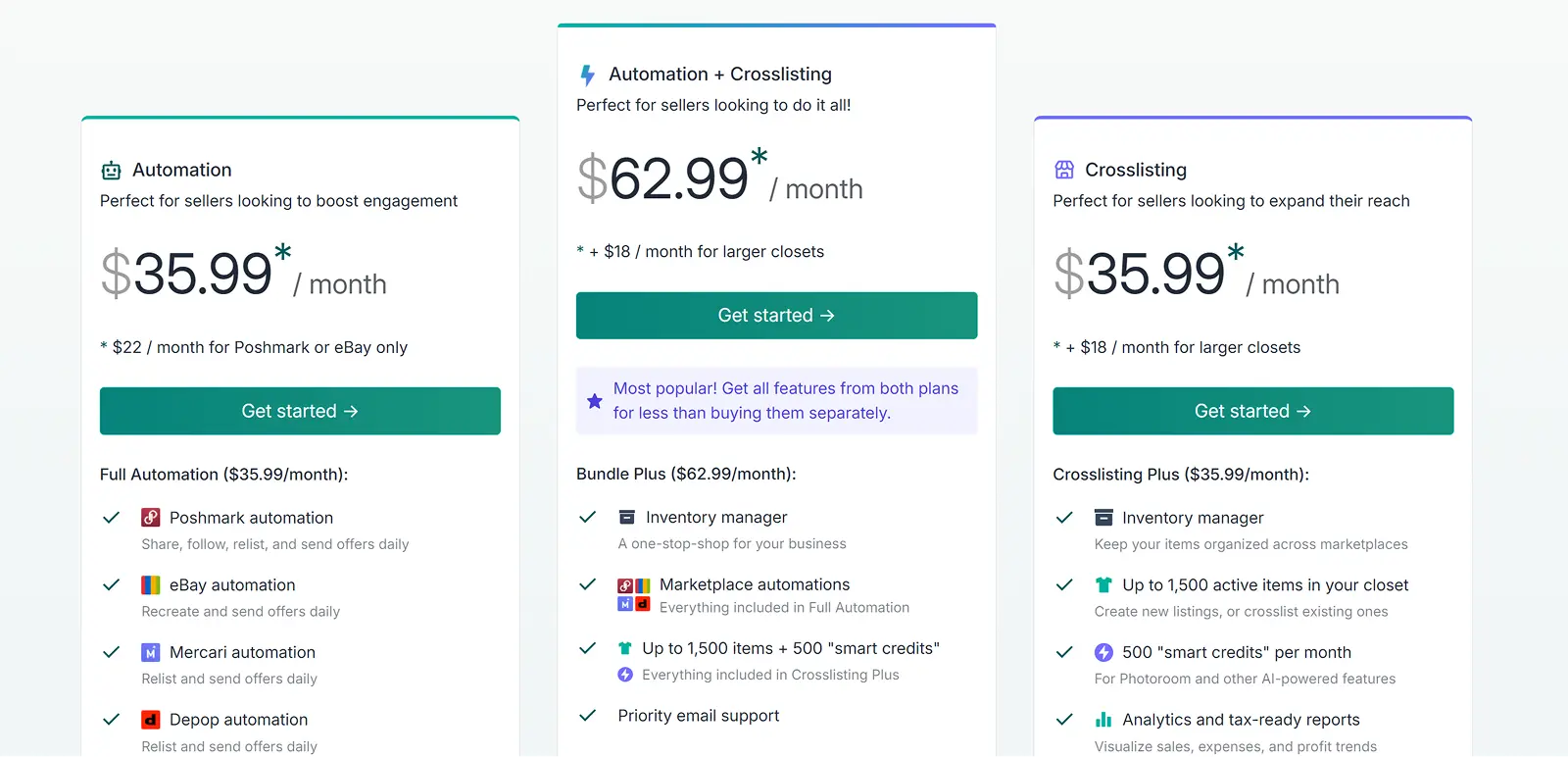
Here, we will focus on the subscription plans that have the cross listing functionality alone.
Nifty’s cross listing plan
Starts at $39.99/month for the Cross Listing Plus, going up to $59.99/month for the Cross Listing Pro plan.
Cross listing plus plan
The Cross Listing Plus plan is the cheapest plan available if you need listing creation and cross listing functionality. Here’s what this plan gets you:
Support for 6 marketplaces: eBay, Etsy, Depop, Whatnot, Mercari, and Poshmark.
Common listing form with marketplace-specific sub-sections: Nifty has a single listing form for all the marketplaces, with a “common” listing details area at the top, followed by marketplace-specific listing detail areas below.
Once you open the form, you’ll have to select the marketplaces you want to post to and enter all the listing attributes in the common area.
Nifty automatically populates these details under the marketplace-specific sub-areas.
However, you should still review and add any missing details (such as eBay’s store categories).
Once you review and give the go-ahead, publish the listing and Nifty will post it to all the selected marketplaces.
AI-powered listing creation: Nifty lets you create listing descriptions using AI by capturing all the product details from the product photos you upload.
Nifty’s AI will create the title, description, tags, and so on — you’ll just have to add the price for your products.
Bulk actions: Nifty lets you carry out certain bulk actions across a maximum of 25 listings.
The listings you select should be on the same page; you can’t select listings across different pages for bulk actions.
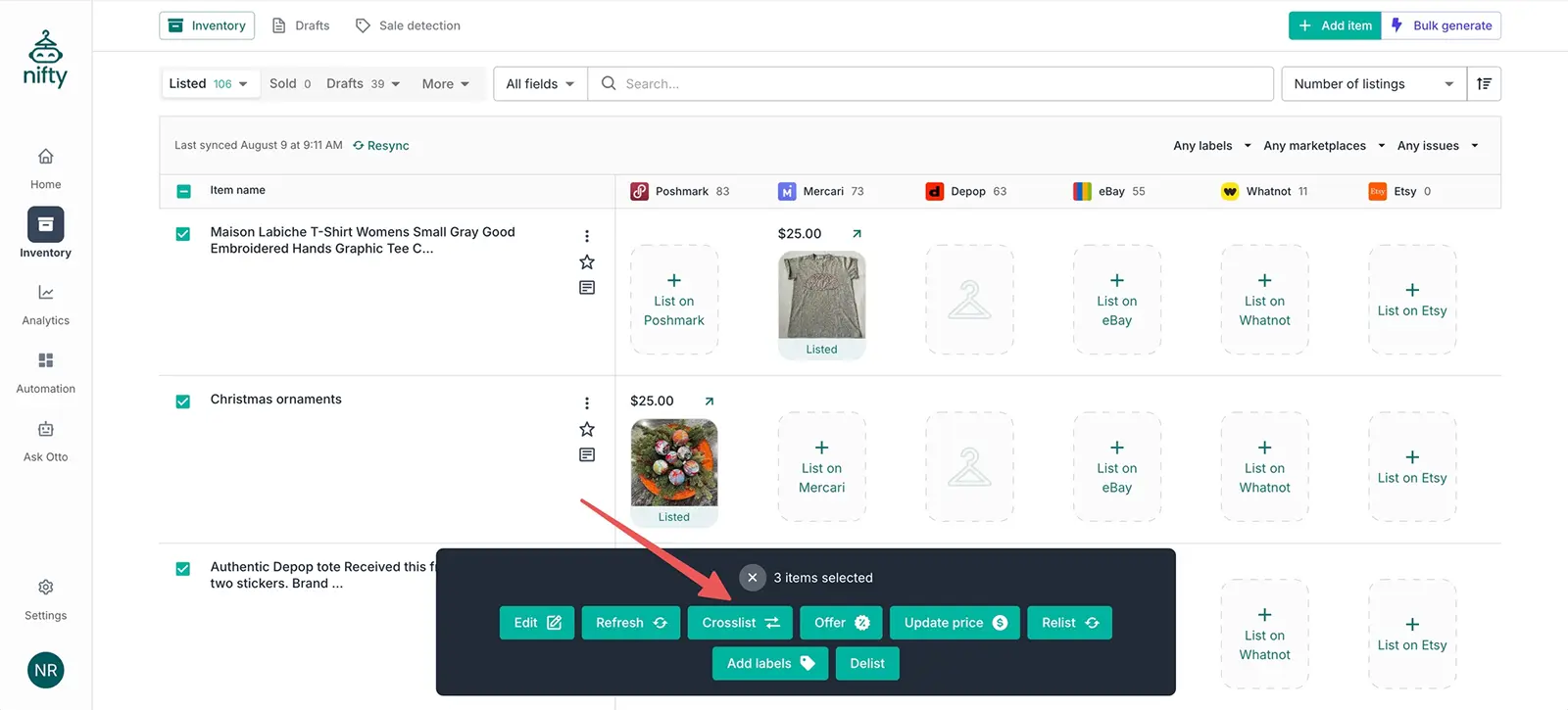
These actions include:
Bulk editing (but only for the shared product attributes across all marketplaces)
Bulk cross listing
Bulk delist and relist
Bulk updation of prices
Bulk application of inventory labels
Bulk refresh of products to bring in the latest marketplace data
Bulk verify
Bulk send offers
Bulk generate, where you add a bunch of photos to Nifty, and the cross listing tool turns those photos into incomplete drafts for you to work on later
Autodelist: When you make a sale, Nifty automatically detects the sale (within 15 minutes), and autodelists the product from the other connected marketplaces (if it was a single-quantity item) to prevent overselling.
For multi-quantity items, Nifty will simply adjust the quantity levels (i.e. bring it down from 3 to 2) after a sale.
Analytics: Nifty has an analytics tab that tracks your sales and turns it into data.

Source: Nifty
You get a detailed profit/loss analysis that’s calculated based on your sale price minus any expenses (such as marketplace fees, shipping, promotion fees, and so on).
The cross listing tool also gives you insights on your sales performance in the form of charts.
Photo editing and background removal: Nifty photo editing features are split into two types: manual editing tools, and AI-powered editing tools.

Source: Nifty
The manual editing tools let you crop, rotate, fine-tune, annotate, redact sensitive information, add frames, and add filters.
You can apply these edits only to one photo at a time.
The AI-powered editing features (powered by Photoroom) include the ability to remove photo backgrounds (and add a neutral color as the backdrop), and add mannequins, flatlays, and shadows.
You can also create an image of a virtual model wearing your products.
The AI edits can be applied to several photos at once.
Ability to set pricing rules: Nifty lets you set different prices for different marketplaces by way of pricing rules.
This helps you stay competitive on all marketplaces while taking the varying fees and pricing trends into account.
You’ll have to choose a primary marketplace, say Mercari, where you’ll set the price for each item.
Now, you’ll have to add pricing rules relative to your primary marketplace for every other platform.
Nifty will automatically set the prices for those marketplaces based on your rules.
Here are the pricing rules you can set:
Match the primary marketplace’s price: This will keep your prices equal across all of your connected marketplaces
Increase/ decrease the prices (either by an absolute value, i.e. $10, or by a percentage, such as 10%)
Set a price ending, i.e. always end prices in $0.49
Schedule listing drafts: If you aren’t ready to post your listings just yet, you can schedule them for later through Nifty.
Maybe it’s a Monday, and you know that your sales are generally low during the start of the work-week, so you want to post your new listings on Friday evening instead.
Rather than be online on Friday, you can just schedule your listings to be posted automatically on Friday.
1,500 closet items and 500 smart credits: Nifty’s Cross Listing Plus plan only lets you hold 1,500 active items in your closet.
You can create new listings or import existing ones from elsewhere, but only till you reach the 1,500 item threshold.
The plan also gives you 500 “smart credits” per month. Smart credits are like digital coins that you use in exchange for Nifty’s AI features.
Here’s where you’ll be using smart credits (and how much):
AI listing generator: 1 credit per listing generation
Background removal: 1 credit per photo, so if you remove the backgrounds of 5 photos, that’s 5 credits
Bulk cross listing: 1 credit per item
Basic AI-powered edits: 1 credit per edit
Advanced AI-powered edits: 5 credits per edit
Once your monthly credits end, you won’t be able to use any of the above AI features.
You’ll either have to wait for the next billing cycle to start and your smart credits to get renewed, or you can purchase more credits for an additional fee.
200 smart credits are $5. These smart credits are separate from the monthly credits, and expire only after 90 days.
Cross listing pro plan
This plan is the same as the cross listing plus, except it comes with a higher price tag and is geared for larger closets. The only differences are that this pro plan:
Lets you hold more than 1,500 active items in your Nifty closet
Gives you a total of 1,000 smart credits per month
Nifty’s automation + cross listing plans
These plans combine the cross listing functionalities with Nifty’s automation features for a comprehensive kit. Starts at $69.99/month and goes up to $89.99/month.
Bundle plus plan
This plan includes everything that you get under the cross listing plus plan + everything you get under the automation plan.
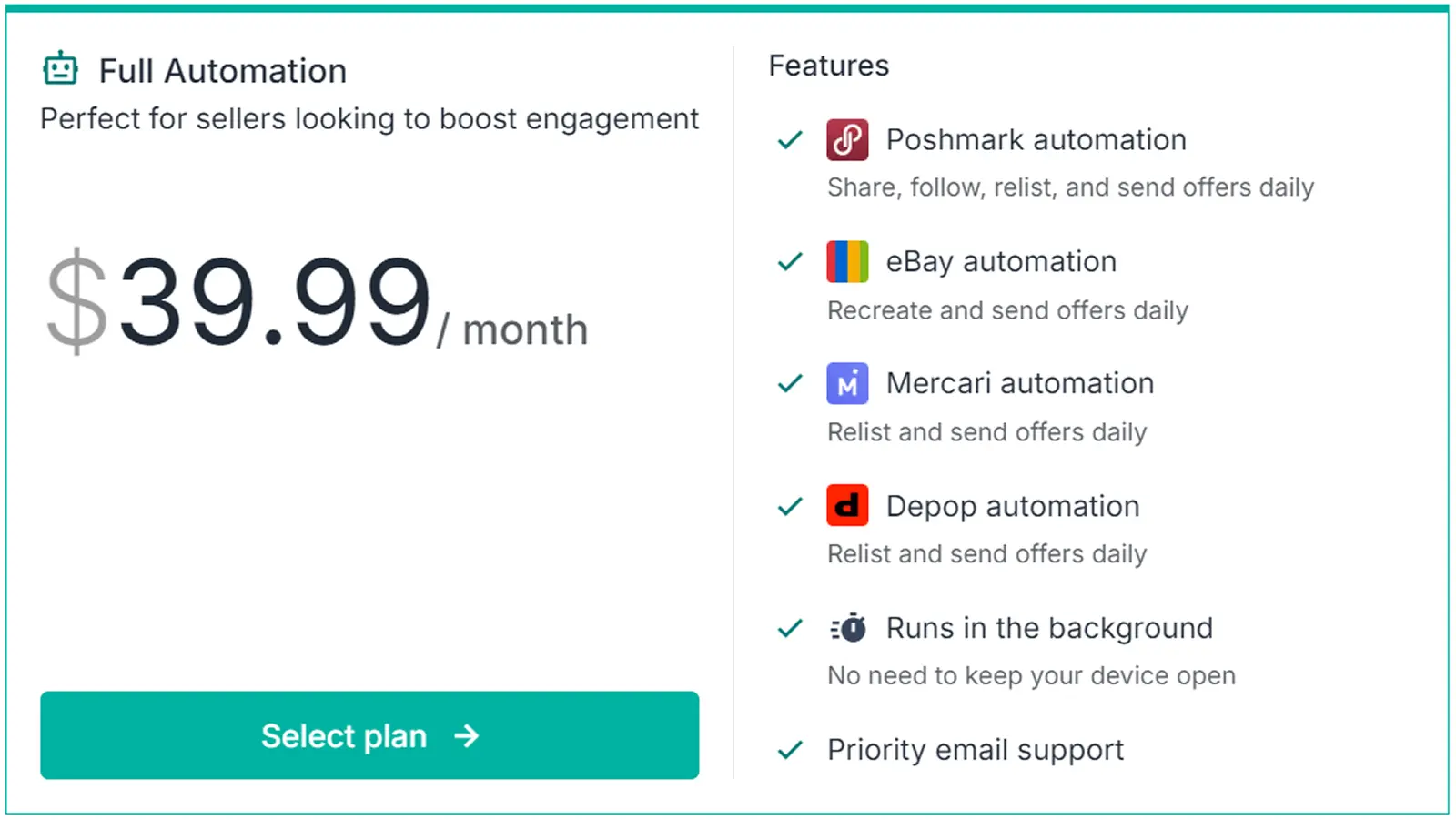
The automation plan works for 4 marketplaces, namely Poshmark, eBay, Mercari, and Depop.
It’s basically a bunch of automation bots that relist your closet and automatically send offers to anybody who likes your listings or follows you.
Bundle pro plan
This plan covers everything you get in bundle plus, with just a little bit extra.
The only difference (again) is that you can have more than 1,500 items in your closet, and get 1,000 smart credits at your disposal.
Nifty free trial
Nifty offers a 7-day free trial so that you can check out the features.
You get a total of 50 smart credits at your disposal during this trial, so you can get a feel of how well the AI features work as well.
Nifty limitations: What features does Nifty lack?
While Nifty does have some attractive features, here’s its biggest flaw: the hefty Nifty cost.
Even the lowest Nifty pricing, at $39.99/month, offers a big barrier for small or budget-conscious resellers.
Not to mention the ones that are just starting out, and can’t invest that much in a tool.
And the highest priced tier, at $89.99/month, will be far too expensive even for serious sellers with a large volume of products.
Nifty’s features simply do not justify these high costs, especially because of the cons we’ll discuss below.
Limited marketplace support: Nifty only supports 6 marketplaces, with a few major players such as Shopify, Facebook Marketplace, and WooCommerce missing in action.
With these marketplaces taking up a huge slice of the e-commerce pie (Shopify alone makes up for 29% of U.S. e-commerce share!), this is quite a big flaw.
So, sellers who also sell on one of these unsupported marketplaces either cannot use Nifty at all, or will have to do everything manually on the other marketplace(s).
Very little closet space: Capping your closet to a measly 1,500 active listings is certainly a choice. One that’s very limiting.
Even a mid-range seller (in terms of product volume) will easily cross this threshold, which means you’re basically forced to upgrade to the more expensive cross listing pro plan.
Even for this plan, it’s not clear what the maximum cap is for active listings.
Not enough smart credits: Let’s be honest. 500, or even 1,000 smart credits aren’t going to get you very far, especially since you need them for pretty much every AI functionality.
Here’s some simple math. Let’s say you list a new item and upload 7 photos. You remove the backgrounds for these photos = 7 credits.
Now, you make 4 basic edits (which is free), and 1 advanced edit, which equals 5 more credits.
You’ve spent a total of 17 smart credits on one listing alone! Don’t forget that you need these credits to cross list in bulk as well.
The bottom line is that if you’re anything more than a hobbyist seller, these smart credits can get used up fast.
And when that happens, you’ll need to spend even more money to purchase more of them.
No mobile app: Nifty doesn’t have a native mobile app. However, you can add a shortcut of the website to your phone or tablet.
But, you might see some limitations in the features.
Nifty review: Verdict
Nifty might have some great features, but the high Nifty cost is a major flaw, as are the limited marketplace integrations and restricted closet space.
If you’re willing to invest close to $100 per month, you might find the tool useful if you’re looking for an all-in-one app that has both cross listing and automation features.
Who isNifty not for? Those who sell on more than the 6 supported marketplaces, people who need unlimited closet space, and resellers on a budget.
Best Nifty alternative: Crosslist
If Nifty’s high cost, as well as the features it lacks, are something you can’t compromise on, we present to you the best alternative: Crosslist.
Not only is this cross listing app more affordable, it also has more intuitive features when compared to Nifty.
Let’s dive into Crosslist’s pricing, including all the features you get access to.
How much does Crosslist cost?
Unlike Nifty’s pricing plans, which can be a little confusing, Crosslist gives you 4 straightforward subscription plans. Crosslist’s pricing ranges from just $29.99/month to $44.99/month.
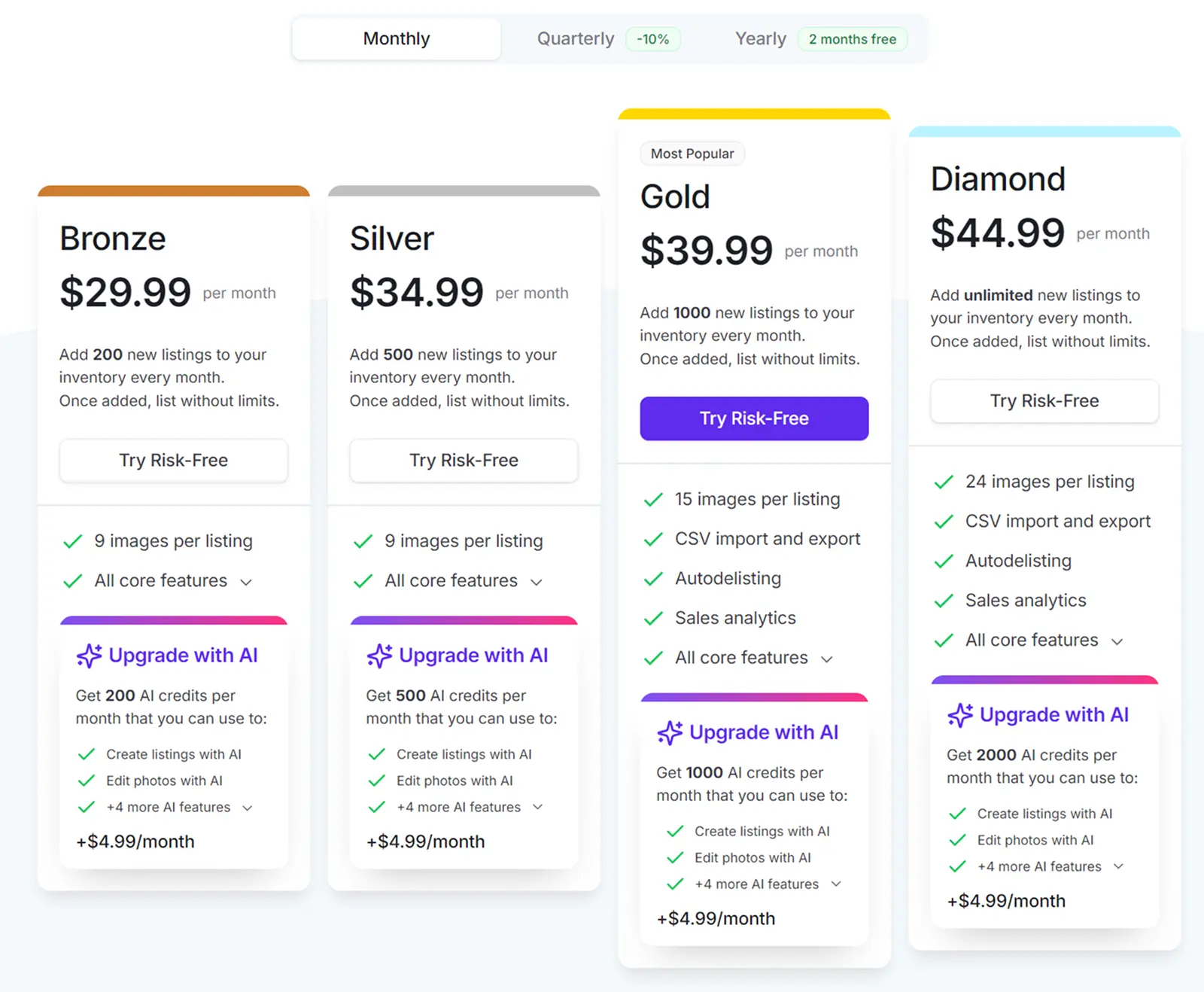
Each plan differs from the others in terms of:
The maximum number of listings you can create per month (note that this is different from the maximum number of active items you can hold in your closet. Crosslist doesn’t put any restrictions on closet space)
The total number of high-resolution images you can add and store per listing
The number of AI credits you get per month
Here’s how much Crosslist costs:
Plan | Price | New listings you can create per month | Number of images you can store per listing |
Bronze | $29.99 | 200 | 9 |
Silver | $34.99 | 500 | 9 |
Gold | $39.99 | 1000 | 15 |
Diamond | $44.99 | Unlimited | 24 |
If you want to save even more money, Crosslist’s annual subscription plans give you a total of 2 months free!
Here’s how much they cost:
Plan | Price per month | New listings you can create per month | Number of images you can store per listing | Amount saved per year |
Bronze | $24.99 | 200 | 9 | $60 |
Silver | $28.99 | 500 | 9 | $72 |
Gold | $32.99 | 1000 | 15 | $84 |
Diamond | $36.99 | Unlimited | 24 | $96 |
If you don’t want to lock in your subscription for an entire year, but still need something more affordable than the monthly plans, we’ve got you with our quarterly subscription plans.
You’ll save a total of 10% when you bill quarterly.
Here’s how much the quarterly plans cost:
Plan | Price per month | New listings you can create per month | Number of images you can store per listing | Amount saved per quarter |
Bronze | $26.99 | 200 | 9 | $9 |
Silver | $31.49 | 500 | 9 | $10.5 |
Gold | $35.99 | 1000 | 15 | $12 |
Diamond | $40.49 | Unlimited | 24 | $13.5 |
AI add-on
Crosslist has an AI add-on that costs a flat fee of $4.99/month, no matter which subscription plan (or billing option) you choose.
Each plan gives you a different number of AI credits that you can use in exchange for Crosslist’s AI functionalities (more on this later).
Here’s the lowdown on the number of AI credits you receive each month:
Plan | Number of AI credits per month |
Bronze | 200 |
Silver | 500 |
Gold | 1,000 |
Diamond | 2,000 |
Crosslist free trial
Crosslist has a 3-day money-back guarantee, but only as long as you’ve created 20 listings or fewer.
Crosslist vs. Nifty pricing: It’s clear that, at every stage, Crosslist beats Nifty in terms of being affordable. Even the most expensive Crosslist plans are on par with Nifty’s starting prices.
Not only that, Crosslist also offers all the features that you can find in Nifty, along with some extra ones. We’ll discuss those below.
What features does Crosslist provide for its price?
Every single one of Crosslist’s subscriptions gives you these core features:
11+ supported marketplaces: This includes all the 6 marketplaces supported by Nifty, along with Shopify, Facebook Marketplace, WooCommerce, Grailed and TikTok Shop.
So, if you run your own e-commerce store via Shopify while also selling on a few other marketplaces, Crosslist lets you easily add and cross list your inventory everywhere in one go.
Single, dynamic listing form: Like Nifty, Crosslist also has a single universal listing form.
However, unlike Nifty, it doesn’t have separate sub-sections for each marketplace.
On Crosslist, you also don’t need to review the details for each marketplace, nor will you have to enter any missing details.
Crosslist’s listing form works by having you select all the marketplaces you want to post to. Then, the form will show all the field attributes needed by the selected marketplaces.
You fill it up once, and you’re all set. Our cross listing tool will capture the relevant details from the single form.
Auto posting of your listings: Once you fill out the listing form and hit that submit button, your job is done.
Crosslist will automatically publish the listings to the relevant marketplaces.
You can continue working on your device while Crosslist does its job in the background.
AI-generated listings (including AI-suggested optimal prices): Like Nifty, Crosslist also lets you generate entire listings from scratch using just your product photos as a starting point.
The AI tool generates all the details, including title, description, brand, color, condition, and whether the item comes with tags or not.
But, the way in which Crosslist’s AI tool is superior to that of Nifty’s is that Crosslist’s AI also gives you optimal pricing suggestions for your products based on market trends.
This saves you hours of research, letting you create publish-ready listings within a few minutes.
📝 Note: Each time you generate a description with AI, you use 1 credit.
Bulk actions: You can save more time on Crosslist by carrying out the following bulk actions:
Cross listing
Deleting
Editing listings (these edits will be automatically reflected in your live listings)
Delisting and relisting
Setting different prices for marketplaces
Clone
Setting different prices for different marketplaces: On Crosslist, you can either:
i) Choose a specific listing and price it differently for each marketplace
ii) Increase or decrease the prices for all of your listings across a specific marketplace — either by a percentage or an absolute dollar amount
To do this, go to Account Settings → Price markup. Enter a positive (or negative, to decrease the price) percentage or number, and you’re all set!
Autodelisting: Like Nifty, Crosslist also automatically detects sales across your connected marketplaces and autodelists the items from the other marketplaces.
Unlike Nifty, though, Crosslist doesn’t have a 15-minute window for this, so the sale detection and autodelisting happens quicker.
📝 Note: For some marketplaces, you need to have your browser extension on for the autodelist to work.
Mobile app: Crosslist has a fully-functional mobile app that works the same way as the desktop extension.
So, you can create listings as you pick up great finds at garage sales, delist and relist during long car rides, or check in on your online reselling business right from your mobile without being dependent on desktop workflows.
Advanced image editor: Crosslist has a state of the art image editor with all the usual features: crop, rotate, blur, annotate, add filters, etc.
The cross listing tool also automatically resizes your product photos (without cutting any details off) to fit the marketplace requirements.
Additionally, Crosslist also has AI-powered editing features (powered by Nano Banana) that let you add mannequins to your product photos, create shadows and depth, and enhance it to look like professional-grade pictures.
You can also generate your own images using Crosslist’s AI editor.
📝 Note: Editing your photos with AI consumes 2 AI credits per request. Generating images with AI also takes 2 AI credits per request.
Poshmark automation tool: Unlike Nifty, where you’ll have to pay $25/month for a Poshmark automation tool, or go for one of the most expensive bundle plans.
Crosslist has a free Poshmark bot! Our Poshmark tool can be used by anyone (even if you don’t currently have a Crosslist subscription.)
This bot shares your Poshmark closet periodically, follows people back, and automatically sends offers to your likers, followers, and sharers.
Other features:
Multi-country support for the US, UK, AU, and CA. The cross listing tool automatically converts imperial to metric and vice versa
Ability to set up shipping profiles for each marketplace that will be automatically applied to new listings
Instant answers from the Crossly AI chatbot, plus a support team that replies within one business day
Nifty vs. Crosslist: Which cross listing tool offers more value for your money?
Before we dive into the verdict, here’s a side-by-side comparison of Nifty and Crosslist.
Features | Nifty | Crosslist |
Marketplaces supported | 6 | 11+ |
Listing form | Universal form + separate sub-sections each marketplace that may occasionally need missing details added | Single dynamic listing form with all attributes supported |
Auto posting | ✅ | ✅ |
Free trial | 7 days | 3-day money-back guarantee if you’ve created 20 or fewer listings |
Price | Starts at $39.99/month | Starts at $29.99/month |
Bulk actions | ✅ | ✅ |
AI-generated listings | ✅ | ✅ |
Pricing suggestions | ✅ | ✅ |
Autodelisting | ✅ | ✅ |
Background removal | ✅ | ✅ |
Photo editing tool | ✅ | ✅ |
Mobile app | ❌ | ✅ |
Multi-country support | U.S., UK, CA, and AU | U.S., UK, CA, and AU |
Default shipping preferences | ✅ | ✅ |
Inventory management | ✅ | ✅ |
Have unlimited active listings | ❌ | ✅ |
Final verdict: Crosslist is definitely the clear winner, primarily because it has all the features offered by Nifty at a more affordable price tag.
Nifty not only costs a lot more, but is also missing some essential features, making your listing process harder.
Put your listing process on true autopilot with Crosslist, the only cross listing app that offers great value for the price. Try risk-free now.
Sure, the most important thing to look for in a cross listing tool is its suite of features (including how much it automates the listing process).
But, something else that’s equally important is cost. Because, what use is a tool unless it’s accessible to you?
So, the better question to ask when choosing a cross listing app is this: does this tool give me the best possible features at a reasonable price?
With this question in mind, today, we dive deep into Nifty’s pricing models to see what the tool offers at various price points, and whether it’s worth it.
We also compare Nifty AI with Crosslist to see which tool offers the most bang for your buck.
Key takeaways:
Nifty has 3 different pricing plans, with cross listing functionality costing anywhere from $39.99/month to $89.99/month.
While Nifty does boast some attractive features, its main limitations are its hefty price tag, limited marketplace support, and very little closet space.
Crosslist is the #1 Nifty alternative, giving you all the features available in Nifty and then some, all for a very affordable price.
Nifty cost: What do you get for the money?
Nifty has three different monthly pricing plans, one for cross listing alone, one for closet automation alone, and another that combines cross listing + automation.
Here, we will focus on the subscription plans that have the cross listing functionality alone.
Nifty’s cross listing plan
Starts at $39.99/month for the Cross Listing Plus, going up to $59.99/month for the Cross Listing Pro plan.
Cross listing plus plan
The Cross Listing Plus plan is the cheapest plan available if you need listing creation and cross listing functionality. Here’s what this plan gets you:
Support for 6 marketplaces: eBay, Etsy, Depop, Whatnot, Mercari, and Poshmark.
Common listing form with marketplace-specific sub-sections: Nifty has a single listing form for all the marketplaces, with a “common” listing details area at the top, followed by marketplace-specific listing detail areas below.
Once you open the form, you’ll have to select the marketplaces you want to post to and enter all the listing attributes in the common area.
Nifty automatically populates these details under the marketplace-specific sub-areas.
However, you should still review and add any missing details (such as eBay’s store categories).
Once you review and give the go-ahead, publish the listing and Nifty will post it to all the selected marketplaces.
AI-powered listing creation: Nifty lets you create listing descriptions using AI by capturing all the product details from the product photos you upload.
Nifty’s AI will create the title, description, tags, and so on — you’ll just have to add the price for your products.
Bulk actions: Nifty lets you carry out certain bulk actions across a maximum of 25 listings.
The listings you select should be on the same page; you can’t select listings across different pages for bulk actions.
These actions include:
Bulk editing (but only for the shared product attributes across all marketplaces)
Bulk cross listing
Bulk delist and relist
Bulk updation of prices
Bulk application of inventory labels
Bulk refresh of products to bring in the latest marketplace data
Bulk verify
Bulk send offers
Bulk generate, where you add a bunch of photos to Nifty, and the cross listing tool turns those photos into incomplete drafts for you to work on later
Autodelist: When you make a sale, Nifty automatically detects the sale (within 15 minutes), and autodelists the product from the other connected marketplaces (if it was a single-quantity item) to prevent overselling.
For multi-quantity items, Nifty will simply adjust the quantity levels (i.e. bring it down from 3 to 2) after a sale.
Analytics: Nifty has an analytics tab that tracks your sales and turns it into data.
Source: Nifty
You get a detailed profit/loss analysis that’s calculated based on your sale price minus any expenses (such as marketplace fees, shipping, promotion fees, and so on).
The cross listing tool also gives you insights on your sales performance in the form of charts.
Photo editing and background removal: Nifty photo editing features are split into two types: manual editing tools, and AI-powered editing tools.
Source: Nifty
The manual editing tools let you crop, rotate, fine-tune, annotate, redact sensitive information, add frames, and add filters.
You can apply these edits only to one photo at a time.
The AI-powered editing features (powered by Photoroom) include the ability to remove photo backgrounds (and add a neutral color as the backdrop), and add mannequins, flatlays, and shadows.
You can also create an image of a virtual model wearing your products.
The AI edits can be applied to several photos at once.
Ability to set pricing rules: Nifty lets you set different prices for different marketplaces by way of pricing rules.
This helps you stay competitive on all marketplaces while taking the varying fees and pricing trends into account.
You’ll have to choose a primary marketplace, say Mercari, where you’ll set the price for each item.
Now, you’ll have to add pricing rules relative to your primary marketplace for every other platform.
Nifty will automatically set the prices for those marketplaces based on your rules.
Here are the pricing rules you can set:
Match the primary marketplace’s price: This will keep your prices equal across all of your connected marketplaces
Increase/ decrease the prices (either by an absolute value, i.e. $10, or by a percentage, such as 10%)
Set a price ending, i.e. always end prices in $0.49
Schedule listing drafts: If you aren’t ready to post your listings just yet, you can schedule them for later through Nifty.
Maybe it’s a Monday, and you know that your sales are generally low during the start of the work-week, so you want to post your new listings on Friday evening instead.
Rather than be online on Friday, you can just schedule your listings to be posted automatically on Friday.
1,500 closet items and 500 smart credits: Nifty’s Cross Listing Plus plan only lets you hold 1,500 active items in your closet.
You can create new listings or import existing ones from elsewhere, but only till you reach the 1,500 item threshold.
The plan also gives you 500 “smart credits” per month. Smart credits are like digital coins that you use in exchange for Nifty’s AI features.
Here’s where you’ll be using smart credits (and how much):
AI listing generator: 1 credit per listing generation
Background removal: 1 credit per photo, so if you remove the backgrounds of 5 photos, that’s 5 credits
Bulk cross listing: 1 credit per item
Basic AI-powered edits: 1 credit per edit
Advanced AI-powered edits: 5 credits per edit
Once your monthly credits end, you won’t be able to use any of the above AI features.
You’ll either have to wait for the next billing cycle to start and your smart credits to get renewed, or you can purchase more credits for an additional fee.
200 smart credits are $5. These smart credits are separate from the monthly credits, and expire only after 90 days.
Cross listing pro plan
This plan is the same as the cross listing plus, except it comes with a higher price tag and is geared for larger closets. The only differences are that this pro plan:
Lets you hold more than 1,500 active items in your Nifty closet
Gives you a total of 1,000 smart credits per month
Nifty’s automation + cross listing plans
These plans combine the cross listing functionalities with Nifty’s automation features for a comprehensive kit. Starts at $69.99/month and goes up to $89.99/month.
Bundle plus plan
This plan includes everything that you get under the cross listing plus plan + everything you get under the automation plan.
The automation plan works for 4 marketplaces, namely Poshmark, eBay, Mercari, and Depop.
It’s basically a bunch of automation bots that relist your closet and automatically send offers to anybody who likes your listings or follows you.
Bundle pro plan
This plan covers everything you get in bundle plus, with just a little bit extra.
The only difference (again) is that you can have more than 1,500 items in your closet, and get 1,000 smart credits at your disposal.
Nifty free trial
Nifty offers a 7-day free trial so that you can check out the features.
You get a total of 50 smart credits at your disposal during this trial, so you can get a feel of how well the AI features work as well.
Nifty limitations: What features does Nifty lack?
While Nifty does have some attractive features, here’s its biggest flaw: the hefty Nifty cost.
Even the lowest Nifty pricing, at $39.99/month, offers a big barrier for small or budget-conscious resellers.
Not to mention the ones that are just starting out, and can’t invest that much in a tool.
And the highest priced tier, at $89.99/month, will be far too expensive even for serious sellers with a large volume of products.
Nifty’s features simply do not justify these high costs, especially because of the cons we’ll discuss below.
Limited marketplace support: Nifty only supports 6 marketplaces, with a few major players such as Shopify, Facebook Marketplace, and WooCommerce missing in action.
With these marketplaces taking up a huge slice of the e-commerce pie (Shopify alone makes up for 29% of U.S. e-commerce share!), this is quite a big flaw.
So, sellers who also sell on one of these unsupported marketplaces either cannot use Nifty at all, or will have to do everything manually on the other marketplace(s).
Very little closet space: Capping your closet to a measly 1,500 active listings is certainly a choice. One that’s very limiting.
Even a mid-range seller (in terms of product volume) will easily cross this threshold, which means you’re basically forced to upgrade to the more expensive cross listing pro plan.
Even for this plan, it’s not clear what the maximum cap is for active listings.
Not enough smart credits: Let’s be honest. 500, or even 1,000 smart credits aren’t going to get you very far, especially since you need them for pretty much every AI functionality.
Here’s some simple math. Let’s say you list a new item and upload 7 photos. You remove the backgrounds for these photos = 7 credits.
Now, you make 4 basic edits (which is free), and 1 advanced edit, which equals 5 more credits.
You’ve spent a total of 17 smart credits on one listing alone! Don’t forget that you need these credits to cross list in bulk as well.
The bottom line is that if you’re anything more than a hobbyist seller, these smart credits can get used up fast.
And when that happens, you’ll need to spend even more money to purchase more of them.
No mobile app: Nifty doesn’t have a native mobile app. However, you can add a shortcut of the website to your phone or tablet.
But, you might see some limitations in the features.
Nifty review: Verdict
Nifty might have some great features, but the high Nifty cost is a major flaw, as are the limited marketplace integrations and restricted closet space.
If you’re willing to invest close to $100 per month, you might find the tool useful if you’re looking for an all-in-one app that has both cross listing and automation features.
Who isNifty not for? Those who sell on more than the 6 supported marketplaces, people who need unlimited closet space, and resellers on a budget.
Best Nifty alternative: Crosslist
If Nifty’s high cost, as well as the features it lacks, are something you can’t compromise on, we present to you the best alternative: Crosslist.
Not only is this cross listing app more affordable, it also has more intuitive features when compared to Nifty.
Let’s dive into Crosslist’s pricing, including all the features you get access to.
How much does Crosslist cost?
Unlike Nifty’s pricing plans, which can be a little confusing, Crosslist gives you 4 straightforward subscription plans. Crosslist’s pricing ranges from just $29.99/month to $44.99/month.
Each plan differs from the others in terms of:
The maximum number of listings you can create per month (note that this is different from the maximum number of active items you can hold in your closet. Crosslist doesn’t put any restrictions on closet space)
The total number of high-resolution images you can add and store per listing
The number of AI credits you get per month
Here’s how much Crosslist costs:
Plan | Price | New listings you can create per month | Number of images you can store per listing |
Bronze | $29.99 | 200 | 9 |
Silver | $34.99 | 500 | 9 |
Gold | $39.99 | 1000 | 15 |
Diamond | $44.99 | Unlimited | 24 |
If you want to save even more money, Crosslist’s annual subscription plans give you a total of 2 months free!
Here’s how much they cost:
Plan | Price per month | New listings you can create per month | Number of images you can store per listing | Amount saved per year |
Bronze | $24.99 | 200 | 9 | $60 |
Silver | $28.99 | 500 | 9 | $72 |
Gold | $32.99 | 1000 | 15 | $84 |
Diamond | $36.99 | Unlimited | 24 | $96 |
If you don’t want to lock in your subscription for an entire year, but still need something more affordable than the monthly plans, we’ve got you with our quarterly subscription plans.
You’ll save a total of 10% when you bill quarterly.
Here’s how much the quarterly plans cost:
Plan | Price per month | New listings you can create per month | Number of images you can store per listing | Amount saved per quarter |
Bronze | $26.99 | 200 | 9 | $9 |
Silver | $31.49 | 500 | 9 | $10.5 |
Gold | $35.99 | 1000 | 15 | $12 |
Diamond | $40.49 | Unlimited | 24 | $13.5 |
AI add-on
Crosslist has an AI add-on that costs a flat fee of $4.99/month, no matter which subscription plan (or billing option) you choose.
Each plan gives you a different number of AI credits that you can use in exchange for Crosslist’s AI functionalities (more on this later).
Here’s the lowdown on the number of AI credits you receive each month:
Plan | Number of AI credits per month |
Bronze | 200 |
Silver | 500 |
Gold | 1,000 |
Diamond | 2,000 |
Crosslist free trial
Crosslist has a 3-day money-back guarantee, but only as long as you’ve created 20 listings or fewer.
Crosslist vs. Nifty pricing: It’s clear that, at every stage, Crosslist beats Nifty in terms of being affordable. Even the most expensive Crosslist plans are on par with Nifty’s starting prices.
Not only that, Crosslist also offers all the features that you can find in Nifty, along with some extra ones. We’ll discuss those below.
What features does Crosslist provide for its price?
Every single one of Crosslist’s subscriptions gives you these core features:
11+ supported marketplaces: This includes all the 6 marketplaces supported by Nifty, along with Shopify, Facebook Marketplace, WooCommerce, Grailed and TikTok Shop.
So, if you run your own e-commerce store via Shopify while also selling on a few other marketplaces, Crosslist lets you easily add and cross list your inventory everywhere in one go.
Single, dynamic listing form: Like Nifty, Crosslist also has a single universal listing form.
However, unlike Nifty, it doesn’t have separate sub-sections for each marketplace.
On Crosslist, you also don’t need to review the details for each marketplace, nor will you have to enter any missing details.
Crosslist’s listing form works by having you select all the marketplaces you want to post to. Then, the form will show all the field attributes needed by the selected marketplaces.
You fill it up once, and you’re all set. Our cross listing tool will capture the relevant details from the single form.
Auto posting of your listings: Once you fill out the listing form and hit that submit button, your job is done.
Crosslist will automatically publish the listings to the relevant marketplaces.
You can continue working on your device while Crosslist does its job in the background.
AI-generated listings (including AI-suggested optimal prices): Like Nifty, Crosslist also lets you generate entire listings from scratch using just your product photos as a starting point.
The AI tool generates all the details, including title, description, brand, color, condition, and whether the item comes with tags or not.
But, the way in which Crosslist’s AI tool is superior to that of Nifty’s is that Crosslist’s AI also gives you optimal pricing suggestions for your products based on market trends.
This saves you hours of research, letting you create publish-ready listings within a few minutes.
📝 Note: Each time you generate a description with AI, you use 1 credit.
Bulk actions: You can save more time on Crosslist by carrying out the following bulk actions:
Cross listing
Deleting
Editing listings (these edits will be automatically reflected in your live listings)
Delisting and relisting
Setting different prices for marketplaces
Clone
Setting different prices for different marketplaces: On Crosslist, you can either:
i) Choose a specific listing and price it differently for each marketplace
ii) Increase or decrease the prices for all of your listings across a specific marketplace — either by a percentage or an absolute dollar amount
To do this, go to Account Settings → Price markup. Enter a positive (or negative, to decrease the price) percentage or number, and you’re all set!
Autodelisting: Like Nifty, Crosslist also automatically detects sales across your connected marketplaces and autodelists the items from the other marketplaces.
Unlike Nifty, though, Crosslist doesn’t have a 15-minute window for this, so the sale detection and autodelisting happens quicker.
📝 Note: For some marketplaces, you need to have your browser extension on for the autodelist to work.
Mobile app: Crosslist has a fully-functional mobile app that works the same way as the desktop extension.
So, you can create listings as you pick up great finds at garage sales, delist and relist during long car rides, or check in on your online reselling business right from your mobile without being dependent on desktop workflows.
Advanced image editor: Crosslist has a state of the art image editor with all the usual features: crop, rotate, blur, annotate, add filters, etc.
The cross listing tool also automatically resizes your product photos (without cutting any details off) to fit the marketplace requirements.
Additionally, Crosslist also has AI-powered editing features (powered by Nano Banana) that let you add mannequins to your product photos, create shadows and depth, and enhance it to look like professional-grade pictures.
You can also generate your own images using Crosslist’s AI editor.
📝 Note: Editing your photos with AI consumes 2 AI credits per request. Generating images with AI also takes 2 AI credits per request.
Poshmark automation tool: Unlike Nifty, where you’ll have to pay $25/month for a Poshmark automation tool, or go for one of the most expensive bundle plans.
Crosslist has a free Poshmark bot! Our Poshmark tool can be used by anyone (even if you don’t currently have a Crosslist subscription.)
This bot shares your Poshmark closet periodically, follows people back, and automatically sends offers to your likers, followers, and sharers.
Other features:
Multi-country support for the US, UK, AU, and CA. The cross listing tool automatically converts imperial to metric and vice versa
Ability to set up shipping profiles for each marketplace that will be automatically applied to new listings
Instant answers from the Crossly AI chatbot, plus a support team that replies within one business day
Nifty vs. Crosslist: Which cross listing tool offers more value for your money?
Before we dive into the verdict, here’s a side-by-side comparison of Nifty and Crosslist.
Features | Nifty | Crosslist |
Marketplaces supported | 6 | 11+ |
Listing form | Universal form + separate sub-sections each marketplace that may occasionally need missing details added | Single dynamic listing form with all attributes supported |
Auto posting | ✅ | ✅ |
Free trial | 7 days | 3-day money-back guarantee if you’ve created 20 or fewer listings |
Price | Starts at $39.99/month | Starts at $29.99/month |
Bulk actions | ✅ | ✅ |
AI-generated listings | ✅ | ✅ |
Pricing suggestions | ✅ | ✅ |
Autodelisting | ✅ | ✅ |
Background removal | ✅ | ✅ |
Photo editing tool | ✅ | ✅ |
Mobile app | ❌ | ✅ |
Multi-country support | U.S., UK, CA, and AU | U.S., UK, CA, and AU |
Default shipping preferences | ✅ | ✅ |
Inventory management | ✅ | ✅ |
Have unlimited active listings | ❌ | ✅ |
Final verdict: Crosslist is definitely the clear winner, primarily because it has all the features offered by Nifty at a more affordable price tag.
Nifty not only costs a lot more, but is also missing some essential features, making your listing process harder.
Put your listing process on true autopilot with Crosslist, the only cross listing app that offers great value for the price. Try risk-free now.
Sure, the most important thing to look for in a cross listing tool is its suite of features (including how much it automates the listing process).
But, something else that’s equally important is cost. Because, what use is a tool unless it’s accessible to you?
So, the better question to ask when choosing a cross listing app is this: does this tool give me the best possible features at a reasonable price?
With this question in mind, today, we dive deep into Nifty’s pricing models to see what the tool offers at various price points, and whether it’s worth it.
We also compare Nifty AI with Crosslist to see which tool offers the most bang for your buck.
Key takeaways:
Nifty has 3 different pricing plans, with cross listing functionality costing anywhere from $39.99/month to $89.99/month.
While Nifty does boast some attractive features, its main limitations are its hefty price tag, limited marketplace support, and very little closet space.
Crosslist is the #1 Nifty alternative, giving you all the features available in Nifty and then some, all for a very affordable price.
Nifty cost: What do you get for the money?
Nifty has three different monthly pricing plans, one for cross listing alone, one for closet automation alone, and another that combines cross listing + automation.
Here, we will focus on the subscription plans that have the cross listing functionality alone.
Nifty’s cross listing plan
Starts at $39.99/month for the Cross Listing Plus, going up to $59.99/month for the Cross Listing Pro plan.
Cross listing plus plan
The Cross Listing Plus plan is the cheapest plan available if you need listing creation and cross listing functionality. Here’s what this plan gets you:
Support for 6 marketplaces: eBay, Etsy, Depop, Whatnot, Mercari, and Poshmark.
Common listing form with marketplace-specific sub-sections: Nifty has a single listing form for all the marketplaces, with a “common” listing details area at the top, followed by marketplace-specific listing detail areas below.
Once you open the form, you’ll have to select the marketplaces you want to post to and enter all the listing attributes in the common area.
Nifty automatically populates these details under the marketplace-specific sub-areas.
However, you should still review and add any missing details (such as eBay’s store categories).
Once you review and give the go-ahead, publish the listing and Nifty will post it to all the selected marketplaces.
AI-powered listing creation: Nifty lets you create listing descriptions using AI by capturing all the product details from the product photos you upload.
Nifty’s AI will create the title, description, tags, and so on — you’ll just have to add the price for your products.
Bulk actions: Nifty lets you carry out certain bulk actions across a maximum of 25 listings.
The listings you select should be on the same page; you can’t select listings across different pages for bulk actions.
These actions include:
Bulk editing (but only for the shared product attributes across all marketplaces)
Bulk cross listing
Bulk delist and relist
Bulk updation of prices
Bulk application of inventory labels
Bulk refresh of products to bring in the latest marketplace data
Bulk verify
Bulk send offers
Bulk generate, where you add a bunch of photos to Nifty, and the cross listing tool turns those photos into incomplete drafts for you to work on later
Autodelist: When you make a sale, Nifty automatically detects the sale (within 15 minutes), and autodelists the product from the other connected marketplaces (if it was a single-quantity item) to prevent overselling.
For multi-quantity items, Nifty will simply adjust the quantity levels (i.e. bring it down from 3 to 2) after a sale.
Analytics: Nifty has an analytics tab that tracks your sales and turns it into data.
Source: Nifty
You get a detailed profit/loss analysis that’s calculated based on your sale price minus any expenses (such as marketplace fees, shipping, promotion fees, and so on).
The cross listing tool also gives you insights on your sales performance in the form of charts.
Photo editing and background removal: Nifty photo editing features are split into two types: manual editing tools, and AI-powered editing tools.
Source: Nifty
The manual editing tools let you crop, rotate, fine-tune, annotate, redact sensitive information, add frames, and add filters.
You can apply these edits only to one photo at a time.
The AI-powered editing features (powered by Photoroom) include the ability to remove photo backgrounds (and add a neutral color as the backdrop), and add mannequins, flatlays, and shadows.
You can also create an image of a virtual model wearing your products.
The AI edits can be applied to several photos at once.
Ability to set pricing rules: Nifty lets you set different prices for different marketplaces by way of pricing rules.
This helps you stay competitive on all marketplaces while taking the varying fees and pricing trends into account.
You’ll have to choose a primary marketplace, say Mercari, where you’ll set the price for each item.
Now, you’ll have to add pricing rules relative to your primary marketplace for every other platform.
Nifty will automatically set the prices for those marketplaces based on your rules.
Here are the pricing rules you can set:
Match the primary marketplace’s price: This will keep your prices equal across all of your connected marketplaces
Increase/ decrease the prices (either by an absolute value, i.e. $10, or by a percentage, such as 10%)
Set a price ending, i.e. always end prices in $0.49
Schedule listing drafts: If you aren’t ready to post your listings just yet, you can schedule them for later through Nifty.
Maybe it’s a Monday, and you know that your sales are generally low during the start of the work-week, so you want to post your new listings on Friday evening instead.
Rather than be online on Friday, you can just schedule your listings to be posted automatically on Friday.
1,500 closet items and 500 smart credits: Nifty’s Cross Listing Plus plan only lets you hold 1,500 active items in your closet.
You can create new listings or import existing ones from elsewhere, but only till you reach the 1,500 item threshold.
The plan also gives you 500 “smart credits” per month. Smart credits are like digital coins that you use in exchange for Nifty’s AI features.
Here’s where you’ll be using smart credits (and how much):
AI listing generator: 1 credit per listing generation
Background removal: 1 credit per photo, so if you remove the backgrounds of 5 photos, that’s 5 credits
Bulk cross listing: 1 credit per item
Basic AI-powered edits: 1 credit per edit
Advanced AI-powered edits: 5 credits per edit
Once your monthly credits end, you won’t be able to use any of the above AI features.
You’ll either have to wait for the next billing cycle to start and your smart credits to get renewed, or you can purchase more credits for an additional fee.
200 smart credits are $5. These smart credits are separate from the monthly credits, and expire only after 90 days.
Cross listing pro plan
This plan is the same as the cross listing plus, except it comes with a higher price tag and is geared for larger closets. The only differences are that this pro plan:
Lets you hold more than 1,500 active items in your Nifty closet
Gives you a total of 1,000 smart credits per month
Nifty’s automation + cross listing plans
These plans combine the cross listing functionalities with Nifty’s automation features for a comprehensive kit. Starts at $69.99/month and goes up to $89.99/month.
Bundle plus plan
This plan includes everything that you get under the cross listing plus plan + everything you get under the automation plan.
The automation plan works for 4 marketplaces, namely Poshmark, eBay, Mercari, and Depop.
It’s basically a bunch of automation bots that relist your closet and automatically send offers to anybody who likes your listings or follows you.
Bundle pro plan
This plan covers everything you get in bundle plus, with just a little bit extra.
The only difference (again) is that you can have more than 1,500 items in your closet, and get 1,000 smart credits at your disposal.
Nifty free trial
Nifty offers a 7-day free trial so that you can check out the features.
You get a total of 50 smart credits at your disposal during this trial, so you can get a feel of how well the AI features work as well.
Nifty limitations: What features does Nifty lack?
While Nifty does have some attractive features, here’s its biggest flaw: the hefty Nifty cost.
Even the lowest Nifty pricing, at $39.99/month, offers a big barrier for small or budget-conscious resellers.
Not to mention the ones that are just starting out, and can’t invest that much in a tool.
And the highest priced tier, at $89.99/month, will be far too expensive even for serious sellers with a large volume of products.
Nifty’s features simply do not justify these high costs, especially because of the cons we’ll discuss below.
Limited marketplace support: Nifty only supports 6 marketplaces, with a few major players such as Shopify, Facebook Marketplace, and WooCommerce missing in action.
With these marketplaces taking up a huge slice of the e-commerce pie (Shopify alone makes up for 29% of U.S. e-commerce share!), this is quite a big flaw.
So, sellers who also sell on one of these unsupported marketplaces either cannot use Nifty at all, or will have to do everything manually on the other marketplace(s).
Very little closet space: Capping your closet to a measly 1,500 active listings is certainly a choice. One that’s very limiting.
Even a mid-range seller (in terms of product volume) will easily cross this threshold, which means you’re basically forced to upgrade to the more expensive cross listing pro plan.
Even for this plan, it’s not clear what the maximum cap is for active listings.
Not enough smart credits: Let’s be honest. 500, or even 1,000 smart credits aren’t going to get you very far, especially since you need them for pretty much every AI functionality.
Here’s some simple math. Let’s say you list a new item and upload 7 photos. You remove the backgrounds for these photos = 7 credits.
Now, you make 4 basic edits (which is free), and 1 advanced edit, which equals 5 more credits.
You’ve spent a total of 17 smart credits on one listing alone! Don’t forget that you need these credits to cross list in bulk as well.
The bottom line is that if you’re anything more than a hobbyist seller, these smart credits can get used up fast.
And when that happens, you’ll need to spend even more money to purchase more of them.
No mobile app: Nifty doesn’t have a native mobile app. However, you can add a shortcut of the website to your phone or tablet.
But, you might see some limitations in the features.
Nifty review: Verdict
Nifty might have some great features, but the high Nifty cost is a major flaw, as are the limited marketplace integrations and restricted closet space.
If you’re willing to invest close to $100 per month, you might find the tool useful if you’re looking for an all-in-one app that has both cross listing and automation features.
Who isNifty not for? Those who sell on more than the 6 supported marketplaces, people who need unlimited closet space, and resellers on a budget.
Best Nifty alternative: Crosslist
If Nifty’s high cost, as well as the features it lacks, are something you can’t compromise on, we present to you the best alternative: Crosslist.
Not only is this cross listing app more affordable, it also has more intuitive features when compared to Nifty.
Let’s dive into Crosslist’s pricing, including all the features you get access to.
How much does Crosslist cost?
Unlike Nifty’s pricing plans, which can be a little confusing, Crosslist gives you 4 straightforward subscription plans. Crosslist’s pricing ranges from just $29.99/month to $44.99/month.
Each plan differs from the others in terms of:
The maximum number of listings you can create per month (note that this is different from the maximum number of active items you can hold in your closet. Crosslist doesn’t put any restrictions on closet space)
The total number of high-resolution images you can add and store per listing
The number of AI credits you get per month
Here’s how much Crosslist costs:
Plan | Price | New listings you can create per month | Number of images you can store per listing |
Bronze | $29.99 | 200 | 9 |
Silver | $34.99 | 500 | 9 |
Gold | $39.99 | 1000 | 15 |
Diamond | $44.99 | Unlimited | 24 |
If you want to save even more money, Crosslist’s annual subscription plans give you a total of 2 months free!
Here’s how much they cost:
Plan | Price per month | New listings you can create per month | Number of images you can store per listing | Amount saved per year |
Bronze | $24.99 | 200 | 9 | $60 |
Silver | $28.99 | 500 | 9 | $72 |
Gold | $32.99 | 1000 | 15 | $84 |
Diamond | $36.99 | Unlimited | 24 | $96 |
If you don’t want to lock in your subscription for an entire year, but still need something more affordable than the monthly plans, we’ve got you with our quarterly subscription plans.
You’ll save a total of 10% when you bill quarterly.
Here’s how much the quarterly plans cost:
Plan | Price per month | New listings you can create per month | Number of images you can store per listing | Amount saved per quarter |
Bronze | $26.99 | 200 | 9 | $9 |
Silver | $31.49 | 500 | 9 | $10.5 |
Gold | $35.99 | 1000 | 15 | $12 |
Diamond | $40.49 | Unlimited | 24 | $13.5 |
AI add-on
Crosslist has an AI add-on that costs a flat fee of $4.99/month, no matter which subscription plan (or billing option) you choose.
Each plan gives you a different number of AI credits that you can use in exchange for Crosslist’s AI functionalities (more on this later).
Here’s the lowdown on the number of AI credits you receive each month:
Plan | Number of AI credits per month |
Bronze | 200 |
Silver | 500 |
Gold | 1,000 |
Diamond | 2,000 |
Crosslist free trial
Crosslist has a 3-day money-back guarantee, but only as long as you’ve created 20 listings or fewer.
Crosslist vs. Nifty pricing: It’s clear that, at every stage, Crosslist beats Nifty in terms of being affordable. Even the most expensive Crosslist plans are on par with Nifty’s starting prices.
Not only that, Crosslist also offers all the features that you can find in Nifty, along with some extra ones. We’ll discuss those below.
What features does Crosslist provide for its price?
Every single one of Crosslist’s subscriptions gives you these core features:
11+ supported marketplaces: This includes all the 6 marketplaces supported by Nifty, along with Shopify, Facebook Marketplace, WooCommerce, Grailed and TikTok Shop.
So, if you run your own e-commerce store via Shopify while also selling on a few other marketplaces, Crosslist lets you easily add and cross list your inventory everywhere in one go.
Single, dynamic listing form: Like Nifty, Crosslist also has a single universal listing form.
However, unlike Nifty, it doesn’t have separate sub-sections for each marketplace.
On Crosslist, you also don’t need to review the details for each marketplace, nor will you have to enter any missing details.
Crosslist’s listing form works by having you select all the marketplaces you want to post to. Then, the form will show all the field attributes needed by the selected marketplaces.
You fill it up once, and you’re all set. Our cross listing tool will capture the relevant details from the single form.
Auto posting of your listings: Once you fill out the listing form and hit that submit button, your job is done.
Crosslist will automatically publish the listings to the relevant marketplaces.
You can continue working on your device while Crosslist does its job in the background.
AI-generated listings (including AI-suggested optimal prices): Like Nifty, Crosslist also lets you generate entire listings from scratch using just your product photos as a starting point.
The AI tool generates all the details, including title, description, brand, color, condition, and whether the item comes with tags or not.
But, the way in which Crosslist’s AI tool is superior to that of Nifty’s is that Crosslist’s AI also gives you optimal pricing suggestions for your products based on market trends.
This saves you hours of research, letting you create publish-ready listings within a few minutes.
📝 Note: Each time you generate a description with AI, you use 1 credit.
Bulk actions: You can save more time on Crosslist by carrying out the following bulk actions:
Cross listing
Deleting
Editing listings (these edits will be automatically reflected in your live listings)
Delisting and relisting
Setting different prices for marketplaces
Clone
Setting different prices for different marketplaces: On Crosslist, you can either:
i) Choose a specific listing and price it differently for each marketplace
ii) Increase or decrease the prices for all of your listings across a specific marketplace — either by a percentage or an absolute dollar amount
To do this, go to Account Settings → Price markup. Enter a positive (or negative, to decrease the price) percentage or number, and you’re all set!
Autodelisting: Like Nifty, Crosslist also automatically detects sales across your connected marketplaces and autodelists the items from the other marketplaces.
Unlike Nifty, though, Crosslist doesn’t have a 15-minute window for this, so the sale detection and autodelisting happens quicker.
📝 Note: For some marketplaces, you need to have your browser extension on for the autodelist to work.
Mobile app: Crosslist has a fully-functional mobile app that works the same way as the desktop extension.
So, you can create listings as you pick up great finds at garage sales, delist and relist during long car rides, or check in on your online reselling business right from your mobile without being dependent on desktop workflows.
Advanced image editor: Crosslist has a state of the art image editor with all the usual features: crop, rotate, blur, annotate, add filters, etc.
The cross listing tool also automatically resizes your product photos (without cutting any details off) to fit the marketplace requirements.
Additionally, Crosslist also has AI-powered editing features (powered by Nano Banana) that let you add mannequins to your product photos, create shadows and depth, and enhance it to look like professional-grade pictures.
You can also generate your own images using Crosslist’s AI editor.
📝 Note: Editing your photos with AI consumes 2 AI credits per request. Generating images with AI also takes 2 AI credits per request.
Poshmark automation tool: Unlike Nifty, where you’ll have to pay $25/month for a Poshmark automation tool, or go for one of the most expensive bundle plans.
Crosslist has a free Poshmark bot! Our Poshmark tool can be used by anyone (even if you don’t currently have a Crosslist subscription.)
This bot shares your Poshmark closet periodically, follows people back, and automatically sends offers to your likers, followers, and sharers.
Other features:
Multi-country support for the US, UK, AU, and CA. The cross listing tool automatically converts imperial to metric and vice versa
Ability to set up shipping profiles for each marketplace that will be automatically applied to new listings
Instant answers from the Crossly AI chatbot, plus a support team that replies within one business day
Nifty vs. Crosslist: Which cross listing tool offers more value for your money?
Before we dive into the verdict, here’s a side-by-side comparison of Nifty and Crosslist.
Features | Nifty | Crosslist |
Marketplaces supported | 6 | 11+ |
Listing form | Universal form + separate sub-sections each marketplace that may occasionally need missing details added | Single dynamic listing form with all attributes supported |
Auto posting | ✅ | ✅ |
Free trial | 7 days | 3-day money-back guarantee if you’ve created 20 or fewer listings |
Price | Starts at $39.99/month | Starts at $29.99/month |
Bulk actions | ✅ | ✅ |
AI-generated listings | ✅ | ✅ |
Pricing suggestions | ✅ | ✅ |
Autodelisting | ✅ | ✅ |
Background removal | ✅ | ✅ |
Photo editing tool | ✅ | ✅ |
Mobile app | ❌ | ✅ |
Multi-country support | U.S., UK, CA, and AU | U.S., UK, CA, and AU |
Default shipping preferences | ✅ | ✅ |
Inventory management | ✅ | ✅ |
Have unlimited active listings | ❌ | ✅ |
Final verdict: Crosslist is definitely the clear winner, primarily because it has all the features offered by Nifty at a more affordable price tag.
Nifty not only costs a lot more, but is also missing some essential features, making your listing process harder.
Put your listing process on true autopilot with Crosslist, the only cross listing app that offers great value for the price. Try risk-free now.
Sure, the most important thing to look for in a cross listing tool is its suite of features (including how much it automates the listing process).
But, something else that’s equally important is cost. Because, what use is a tool unless it’s accessible to you?
So, the better question to ask when choosing a cross listing app is this: does this tool give me the best possible features at a reasonable price?
With this question in mind, today, we dive deep into Nifty’s pricing models to see what the tool offers at various price points, and whether it’s worth it.
We also compare Nifty AI with Crosslist to see which tool offers the most bang for your buck.
Key takeaways:
Nifty has 3 different pricing plans, with cross listing functionality costing anywhere from $39.99/month to $89.99/month.
While Nifty does boast some attractive features, its main limitations are its hefty price tag, limited marketplace support, and very little closet space.
Crosslist is the #1 Nifty alternative, giving you all the features available in Nifty and then some, all for a very affordable price.
Nifty cost: What do you get for the money?
Nifty has three different monthly pricing plans, one for cross listing alone, one for closet automation alone, and another that combines cross listing + automation.
Here, we will focus on the subscription plans that have the cross listing functionality alone.
Nifty’s cross listing plan
Starts at $39.99/month for the Cross Listing Plus, going up to $59.99/month for the Cross Listing Pro plan.
Cross listing plus plan
The Cross Listing Plus plan is the cheapest plan available if you need listing creation and cross listing functionality. Here’s what this plan gets you:
Support for 6 marketplaces: eBay, Etsy, Depop, Whatnot, Mercari, and Poshmark.
Common listing form with marketplace-specific sub-sections: Nifty has a single listing form for all the marketplaces, with a “common” listing details area at the top, followed by marketplace-specific listing detail areas below.
Once you open the form, you’ll have to select the marketplaces you want to post to and enter all the listing attributes in the common area.
Nifty automatically populates these details under the marketplace-specific sub-areas.
However, you should still review and add any missing details (such as eBay’s store categories).
Once you review and give the go-ahead, publish the listing and Nifty will post it to all the selected marketplaces.
AI-powered listing creation: Nifty lets you create listing descriptions using AI by capturing all the product details from the product photos you upload.
Nifty’s AI will create the title, description, tags, and so on — you’ll just have to add the price for your products.
Bulk actions: Nifty lets you carry out certain bulk actions across a maximum of 25 listings.
The listings you select should be on the same page; you can’t select listings across different pages for bulk actions.
These actions include:
Bulk editing (but only for the shared product attributes across all marketplaces)
Bulk cross listing
Bulk delist and relist
Bulk updation of prices
Bulk application of inventory labels
Bulk refresh of products to bring in the latest marketplace data
Bulk verify
Bulk send offers
Bulk generate, where you add a bunch of photos to Nifty, and the cross listing tool turns those photos into incomplete drafts for you to work on later
Autodelist: When you make a sale, Nifty automatically detects the sale (within 15 minutes), and autodelists the product from the other connected marketplaces (if it was a single-quantity item) to prevent overselling.
For multi-quantity items, Nifty will simply adjust the quantity levels (i.e. bring it down from 3 to 2) after a sale.
Analytics: Nifty has an analytics tab that tracks your sales and turns it into data.
Source: Nifty
You get a detailed profit/loss analysis that’s calculated based on your sale price minus any expenses (such as marketplace fees, shipping, promotion fees, and so on).
The cross listing tool also gives you insights on your sales performance in the form of charts.
Photo editing and background removal: Nifty photo editing features are split into two types: manual editing tools, and AI-powered editing tools.
Source: Nifty
The manual editing tools let you crop, rotate, fine-tune, annotate, redact sensitive information, add frames, and add filters.
You can apply these edits only to one photo at a time.
The AI-powered editing features (powered by Photoroom) include the ability to remove photo backgrounds (and add a neutral color as the backdrop), and add mannequins, flatlays, and shadows.
You can also create an image of a virtual model wearing your products.
The AI edits can be applied to several photos at once.
Ability to set pricing rules: Nifty lets you set different prices for different marketplaces by way of pricing rules.
This helps you stay competitive on all marketplaces while taking the varying fees and pricing trends into account.
You’ll have to choose a primary marketplace, say Mercari, where you’ll set the price for each item.
Now, you’ll have to add pricing rules relative to your primary marketplace for every other platform.
Nifty will automatically set the prices for those marketplaces based on your rules.
Here are the pricing rules you can set:
Match the primary marketplace’s price: This will keep your prices equal across all of your connected marketplaces
Increase/ decrease the prices (either by an absolute value, i.e. $10, or by a percentage, such as 10%)
Set a price ending, i.e. always end prices in $0.49
Schedule listing drafts: If you aren’t ready to post your listings just yet, you can schedule them for later through Nifty.
Maybe it’s a Monday, and you know that your sales are generally low during the start of the work-week, so you want to post your new listings on Friday evening instead.
Rather than be online on Friday, you can just schedule your listings to be posted automatically on Friday.
1,500 closet items and 500 smart credits: Nifty’s Cross Listing Plus plan only lets you hold 1,500 active items in your closet.
You can create new listings or import existing ones from elsewhere, but only till you reach the 1,500 item threshold.
The plan also gives you 500 “smart credits” per month. Smart credits are like digital coins that you use in exchange for Nifty’s AI features.
Here’s where you’ll be using smart credits (and how much):
AI listing generator: 1 credit per listing generation
Background removal: 1 credit per photo, so if you remove the backgrounds of 5 photos, that’s 5 credits
Bulk cross listing: 1 credit per item
Basic AI-powered edits: 1 credit per edit
Advanced AI-powered edits: 5 credits per edit
Once your monthly credits end, you won’t be able to use any of the above AI features.
You’ll either have to wait for the next billing cycle to start and your smart credits to get renewed, or you can purchase more credits for an additional fee.
200 smart credits are $5. These smart credits are separate from the monthly credits, and expire only after 90 days.
Cross listing pro plan
This plan is the same as the cross listing plus, except it comes with a higher price tag and is geared for larger closets. The only differences are that this pro plan:
Lets you hold more than 1,500 active items in your Nifty closet
Gives you a total of 1,000 smart credits per month
Nifty’s automation + cross listing plans
These plans combine the cross listing functionalities with Nifty’s automation features for a comprehensive kit. Starts at $69.99/month and goes up to $89.99/month.
Bundle plus plan
This plan includes everything that you get under the cross listing plus plan + everything you get under the automation plan.
The automation plan works for 4 marketplaces, namely Poshmark, eBay, Mercari, and Depop.
It’s basically a bunch of automation bots that relist your closet and automatically send offers to anybody who likes your listings or follows you.
Bundle pro plan
This plan covers everything you get in bundle plus, with just a little bit extra.
The only difference (again) is that you can have more than 1,500 items in your closet, and get 1,000 smart credits at your disposal.
Nifty free trial
Nifty offers a 7-day free trial so that you can check out the features.
You get a total of 50 smart credits at your disposal during this trial, so you can get a feel of how well the AI features work as well.
Nifty limitations: What features does Nifty lack?
While Nifty does have some attractive features, here’s its biggest flaw: the hefty Nifty cost.
Even the lowest Nifty pricing, at $39.99/month, offers a big barrier for small or budget-conscious resellers.
Not to mention the ones that are just starting out, and can’t invest that much in a tool.
And the highest priced tier, at $89.99/month, will be far too expensive even for serious sellers with a large volume of products.
Nifty’s features simply do not justify these high costs, especially because of the cons we’ll discuss below.
Limited marketplace support: Nifty only supports 6 marketplaces, with a few major players such as Shopify, Facebook Marketplace, and WooCommerce missing in action.
With these marketplaces taking up a huge slice of the e-commerce pie (Shopify alone makes up for 29% of U.S. e-commerce share!), this is quite a big flaw.
So, sellers who also sell on one of these unsupported marketplaces either cannot use Nifty at all, or will have to do everything manually on the other marketplace(s).
Very little closet space: Capping your closet to a measly 1,500 active listings is certainly a choice. One that’s very limiting.
Even a mid-range seller (in terms of product volume) will easily cross this threshold, which means you’re basically forced to upgrade to the more expensive cross listing pro plan.
Even for this plan, it’s not clear what the maximum cap is for active listings.
Not enough smart credits: Let’s be honest. 500, or even 1,000 smart credits aren’t going to get you very far, especially since you need them for pretty much every AI functionality.
Here’s some simple math. Let’s say you list a new item and upload 7 photos. You remove the backgrounds for these photos = 7 credits.
Now, you make 4 basic edits (which is free), and 1 advanced edit, which equals 5 more credits.
You’ve spent a total of 17 smart credits on one listing alone! Don’t forget that you need these credits to cross list in bulk as well.
The bottom line is that if you’re anything more than a hobbyist seller, these smart credits can get used up fast.
And when that happens, you’ll need to spend even more money to purchase more of them.
No mobile app: Nifty doesn’t have a native mobile app. However, you can add a shortcut of the website to your phone or tablet.
But, you might see some limitations in the features.
Nifty review: Verdict
Nifty might have some great features, but the high Nifty cost is a major flaw, as are the limited marketplace integrations and restricted closet space.
If you’re willing to invest close to $100 per month, you might find the tool useful if you’re looking for an all-in-one app that has both cross listing and automation features.
Who isNifty not for? Those who sell on more than the 6 supported marketplaces, people who need unlimited closet space, and resellers on a budget.
Best Nifty alternative: Crosslist
If Nifty’s high cost, as well as the features it lacks, are something you can’t compromise on, we present to you the best alternative: Crosslist.
Not only is this cross listing app more affordable, it also has more intuitive features when compared to Nifty.
Let’s dive into Crosslist’s pricing, including all the features you get access to.
How much does Crosslist cost?
Unlike Nifty’s pricing plans, which can be a little confusing, Crosslist gives you 4 straightforward subscription plans. Crosslist’s pricing ranges from just $29.99/month to $44.99/month.
Each plan differs from the others in terms of:
The maximum number of listings you can create per month (note that this is different from the maximum number of active items you can hold in your closet. Crosslist doesn’t put any restrictions on closet space)
The total number of high-resolution images you can add and store per listing
The number of AI credits you get per month
Here’s how much Crosslist costs:
Plan | Price | New listings you can create per month | Number of images you can store per listing |
Bronze | $29.99 | 200 | 9 |
Silver | $34.99 | 500 | 9 |
Gold | $39.99 | 1000 | 15 |
Diamond | $44.99 | Unlimited | 24 |
If you want to save even more money, Crosslist’s annual subscription plans give you a total of 2 months free!
Here’s how much they cost:
Plan | Price per month | New listings you can create per month | Number of images you can store per listing | Amount saved per year |
Bronze | $24.99 | 200 | 9 | $60 |
Silver | $28.99 | 500 | 9 | $72 |
Gold | $32.99 | 1000 | 15 | $84 |
Diamond | $36.99 | Unlimited | 24 | $96 |
If you don’t want to lock in your subscription for an entire year, but still need something more affordable than the monthly plans, we’ve got you with our quarterly subscription plans.
You’ll save a total of 10% when you bill quarterly.
Here’s how much the quarterly plans cost:
Plan | Price per month | New listings you can create per month | Number of images you can store per listing | Amount saved per quarter |
Bronze | $26.99 | 200 | 9 | $9 |
Silver | $31.49 | 500 | 9 | $10.5 |
Gold | $35.99 | 1000 | 15 | $12 |
Diamond | $40.49 | Unlimited | 24 | $13.5 |
AI add-on
Crosslist has an AI add-on that costs a flat fee of $4.99/month, no matter which subscription plan (or billing option) you choose.
Each plan gives you a different number of AI credits that you can use in exchange for Crosslist’s AI functionalities (more on this later).
Here’s the lowdown on the number of AI credits you receive each month:
Plan | Number of AI credits per month |
Bronze | 200 |
Silver | 500 |
Gold | 1,000 |
Diamond | 2,000 |
Crosslist free trial
Crosslist has a 3-day money-back guarantee, but only as long as you’ve created 20 listings or fewer.
Crosslist vs. Nifty pricing: It’s clear that, at every stage, Crosslist beats Nifty in terms of being affordable. Even the most expensive Crosslist plans are on par with Nifty’s starting prices.
Not only that, Crosslist also offers all the features that you can find in Nifty, along with some extra ones. We’ll discuss those below.
What features does Crosslist provide for its price?
Every single one of Crosslist’s subscriptions gives you these core features:
11+ supported marketplaces: This includes all the 6 marketplaces supported by Nifty, along with Shopify, Facebook Marketplace, WooCommerce, Grailed and TikTok Shop.
So, if you run your own e-commerce store via Shopify while also selling on a few other marketplaces, Crosslist lets you easily add and cross list your inventory everywhere in one go.
Single, dynamic listing form: Like Nifty, Crosslist also has a single universal listing form.
However, unlike Nifty, it doesn’t have separate sub-sections for each marketplace.
On Crosslist, you also don’t need to review the details for each marketplace, nor will you have to enter any missing details.
Crosslist’s listing form works by having you select all the marketplaces you want to post to. Then, the form will show all the field attributes needed by the selected marketplaces.
You fill it up once, and you’re all set. Our cross listing tool will capture the relevant details from the single form.
Auto posting of your listings: Once you fill out the listing form and hit that submit button, your job is done.
Crosslist will automatically publish the listings to the relevant marketplaces.
You can continue working on your device while Crosslist does its job in the background.
AI-generated listings (including AI-suggested optimal prices): Like Nifty, Crosslist also lets you generate entire listings from scratch using just your product photos as a starting point.
The AI tool generates all the details, including title, description, brand, color, condition, and whether the item comes with tags or not.
But, the way in which Crosslist’s AI tool is superior to that of Nifty’s is that Crosslist’s AI also gives you optimal pricing suggestions for your products based on market trends.
This saves you hours of research, letting you create publish-ready listings within a few minutes.
📝 Note: Each time you generate a description with AI, you use 1 credit.
Bulk actions: You can save more time on Crosslist by carrying out the following bulk actions:
Cross listing
Deleting
Editing listings (these edits will be automatically reflected in your live listings)
Delisting and relisting
Setting different prices for marketplaces
Clone
Setting different prices for different marketplaces: On Crosslist, you can either:
i) Choose a specific listing and price it differently for each marketplace
ii) Increase or decrease the prices for all of your listings across a specific marketplace — either by a percentage or an absolute dollar amount
To do this, go to Account Settings → Price markup. Enter a positive (or negative, to decrease the price) percentage or number, and you’re all set!
Autodelisting: Like Nifty, Crosslist also automatically detects sales across your connected marketplaces and autodelists the items from the other marketplaces.
Unlike Nifty, though, Crosslist doesn’t have a 15-minute window for this, so the sale detection and autodelisting happens quicker.
📝 Note: For some marketplaces, you need to have your browser extension on for the autodelist to work.
Mobile app: Crosslist has a fully-functional mobile app that works the same way as the desktop extension.
So, you can create listings as you pick up great finds at garage sales, delist and relist during long car rides, or check in on your online reselling business right from your mobile without being dependent on desktop workflows.
Advanced image editor: Crosslist has a state of the art image editor with all the usual features: crop, rotate, blur, annotate, add filters, etc.
The cross listing tool also automatically resizes your product photos (without cutting any details off) to fit the marketplace requirements.
Additionally, Crosslist also has AI-powered editing features (powered by Nano Banana) that let you add mannequins to your product photos, create shadows and depth, and enhance it to look like professional-grade pictures.
You can also generate your own images using Crosslist’s AI editor.
📝 Note: Editing your photos with AI consumes 2 AI credits per request. Generating images with AI also takes 2 AI credits per request.
Poshmark automation tool: Unlike Nifty, where you’ll have to pay $25/month for a Poshmark automation tool, or go for one of the most expensive bundle plans.
Crosslist has a free Poshmark bot! Our Poshmark tool can be used by anyone (even if you don’t currently have a Crosslist subscription.)
This bot shares your Poshmark closet periodically, follows people back, and automatically sends offers to your likers, followers, and sharers.
Other features:
Multi-country support for the US, UK, AU, and CA. The cross listing tool automatically converts imperial to metric and vice versa
Ability to set up shipping profiles for each marketplace that will be automatically applied to new listings
Instant answers from the Crossly AI chatbot, plus a support team that replies within one business day
Nifty vs. Crosslist: Which cross listing tool offers more value for your money?
Before we dive into the verdict, here’s a side-by-side comparison of Nifty and Crosslist.
Features | Nifty | Crosslist |
Marketplaces supported | 6 | 11+ |
Listing form | Universal form + separate sub-sections each marketplace that may occasionally need missing details added | Single dynamic listing form with all attributes supported |
Auto posting | ✅ | ✅ |
Free trial | 7 days | 3-day money-back guarantee if you’ve created 20 or fewer listings |
Price | Starts at $39.99/month | Starts at $29.99/month |
Bulk actions | ✅ | ✅ |
AI-generated listings | ✅ | ✅ |
Pricing suggestions | ✅ | ✅ |
Autodelisting | ✅ | ✅ |
Background removal | ✅ | ✅ |
Photo editing tool | ✅ | ✅ |
Mobile app | ❌ | ✅ |
Multi-country support | U.S., UK, CA, and AU | U.S., UK, CA, and AU |
Default shipping preferences | ✅ | ✅ |
Inventory management | ✅ | ✅ |
Have unlimited active listings | ❌ | ✅ |
Final verdict: Crosslist is definitely the clear winner, primarily because it has all the features offered by Nifty at a more affordable price tag.
Nifty not only costs a lot more, but is also missing some essential features, making your listing process harder.
Put your listing process on true autopilot with Crosslist, the only cross listing app that offers great value for the price. Try risk-free now.