


Are cross listing apps safe? The right ones are.
But if you’ve seen the video from Justin Resells where he “exposes the truth about cross listing apps,” you’re probably wondering if the tool you rely on could put your reselling accounts (and your entire business) at risk.
We don’t blame you. When a good chunk of your income depends on these platforms, you want to be sure the tools you use won’t put it at risk.
In this article, which is a response to Justin’s video, we break down what makes a cross listing app safe and how to check any tool before you trust it with your accounts (hint: Crosslist works with the go-ahead of, or a direct relationship with, nearly every marketplace it supports).
And since Justin couldn’t have known about Crosslist’s private marketplace partnerships, it’s only fair you hear about them from us.
Key takeaways:
Cross listing apps are safe, as long as you pick one that connects the right way.
What makes a cross listing app safe is whether the marketplace allows the connection, not just the technology behind it.
Crosslist has official API access to eBay, Etsy, Shopify, WooCommerce, Depop, and Facebook Marketplace. On the marketplaces where it uses its browser extension, it has approval or a direct relationship in most cases, including Grailed and Poshmark.
To stay safe, pick a tool that connects with the marketplace’s permission, never asks for your passwords, and has an established user base.
Are cross listing apps safe?
Yes, reputable cross listing apps are safe to use as long as they:
Connect with the marketplace’s permission, through an official API or a browser extension that runs inside your own browser
Never ask you to hand over your marketplace login details (such as passwords)
Always inform you when a particular action fails (for example, when an item doesn’t get delisted)
Crosslist does all three, so you're in good hands when you use our cross listing tool.
But hey, we get it. The thought of using a tool that could be violating a marketplace’s terms and conditions is enough to make your palms sweaty, especially when it’s a tool you’ve come to rely on to save you some time.
So we won’t lie and tell you that all cross listing tools are absolutely safe.
The truth is that low-quality bots can get your selling accounts flagged, which could get you kicked out of the platforms. Spammy bots and tools that ask for your passwords are also a security risk.
Below, we explain exactly how cross listing apps work, and why Crosslist is a safe choice.
How do cross listing apps connect to marketplaces?
There isn’t a lot of info out there about the inner workings of cross listing apps — specifically the way they connect to marketplaces.
So we went straight to the source and interviewed Gilles Couvreur, co-founder and CEO of Crosslist.
According to him, cross listing apps typically use one of the following common methods to connect to marketplaces and make cross listing possible: through APIs (both public and private), browser extensions, and server-side logins.
Through APIs
An API, or an Application Programming Interface, is a bridge that connects two different software applications, allowing them to talk to (and exchange data with) each other.
Gilles says that there are a few different types of APIs.
Official, public APIs: When the marketplace publishes a very public, use-for-all API for developers. Everyone knows these APIs exist, and they can be used by anybody.
Official, private APIs that are publicly disclosed: A few marketplaces offer official APIs, but only to selected partners. However, the fact that these APIs exist is public knowledge.
Official, private APIs that are not publicly disclosed: Some marketplaces offer official APIs to selected partners, but they don’t advertise this fact, so others likely won’t know such APIs exist. Think of it as a confidential deal between the tool and the platform.
"Official APIs are the clearest form of permission a marketplace can give,” says Gilles. “So we use them wherever they serve sellers well. And where we use our browser extension instead, we aim to have the marketplace’s go-ahead too."
Browser extension in your own browser
A browser extension works the way you would, from your own device.
Since you’re already logged in to your marketplaces, it uses your browser’s active session to get the job done. You never hand over your passwords.
Gilles points to three things that set this apart from tools that log in as you from their own servers:
Your login details stay with you. They’re never stored on Crosslist’s servers.
It only works while you’re online. The extension can’t take any action unless your computer is online and your browser is active. Nobody can act on your account in the background while your laptop is closed.
Google checks it. Google reviews extensions in the Chrome Web Store for malicious code, and every extension has to declare its permissions up front. Crosslist can’t go beyond the permissions you approved when you installed it.
“Crosslist uses a browser extension where no official API exists, or where it simply works better for sellers. Done responsibly, it's very low risk."
Server-side login with your password
Here, you enter your marketplace username and password into the cross listing app, and its bots log in as you from the company’s own servers.
That’s what lets these tools act on your behalf even when your computer is off. It’s also where the risk comes from:
Your passwords sit on someone else’s servers. If that company is ever breached, attackers get direct access to your selling accounts, and to any other account where you’ve reused the same password.
Logins come from places you’ve never been. The marketplace sees your account logging in from a server, not your device or home network, often from addresses shared with many other accounts. That’s a classic sign of account takeover, and it can trigger security checks, forced password resets, or account locks.
It looks like a bot, because it is. Activity at all hours, at machine speed, with no real browser session behind it, is exactly the pattern marketplaces’ automation detection is built to catch.
You’re breaking a basic security rule. Marketplaces routinely warn sellers never to share their login details with anyone. Handing them to a third-party tool does exactly that.
You can’t see what it’s doing. Actions happen while you’re away, so you may only find out something went wrong after your account is flagged.
"This method carries the most risk, so I always recommend sellers to avoid using tools that rely on server-side logins. We also don’t use this method at all at Crosslist."
Overview
Method type | How it works | Benefits | Limitations |
Official APIs | Through APIs the marketplace provides or approves (public or partner-only) | Explicit permission from the marketplace; safest choice | Only available where the marketplace offers one |
Browser extensions | By acting as you inside your own browser | Uses your browser’s active cookies and session tokens, so doesn’t need your login credentials | Depends on how a marketplace’s site works, so may need changes when a platform updates its site |
Server-side login | Logs in as you from the tool’s own servers | Syncs your inventory and performs autodelisting actions even when your device is off | Your passwords are stored on the tool’s servers, logins come from unfamiliar locations, and the activity looks like a bot, so it carries the highest risk |
Are browser extensions risky?
Browser extensions aren’t risk-free,” says Gilles. “They depend largely on how a marketplace’s website works, so the extension may need to be updated whenever a marketplace changes its site.”
But a browser extension that uses your own session, on your own device, isn’t the same as scraping websites or running cloud-based bots.
The bigger question is whether the marketplace is OK with it. On platforms that welcome or tolerate cross listing tools, the risk is minimal.
On a platform that actively detects automation, any tool can trigger restrictions, however carefully it’s built.
That’s where Justin’s claim that cross listing apps connect without permission falls apart for Crosslist.
On most of the marketplaces where we use our extension, the marketplace is on board. Grailed gave us the go-ahead for our integration and shared their category data so your listings land in the right category.
With Poshmark, we sponsored PoshFest, its official seller conference, and have had talks with their team.
List Perfectly and Nifty have been PoshFest sponsors too. A marketplace doesn’t invite cross listing tools onto its own stage if it sees them as a threat to its sellers.
Some of our other arrangements are covered by confidentiality agreements, so we can’t share the details.
The only marketplace that we currently integrate with and haven't spoken with is Whatnot.
For Whatnot, Crosslist connects through the same extension, under the same rules: your login details stay on your device, nothing happens unless you’re online, and the extension can’t go beyond the permissions you approved.
Vinted is the one marketplace that went the other way. In 2026, it started detecting accounts that used third-party automation, from any tool, and suspending them temporarily.
We worked on fixes, but we weren’t willing to keep onboarding sellers onto a marketplace that didn’t want tools like ours connecting, so we stopped offering Vinted to new users.
“When done responsibly, browser extensions carry minimal risk,” says Gilles. “But the best way to connect is with the marketplace’s permission, ideally through an official API. And if a marketplace doesn’t want us there, we don’t force it.”
Myth: “Only eBay and Etsy have APIs”
It’s true that eBay and Etsy both have public APIs for third-party integrations. Cross listing tools use these official APIs to connect to these two marketplaces, which lets them manage your inventory and listings.
Think of it as a formal go-ahead by eBay and Etsy, so a tool that connects through their official APIs won’t put your accounts on these two platforms at risk.
But are eBay and Etsy the only two marketplaces that have APIs? Absolutely not. It’s just that these two platforms are the ones with very public APIs, which is why they get talked about so often. However, other marketplaces also offer public or private APIs.
Shopify and WooCommerce offer official public APIs too, so Crosslist connects to all four through their APIs.
Gilles revealed that Crosslist has private API partnerships with Depop and Facebook Marketplace. “This is the first time we’ve spoken about these deals publicly, so it would have been impossible for a third party like Justin to know about them.”
For the marketplaces that don’t offer any type of APIs, Crosslist uses a browser extension as it carries the least risk when compared to the other connection methods available. This is a normal, widely used approach, and not a hack or an unsafe shortcut.
Can you get banned for cross listing?
No, cross listing by itself, i.e. listing the same products across several marketplaces, won't get you banned.
Here’s what actually causes problems for sellers:
Duplicate listings, i.e. two or more identical listings for the same product, within the same marketplace
Double-selling or overselling where you sell the same item more than once because you did not delist the product in time. This means you’ll have to cancel your orders, which can severely hurt your seller rating. If this pattern continues over time, the platform may even restrict or ban you
Sharing your login credentials. This is a gateway for bad actors to gain control of your account and commit fraud
This is why you should always pick a cross listing app with an autodelisting feature that automatically delists your sold items from other connected marketplaces. It works as a safety feature, preventing you from overselling.
Do Crosslist’s terms prove that cross listing apps are unsafe?
In his video, Justin highlights a few lines from Crosslist’s terms of service (pictured below) and uses them as proof that cross listing apps are unsafe.
In short, those lines say that sellers are responsible for following each marketplace’s rules, and that Crosslist isn’t liable if a marketplace restricts their account.
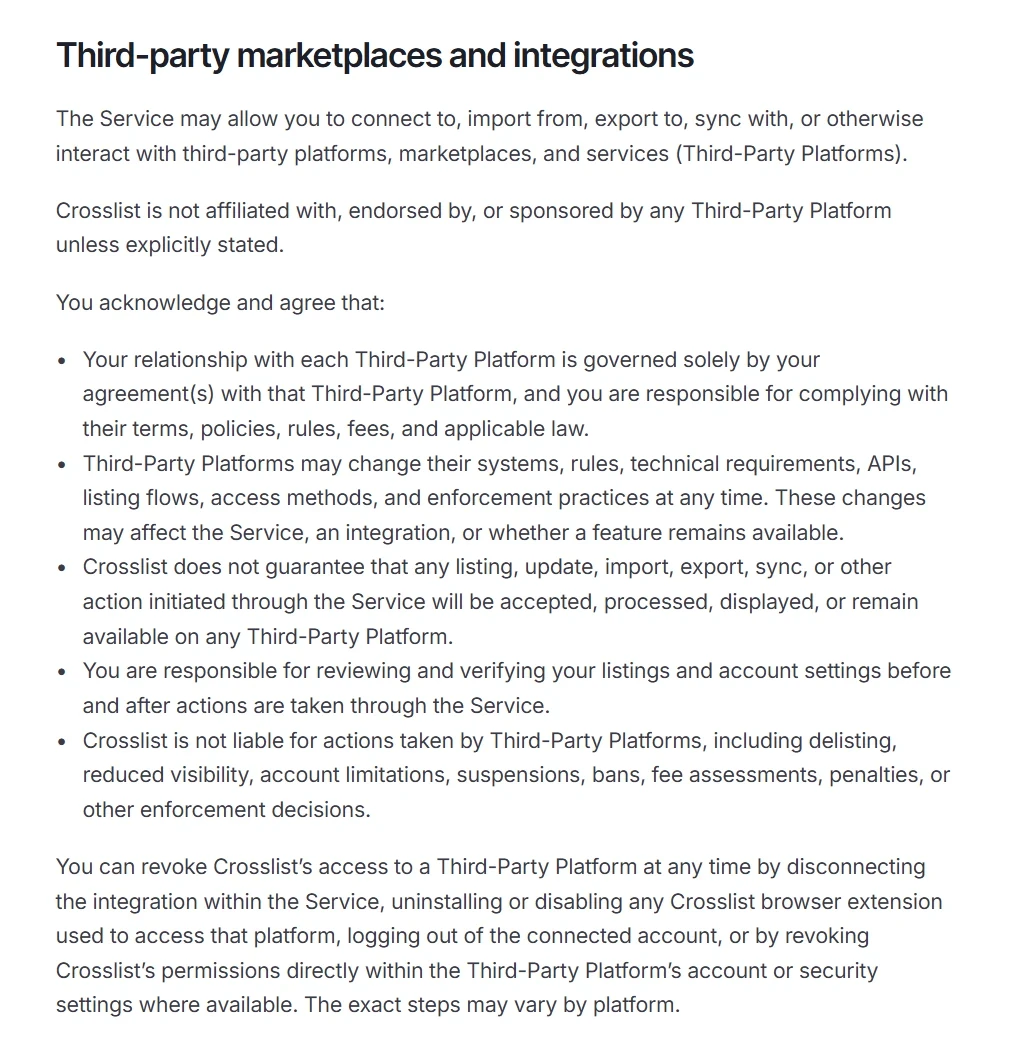
Does that prove his point? No. It’s standard liability language, the kind you’ll find in pretty much every tool’s terms of service, whether it connects through official APIs or not.
It simply makes sure Crosslist isn’t held responsible for bans or restrictions caused by a seller’s own actions, such as policy violations that have nothing to do with cross listing.
Think of it as basic protection for any software company. A tool can’t control what every seller does with their account, so it can’t take the blame for every ban either.
Without a clause like this, a seller who gets banned for something completely unrelated could simply point at the tool they happen to use.
Here’s an example. A seller who sells counterfeit items, bids on their own items to drive up the price, or uses misleading titles is breaking platform rules, and any of these is enough to get them banned.
None of that has anything to do with cross listing, or with Crosslist. Our terms just make that clear.
What we can control is how Crosslist itself works. That’s why we make sure that using it for what it’s built for (cross listing, importing, delisting, relisting, and so on) is as safe as possible.
Justin Resells is not exactly a neutral source
Justin is the co-founder of Flipwise, an eBay-only automation tool that offers profit calculation, real-time data sync, and automatic relisting and repricing.
On its website, Flipwise states that if other platforms offered official APIs, it would be “first in line” to build cross listing functionality.

So the person warning sellers away from cross listing tools runs a tool that would like to offer cross listing itself. And like any tool that works with eBay, Flipwise connects to your eBay account to do its job.
We weren’t the only ones to notice. A longtime reseller who has cross listed for years pushed back on Reddit:
“Where Justin really failed was lumping them all together and then taking the worst case scenario.” They also pointed out that their sales on other marketplaces now match what they make on eBay. For them, dropping cross listing would mean cutting their income in half.
That’s the point of this article. Not all cross listing apps are built the same, and judging them all by the worst one doesn’t help anyone. We’ll let you draw your own conclusions.
How to choose a cross listing app that is safe
Before you pick a cross listing app, use this checklist to vet the tool. Here are some conditions that make for a safer cross listing app:
Never asks for your marketplace passwords
Uses official APIs where marketplaces offer them
Can show that the marketplaces it connects to know about it and allow it, not just that nobody has complained yet
Runs in your own browser where it doesn’t use an API. More importantly, it does NOT log in as you from a remote server
Requests only the permissions necessary for its features to work
Has an automatic sales detection and autodelisting feature to prevent you from double-selling your products
Is an established company with a large number of real user reviews (you can check this on Trustpilot or the app store. You can also see what people are saying about the app on social media platforms such as Reddit)
Has a clear privacy policy and a responsive customer service team willing to answer your questions
Crosslist is the safest cross listing app
Crosslist checks all of the boxes that a safe cross listing tool should check.
✔️ It connects through official APIs, both public and private, and has the go-ahead of, or a direct relationship with, most of the other marketplaces it supports.
✔️ Everywhere else, it uses a secure browser extension that runs in your own browser, never on a remote server.
✔️ Crosslist never asks for your login details, and only requests the necessary permissions.
✔️ Our tool is designed to avoid spam or disruptive behavior, so you won’t get complaints of mass bot activity.
✔️ Crosslist’s autodelisting feature works for your safety by preventing you from accidentally selling the same products again. Our tool also alerts you right away when a delist fails so that you can take care of it manually.
✔️ Steps back when a marketplace pushes back, as it did with Vinted.
Here are some of Crosslist’s other features that make it an easy choice for sellers:
Connects to 11+ marketplaces
Has a single, universal listing form that posts to all the marketplaces at once
Supports various countries, including US, UK, CA, and AU
Has a native iOS and Android mobile app
Has a strong review footprint on Trustpilot, with the current score being 4.5 out of 5 stars based on more than 1,000 reviews
So, are cross listing apps safe?
The ones that connect with the marketplace’s permission, run in your own browser instead of logging in from a server, and never ask for your passwords are. Crosslist does all three.
Ready to grow your business with a cross listing tool that actually cares about your safety? Get Crosslist now.
Are cross listing apps safe? The right ones are.
But if you’ve seen the video from Justin Resells where he “exposes the truth about cross listing apps,” you’re probably wondering if the tool you rely on could put your reselling accounts (and your entire business) at risk.
We don’t blame you. When a good chunk of your income depends on these platforms, you want to be sure the tools you use won’t put it at risk.
In this article, which is a response to Justin’s video, we break down what makes a cross listing app safe and how to check any tool before you trust it with your accounts (hint: Crosslist works with the go-ahead of, or a direct relationship with, nearly every marketplace it supports).
And since Justin couldn’t have known about Crosslist’s private marketplace partnerships, it’s only fair you hear about them from us.
Key takeaways:
Cross listing apps are safe, as long as you pick one that connects the right way.
What makes a cross listing app safe is whether the marketplace allows the connection, not just the technology behind it.
Crosslist has official API access to eBay, Etsy, Shopify, WooCommerce, Depop, and Facebook Marketplace. On the marketplaces where it uses its browser extension, it has approval or a direct relationship in most cases, including Grailed and Poshmark.
To stay safe, pick a tool that connects with the marketplace’s permission, never asks for your passwords, and has an established user base.
Are cross listing apps safe?
Yes, reputable cross listing apps are safe to use as long as they:
Connect with the marketplace’s permission, through an official API or a browser extension that runs inside your own browser
Never ask you to hand over your marketplace login details (such as passwords)
Always inform you when a particular action fails (for example, when an item doesn’t get delisted)
Crosslist does all three, so you're in good hands when you use our cross listing tool.
But hey, we get it. The thought of using a tool that could be violating a marketplace’s terms and conditions is enough to make your palms sweaty, especially when it’s a tool you’ve come to rely on to save you some time.
So we won’t lie and tell you that all cross listing tools are absolutely safe.
The truth is that low-quality bots can get your selling accounts flagged, which could get you kicked out of the platforms. Spammy bots and tools that ask for your passwords are also a security risk.
Below, we explain exactly how cross listing apps work, and why Crosslist is a safe choice.
How do cross listing apps connect to marketplaces?
There isn’t a lot of info out there about the inner workings of cross listing apps — specifically the way they connect to marketplaces.
So we went straight to the source and interviewed Gilles Couvreur, co-founder and CEO of Crosslist.
According to him, cross listing apps typically use one of the following common methods to connect to marketplaces and make cross listing possible: through APIs (both public and private), browser extensions, and server-side logins.
Through APIs
An API, or an Application Programming Interface, is a bridge that connects two different software applications, allowing them to talk to (and exchange data with) each other.
Gilles says that there are a few different types of APIs.
Official, public APIs: When the marketplace publishes a very public, use-for-all API for developers. Everyone knows these APIs exist, and they can be used by anybody.
Official, private APIs that are publicly disclosed: A few marketplaces offer official APIs, but only to selected partners. However, the fact that these APIs exist is public knowledge.
Official, private APIs that are not publicly disclosed: Some marketplaces offer official APIs to selected partners, but they don’t advertise this fact, so others likely won’t know such APIs exist. Think of it as a confidential deal between the tool and the platform.
"Official APIs are the clearest form of permission a marketplace can give,” says Gilles. “So we use them wherever they serve sellers well. And where we use our browser extension instead, we aim to have the marketplace’s go-ahead too."
Browser extension in your own browser
A browser extension works the way you would, from your own device.
Since you’re already logged in to your marketplaces, it uses your browser’s active session to get the job done. You never hand over your passwords.
Gilles points to three things that set this apart from tools that log in as you from their own servers:
Your login details stay with you. They’re never stored on Crosslist’s servers.
It only works while you’re online. The extension can’t take any action unless your computer is online and your browser is active. Nobody can act on your account in the background while your laptop is closed.
Google checks it. Google reviews extensions in the Chrome Web Store for malicious code, and every extension has to declare its permissions up front. Crosslist can’t go beyond the permissions you approved when you installed it.
“Crosslist uses a browser extension where no official API exists, or where it simply works better for sellers. Done responsibly, it's very low risk."
Server-side login with your password
Here, you enter your marketplace username and password into the cross listing app, and its bots log in as you from the company’s own servers.
That’s what lets these tools act on your behalf even when your computer is off. It’s also where the risk comes from:
Your passwords sit on someone else’s servers. If that company is ever breached, attackers get direct access to your selling accounts, and to any other account where you’ve reused the same password.
Logins come from places you’ve never been. The marketplace sees your account logging in from a server, not your device or home network, often from addresses shared with many other accounts. That’s a classic sign of account takeover, and it can trigger security checks, forced password resets, or account locks.
It looks like a bot, because it is. Activity at all hours, at machine speed, with no real browser session behind it, is exactly the pattern marketplaces’ automation detection is built to catch.
You’re breaking a basic security rule. Marketplaces routinely warn sellers never to share their login details with anyone. Handing them to a third-party tool does exactly that.
You can’t see what it’s doing. Actions happen while you’re away, so you may only find out something went wrong after your account is flagged.
"This method carries the most risk, so I always recommend sellers to avoid using tools that rely on server-side logins. We also don’t use this method at all at Crosslist."
Overview
Method type | How it works | Benefits | Limitations |
Official APIs | Through APIs the marketplace provides or approves (public or partner-only) | Explicit permission from the marketplace; safest choice | Only available where the marketplace offers one |
Browser extensions | By acting as you inside your own browser | Uses your browser’s active cookies and session tokens, so doesn’t need your login credentials | Depends on how a marketplace’s site works, so may need changes when a platform updates its site |
Server-side login | Logs in as you from the tool’s own servers | Syncs your inventory and performs autodelisting actions even when your device is off | Your passwords are stored on the tool’s servers, logins come from unfamiliar locations, and the activity looks like a bot, so it carries the highest risk |
Are browser extensions risky?
Browser extensions aren’t risk-free,” says Gilles. “They depend largely on how a marketplace’s website works, so the extension may need to be updated whenever a marketplace changes its site.”
But a browser extension that uses your own session, on your own device, isn’t the same as scraping websites or running cloud-based bots.
The bigger question is whether the marketplace is OK with it. On platforms that welcome or tolerate cross listing tools, the risk is minimal.
On a platform that actively detects automation, any tool can trigger restrictions, however carefully it’s built.
That’s where Justin’s claim that cross listing apps connect without permission falls apart for Crosslist.
On most of the marketplaces where we use our extension, the marketplace is on board. Grailed gave us the go-ahead for our integration and shared their category data so your listings land in the right category.
With Poshmark, we sponsored PoshFest, its official seller conference, and have had talks with their team.
List Perfectly and Nifty have been PoshFest sponsors too. A marketplace doesn’t invite cross listing tools onto its own stage if it sees them as a threat to its sellers.
Some of our other arrangements are covered by confidentiality agreements, so we can’t share the details.
The only marketplace that we currently integrate with and haven't spoken with is Whatnot.
For Whatnot, Crosslist connects through the same extension, under the same rules: your login details stay on your device, nothing happens unless you’re online, and the extension can’t go beyond the permissions you approved.
Vinted is the one marketplace that went the other way. In 2026, it started detecting accounts that used third-party automation, from any tool, and suspending them temporarily.
We worked on fixes, but we weren’t willing to keep onboarding sellers onto a marketplace that didn’t want tools like ours connecting, so we stopped offering Vinted to new users.
“When done responsibly, browser extensions carry minimal risk,” says Gilles. “But the best way to connect is with the marketplace’s permission, ideally through an official API. And if a marketplace doesn’t want us there, we don’t force it.”
Myth: “Only eBay and Etsy have APIs”
It’s true that eBay and Etsy both have public APIs for third-party integrations. Cross listing tools use these official APIs to connect to these two marketplaces, which lets them manage your inventory and listings.
Think of it as a formal go-ahead by eBay and Etsy, so a tool that connects through their official APIs won’t put your accounts on these two platforms at risk.
But are eBay and Etsy the only two marketplaces that have APIs? Absolutely not. It’s just that these two platforms are the ones with very public APIs, which is why they get talked about so often. However, other marketplaces also offer public or private APIs.
Shopify and WooCommerce offer official public APIs too, so Crosslist connects to all four through their APIs.
Gilles revealed that Crosslist has private API partnerships with Depop and Facebook Marketplace. “This is the first time we’ve spoken about these deals publicly, so it would have been impossible for a third party like Justin to know about them.”
For the marketplaces that don’t offer any type of APIs, Crosslist uses a browser extension as it carries the least risk when compared to the other connection methods available. This is a normal, widely used approach, and not a hack or an unsafe shortcut.
Can you get banned for cross listing?
No, cross listing by itself, i.e. listing the same products across several marketplaces, won't get you banned.
Here’s what actually causes problems for sellers:
Duplicate listings, i.e. two or more identical listings for the same product, within the same marketplace
Double-selling or overselling where you sell the same item more than once because you did not delist the product in time. This means you’ll have to cancel your orders, which can severely hurt your seller rating. If this pattern continues over time, the platform may even restrict or ban you
Sharing your login credentials. This is a gateway for bad actors to gain control of your account and commit fraud
This is why you should always pick a cross listing app with an autodelisting feature that automatically delists your sold items from other connected marketplaces. It works as a safety feature, preventing you from overselling.
Do Crosslist’s terms prove that cross listing apps are unsafe?
In his video, Justin highlights a few lines from Crosslist’s terms of service (pictured below) and uses them as proof that cross listing apps are unsafe.
In short, those lines say that sellers are responsible for following each marketplace’s rules, and that Crosslist isn’t liable if a marketplace restricts their account.
Does that prove his point? No. It’s standard liability language, the kind you’ll find in pretty much every tool’s terms of service, whether it connects through official APIs or not.
It simply makes sure Crosslist isn’t held responsible for bans or restrictions caused by a seller’s own actions, such as policy violations that have nothing to do with cross listing.
Think of it as basic protection for any software company. A tool can’t control what every seller does with their account, so it can’t take the blame for every ban either.
Without a clause like this, a seller who gets banned for something completely unrelated could simply point at the tool they happen to use.
Here’s an example. A seller who sells counterfeit items, bids on their own items to drive up the price, or uses misleading titles is breaking platform rules, and any of these is enough to get them banned.
None of that has anything to do with cross listing, or with Crosslist. Our terms just make that clear.
What we can control is how Crosslist itself works. That’s why we make sure that using it for what it’s built for (cross listing, importing, delisting, relisting, and so on) is as safe as possible.
Justin Resells is not exactly a neutral source
Justin is the co-founder of Flipwise, an eBay-only automation tool that offers profit calculation, real-time data sync, and automatic relisting and repricing.
On its website, Flipwise states that if other platforms offered official APIs, it would be “first in line” to build cross listing functionality.
So the person warning sellers away from cross listing tools runs a tool that would like to offer cross listing itself. And like any tool that works with eBay, Flipwise connects to your eBay account to do its job.
We weren’t the only ones to notice. A longtime reseller who has cross listed for years pushed back on Reddit:
“Where Justin really failed was lumping them all together and then taking the worst case scenario.” They also pointed out that their sales on other marketplaces now match what they make on eBay. For them, dropping cross listing would mean cutting their income in half.
That’s the point of this article. Not all cross listing apps are built the same, and judging them all by the worst one doesn’t help anyone. We’ll let you draw your own conclusions.
How to choose a cross listing app that is safe
Before you pick a cross listing app, use this checklist to vet the tool. Here are some conditions that make for a safer cross listing app:
Never asks for your marketplace passwords
Uses official APIs where marketplaces offer them
Can show that the marketplaces it connects to know about it and allow it, not just that nobody has complained yet
Runs in your own browser where it doesn’t use an API. More importantly, it does NOT log in as you from a remote server
Requests only the permissions necessary for its features to work
Has an automatic sales detection and autodelisting feature to prevent you from double-selling your products
Is an established company with a large number of real user reviews (you can check this on Trustpilot or the app store. You can also see what people are saying about the app on social media platforms such as Reddit)
Has a clear privacy policy and a responsive customer service team willing to answer your questions
Crosslist is the safest cross listing app
Crosslist checks all of the boxes that a safe cross listing tool should check.
✔️ It connects through official APIs, both public and private, and has the go-ahead of, or a direct relationship with, most of the other marketplaces it supports.
✔️ Everywhere else, it uses a secure browser extension that runs in your own browser, never on a remote server.
✔️ Crosslist never asks for your login details, and only requests the necessary permissions.
✔️ Our tool is designed to avoid spam or disruptive behavior, so you won’t get complaints of mass bot activity.
✔️ Crosslist’s autodelisting feature works for your safety by preventing you from accidentally selling the same products again. Our tool also alerts you right away when a delist fails so that you can take care of it manually.
✔️ Steps back when a marketplace pushes back, as it did with Vinted.
Here are some of Crosslist’s other features that make it an easy choice for sellers:
Connects to 11+ marketplaces
Has a single, universal listing form that posts to all the marketplaces at once
Supports various countries, including US, UK, CA, and AU
Has a native iOS and Android mobile app
Has a strong review footprint on Trustpilot, with the current score being 4.5 out of 5 stars based on more than 1,000 reviews
So, are cross listing apps safe?
The ones that connect with the marketplace’s permission, run in your own browser instead of logging in from a server, and never ask for your passwords are. Crosslist does all three.
Ready to grow your business with a cross listing tool that actually cares about your safety? Get Crosslist now.
Are cross listing apps safe? The right ones are.
But if you’ve seen the video from Justin Resells where he “exposes the truth about cross listing apps,” you’re probably wondering if the tool you rely on could put your reselling accounts (and your entire business) at risk.
We don’t blame you. When a good chunk of your income depends on these platforms, you want to be sure the tools you use won’t put it at risk.
In this article, which is a response to Justin’s video, we break down what makes a cross listing app safe and how to check any tool before you trust it with your accounts (hint: Crosslist works with the go-ahead of, or a direct relationship with, nearly every marketplace it supports).
And since Justin couldn’t have known about Crosslist’s private marketplace partnerships, it’s only fair you hear about them from us.
Key takeaways:
Cross listing apps are safe, as long as you pick one that connects the right way.
What makes a cross listing app safe is whether the marketplace allows the connection, not just the technology behind it.
Crosslist has official API access to eBay, Etsy, Shopify, WooCommerce, Depop, and Facebook Marketplace. On the marketplaces where it uses its browser extension, it has approval or a direct relationship in most cases, including Grailed and Poshmark.
To stay safe, pick a tool that connects with the marketplace’s permission, never asks for your passwords, and has an established user base.
Are cross listing apps safe?
Yes, reputable cross listing apps are safe to use as long as they:
Connect with the marketplace’s permission, through an official API or a browser extension that runs inside your own browser
Never ask you to hand over your marketplace login details (such as passwords)
Always inform you when a particular action fails (for example, when an item doesn’t get delisted)
Crosslist does all three, so you're in good hands when you use our cross listing tool.
But hey, we get it. The thought of using a tool that could be violating a marketplace’s terms and conditions is enough to make your palms sweaty, especially when it’s a tool you’ve come to rely on to save you some time.
So we won’t lie and tell you that all cross listing tools are absolutely safe.
The truth is that low-quality bots can get your selling accounts flagged, which could get you kicked out of the platforms. Spammy bots and tools that ask for your passwords are also a security risk.
Below, we explain exactly how cross listing apps work, and why Crosslist is a safe choice.
How do cross listing apps connect to marketplaces?
There isn’t a lot of info out there about the inner workings of cross listing apps — specifically the way they connect to marketplaces.
So we went straight to the source and interviewed Gilles Couvreur, co-founder and CEO of Crosslist.
According to him, cross listing apps typically use one of the following common methods to connect to marketplaces and make cross listing possible: through APIs (both public and private), browser extensions, and server-side logins.
Through APIs
An API, or an Application Programming Interface, is a bridge that connects two different software applications, allowing them to talk to (and exchange data with) each other.
Gilles says that there are a few different types of APIs.
Official, public APIs: When the marketplace publishes a very public, use-for-all API for developers. Everyone knows these APIs exist, and they can be used by anybody.
Official, private APIs that are publicly disclosed: A few marketplaces offer official APIs, but only to selected partners. However, the fact that these APIs exist is public knowledge.
Official, private APIs that are not publicly disclosed: Some marketplaces offer official APIs to selected partners, but they don’t advertise this fact, so others likely won’t know such APIs exist. Think of it as a confidential deal between the tool and the platform.
"Official APIs are the clearest form of permission a marketplace can give,” says Gilles. “So we use them wherever they serve sellers well. And where we use our browser extension instead, we aim to have the marketplace’s go-ahead too."
Browser extension in your own browser
A browser extension works the way you would, from your own device.
Since you’re already logged in to your marketplaces, it uses your browser’s active session to get the job done. You never hand over your passwords.
Gilles points to three things that set this apart from tools that log in as you from their own servers:
Your login details stay with you. They’re never stored on Crosslist’s servers.
It only works while you’re online. The extension can’t take any action unless your computer is online and your browser is active. Nobody can act on your account in the background while your laptop is closed.
Google checks it. Google reviews extensions in the Chrome Web Store for malicious code, and every extension has to declare its permissions up front. Crosslist can’t go beyond the permissions you approved when you installed it.
“Crosslist uses a browser extension where no official API exists, or where it simply works better for sellers. Done responsibly, it's very low risk."
Server-side login with your password
Here, you enter your marketplace username and password into the cross listing app, and its bots log in as you from the company’s own servers.
That’s what lets these tools act on your behalf even when your computer is off. It’s also where the risk comes from:
Your passwords sit on someone else’s servers. If that company is ever breached, attackers get direct access to your selling accounts, and to any other account where you’ve reused the same password.
Logins come from places you’ve never been. The marketplace sees your account logging in from a server, not your device or home network, often from addresses shared with many other accounts. That’s a classic sign of account takeover, and it can trigger security checks, forced password resets, or account locks.
It looks like a bot, because it is. Activity at all hours, at machine speed, with no real browser session behind it, is exactly the pattern marketplaces’ automation detection is built to catch.
You’re breaking a basic security rule. Marketplaces routinely warn sellers never to share their login details with anyone. Handing them to a third-party tool does exactly that.
You can’t see what it’s doing. Actions happen while you’re away, so you may only find out something went wrong after your account is flagged.
"This method carries the most risk, so I always recommend sellers to avoid using tools that rely on server-side logins. We also don’t use this method at all at Crosslist."
Overview
Method type | How it works | Benefits | Limitations |
Official APIs | Through APIs the marketplace provides or approves (public or partner-only) | Explicit permission from the marketplace; safest choice | Only available where the marketplace offers one |
Browser extensions | By acting as you inside your own browser | Uses your browser’s active cookies and session tokens, so doesn’t need your login credentials | Depends on how a marketplace’s site works, so may need changes when a platform updates its site |
Server-side login | Logs in as you from the tool’s own servers | Syncs your inventory and performs autodelisting actions even when your device is off | Your passwords are stored on the tool’s servers, logins come from unfamiliar locations, and the activity looks like a bot, so it carries the highest risk |
Are browser extensions risky?
Browser extensions aren’t risk-free,” says Gilles. “They depend largely on how a marketplace’s website works, so the extension may need to be updated whenever a marketplace changes its site.”
But a browser extension that uses your own session, on your own device, isn’t the same as scraping websites or running cloud-based bots.
The bigger question is whether the marketplace is OK with it. On platforms that welcome or tolerate cross listing tools, the risk is minimal.
On a platform that actively detects automation, any tool can trigger restrictions, however carefully it’s built.
That’s where Justin’s claim that cross listing apps connect without permission falls apart for Crosslist.
On most of the marketplaces where we use our extension, the marketplace is on board. Grailed gave us the go-ahead for our integration and shared their category data so your listings land in the right category.
With Poshmark, we sponsored PoshFest, its official seller conference, and have had talks with their team.
List Perfectly and Nifty have been PoshFest sponsors too. A marketplace doesn’t invite cross listing tools onto its own stage if it sees them as a threat to its sellers.
Some of our other arrangements are covered by confidentiality agreements, so we can’t share the details.
The only marketplace that we currently integrate with and haven't spoken with is Whatnot.
For Whatnot, Crosslist connects through the same extension, under the same rules: your login details stay on your device, nothing happens unless you’re online, and the extension can’t go beyond the permissions you approved.
Vinted is the one marketplace that went the other way. In 2026, it started detecting accounts that used third-party automation, from any tool, and suspending them temporarily.
We worked on fixes, but we weren’t willing to keep onboarding sellers onto a marketplace that didn’t want tools like ours connecting, so we stopped offering Vinted to new users.
“When done responsibly, browser extensions carry minimal risk,” says Gilles. “But the best way to connect is with the marketplace’s permission, ideally through an official API. And if a marketplace doesn’t want us there, we don’t force it.”
Myth: “Only eBay and Etsy have APIs”
It’s true that eBay and Etsy both have public APIs for third-party integrations. Cross listing tools use these official APIs to connect to these two marketplaces, which lets them manage your inventory and listings.
Think of it as a formal go-ahead by eBay and Etsy, so a tool that connects through their official APIs won’t put your accounts on these two platforms at risk.
But are eBay and Etsy the only two marketplaces that have APIs? Absolutely not. It’s just that these two platforms are the ones with very public APIs, which is why they get talked about so often. However, other marketplaces also offer public or private APIs.
Shopify and WooCommerce offer official public APIs too, so Crosslist connects to all four through their APIs.
Gilles revealed that Crosslist has private API partnerships with Depop and Facebook Marketplace. “This is the first time we’ve spoken about these deals publicly, so it would have been impossible for a third party like Justin to know about them.”
For the marketplaces that don’t offer any type of APIs, Crosslist uses a browser extension as it carries the least risk when compared to the other connection methods available. This is a normal, widely used approach, and not a hack or an unsafe shortcut.
Can you get banned for cross listing?
No, cross listing by itself, i.e. listing the same products across several marketplaces, won't get you banned.
Here’s what actually causes problems for sellers:
Duplicate listings, i.e. two or more identical listings for the same product, within the same marketplace
Double-selling or overselling where you sell the same item more than once because you did not delist the product in time. This means you’ll have to cancel your orders, which can severely hurt your seller rating. If this pattern continues over time, the platform may even restrict or ban you
Sharing your login credentials. This is a gateway for bad actors to gain control of your account and commit fraud
This is why you should always pick a cross listing app with an autodelisting feature that automatically delists your sold items from other connected marketplaces. It works as a safety feature, preventing you from overselling.
Do Crosslist’s terms prove that cross listing apps are unsafe?
In his video, Justin highlights a few lines from Crosslist’s terms of service (pictured below) and uses them as proof that cross listing apps are unsafe.
In short, those lines say that sellers are responsible for following each marketplace’s rules, and that Crosslist isn’t liable if a marketplace restricts their account.
Does that prove his point? No. It’s standard liability language, the kind you’ll find in pretty much every tool’s terms of service, whether it connects through official APIs or not.
It simply makes sure Crosslist isn’t held responsible for bans or restrictions caused by a seller’s own actions, such as policy violations that have nothing to do with cross listing.
Think of it as basic protection for any software company. A tool can’t control what every seller does with their account, so it can’t take the blame for every ban either.
Without a clause like this, a seller who gets banned for something completely unrelated could simply point at the tool they happen to use.
Here’s an example. A seller who sells counterfeit items, bids on their own items to drive up the price, or uses misleading titles is breaking platform rules, and any of these is enough to get them banned.
None of that has anything to do with cross listing, or with Crosslist. Our terms just make that clear.
What we can control is how Crosslist itself works. That’s why we make sure that using it for what it’s built for (cross listing, importing, delisting, relisting, and so on) is as safe as possible.
Justin Resells is not exactly a neutral source
Justin is the co-founder of Flipwise, an eBay-only automation tool that offers profit calculation, real-time data sync, and automatic relisting and repricing.
On its website, Flipwise states that if other platforms offered official APIs, it would be “first in line” to build cross listing functionality.
So the person warning sellers away from cross listing tools runs a tool that would like to offer cross listing itself. And like any tool that works with eBay, Flipwise connects to your eBay account to do its job.
We weren’t the only ones to notice. A longtime reseller who has cross listed for years pushed back on Reddit:
“Where Justin really failed was lumping them all together and then taking the worst case scenario.” They also pointed out that their sales on other marketplaces now match what they make on eBay. For them, dropping cross listing would mean cutting their income in half.
That’s the point of this article. Not all cross listing apps are built the same, and judging them all by the worst one doesn’t help anyone. We’ll let you draw your own conclusions.
How to choose a cross listing app that is safe
Before you pick a cross listing app, use this checklist to vet the tool. Here are some conditions that make for a safer cross listing app:
Never asks for your marketplace passwords
Uses official APIs where marketplaces offer them
Can show that the marketplaces it connects to know about it and allow it, not just that nobody has complained yet
Runs in your own browser where it doesn’t use an API. More importantly, it does NOT log in as you from a remote server
Requests only the permissions necessary for its features to work
Has an automatic sales detection and autodelisting feature to prevent you from double-selling your products
Is an established company with a large number of real user reviews (you can check this on Trustpilot or the app store. You can also see what people are saying about the app on social media platforms such as Reddit)
Has a clear privacy policy and a responsive customer service team willing to answer your questions
Crosslist is the safest cross listing app
Crosslist checks all of the boxes that a safe cross listing tool should check.
✔️ It connects through official APIs, both public and private, and has the go-ahead of, or a direct relationship with, most of the other marketplaces it supports.
✔️ Everywhere else, it uses a secure browser extension that runs in your own browser, never on a remote server.
✔️ Crosslist never asks for your login details, and only requests the necessary permissions.
✔️ Our tool is designed to avoid spam or disruptive behavior, so you won’t get complaints of mass bot activity.
✔️ Crosslist’s autodelisting feature works for your safety by preventing you from accidentally selling the same products again. Our tool also alerts you right away when a delist fails so that you can take care of it manually.
✔️ Steps back when a marketplace pushes back, as it did with Vinted.
Here are some of Crosslist’s other features that make it an easy choice for sellers:
Connects to 11+ marketplaces
Has a single, universal listing form that posts to all the marketplaces at once
Supports various countries, including US, UK, CA, and AU
Has a native iOS and Android mobile app
Has a strong review footprint on Trustpilot, with the current score being 4.5 out of 5 stars based on more than 1,000 reviews
So, are cross listing apps safe?
The ones that connect with the marketplace’s permission, run in your own browser instead of logging in from a server, and never ask for your passwords are. Crosslist does all three.
Ready to grow your business with a cross listing tool that actually cares about your safety? Get Crosslist now.
Are cross listing apps safe? The right ones are.
But if you’ve seen the video from Justin Resells where he “exposes the truth about cross listing apps,” you’re probably wondering if the tool you rely on could put your reselling accounts (and your entire business) at risk.
We don’t blame you. When a good chunk of your income depends on these platforms, you want to be sure the tools you use won’t put it at risk.
In this article, which is a response to Justin’s video, we break down what makes a cross listing app safe and how to check any tool before you trust it with your accounts (hint: Crosslist works with the go-ahead of, or a direct relationship with, nearly every marketplace it supports).
And since Justin couldn’t have known about Crosslist’s private marketplace partnerships, it’s only fair you hear about them from us.
Key takeaways:
Cross listing apps are safe, as long as you pick one that connects the right way.
What makes a cross listing app safe is whether the marketplace allows the connection, not just the technology behind it.
Crosslist has official API access to eBay, Etsy, Shopify, WooCommerce, Depop, and Facebook Marketplace. On the marketplaces where it uses its browser extension, it has approval or a direct relationship in most cases, including Grailed and Poshmark.
To stay safe, pick a tool that connects with the marketplace’s permission, never asks for your passwords, and has an established user base.
Are cross listing apps safe?
Yes, reputable cross listing apps are safe to use as long as they:
Connect with the marketplace’s permission, through an official API or a browser extension that runs inside your own browser
Never ask you to hand over your marketplace login details (such as passwords)
Always inform you when a particular action fails (for example, when an item doesn’t get delisted)
Crosslist does all three, so you're in good hands when you use our cross listing tool.
But hey, we get it. The thought of using a tool that could be violating a marketplace’s terms and conditions is enough to make your palms sweaty, especially when it’s a tool you’ve come to rely on to save you some time.
So we won’t lie and tell you that all cross listing tools are absolutely safe.
The truth is that low-quality bots can get your selling accounts flagged, which could get you kicked out of the platforms. Spammy bots and tools that ask for your passwords are also a security risk.
Below, we explain exactly how cross listing apps work, and why Crosslist is a safe choice.
How do cross listing apps connect to marketplaces?
There isn’t a lot of info out there about the inner workings of cross listing apps — specifically the way they connect to marketplaces.
So we went straight to the source and interviewed Gilles Couvreur, co-founder and CEO of Crosslist.
According to him, cross listing apps typically use one of the following common methods to connect to marketplaces and make cross listing possible: through APIs (both public and private), browser extensions, and server-side logins.
Through APIs
An API, or an Application Programming Interface, is a bridge that connects two different software applications, allowing them to talk to (and exchange data with) each other.
Gilles says that there are a few different types of APIs.
Official, public APIs: When the marketplace publishes a very public, use-for-all API for developers. Everyone knows these APIs exist, and they can be used by anybody.
Official, private APIs that are publicly disclosed: A few marketplaces offer official APIs, but only to selected partners. However, the fact that these APIs exist is public knowledge.
Official, private APIs that are not publicly disclosed: Some marketplaces offer official APIs to selected partners, but they don’t advertise this fact, so others likely won’t know such APIs exist. Think of it as a confidential deal between the tool and the platform.
"Official APIs are the clearest form of permission a marketplace can give,” says Gilles. “So we use them wherever they serve sellers well. And where we use our browser extension instead, we aim to have the marketplace’s go-ahead too."
Browser extension in your own browser
A browser extension works the way you would, from your own device.
Since you’re already logged in to your marketplaces, it uses your browser’s active session to get the job done. You never hand over your passwords.
Gilles points to three things that set this apart from tools that log in as you from their own servers:
Your login details stay with you. They’re never stored on Crosslist’s servers.
It only works while you’re online. The extension can’t take any action unless your computer is online and your browser is active. Nobody can act on your account in the background while your laptop is closed.
Google checks it. Google reviews extensions in the Chrome Web Store for malicious code, and every extension has to declare its permissions up front. Crosslist can’t go beyond the permissions you approved when you installed it.
“Crosslist uses a browser extension where no official API exists, or where it simply works better for sellers. Done responsibly, it's very low risk."
Server-side login with your password
Here, you enter your marketplace username and password into the cross listing app, and its bots log in as you from the company’s own servers.
That’s what lets these tools act on your behalf even when your computer is off. It’s also where the risk comes from:
Your passwords sit on someone else’s servers. If that company is ever breached, attackers get direct access to your selling accounts, and to any other account where you’ve reused the same password.
Logins come from places you’ve never been. The marketplace sees your account logging in from a server, not your device or home network, often from addresses shared with many other accounts. That’s a classic sign of account takeover, and it can trigger security checks, forced password resets, or account locks.
It looks like a bot, because it is. Activity at all hours, at machine speed, with no real browser session behind it, is exactly the pattern marketplaces’ automation detection is built to catch.
You’re breaking a basic security rule. Marketplaces routinely warn sellers never to share their login details with anyone. Handing them to a third-party tool does exactly that.
You can’t see what it’s doing. Actions happen while you’re away, so you may only find out something went wrong after your account is flagged.
"This method carries the most risk, so I always recommend sellers to avoid using tools that rely on server-side logins. We also don’t use this method at all at Crosslist."
Overview
Method type | How it works | Benefits | Limitations |
Official APIs | Through APIs the marketplace provides or approves (public or partner-only) | Explicit permission from the marketplace; safest choice | Only available where the marketplace offers one |
Browser extensions | By acting as you inside your own browser | Uses your browser’s active cookies and session tokens, so doesn’t need your login credentials | Depends on how a marketplace’s site works, so may need changes when a platform updates its site |
Server-side login | Logs in as you from the tool’s own servers | Syncs your inventory and performs autodelisting actions even when your device is off | Your passwords are stored on the tool’s servers, logins come from unfamiliar locations, and the activity looks like a bot, so it carries the highest risk |
Are browser extensions risky?
Browser extensions aren’t risk-free,” says Gilles. “They depend largely on how a marketplace’s website works, so the extension may need to be updated whenever a marketplace changes its site.”
But a browser extension that uses your own session, on your own device, isn’t the same as scraping websites or running cloud-based bots.
The bigger question is whether the marketplace is OK with it. On platforms that welcome or tolerate cross listing tools, the risk is minimal.
On a platform that actively detects automation, any tool can trigger restrictions, however carefully it’s built.
That’s where Justin’s claim that cross listing apps connect without permission falls apart for Crosslist.
On most of the marketplaces where we use our extension, the marketplace is on board. Grailed gave us the go-ahead for our integration and shared their category data so your listings land in the right category.
With Poshmark, we sponsored PoshFest, its official seller conference, and have had talks with their team.
List Perfectly and Nifty have been PoshFest sponsors too. A marketplace doesn’t invite cross listing tools onto its own stage if it sees them as a threat to its sellers.
Some of our other arrangements are covered by confidentiality agreements, so we can’t share the details.
The only marketplace that we currently integrate with and haven't spoken with is Whatnot.
For Whatnot, Crosslist connects through the same extension, under the same rules: your login details stay on your device, nothing happens unless you’re online, and the extension can’t go beyond the permissions you approved.
Vinted is the one marketplace that went the other way. In 2026, it started detecting accounts that used third-party automation, from any tool, and suspending them temporarily.
We worked on fixes, but we weren’t willing to keep onboarding sellers onto a marketplace that didn’t want tools like ours connecting, so we stopped offering Vinted to new users.
“When done responsibly, browser extensions carry minimal risk,” says Gilles. “But the best way to connect is with the marketplace’s permission, ideally through an official API. And if a marketplace doesn’t want us there, we don’t force it.”
Myth: “Only eBay and Etsy have APIs”
It’s true that eBay and Etsy both have public APIs for third-party integrations. Cross listing tools use these official APIs to connect to these two marketplaces, which lets them manage your inventory and listings.
Think of it as a formal go-ahead by eBay and Etsy, so a tool that connects through their official APIs won’t put your accounts on these two platforms at risk.
But are eBay and Etsy the only two marketplaces that have APIs? Absolutely not. It’s just that these two platforms are the ones with very public APIs, which is why they get talked about so often. However, other marketplaces also offer public or private APIs.
Shopify and WooCommerce offer official public APIs too, so Crosslist connects to all four through their APIs.
Gilles revealed that Crosslist has private API partnerships with Depop and Facebook Marketplace. “This is the first time we’ve spoken about these deals publicly, so it would have been impossible for a third party like Justin to know about them.”
For the marketplaces that don’t offer any type of APIs, Crosslist uses a browser extension as it carries the least risk when compared to the other connection methods available. This is a normal, widely used approach, and not a hack or an unsafe shortcut.
Can you get banned for cross listing?
No, cross listing by itself, i.e. listing the same products across several marketplaces, won't get you banned.
Here’s what actually causes problems for sellers:
Duplicate listings, i.e. two or more identical listings for the same product, within the same marketplace
Double-selling or overselling where you sell the same item more than once because you did not delist the product in time. This means you’ll have to cancel your orders, which can severely hurt your seller rating. If this pattern continues over time, the platform may even restrict or ban you
Sharing your login credentials. This is a gateway for bad actors to gain control of your account and commit fraud
This is why you should always pick a cross listing app with an autodelisting feature that automatically delists your sold items from other connected marketplaces. It works as a safety feature, preventing you from overselling.
Do Crosslist’s terms prove that cross listing apps are unsafe?
In his video, Justin highlights a few lines from Crosslist’s terms of service (pictured below) and uses them as proof that cross listing apps are unsafe.
In short, those lines say that sellers are responsible for following each marketplace’s rules, and that Crosslist isn’t liable if a marketplace restricts their account.
Does that prove his point? No. It’s standard liability language, the kind you’ll find in pretty much every tool’s terms of service, whether it connects through official APIs or not.
It simply makes sure Crosslist isn’t held responsible for bans or restrictions caused by a seller’s own actions, such as policy violations that have nothing to do with cross listing.
Think of it as basic protection for any software company. A tool can’t control what every seller does with their account, so it can’t take the blame for every ban either.
Without a clause like this, a seller who gets banned for something completely unrelated could simply point at the tool they happen to use.
Here’s an example. A seller who sells counterfeit items, bids on their own items to drive up the price, or uses misleading titles is breaking platform rules, and any of these is enough to get them banned.
None of that has anything to do with cross listing, or with Crosslist. Our terms just make that clear.
What we can control is how Crosslist itself works. That’s why we make sure that using it for what it’s built for (cross listing, importing, delisting, relisting, and so on) is as safe as possible.
Justin Resells is not exactly a neutral source
Justin is the co-founder of Flipwise, an eBay-only automation tool that offers profit calculation, real-time data sync, and automatic relisting and repricing.
On its website, Flipwise states that if other platforms offered official APIs, it would be “first in line” to build cross listing functionality.
So the person warning sellers away from cross listing tools runs a tool that would like to offer cross listing itself. And like any tool that works with eBay, Flipwise connects to your eBay account to do its job.
We weren’t the only ones to notice. A longtime reseller who has cross listed for years pushed back on Reddit:
“Where Justin really failed was lumping them all together and then taking the worst case scenario.” They also pointed out that their sales on other marketplaces now match what they make on eBay. For them, dropping cross listing would mean cutting their income in half.
That’s the point of this article. Not all cross listing apps are built the same, and judging them all by the worst one doesn’t help anyone. We’ll let you draw your own conclusions.
How to choose a cross listing app that is safe
Before you pick a cross listing app, use this checklist to vet the tool. Here are some conditions that make for a safer cross listing app:
Never asks for your marketplace passwords
Uses official APIs where marketplaces offer them
Can show that the marketplaces it connects to know about it and allow it, not just that nobody has complained yet
Runs in your own browser where it doesn’t use an API. More importantly, it does NOT log in as you from a remote server
Requests only the permissions necessary for its features to work
Has an automatic sales detection and autodelisting feature to prevent you from double-selling your products
Is an established company with a large number of real user reviews (you can check this on Trustpilot or the app store. You can also see what people are saying about the app on social media platforms such as Reddit)
Has a clear privacy policy and a responsive customer service team willing to answer your questions
Crosslist is the safest cross listing app
Crosslist checks all of the boxes that a safe cross listing tool should check.
✔️ It connects through official APIs, both public and private, and has the go-ahead of, or a direct relationship with, most of the other marketplaces it supports.
✔️ Everywhere else, it uses a secure browser extension that runs in your own browser, never on a remote server.
✔️ Crosslist never asks for your login details, and only requests the necessary permissions.
✔️ Our tool is designed to avoid spam or disruptive behavior, so you won’t get complaints of mass bot activity.
✔️ Crosslist’s autodelisting feature works for your safety by preventing you from accidentally selling the same products again. Our tool also alerts you right away when a delist fails so that you can take care of it manually.
✔️ Steps back when a marketplace pushes back, as it did with Vinted.
Here are some of Crosslist’s other features that make it an easy choice for sellers:
Connects to 11+ marketplaces
Has a single, universal listing form that posts to all the marketplaces at once
Supports various countries, including US, UK, CA, and AU
Has a native iOS and Android mobile app
Has a strong review footprint on Trustpilot, with the current score being 4.5 out of 5 stars based on more than 1,000 reviews
So, are cross listing apps safe?
The ones that connect with the marketplace’s permission, run in your own browser instead of logging in from a server, and never ask for your passwords are. Crosslist does all three.
Ready to grow your business with a cross listing tool that actually cares about your safety? Get Crosslist now.