

When shopping around for a cross listing app, how do you choose the one that’s an ideal fit for your reselling needs?
Our formula is simple: a good cross listing app must offer the perfect blend of useful features at an affordable cost.
Here, we explore PrimeLister’s pricing, take a look at the features this app offers for its price tag, and see how Crosslist compares.
You’ll walk away knowing which cross listing tool offers the most value for its price.
Key takeaways:
With a price tag of $49.99/month, PrimeLister is more expensive than all of Crosslist’s pricing plans.
While PrimeLister has some decent features, it has more cons than pros: the lack of a listing form, the usage of form-filling software, and the absence of a mobile app are some of its major flaws, among many others.
Crosslist’s cost ranges from $29.99/month to $44.99/month.
Crosslist takes all of PrimeLister’s features and makes them better. It also has several additional features that make your listing process easier, such as the AI listing generation, single, dynamic listing form, background autoposting, mobile app, and more.
Crosslist is the #1 PrimeLister alternative, and the only tool out of the two that offers a lot of value for its price tag.
PrimeLister Cost: What do you get for the price?
PrimeLister only has a single subscription plan that costs $49.99/month.
If you opt for the yearly subscription, you get a total discount of 33%, which saves you $200 per year. This effectively brings down the monthly cost to $33.33/month.
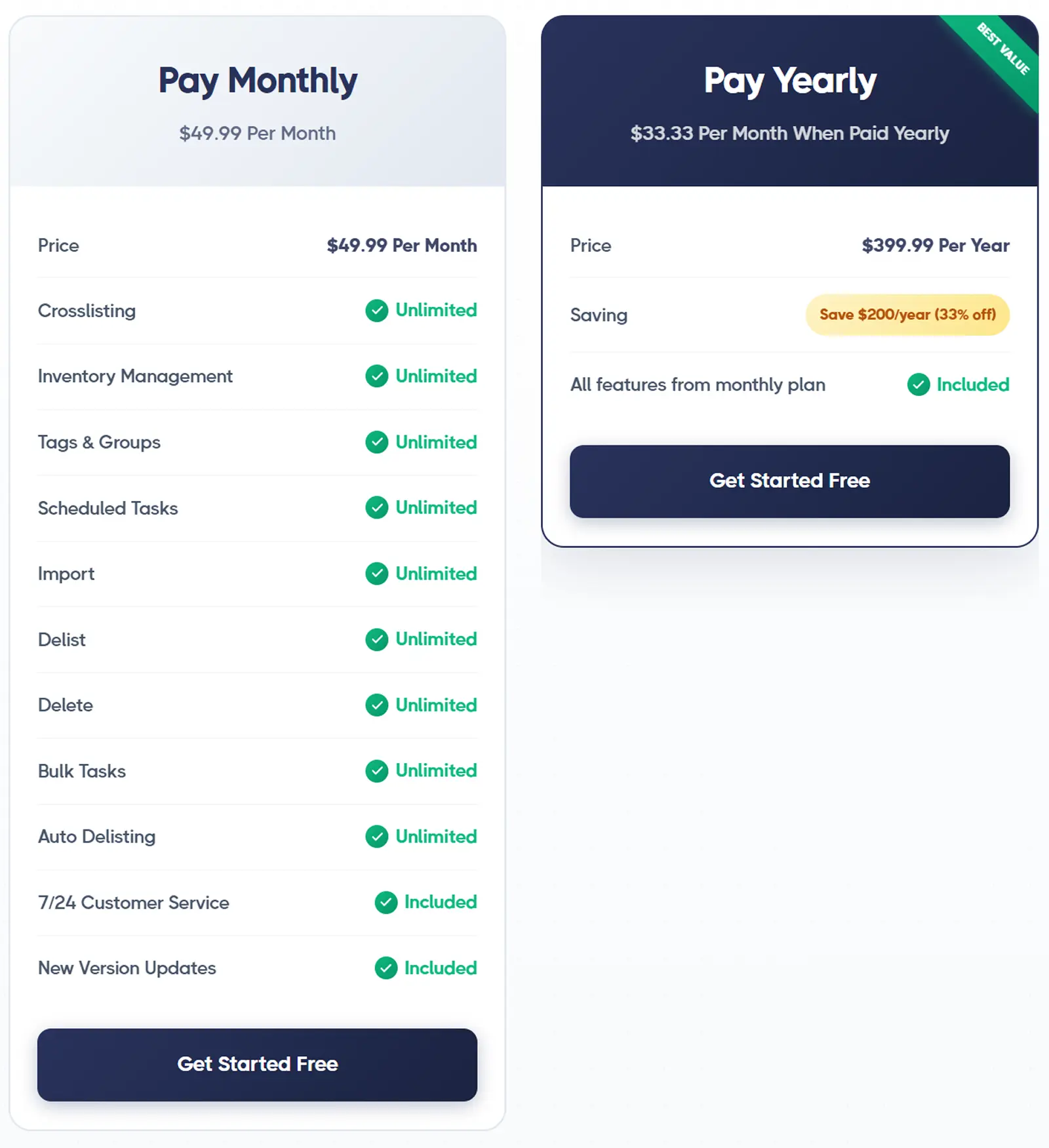
If you want to try out the tool before committing to it, you can make use of the 7-day free trial. You can perform a total of 100 tasks during the free trial.
What counts as a task? Cross listing, delisting, and relisting. Importing and deleting your listings doesn’t count.
Let’s dive into all the features that PrimeLister gives you for the cost.
Support for 8 marketplaces: Poshmark, Mercari, Facebook Marketplace, Depop, eBay, Etsy, Grailed, and Shopify.
Auto-population of listing details: Once you select all the listings you want to cross list, PrimeLister lets you choose the destination marketplaces in one go.
Let’s say you select 5 listings and pick eBay and Poshmark to cross list them to.
Now, PrimeLister will open a new tab for each listing for each marketplace (i.e. 5 tabs for eBay and 5 tabs for Poshmark, making a total of 10 open tabs), and auto-populate all the existing listing details.
This is known as the form-filling software method.
You’ll have to review each listing tab, input any missing information, and publish each listing.
Direct cross listing from one platform to another: With PrimeLister, you can cross list your items directly from one marketplace to another.
You should have the PrimeLister extension installed (obviously), and be logged in to both the marketplaces.
Head to the marketplace you want to cross list from, say eBay, and select the required listings.
Then, click on the “slide bar” button on the right corner of your screen, choose the “cross list” option, and select the marketplace you want to cross list to (say, Depop).
PrimeLister will now open a tab for each listing and auto-populate the details. As usual, you’ll have to fill in the missing details and publish each listing.
Bulk actions: PrimeLister supports unlimited bulk actions, which includes:
Relisting and delisting
Importing
Deleting
Cross listing
Though cross listing in bulk is technically supported, you'll have to contend with the form-filling software and its multiple tabs.
Not to mention the fact that you will need to manually review, finish, and publish each listing. This makes the “bulk” part essentially worthless.
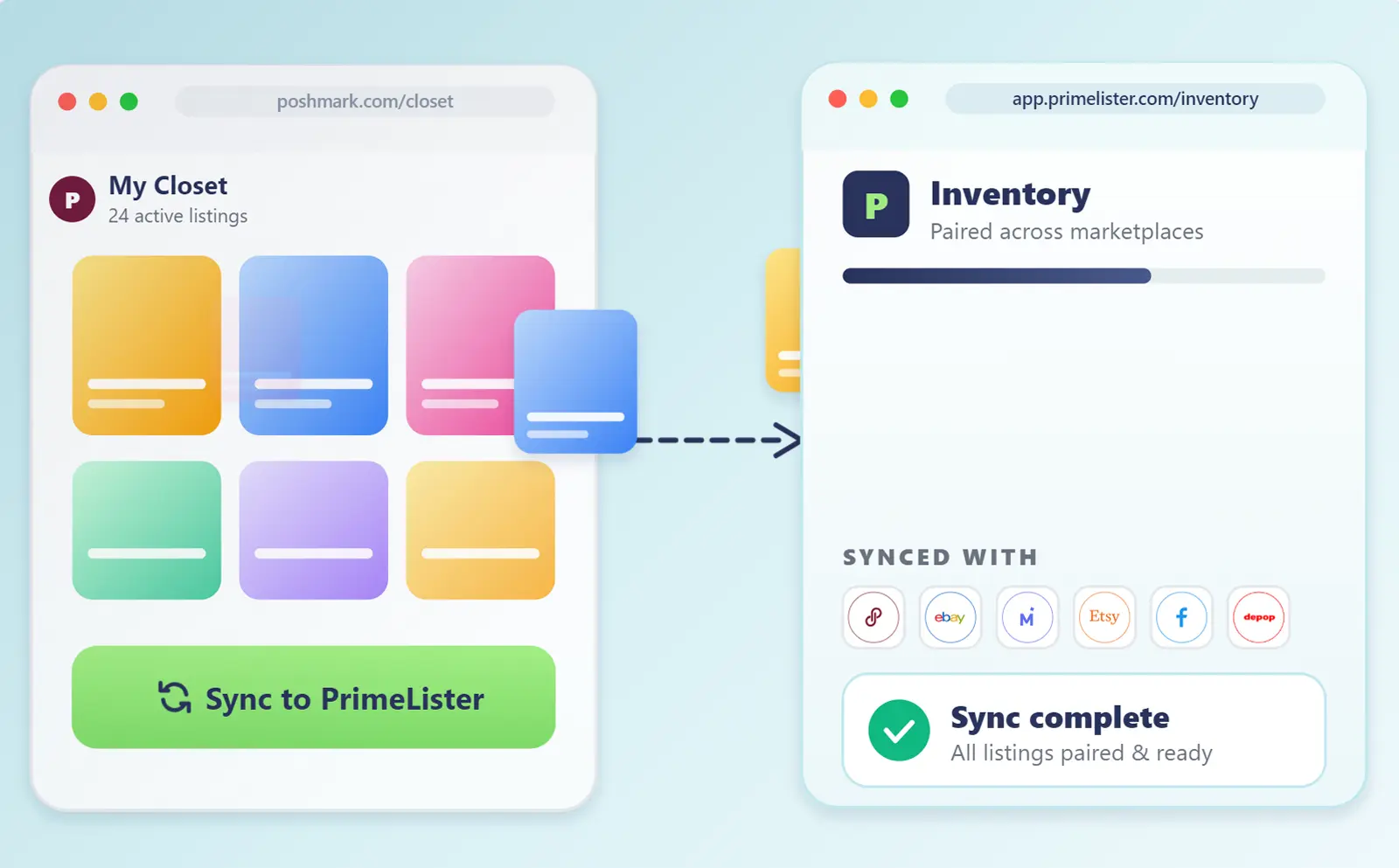
Syncing of updated live listings: Let's say you want to make a tiny change to a published listing. So, you make the edit directly on the live listing on the marketplace.
But your inventory on PrimeLister still doesn't reflect this change. To make that happen, the cross listing tool lets you sync your updated live listings with the PrimeLister inventory.
This way, any changes you make get reflected on the app as well.
Autodelist: Whenever you make a sale, PrimeLister automatically detects it and autodelists the product from the other connected marketplaces to prevent overselling.
This feature is supported for 7 out of the 8 connected marketplaces.
PrimeLister’s autodelist feature runs on the cloud, so the sale detection and autodelisting feature will happen 24/7, even when your computer and browser aren't on.
Inventory management: No matter how many of the 8 supported marketplaces you sell on, you can manage your entire inventory through PrimeLister.
The cross listing tool lets you import any existing listings as well.
You can group your listings on PrimeLister through tags and labels. Want to search for specific listings?
Filter your inventory by price, item size, gender, shipping type, and so on.
Scheduling: If you want your listings to go live at a specific date and time, but can’t be on your computer during that window, you can schedule your posts.
PrimeLister will carry out the required tasks on autopilot.
Scheduling works for cross listing, delisting, and relisting your items, and can be done in bulk.
Multi-region support for a few marketplaces: While PrimeLister primarily supports US-only marketplaces, there are two marketplaces for which multi-country support is available.
The cross listing tool also supports the Canadian domain of Poshmark, and supports both Canada and Australia-based sellers for eBay.
PrimeLister limitations: What features does PrimeLister lack?
PrimeLister has some nice features, but it also lacks some major ones that truly remove the friction from the listing process.
Here’s a detailed overview of all the features that PrimeLister doesn’t have (and why they’re so important).
Lack of support for some major marketplaces: PrimeLister doesn’t support a few online sales giants such as Whatnot, Vinted, and WooCommerce.
If you sell on any of the three platforms, PrimeLister is not an option for you.
(We’ll let you in on a little secret. A majority of Crosslist’s users are resellers who use Vinted because we’re one of the only few tools supporting the platform.)
No option to create fresh listings: This is probably the major flaw that PrimeLister has, it doesn’t let you create a new listing from within the app!
Baffled? So are we, because isn’t that a primary function of every cross listing app?
So, what do you do if you're a PrimeLister user and you need to create a new listing for a product and cross list it everywhere else? You’ll have to:
Create a new listing directly on one of the marketplaces you sell on
Import the listing to PrimeLister
Cross list it to the other marketplaces you sell on
Imagine how much time you’ll spend on this process to list multiple new products.
No background autoposting (aka uses form-filling software): Cross listing through PrimeLister is a tedious process that requires a lot of manual input from you.
Once you select a listing (or multiple) and choose the cross listing function, PrimeLister only opens a new tab for each listing on each marketplace and auto-populates the existing info and product photos.
That’s it. The app doesn’t fill in all of the listing details, nor does it publish the listings on your behalf. All of that falls on you.
You have to review each listing for missing details, fill them up, and then publish them.
Even if you were only cross listing a handful of listings (say, 10), this process would eat up hours of your time!
No AI-generated listings: PrimeLister doesn’t have any feature where you can fast-track your bulk listing process by having the tool generate the listing details for you.
If you don’t have the time to write each listing description yourself, you’re forced to use third-party AI tools and copy-paste each detail.
No extra time-saving to be found here.
Can’t update listings within the app: If you want to edit your published listings, you can’t make the updates from within PrimeLister and have it reflected on the live listings.
Instead, you have to update the live listings directly, come back to PrimeLister, and sync your listings to make sure your inventory also reflects the changes.
The problem with this is that if you’re trying to make a similar change across multiple listings, you’re stuck editing each listing one-by-one.
No image editor or background remover: PrimeLister doesn’t even have a basic photo editing or background removal tool to enhance your product images.
If you do wish to make any edits, you have to rely on third-party tools again.
No autodelist for Facebook Marketplace: Or for Mercari bundles, or listings with multiple quantities.
This means that you’ll need to closely monitor your Facebook Marketplace and multi-quantity listing sales and delist any sold items yourself to avoid double-selling.
There’s also a very real chance that you may oversell something on Facebook Marketplace when you’re asleep or away.
No mobile app: PrimeLister is completely desktop-dependent, which reduces the window of time you have to manage your online business. No cross listing or relisting on the go.
Lack of support for resellers from other countries: If you live anywhere other than the US, you’re fresh out of luck since you won’t be able to access your country’s domains from this cross listing tool.
No option to set default shipping preferences: PrimeLister doesn’t allow you to set your shipping preferences for each marketplace.
So, every time you cross list, you’ll have to keep entering the shipping information again and again for each listing.
Only one subscription plan: PrimeLister only has one subscription option, which means you’re shoehorned into simply accepting whatever the app gives you instead of picking the right plan for your business needs.
Whether you’re a hobbyist or an enterprise reseller, you’re forced to pick the same plan, even though your cross listing needs may vary greatly.
Expensive: At $49.99/month, PrimeLister is a bit more expensive than we’d like, especially since it lacks a lot of essential features.
PrimeLister review: Verdict
Not only is PrimeLister expensive, it also doesn’t have a lot going for it. For example, not giving resellers the option to create a fresh listing within the app is a major glaring flaw.
The form-filling software method is bound to eat up a lot of your time, so the cross listing tool doesn’t save you any time, either.
Best PrimeLister alternative: Crosslist
If you want a cross listing app that’s intuitive, actually saves you time by putting your listing process on autopilot, and fills the gaps created by PrimeLister’s limitations, then Crosslist is the cross listing app for you.
It has all of PrimeLister’s best features and more, and comes with an affordable price tag. Let’s take a look at how much Crosslist costs and what you get for the price.
How much does Crosslist cost?
Unlike PrimeLister, Crosslist gives you four different subscription plans to choose from.
Ranging from $29.99/month to $44.99/month, each of Crosslist’s pricing plans (including the most expensive one) is cheaper than PrimeLister’s pricing.
Each of Crosslist’s pricing plans differ with respect to:
The maximum number of new listings you can create in a month
The total number of high-resolution product images you can store per listing
The number of AI credits you get per month
Here’s how much Crosslist costs per month:
Plan | Price | New listings you can create per month | Number of images you can store per listing |
Bronze | $29.99 | 200 | 9 |
Silver | $34.99 | 500 | 9 |
Gold | $39.99 | 1000 | 15 |
Diamond | $44.99 | Unlimited | 24 |
Crosslist also has annual pricing plans which give you a total of 2 months free.
Here’s how much they cost, and the amount they save you per year when compared to the monthly plans:
Plan | Price per month | New listings you can create per month | Number of images you can store per listing | Amount saved per year |
Bronze | $24.99 | 200 | 9 | $60 |
Silver | $28.99 | 500 | 9 | $72 |
Gold | $32.99 | 1000 | 15 | $84 |
Diamond | $36.99 | Unlimited | 24 | $96 |
But, what if you want something cheaper than the monthly plans, but also don’t want to lock in your subscription for a year?
This is where Crosslist’s quarterly plans come in. They’re billed once every three months, and give you a total discount of 10%.
Here’s how much the quarterly plans cost:
Plan | Price per month | New listings you can create per month | Number of images you can store per listing | Amount saved per quarter |
Bronze | $26.99 | 200 | 9 | $9 |
Silver | $31.49 | 500 | 9 | $10.50 |
Gold | $35.99 | 1000 | 15 | $12 |
Diamond | $40.49 | Unlimited | 24 | $13.50 |
AI add-on: Crosslist also has only one add-on, which you can purchase if you want to generate your listing details with AI.
No matter which plan (or billing option) you’re on, the AI add-on costs a flat fee of $4.99/month.
Each subscription plan, however, gives you a different number of AI credits (which are consumed when you use the AI listing generation or AI editing options).
Here’s the number of AI credits you receive each month based on your base subscription plan:
Plan | Number of AI credits per month |
Bronze | 200 |
Silver | 500 |
Gold | 1,000 |
Diamond | 2,000 |
Free trial: Crosslist offers a 3-day money-back guarantee as long as you’ve created 20 or fewer listings.
Even in absolute numbers, Crosslist is more affordable than PrimeLister. Our cross listing tool also gives you multiple subscription plans to choose from instead of PrimeLister’s “one size fits all” approach.
Let’s explore how Crosslist fares in terms of the features it offers.
What features does Crosslist provide for its price?
Every single one of Crosslist’s pricing plans offer these core features:
11+ supported marketplaces: In addition to all the 8 marketplaces supported by PrimeLister, Crosslist also supports Vinted, WooCommerce, and Whatnot.
Single, dynamic listing form: Unlike PrimeLister, Crosslist lets you create new listings directly from within the app.
And no matter how many marketplaces you want to cross list the new listing to, you only need to fill out one single form.
The form contains all the listing attributes needed to post on all 11+ marketplaces.
Once you fill it out, simply select the marketplaces you want to post the listing to, and you’re all done!
Background autoposting of your listings: Once you finish the listing form, select the target marketplaces, and click the submit button, your work is done!
Crosslist automatically publishes your listings to the relevant platforms.
Since the form contains all the details needed, you don’t have to check for any missing details or manually publish the listings.
Trust us when we say that this will actually automate your listing process and save you at least 5+ hours each week!
AI-generated listings (including AI-suggested optimal prices): If you get Crosslist’s AI add-on, you can get your entire listing generated with our AI tool.
Upload your product photos from all angles, and the AI tool will capture all the relevant information from them and generate the listing for you.
The tool will generate everything, right from the title and description to the tags, categories, brand, color, and condition.
You can tweak the tone and length, and even add your own custom prompts for the AI.
Only need a few details filled in? No problem! The AI tool can do that while you take care of the rest.
Additionally, the AI tool also suggests optimal prices for your products based on current internet trends, saving you from having to research that separately.
📝 Note: Each time you generate a description with AI, you use 1 AI credit.
Bulk actions: Crosslist supports the following bulk actions without any restrictions or limitations:
Importing
Cross listing
Delisting and relisting
Deleting
Editing (right on the app, with the edits being reflected on the published listings automatically)
Setting different prices for different marketplaces
Cloning
Archiving
Editing and cloning alone can be carried out only on a maximum of 100 listings at once.
Autodelisting: Like PrimeLister, Crosslist automatically detects any sales and autodelists the listings from the other connected marketplaces.
Unlike PrimeLister, though, all of the 11+ marketplaces are supported by this feature.
📝 Note: Autodelisting is fully server-based for 4 marketplaces. For the others, your browser needs to periodically remain active for it to work.
Updating listings without delisting and relisting: You can edit up to 100 listings at once within Crosslist, and our tool will automatically apply these changes to the published listings. Easy peasy!
Setting different prices for different marketplaces: To help you stay competitive on all the marketplaces even after taking the varying fees into account, Crosslist lets you set different prices for each marketplace.
Go to Account Settings → Price markup, and enter a positive (or negative, to discount the price) percentage or dollar amount beside each marketplace.
This will increase or decrease the prices of each listing by the entered value.
For instance, if you add -5% in the box beside eBay, this will decrease the prices of all of your eBay products by 5%.
Mobile app: Crosslist has a fully functional mobile app where you can do anything the browser version can do.
You can create new listings, delist and relist, edit, change the price, and so on.
Think of it as a miniature version of Crosslist that you can use wherever you are. Going on a road trip and want to run a sale on Poshmark at the same time?
Just use the Crosslist mobile app to mark down the prices of your Poshmark listing.
At an estate sale and want to immediately list the vintage pieces you found? Crosslist’s mobile app comes to the rescue again!
Advanced AI image editor and background remover: Crosslist has an in-built image editor which has both AI and manual editing features.
Use the AI-powered editing features to add mannequins to your photos, enhance the shadows, lighting, and depth, and even generate stock images of your products.
The manual editing tools, on the other hand, let you fine-tune the brightness and saturation, add filters, or blur sensitive information.
Our editing tool also automatically resizes your product images (without any loss) to fit the various marketplace requirements.
📝 Note: Editing your photos with AI, and generating images with AI, both consume 2 AI credits per request.
Crosslist also has a one-click background photo remover.
Simply press the “remove all photo backgrounds” button, and our tool will carry out the action in bulk on all of your product photos.
Set default shipping preferences: Crosslist lets you set your preferred shipping method for each marketplace.
You can set your default shipping carriers, weight, and dimensions. These preferences will be automatically applied to each new listing you create.
You can create multiple shipping profiles for each marketplace, and easily switch between them whenever you want!
Multi-country support: Crosslist supports US, UK, CA, and AU-based domains for all 11+ marketplaces.
Our cross listing tool also automatically publishes to the right domain based on your region, and automatically converts from imperial to metric and vice versa.
Other features:
Free Poshmark automation bot which can be used even if you don’t have a Crosslist subscription
Sales analytics
Inventory management from a single dashboard, with tags and labels to help you filter through your listings faster
Templates to speed up the creation of similar listings
Instant answers from the Crossly AI chatbot, plus a support team that replies within 1 business day
PrimeLister vs. Crosslist: Which cross listing tool offers the most value for the money?
Before we dive into the verdict, here’s a side-by-side comparison of PrimeLister and Crosslist.
Features | PrimeLister | Crosslist |
Marketplaces supported | 8 | 11+ |
Listing form | Doesn’t have a listing form as it doesn’t let you create new listings from within the app | Single dynamic listing form with all attributes supported |
Cross listing | Uses form-filling software, so you need to review each listing, add missing details, and publish them yourself | Is automated. You only need to fill out the listing form and submit it |
Autoposting | ❌ | ✅ |
Free trial | 7 days | 3-day money-back guarantee if you’ve created 20 or fewer listings |
Price | $49.99/month | Starts at $29.99/month |
Bulk actions | ✅ | ✅ |
AI-generated listings | ❌ | ✅ |
Pricing suggestions | ❌ | ✅ |
Autodelisting | ✅ | ✅ |
Background removal | ❌ | ✅ |
Photo editing tool | ❌ | ✅ |
Mobile app | ❌ | ✅ |
Edit listings without delisting and relisting | ❌ | ✅ |
Set different prices for different marketplaces | ❌ | ✅ |
Multi-country support | U.S. only, with two exceptions | U.S., UK, CA, and AU |
Default shipping preferences | ❌ | ✅ |
Inventory management | ✅ | ✅ |
Schedule listings | ✅ | ❌ |
Final verdict: No matter which way you look at it, Crosslist is the clear winner. It’s more affordable, and offers more bang for your buck.
It’s the only cross listing app that actually puts your listing process on autopilot.
PrimeLister, on the other hand, is missing a lot of essential features. Combine the lack of features with the high price tag, and you’re left wondering if it’s even worth the investment.
I mean, why spend hours reviewing and publishing your listings when you can get a tool that will do the tedious tasks for you?
Save 10+ hours each week on cross listing with Crosslist. Try risk-free now.
When shopping around for a cross listing app, how do you choose the one that’s an ideal fit for your reselling needs?
Our formula is simple: a good cross listing app must offer the perfect blend of useful features at an affordable cost.
Here, we explore PrimeLister’s pricing, take a look at the features this app offers for its price tag, and see how Crosslist compares.
You’ll walk away knowing which cross listing tool offers the most value for its price.
Key takeaways:
With a price tag of $49.99/month, PrimeLister is more expensive than all of Crosslist’s pricing plans.
While PrimeLister has some decent features, it has more cons than pros: the lack of a listing form, the usage of form-filling software, and the absence of a mobile app are some of its major flaws, among many others.
Crosslist’s cost ranges from $29.99/month to $44.99/month.
Crosslist takes all of PrimeLister’s features and makes them better. It also has several additional features that make your listing process easier, such as the AI listing generation, single, dynamic listing form, background autoposting, mobile app, and more.
Crosslist is the #1 PrimeLister alternative, and the only tool out of the two that offers a lot of value for its price tag.
PrimeLister Cost: What do you get for the price?
PrimeLister only has a single subscription plan that costs $49.99/month.
If you opt for the yearly subscription, you get a total discount of 33%, which saves you $200 per year. This effectively brings down the monthly cost to $33.33/month.
If you want to try out the tool before committing to it, you can make use of the 7-day free trial. You can perform a total of 100 tasks during the free trial.
What counts as a task? Cross listing, delisting, and relisting. Importing and deleting your listings doesn’t count.
Let’s dive into all the features that PrimeLister gives you for the cost.
Support for 8 marketplaces: Poshmark, Mercari, Facebook Marketplace, Depop, eBay, Etsy, Grailed, and Shopify.
Auto-population of listing details: Once you select all the listings you want to cross list, PrimeLister lets you choose the destination marketplaces in one go.
Let’s say you select 5 listings and pick eBay and Poshmark to cross list them to.
Now, PrimeLister will open a new tab for each listing for each marketplace (i.e. 5 tabs for eBay and 5 tabs for Poshmark, making a total of 10 open tabs), and auto-populate all the existing listing details.
This is known as the form-filling software method.
You’ll have to review each listing tab, input any missing information, and publish each listing.
Direct cross listing from one platform to another: With PrimeLister, you can cross list your items directly from one marketplace to another.
You should have the PrimeLister extension installed (obviously), and be logged in to both the marketplaces.
Head to the marketplace you want to cross list from, say eBay, and select the required listings.
Then, click on the “slide bar” button on the right corner of your screen, choose the “cross list” option, and select the marketplace you want to cross list to (say, Depop).
PrimeLister will now open a tab for each listing and auto-populate the details. As usual, you’ll have to fill in the missing details and publish each listing.
Bulk actions: PrimeLister supports unlimited bulk actions, which includes:
Relisting and delisting
Importing
Deleting
Cross listing
Though cross listing in bulk is technically supported, you'll have to contend with the form-filling software and its multiple tabs.
Not to mention the fact that you will need to manually review, finish, and publish each listing. This makes the “bulk” part essentially worthless.
Syncing of updated live listings: Let's say you want to make a tiny change to a published listing. So, you make the edit directly on the live listing on the marketplace.
But your inventory on PrimeLister still doesn't reflect this change. To make that happen, the cross listing tool lets you sync your updated live listings with the PrimeLister inventory.
This way, any changes you make get reflected on the app as well.
Autodelist: Whenever you make a sale, PrimeLister automatically detects it and autodelists the product from the other connected marketplaces to prevent overselling.
This feature is supported for 7 out of the 8 connected marketplaces.
PrimeLister’s autodelist feature runs on the cloud, so the sale detection and autodelisting feature will happen 24/7, even when your computer and browser aren't on.
Inventory management: No matter how many of the 8 supported marketplaces you sell on, you can manage your entire inventory through PrimeLister.
The cross listing tool lets you import any existing listings as well.
You can group your listings on PrimeLister through tags and labels. Want to search for specific listings?
Filter your inventory by price, item size, gender, shipping type, and so on.
Scheduling: If you want your listings to go live at a specific date and time, but can’t be on your computer during that window, you can schedule your posts.
PrimeLister will carry out the required tasks on autopilot.
Scheduling works for cross listing, delisting, and relisting your items, and can be done in bulk.
Multi-region support for a few marketplaces: While PrimeLister primarily supports US-only marketplaces, there are two marketplaces for which multi-country support is available.
The cross listing tool also supports the Canadian domain of Poshmark, and supports both Canada and Australia-based sellers for eBay.
PrimeLister limitations: What features does PrimeLister lack?
PrimeLister has some nice features, but it also lacks some major ones that truly remove the friction from the listing process.
Here’s a detailed overview of all the features that PrimeLister doesn’t have (and why they’re so important).
Lack of support for some major marketplaces: PrimeLister doesn’t support a few online sales giants such as Whatnot, Vinted, and WooCommerce.
If you sell on any of the three platforms, PrimeLister is not an option for you.
(We’ll let you in on a little secret. A majority of Crosslist’s users are resellers who use Vinted because we’re one of the only few tools supporting the platform.)
No option to create fresh listings: This is probably the major flaw that PrimeLister has, it doesn’t let you create a new listing from within the app!
Baffled? So are we, because isn’t that a primary function of every cross listing app?
So, what do you do if you're a PrimeLister user and you need to create a new listing for a product and cross list it everywhere else? You’ll have to:
Create a new listing directly on one of the marketplaces you sell on
Import the listing to PrimeLister
Cross list it to the other marketplaces you sell on
Imagine how much time you’ll spend on this process to list multiple new products.
No background autoposting (aka uses form-filling software): Cross listing through PrimeLister is a tedious process that requires a lot of manual input from you.
Once you select a listing (or multiple) and choose the cross listing function, PrimeLister only opens a new tab for each listing on each marketplace and auto-populates the existing info and product photos.
That’s it. The app doesn’t fill in all of the listing details, nor does it publish the listings on your behalf. All of that falls on you.
You have to review each listing for missing details, fill them up, and then publish them.
Even if you were only cross listing a handful of listings (say, 10), this process would eat up hours of your time!
No AI-generated listings: PrimeLister doesn’t have any feature where you can fast-track your bulk listing process by having the tool generate the listing details for you.
If you don’t have the time to write each listing description yourself, you’re forced to use third-party AI tools and copy-paste each detail.
No extra time-saving to be found here.
Can’t update listings within the app: If you want to edit your published listings, you can’t make the updates from within PrimeLister and have it reflected on the live listings.
Instead, you have to update the live listings directly, come back to PrimeLister, and sync your listings to make sure your inventory also reflects the changes.
The problem with this is that if you’re trying to make a similar change across multiple listings, you’re stuck editing each listing one-by-one.
No image editor or background remover: PrimeLister doesn’t even have a basic photo editing or background removal tool to enhance your product images.
If you do wish to make any edits, you have to rely on third-party tools again.
No autodelist for Facebook Marketplace: Or for Mercari bundles, or listings with multiple quantities.
This means that you’ll need to closely monitor your Facebook Marketplace and multi-quantity listing sales and delist any sold items yourself to avoid double-selling.
There’s also a very real chance that you may oversell something on Facebook Marketplace when you’re asleep or away.
No mobile app: PrimeLister is completely desktop-dependent, which reduces the window of time you have to manage your online business. No cross listing or relisting on the go.
Lack of support for resellers from other countries: If you live anywhere other than the US, you’re fresh out of luck since you won’t be able to access your country’s domains from this cross listing tool.
No option to set default shipping preferences: PrimeLister doesn’t allow you to set your shipping preferences for each marketplace.
So, every time you cross list, you’ll have to keep entering the shipping information again and again for each listing.
Only one subscription plan: PrimeLister only has one subscription option, which means you’re shoehorned into simply accepting whatever the app gives you instead of picking the right plan for your business needs.
Whether you’re a hobbyist or an enterprise reseller, you’re forced to pick the same plan, even though your cross listing needs may vary greatly.
Expensive: At $49.99/month, PrimeLister is a bit more expensive than we’d like, especially since it lacks a lot of essential features.
PrimeLister review: Verdict
Not only is PrimeLister expensive, it also doesn’t have a lot going for it. For example, not giving resellers the option to create a fresh listing within the app is a major glaring flaw.
The form-filling software method is bound to eat up a lot of your time, so the cross listing tool doesn’t save you any time, either.
Best PrimeLister alternative: Crosslist
If you want a cross listing app that’s intuitive, actually saves you time by putting your listing process on autopilot, and fills the gaps created by PrimeLister’s limitations, then Crosslist is the cross listing app for you.
It has all of PrimeLister’s best features and more, and comes with an affordable price tag. Let’s take a look at how much Crosslist costs and what you get for the price.
How much does Crosslist cost?
Unlike PrimeLister, Crosslist gives you four different subscription plans to choose from.
Ranging from $29.99/month to $44.99/month, each of Crosslist’s pricing plans (including the most expensive one) is cheaper than PrimeLister’s pricing.
Each of Crosslist’s pricing plans differ with respect to:
The maximum number of new listings you can create in a month
The total number of high-resolution product images you can store per listing
The number of AI credits you get per month
Here’s how much Crosslist costs per month:
Plan | Price | New listings you can create per month | Number of images you can store per listing |
Bronze | $29.99 | 200 | 9 |
Silver | $34.99 | 500 | 9 |
Gold | $39.99 | 1000 | 15 |
Diamond | $44.99 | Unlimited | 24 |
Crosslist also has annual pricing plans which give you a total of 2 months free.
Here’s how much they cost, and the amount they save you per year when compared to the monthly plans:
Plan | Price per month | New listings you can create per month | Number of images you can store per listing | Amount saved per year |
Bronze | $24.99 | 200 | 9 | $60 |
Silver | $28.99 | 500 | 9 | $72 |
Gold | $32.99 | 1000 | 15 | $84 |
Diamond | $36.99 | Unlimited | 24 | $96 |
But, what if you want something cheaper than the monthly plans, but also don’t want to lock in your subscription for a year?
This is where Crosslist’s quarterly plans come in. They’re billed once every three months, and give you a total discount of 10%.
Here’s how much the quarterly plans cost:
Plan | Price per month | New listings you can create per month | Number of images you can store per listing | Amount saved per quarter |
Bronze | $26.99 | 200 | 9 | $9 |
Silver | $31.49 | 500 | 9 | $10.50 |
Gold | $35.99 | 1000 | 15 | $12 |
Diamond | $40.49 | Unlimited | 24 | $13.50 |
AI add-on: Crosslist also has only one add-on, which you can purchase if you want to generate your listing details with AI.
No matter which plan (or billing option) you’re on, the AI add-on costs a flat fee of $4.99/month.
Each subscription plan, however, gives you a different number of AI credits (which are consumed when you use the AI listing generation or AI editing options).
Here’s the number of AI credits you receive each month based on your base subscription plan:
Plan | Number of AI credits per month |
Bronze | 200 |
Silver | 500 |
Gold | 1,000 |
Diamond | 2,000 |
Free trial: Crosslist offers a 3-day money-back guarantee as long as you’ve created 20 or fewer listings.
Even in absolute numbers, Crosslist is more affordable than PrimeLister. Our cross listing tool also gives you multiple subscription plans to choose from instead of PrimeLister’s “one size fits all” approach.
Let’s explore how Crosslist fares in terms of the features it offers.
What features does Crosslist provide for its price?
Every single one of Crosslist’s pricing plans offer these core features:
11+ supported marketplaces: In addition to all the 8 marketplaces supported by PrimeLister, Crosslist also supports Vinted, WooCommerce, and Whatnot.
Single, dynamic listing form: Unlike PrimeLister, Crosslist lets you create new listings directly from within the app.
And no matter how many marketplaces you want to cross list the new listing to, you only need to fill out one single form.
The form contains all the listing attributes needed to post on all 11+ marketplaces.
Once you fill it out, simply select the marketplaces you want to post the listing to, and you’re all done!
Background autoposting of your listings: Once you finish the listing form, select the target marketplaces, and click the submit button, your work is done!
Crosslist automatically publishes your listings to the relevant platforms.
Since the form contains all the details needed, you don’t have to check for any missing details or manually publish the listings.
Trust us when we say that this will actually automate your listing process and save you at least 5+ hours each week!
AI-generated listings (including AI-suggested optimal prices): If you get Crosslist’s AI add-on, you can get your entire listing generated with our AI tool.
Upload your product photos from all angles, and the AI tool will capture all the relevant information from them and generate the listing for you.
The tool will generate everything, right from the title and description to the tags, categories, brand, color, and condition.
You can tweak the tone and length, and even add your own custom prompts for the AI.
Only need a few details filled in? No problem! The AI tool can do that while you take care of the rest.
Additionally, the AI tool also suggests optimal prices for your products based on current internet trends, saving you from having to research that separately.
📝 Note: Each time you generate a description with AI, you use 1 AI credit.
Bulk actions: Crosslist supports the following bulk actions without any restrictions or limitations:
Importing
Cross listing
Delisting and relisting
Deleting
Editing (right on the app, with the edits being reflected on the published listings automatically)
Setting different prices for different marketplaces
Cloning
Archiving
Editing and cloning alone can be carried out only on a maximum of 100 listings at once.
Autodelisting: Like PrimeLister, Crosslist automatically detects any sales and autodelists the listings from the other connected marketplaces.
Unlike PrimeLister, though, all of the 11+ marketplaces are supported by this feature.
📝 Note: Autodelisting is fully server-based for 4 marketplaces. For the others, your browser needs to periodically remain active for it to work.
Updating listings without delisting and relisting: You can edit up to 100 listings at once within Crosslist, and our tool will automatically apply these changes to the published listings. Easy peasy!
Setting different prices for different marketplaces: To help you stay competitive on all the marketplaces even after taking the varying fees into account, Crosslist lets you set different prices for each marketplace.
Go to Account Settings → Price markup, and enter a positive (or negative, to discount the price) percentage or dollar amount beside each marketplace.
This will increase or decrease the prices of each listing by the entered value.
For instance, if you add -5% in the box beside eBay, this will decrease the prices of all of your eBay products by 5%.
Mobile app: Crosslist has a fully functional mobile app where you can do anything the browser version can do.
You can create new listings, delist and relist, edit, change the price, and so on.
Think of it as a miniature version of Crosslist that you can use wherever you are. Going on a road trip and want to run a sale on Poshmark at the same time?
Just use the Crosslist mobile app to mark down the prices of your Poshmark listing.
At an estate sale and want to immediately list the vintage pieces you found? Crosslist’s mobile app comes to the rescue again!
Advanced AI image editor and background remover: Crosslist has an in-built image editor which has both AI and manual editing features.
Use the AI-powered editing features to add mannequins to your photos, enhance the shadows, lighting, and depth, and even generate stock images of your products.
The manual editing tools, on the other hand, let you fine-tune the brightness and saturation, add filters, or blur sensitive information.
Our editing tool also automatically resizes your product images (without any loss) to fit the various marketplace requirements.
📝 Note: Editing your photos with AI, and generating images with AI, both consume 2 AI credits per request.
Crosslist also has a one-click background photo remover.
Simply press the “remove all photo backgrounds” button, and our tool will carry out the action in bulk on all of your product photos.
Set default shipping preferences: Crosslist lets you set your preferred shipping method for each marketplace.
You can set your default shipping carriers, weight, and dimensions. These preferences will be automatically applied to each new listing you create.
You can create multiple shipping profiles for each marketplace, and easily switch between them whenever you want!
Multi-country support: Crosslist supports US, UK, CA, and AU-based domains for all 11+ marketplaces.
Our cross listing tool also automatically publishes to the right domain based on your region, and automatically converts from imperial to metric and vice versa.
Other features:
Free Poshmark automation bot which can be used even if you don’t have a Crosslist subscription
Sales analytics
Inventory management from a single dashboard, with tags and labels to help you filter through your listings faster
Templates to speed up the creation of similar listings
Instant answers from the Crossly AI chatbot, plus a support team that replies within 1 business day
PrimeLister vs. Crosslist: Which cross listing tool offers the most value for the money?
Before we dive into the verdict, here’s a side-by-side comparison of PrimeLister and Crosslist.
Features | PrimeLister | Crosslist |
Marketplaces supported | 8 | 11+ |
Listing form | Doesn’t have a listing form as it doesn’t let you create new listings from within the app | Single dynamic listing form with all attributes supported |
Cross listing | Uses form-filling software, so you need to review each listing, add missing details, and publish them yourself | Is automated. You only need to fill out the listing form and submit it |
Autoposting | ❌ | ✅ |
Free trial | 7 days | 3-day money-back guarantee if you’ve created 20 or fewer listings |
Price | $49.99/month | Starts at $29.99/month |
Bulk actions | ✅ | ✅ |
AI-generated listings | ❌ | ✅ |
Pricing suggestions | ❌ | ✅ |
Autodelisting | ✅ | ✅ |
Background removal | ❌ | ✅ |
Photo editing tool | ❌ | ✅ |
Mobile app | ❌ | ✅ |
Edit listings without delisting and relisting | ❌ | ✅ |
Set different prices for different marketplaces | ❌ | ✅ |
Multi-country support | U.S. only, with two exceptions | U.S., UK, CA, and AU |
Default shipping preferences | ❌ | ✅ |
Inventory management | ✅ | ✅ |
Schedule listings | ✅ | ❌ |
Final verdict: No matter which way you look at it, Crosslist is the clear winner. It’s more affordable, and offers more bang for your buck.
It’s the only cross listing app that actually puts your listing process on autopilot.
PrimeLister, on the other hand, is missing a lot of essential features. Combine the lack of features with the high price tag, and you’re left wondering if it’s even worth the investment.
I mean, why spend hours reviewing and publishing your listings when you can get a tool that will do the tedious tasks for you?
Save 10+ hours each week on cross listing with Crosslist. Try risk-free now.
When shopping around for a cross listing app, how do you choose the one that’s an ideal fit for your reselling needs?
Our formula is simple: a good cross listing app must offer the perfect blend of useful features at an affordable cost.
Here, we explore PrimeLister’s pricing, take a look at the features this app offers for its price tag, and see how Crosslist compares.
You’ll walk away knowing which cross listing tool offers the most value for its price.
Key takeaways:
With a price tag of $49.99/month, PrimeLister is more expensive than all of Crosslist’s pricing plans.
While PrimeLister has some decent features, it has more cons than pros: the lack of a listing form, the usage of form-filling software, and the absence of a mobile app are some of its major flaws, among many others.
Crosslist’s cost ranges from $29.99/month to $44.99/month.
Crosslist takes all of PrimeLister’s features and makes them better. It also has several additional features that make your listing process easier, such as the AI listing generation, single, dynamic listing form, background autoposting, mobile app, and more.
Crosslist is the #1 PrimeLister alternative, and the only tool out of the two that offers a lot of value for its price tag.
PrimeLister Cost: What do you get for the price?
PrimeLister only has a single subscription plan that costs $49.99/month.
If you opt for the yearly subscription, you get a total discount of 33%, which saves you $200 per year. This effectively brings down the monthly cost to $33.33/month.
If you want to try out the tool before committing to it, you can make use of the 7-day free trial. You can perform a total of 100 tasks during the free trial.
What counts as a task? Cross listing, delisting, and relisting. Importing and deleting your listings doesn’t count.
Let’s dive into all the features that PrimeLister gives you for the cost.
Support for 8 marketplaces: Poshmark, Mercari, Facebook Marketplace, Depop, eBay, Etsy, Grailed, and Shopify.
Auto-population of listing details: Once you select all the listings you want to cross list, PrimeLister lets you choose the destination marketplaces in one go.
Let’s say you select 5 listings and pick eBay and Poshmark to cross list them to.
Now, PrimeLister will open a new tab for each listing for each marketplace (i.e. 5 tabs for eBay and 5 tabs for Poshmark, making a total of 10 open tabs), and auto-populate all the existing listing details.
This is known as the form-filling software method.
You’ll have to review each listing tab, input any missing information, and publish each listing.
Direct cross listing from one platform to another: With PrimeLister, you can cross list your items directly from one marketplace to another.
You should have the PrimeLister extension installed (obviously), and be logged in to both the marketplaces.
Head to the marketplace you want to cross list from, say eBay, and select the required listings.
Then, click on the “slide bar” button on the right corner of your screen, choose the “cross list” option, and select the marketplace you want to cross list to (say, Depop).
PrimeLister will now open a tab for each listing and auto-populate the details. As usual, you’ll have to fill in the missing details and publish each listing.
Bulk actions: PrimeLister supports unlimited bulk actions, which includes:
Relisting and delisting
Importing
Deleting
Cross listing
Though cross listing in bulk is technically supported, you'll have to contend with the form-filling software and its multiple tabs.
Not to mention the fact that you will need to manually review, finish, and publish each listing. This makes the “bulk” part essentially worthless.
Syncing of updated live listings: Let's say you want to make a tiny change to a published listing. So, you make the edit directly on the live listing on the marketplace.
But your inventory on PrimeLister still doesn't reflect this change. To make that happen, the cross listing tool lets you sync your updated live listings with the PrimeLister inventory.
This way, any changes you make get reflected on the app as well.
Autodelist: Whenever you make a sale, PrimeLister automatically detects it and autodelists the product from the other connected marketplaces to prevent overselling.
This feature is supported for 7 out of the 8 connected marketplaces.
PrimeLister’s autodelist feature runs on the cloud, so the sale detection and autodelisting feature will happen 24/7, even when your computer and browser aren't on.
Inventory management: No matter how many of the 8 supported marketplaces you sell on, you can manage your entire inventory through PrimeLister.
The cross listing tool lets you import any existing listings as well.
You can group your listings on PrimeLister through tags and labels. Want to search for specific listings?
Filter your inventory by price, item size, gender, shipping type, and so on.
Scheduling: If you want your listings to go live at a specific date and time, but can’t be on your computer during that window, you can schedule your posts.
PrimeLister will carry out the required tasks on autopilot.
Scheduling works for cross listing, delisting, and relisting your items, and can be done in bulk.
Multi-region support for a few marketplaces: While PrimeLister primarily supports US-only marketplaces, there are two marketplaces for which multi-country support is available.
The cross listing tool also supports the Canadian domain of Poshmark, and supports both Canada and Australia-based sellers for eBay.
PrimeLister limitations: What features does PrimeLister lack?
PrimeLister has some nice features, but it also lacks some major ones that truly remove the friction from the listing process.
Here’s a detailed overview of all the features that PrimeLister doesn’t have (and why they’re so important).
Lack of support for some major marketplaces: PrimeLister doesn’t support a few online sales giants such as Whatnot, Vinted, and WooCommerce.
If you sell on any of the three platforms, PrimeLister is not an option for you.
(We’ll let you in on a little secret. A majority of Crosslist’s users are resellers who use Vinted because we’re one of the only few tools supporting the platform.)
No option to create fresh listings: This is probably the major flaw that PrimeLister has, it doesn’t let you create a new listing from within the app!
Baffled? So are we, because isn’t that a primary function of every cross listing app?
So, what do you do if you're a PrimeLister user and you need to create a new listing for a product and cross list it everywhere else? You’ll have to:
Create a new listing directly on one of the marketplaces you sell on
Import the listing to PrimeLister
Cross list it to the other marketplaces you sell on
Imagine how much time you’ll spend on this process to list multiple new products.
No background autoposting (aka uses form-filling software): Cross listing through PrimeLister is a tedious process that requires a lot of manual input from you.
Once you select a listing (or multiple) and choose the cross listing function, PrimeLister only opens a new tab for each listing on each marketplace and auto-populates the existing info and product photos.
That’s it. The app doesn’t fill in all of the listing details, nor does it publish the listings on your behalf. All of that falls on you.
You have to review each listing for missing details, fill them up, and then publish them.
Even if you were only cross listing a handful of listings (say, 10), this process would eat up hours of your time!
No AI-generated listings: PrimeLister doesn’t have any feature where you can fast-track your bulk listing process by having the tool generate the listing details for you.
If you don’t have the time to write each listing description yourself, you’re forced to use third-party AI tools and copy-paste each detail.
No extra time-saving to be found here.
Can’t update listings within the app: If you want to edit your published listings, you can’t make the updates from within PrimeLister and have it reflected on the live listings.
Instead, you have to update the live listings directly, come back to PrimeLister, and sync your listings to make sure your inventory also reflects the changes.
The problem with this is that if you’re trying to make a similar change across multiple listings, you’re stuck editing each listing one-by-one.
No image editor or background remover: PrimeLister doesn’t even have a basic photo editing or background removal tool to enhance your product images.
If you do wish to make any edits, you have to rely on third-party tools again.
No autodelist for Facebook Marketplace: Or for Mercari bundles, or listings with multiple quantities.
This means that you’ll need to closely monitor your Facebook Marketplace and multi-quantity listing sales and delist any sold items yourself to avoid double-selling.
There’s also a very real chance that you may oversell something on Facebook Marketplace when you’re asleep or away.
No mobile app: PrimeLister is completely desktop-dependent, which reduces the window of time you have to manage your online business. No cross listing or relisting on the go.
Lack of support for resellers from other countries: If you live anywhere other than the US, you’re fresh out of luck since you won’t be able to access your country’s domains from this cross listing tool.
No option to set default shipping preferences: PrimeLister doesn’t allow you to set your shipping preferences for each marketplace.
So, every time you cross list, you’ll have to keep entering the shipping information again and again for each listing.
Only one subscription plan: PrimeLister only has one subscription option, which means you’re shoehorned into simply accepting whatever the app gives you instead of picking the right plan for your business needs.
Whether you’re a hobbyist or an enterprise reseller, you’re forced to pick the same plan, even though your cross listing needs may vary greatly.
Expensive: At $49.99/month, PrimeLister is a bit more expensive than we’d like, especially since it lacks a lot of essential features.
PrimeLister review: Verdict
Not only is PrimeLister expensive, it also doesn’t have a lot going for it. For example, not giving resellers the option to create a fresh listing within the app is a major glaring flaw.
The form-filling software method is bound to eat up a lot of your time, so the cross listing tool doesn’t save you any time, either.
Best PrimeLister alternative: Crosslist
If you want a cross listing app that’s intuitive, actually saves you time by putting your listing process on autopilot, and fills the gaps created by PrimeLister’s limitations, then Crosslist is the cross listing app for you.
It has all of PrimeLister’s best features and more, and comes with an affordable price tag. Let’s take a look at how much Crosslist costs and what you get for the price.
How much does Crosslist cost?
Unlike PrimeLister, Crosslist gives you four different subscription plans to choose from.
Ranging from $29.99/month to $44.99/month, each of Crosslist’s pricing plans (including the most expensive one) is cheaper than PrimeLister’s pricing.
Each of Crosslist’s pricing plans differ with respect to:
The maximum number of new listings you can create in a month
The total number of high-resolution product images you can store per listing
The number of AI credits you get per month
Here’s how much Crosslist costs per month:
Plan | Price | New listings you can create per month | Number of images you can store per listing |
Bronze | $29.99 | 200 | 9 |
Silver | $34.99 | 500 | 9 |
Gold | $39.99 | 1000 | 15 |
Diamond | $44.99 | Unlimited | 24 |
Crosslist also has annual pricing plans which give you a total of 2 months free.
Here’s how much they cost, and the amount they save you per year when compared to the monthly plans:
Plan | Price per month | New listings you can create per month | Number of images you can store per listing | Amount saved per year |
Bronze | $24.99 | 200 | 9 | $60 |
Silver | $28.99 | 500 | 9 | $72 |
Gold | $32.99 | 1000 | 15 | $84 |
Diamond | $36.99 | Unlimited | 24 | $96 |
But, what if you want something cheaper than the monthly plans, but also don’t want to lock in your subscription for a year?
This is where Crosslist’s quarterly plans come in. They’re billed once every three months, and give you a total discount of 10%.
Here’s how much the quarterly plans cost:
Plan | Price per month | New listings you can create per month | Number of images you can store per listing | Amount saved per quarter |
Bronze | $26.99 | 200 | 9 | $9 |
Silver | $31.49 | 500 | 9 | $10.50 |
Gold | $35.99 | 1000 | 15 | $12 |
Diamond | $40.49 | Unlimited | 24 | $13.50 |
AI add-on: Crosslist also has only one add-on, which you can purchase if you want to generate your listing details with AI.
No matter which plan (or billing option) you’re on, the AI add-on costs a flat fee of $4.99/month.
Each subscription plan, however, gives you a different number of AI credits (which are consumed when you use the AI listing generation or AI editing options).
Here’s the number of AI credits you receive each month based on your base subscription plan:
Plan | Number of AI credits per month |
Bronze | 200 |
Silver | 500 |
Gold | 1,000 |
Diamond | 2,000 |
Free trial: Crosslist offers a 3-day money-back guarantee as long as you’ve created 20 or fewer listings.
Even in absolute numbers, Crosslist is more affordable than PrimeLister. Our cross listing tool also gives you multiple subscription plans to choose from instead of PrimeLister’s “one size fits all” approach.
Let’s explore how Crosslist fares in terms of the features it offers.
What features does Crosslist provide for its price?
Every single one of Crosslist’s pricing plans offer these core features:
11+ supported marketplaces: In addition to all the 8 marketplaces supported by PrimeLister, Crosslist also supports Vinted, WooCommerce, and Whatnot.
Single, dynamic listing form: Unlike PrimeLister, Crosslist lets you create new listings directly from within the app.
And no matter how many marketplaces you want to cross list the new listing to, you only need to fill out one single form.
The form contains all the listing attributes needed to post on all 11+ marketplaces.
Once you fill it out, simply select the marketplaces you want to post the listing to, and you’re all done!
Background autoposting of your listings: Once you finish the listing form, select the target marketplaces, and click the submit button, your work is done!
Crosslist automatically publishes your listings to the relevant platforms.
Since the form contains all the details needed, you don’t have to check for any missing details or manually publish the listings.
Trust us when we say that this will actually automate your listing process and save you at least 5+ hours each week!
AI-generated listings (including AI-suggested optimal prices): If you get Crosslist’s AI add-on, you can get your entire listing generated with our AI tool.
Upload your product photos from all angles, and the AI tool will capture all the relevant information from them and generate the listing for you.
The tool will generate everything, right from the title and description to the tags, categories, brand, color, and condition.
You can tweak the tone and length, and even add your own custom prompts for the AI.
Only need a few details filled in? No problem! The AI tool can do that while you take care of the rest.
Additionally, the AI tool also suggests optimal prices for your products based on current internet trends, saving you from having to research that separately.
📝 Note: Each time you generate a description with AI, you use 1 AI credit.
Bulk actions: Crosslist supports the following bulk actions without any restrictions or limitations:
Importing
Cross listing
Delisting and relisting
Deleting
Editing (right on the app, with the edits being reflected on the published listings automatically)
Setting different prices for different marketplaces
Cloning
Archiving
Editing and cloning alone can be carried out only on a maximum of 100 listings at once.
Autodelisting: Like PrimeLister, Crosslist automatically detects any sales and autodelists the listings from the other connected marketplaces.
Unlike PrimeLister, though, all of the 11+ marketplaces are supported by this feature.
📝 Note: Autodelisting is fully server-based for 4 marketplaces. For the others, your browser needs to periodically remain active for it to work.
Updating listings without delisting and relisting: You can edit up to 100 listings at once within Crosslist, and our tool will automatically apply these changes to the published listings. Easy peasy!
Setting different prices for different marketplaces: To help you stay competitive on all the marketplaces even after taking the varying fees into account, Crosslist lets you set different prices for each marketplace.
Go to Account Settings → Price markup, and enter a positive (or negative, to discount the price) percentage or dollar amount beside each marketplace.
This will increase or decrease the prices of each listing by the entered value.
For instance, if you add -5% in the box beside eBay, this will decrease the prices of all of your eBay products by 5%.
Mobile app: Crosslist has a fully functional mobile app where you can do anything the browser version can do.
You can create new listings, delist and relist, edit, change the price, and so on.
Think of it as a miniature version of Crosslist that you can use wherever you are. Going on a road trip and want to run a sale on Poshmark at the same time?
Just use the Crosslist mobile app to mark down the prices of your Poshmark listing.
At an estate sale and want to immediately list the vintage pieces you found? Crosslist’s mobile app comes to the rescue again!
Advanced AI image editor and background remover: Crosslist has an in-built image editor which has both AI and manual editing features.
Use the AI-powered editing features to add mannequins to your photos, enhance the shadows, lighting, and depth, and even generate stock images of your products.
The manual editing tools, on the other hand, let you fine-tune the brightness and saturation, add filters, or blur sensitive information.
Our editing tool also automatically resizes your product images (without any loss) to fit the various marketplace requirements.
📝 Note: Editing your photos with AI, and generating images with AI, both consume 2 AI credits per request.
Crosslist also has a one-click background photo remover.
Simply press the “remove all photo backgrounds” button, and our tool will carry out the action in bulk on all of your product photos.
Set default shipping preferences: Crosslist lets you set your preferred shipping method for each marketplace.
You can set your default shipping carriers, weight, and dimensions. These preferences will be automatically applied to each new listing you create.
You can create multiple shipping profiles for each marketplace, and easily switch between them whenever you want!
Multi-country support: Crosslist supports US, UK, CA, and AU-based domains for all 11+ marketplaces.
Our cross listing tool also automatically publishes to the right domain based on your region, and automatically converts from imperial to metric and vice versa.
Other features:
Free Poshmark automation bot which can be used even if you don’t have a Crosslist subscription
Sales analytics
Inventory management from a single dashboard, with tags and labels to help you filter through your listings faster
Templates to speed up the creation of similar listings
Instant answers from the Crossly AI chatbot, plus a support team that replies within 1 business day
PrimeLister vs. Crosslist: Which cross listing tool offers the most value for the money?
Before we dive into the verdict, here’s a side-by-side comparison of PrimeLister and Crosslist.
Features | PrimeLister | Crosslist |
Marketplaces supported | 8 | 11+ |
Listing form | Doesn’t have a listing form as it doesn’t let you create new listings from within the app | Single dynamic listing form with all attributes supported |
Cross listing | Uses form-filling software, so you need to review each listing, add missing details, and publish them yourself | Is automated. You only need to fill out the listing form and submit it |
Autoposting | ❌ | ✅ |
Free trial | 7 days | 3-day money-back guarantee if you’ve created 20 or fewer listings |
Price | $49.99/month | Starts at $29.99/month |
Bulk actions | ✅ | ✅ |
AI-generated listings | ❌ | ✅ |
Pricing suggestions | ❌ | ✅ |
Autodelisting | ✅ | ✅ |
Background removal | ❌ | ✅ |
Photo editing tool | ❌ | ✅ |
Mobile app | ❌ | ✅ |
Edit listings without delisting and relisting | ❌ | ✅ |
Set different prices for different marketplaces | ❌ | ✅ |
Multi-country support | U.S. only, with two exceptions | U.S., UK, CA, and AU |
Default shipping preferences | ❌ | ✅ |
Inventory management | ✅ | ✅ |
Schedule listings | ✅ | ❌ |
Final verdict: No matter which way you look at it, Crosslist is the clear winner. It’s more affordable, and offers more bang for your buck.
It’s the only cross listing app that actually puts your listing process on autopilot.
PrimeLister, on the other hand, is missing a lot of essential features. Combine the lack of features with the high price tag, and you’re left wondering if it’s even worth the investment.
I mean, why spend hours reviewing and publishing your listings when you can get a tool that will do the tedious tasks for you?
Save 10+ hours each week on cross listing with Crosslist. Try risk-free now.
When shopping around for a cross listing app, how do you choose the one that’s an ideal fit for your reselling needs?
Our formula is simple: a good cross listing app must offer the perfect blend of useful features at an affordable cost.
Here, we explore PrimeLister’s pricing, take a look at the features this app offers for its price tag, and see how Crosslist compares.
You’ll walk away knowing which cross listing tool offers the most value for its price.
Key takeaways:
With a price tag of $49.99/month, PrimeLister is more expensive than all of Crosslist’s pricing plans.
While PrimeLister has some decent features, it has more cons than pros: the lack of a listing form, the usage of form-filling software, and the absence of a mobile app are some of its major flaws, among many others.
Crosslist’s cost ranges from $29.99/month to $44.99/month.
Crosslist takes all of PrimeLister’s features and makes them better. It also has several additional features that make your listing process easier, such as the AI listing generation, single, dynamic listing form, background autoposting, mobile app, and more.
Crosslist is the #1 PrimeLister alternative, and the only tool out of the two that offers a lot of value for its price tag.
PrimeLister Cost: What do you get for the price?
PrimeLister only has a single subscription plan that costs $49.99/month.
If you opt for the yearly subscription, you get a total discount of 33%, which saves you $200 per year. This effectively brings down the monthly cost to $33.33/month.
If you want to try out the tool before committing to it, you can make use of the 7-day free trial. You can perform a total of 100 tasks during the free trial.
What counts as a task? Cross listing, delisting, and relisting. Importing and deleting your listings doesn’t count.
Let’s dive into all the features that PrimeLister gives you for the cost.
Support for 8 marketplaces: Poshmark, Mercari, Facebook Marketplace, Depop, eBay, Etsy, Grailed, and Shopify.
Auto-population of listing details: Once you select all the listings you want to cross list, PrimeLister lets you choose the destination marketplaces in one go.
Let’s say you select 5 listings and pick eBay and Poshmark to cross list them to.
Now, PrimeLister will open a new tab for each listing for each marketplace (i.e. 5 tabs for eBay and 5 tabs for Poshmark, making a total of 10 open tabs), and auto-populate all the existing listing details.
This is known as the form-filling software method.
You’ll have to review each listing tab, input any missing information, and publish each listing.
Direct cross listing from one platform to another: With PrimeLister, you can cross list your items directly from one marketplace to another.
You should have the PrimeLister extension installed (obviously), and be logged in to both the marketplaces.
Head to the marketplace you want to cross list from, say eBay, and select the required listings.
Then, click on the “slide bar” button on the right corner of your screen, choose the “cross list” option, and select the marketplace you want to cross list to (say, Depop).
PrimeLister will now open a tab for each listing and auto-populate the details. As usual, you’ll have to fill in the missing details and publish each listing.
Bulk actions: PrimeLister supports unlimited bulk actions, which includes:
Relisting and delisting
Importing
Deleting
Cross listing
Though cross listing in bulk is technically supported, you'll have to contend with the form-filling software and its multiple tabs.
Not to mention the fact that you will need to manually review, finish, and publish each listing. This makes the “bulk” part essentially worthless.
Syncing of updated live listings: Let's say you want to make a tiny change to a published listing. So, you make the edit directly on the live listing on the marketplace.
But your inventory on PrimeLister still doesn't reflect this change. To make that happen, the cross listing tool lets you sync your updated live listings with the PrimeLister inventory.
This way, any changes you make get reflected on the app as well.
Autodelist: Whenever you make a sale, PrimeLister automatically detects it and autodelists the product from the other connected marketplaces to prevent overselling.
This feature is supported for 7 out of the 8 connected marketplaces.
PrimeLister’s autodelist feature runs on the cloud, so the sale detection and autodelisting feature will happen 24/7, even when your computer and browser aren't on.
Inventory management: No matter how many of the 8 supported marketplaces you sell on, you can manage your entire inventory through PrimeLister.
The cross listing tool lets you import any existing listings as well.
You can group your listings on PrimeLister through tags and labels. Want to search for specific listings?
Filter your inventory by price, item size, gender, shipping type, and so on.
Scheduling: If you want your listings to go live at a specific date and time, but can’t be on your computer during that window, you can schedule your posts.
PrimeLister will carry out the required tasks on autopilot.
Scheduling works for cross listing, delisting, and relisting your items, and can be done in bulk.
Multi-region support for a few marketplaces: While PrimeLister primarily supports US-only marketplaces, there are two marketplaces for which multi-country support is available.
The cross listing tool also supports the Canadian domain of Poshmark, and supports both Canada and Australia-based sellers for eBay.
PrimeLister limitations: What features does PrimeLister lack?
PrimeLister has some nice features, but it also lacks some major ones that truly remove the friction from the listing process.
Here’s a detailed overview of all the features that PrimeLister doesn’t have (and why they’re so important).
Lack of support for some major marketplaces: PrimeLister doesn’t support a few online sales giants such as Whatnot, Vinted, and WooCommerce.
If you sell on any of the three platforms, PrimeLister is not an option for you.
(We’ll let you in on a little secret. A majority of Crosslist’s users are resellers who use Vinted because we’re one of the only few tools supporting the platform.)
No option to create fresh listings: This is probably the major flaw that PrimeLister has, it doesn’t let you create a new listing from within the app!
Baffled? So are we, because isn’t that a primary function of every cross listing app?
So, what do you do if you're a PrimeLister user and you need to create a new listing for a product and cross list it everywhere else? You’ll have to:
Create a new listing directly on one of the marketplaces you sell on
Import the listing to PrimeLister
Cross list it to the other marketplaces you sell on
Imagine how much time you’ll spend on this process to list multiple new products.
No background autoposting (aka uses form-filling software): Cross listing through PrimeLister is a tedious process that requires a lot of manual input from you.
Once you select a listing (or multiple) and choose the cross listing function, PrimeLister only opens a new tab for each listing on each marketplace and auto-populates the existing info and product photos.
That’s it. The app doesn’t fill in all of the listing details, nor does it publish the listings on your behalf. All of that falls on you.
You have to review each listing for missing details, fill them up, and then publish them.
Even if you were only cross listing a handful of listings (say, 10), this process would eat up hours of your time!
No AI-generated listings: PrimeLister doesn’t have any feature where you can fast-track your bulk listing process by having the tool generate the listing details for you.
If you don’t have the time to write each listing description yourself, you’re forced to use third-party AI tools and copy-paste each detail.
No extra time-saving to be found here.
Can’t update listings within the app: If you want to edit your published listings, you can’t make the updates from within PrimeLister and have it reflected on the live listings.
Instead, you have to update the live listings directly, come back to PrimeLister, and sync your listings to make sure your inventory also reflects the changes.
The problem with this is that if you’re trying to make a similar change across multiple listings, you’re stuck editing each listing one-by-one.
No image editor or background remover: PrimeLister doesn’t even have a basic photo editing or background removal tool to enhance your product images.
If you do wish to make any edits, you have to rely on third-party tools again.
No autodelist for Facebook Marketplace: Or for Mercari bundles, or listings with multiple quantities.
This means that you’ll need to closely monitor your Facebook Marketplace and multi-quantity listing sales and delist any sold items yourself to avoid double-selling.
There’s also a very real chance that you may oversell something on Facebook Marketplace when you’re asleep or away.
No mobile app: PrimeLister is completely desktop-dependent, which reduces the window of time you have to manage your online business. No cross listing or relisting on the go.
Lack of support for resellers from other countries: If you live anywhere other than the US, you’re fresh out of luck since you won’t be able to access your country’s domains from this cross listing tool.
No option to set default shipping preferences: PrimeLister doesn’t allow you to set your shipping preferences for each marketplace.
So, every time you cross list, you’ll have to keep entering the shipping information again and again for each listing.
Only one subscription plan: PrimeLister only has one subscription option, which means you’re shoehorned into simply accepting whatever the app gives you instead of picking the right plan for your business needs.
Whether you’re a hobbyist or an enterprise reseller, you’re forced to pick the same plan, even though your cross listing needs may vary greatly.
Expensive: At $49.99/month, PrimeLister is a bit more expensive than we’d like, especially since it lacks a lot of essential features.
PrimeLister review: Verdict
Not only is PrimeLister expensive, it also doesn’t have a lot going for it. For example, not giving resellers the option to create a fresh listing within the app is a major glaring flaw.
The form-filling software method is bound to eat up a lot of your time, so the cross listing tool doesn’t save you any time, either.
Best PrimeLister alternative: Crosslist
If you want a cross listing app that’s intuitive, actually saves you time by putting your listing process on autopilot, and fills the gaps created by PrimeLister’s limitations, then Crosslist is the cross listing app for you.
It has all of PrimeLister’s best features and more, and comes with an affordable price tag. Let’s take a look at how much Crosslist costs and what you get for the price.
How much does Crosslist cost?
Unlike PrimeLister, Crosslist gives you four different subscription plans to choose from.
Ranging from $29.99/month to $44.99/month, each of Crosslist’s pricing plans (including the most expensive one) is cheaper than PrimeLister’s pricing.
Each of Crosslist’s pricing plans differ with respect to:
The maximum number of new listings you can create in a month
The total number of high-resolution product images you can store per listing
The number of AI credits you get per month
Here’s how much Crosslist costs per month:
Plan | Price | New listings you can create per month | Number of images you can store per listing |
Bronze | $29.99 | 200 | 9 |
Silver | $34.99 | 500 | 9 |
Gold | $39.99 | 1000 | 15 |
Diamond | $44.99 | Unlimited | 24 |
Crosslist also has annual pricing plans which give you a total of 2 months free.
Here’s how much they cost, and the amount they save you per year when compared to the monthly plans:
Plan | Price per month | New listings you can create per month | Number of images you can store per listing | Amount saved per year |
Bronze | $24.99 | 200 | 9 | $60 |
Silver | $28.99 | 500 | 9 | $72 |
Gold | $32.99 | 1000 | 15 | $84 |
Diamond | $36.99 | Unlimited | 24 | $96 |
But, what if you want something cheaper than the monthly plans, but also don’t want to lock in your subscription for a year?
This is where Crosslist’s quarterly plans come in. They’re billed once every three months, and give you a total discount of 10%.
Here’s how much the quarterly plans cost:
Plan | Price per month | New listings you can create per month | Number of images you can store per listing | Amount saved per quarter |
Bronze | $26.99 | 200 | 9 | $9 |
Silver | $31.49 | 500 | 9 | $10.50 |
Gold | $35.99 | 1000 | 15 | $12 |
Diamond | $40.49 | Unlimited | 24 | $13.50 |
AI add-on: Crosslist also has only one add-on, which you can purchase if you want to generate your listing details with AI.
No matter which plan (or billing option) you’re on, the AI add-on costs a flat fee of $4.99/month.
Each subscription plan, however, gives you a different number of AI credits (which are consumed when you use the AI listing generation or AI editing options).
Here’s the number of AI credits you receive each month based on your base subscription plan:
Plan | Number of AI credits per month |
Bronze | 200 |
Silver | 500 |
Gold | 1,000 |
Diamond | 2,000 |
Free trial: Crosslist offers a 3-day money-back guarantee as long as you’ve created 20 or fewer listings.
Even in absolute numbers, Crosslist is more affordable than PrimeLister. Our cross listing tool also gives you multiple subscription plans to choose from instead of PrimeLister’s “one size fits all” approach.
Let’s explore how Crosslist fares in terms of the features it offers.
What features does Crosslist provide for its price?
Every single one of Crosslist’s pricing plans offer these core features:
11+ supported marketplaces: In addition to all the 8 marketplaces supported by PrimeLister, Crosslist also supports Vinted, WooCommerce, and Whatnot.
Single, dynamic listing form: Unlike PrimeLister, Crosslist lets you create new listings directly from within the app.
And no matter how many marketplaces you want to cross list the new listing to, you only need to fill out one single form.
The form contains all the listing attributes needed to post on all 11+ marketplaces.
Once you fill it out, simply select the marketplaces you want to post the listing to, and you’re all done!
Background autoposting of your listings: Once you finish the listing form, select the target marketplaces, and click the submit button, your work is done!
Crosslist automatically publishes your listings to the relevant platforms.
Since the form contains all the details needed, you don’t have to check for any missing details or manually publish the listings.
Trust us when we say that this will actually automate your listing process and save you at least 5+ hours each week!
AI-generated listings (including AI-suggested optimal prices): If you get Crosslist’s AI add-on, you can get your entire listing generated with our AI tool.
Upload your product photos from all angles, and the AI tool will capture all the relevant information from them and generate the listing for you.
The tool will generate everything, right from the title and description to the tags, categories, brand, color, and condition.
You can tweak the tone and length, and even add your own custom prompts for the AI.
Only need a few details filled in? No problem! The AI tool can do that while you take care of the rest.
Additionally, the AI tool also suggests optimal prices for your products based on current internet trends, saving you from having to research that separately.
📝 Note: Each time you generate a description with AI, you use 1 AI credit.
Bulk actions: Crosslist supports the following bulk actions without any restrictions or limitations:
Importing
Cross listing
Delisting and relisting
Deleting
Editing (right on the app, with the edits being reflected on the published listings automatically)
Setting different prices for different marketplaces
Cloning
Archiving
Editing and cloning alone can be carried out only on a maximum of 100 listings at once.
Autodelisting: Like PrimeLister, Crosslist automatically detects any sales and autodelists the listings from the other connected marketplaces.
Unlike PrimeLister, though, all of the 11+ marketplaces are supported by this feature.
📝 Note: Autodelisting is fully server-based for 4 marketplaces. For the others, your browser needs to periodically remain active for it to work.
Updating listings without delisting and relisting: You can edit up to 100 listings at once within Crosslist, and our tool will automatically apply these changes to the published listings. Easy peasy!
Setting different prices for different marketplaces: To help you stay competitive on all the marketplaces even after taking the varying fees into account, Crosslist lets you set different prices for each marketplace.
Go to Account Settings → Price markup, and enter a positive (or negative, to discount the price) percentage or dollar amount beside each marketplace.
This will increase or decrease the prices of each listing by the entered value.
For instance, if you add -5% in the box beside eBay, this will decrease the prices of all of your eBay products by 5%.
Mobile app: Crosslist has a fully functional mobile app where you can do anything the browser version can do.
You can create new listings, delist and relist, edit, change the price, and so on.
Think of it as a miniature version of Crosslist that you can use wherever you are. Going on a road trip and want to run a sale on Poshmark at the same time?
Just use the Crosslist mobile app to mark down the prices of your Poshmark listing.
At an estate sale and want to immediately list the vintage pieces you found? Crosslist’s mobile app comes to the rescue again!
Advanced AI image editor and background remover: Crosslist has an in-built image editor which has both AI and manual editing features.
Use the AI-powered editing features to add mannequins to your photos, enhance the shadows, lighting, and depth, and even generate stock images of your products.
The manual editing tools, on the other hand, let you fine-tune the brightness and saturation, add filters, or blur sensitive information.
Our editing tool also automatically resizes your product images (without any loss) to fit the various marketplace requirements.
📝 Note: Editing your photos with AI, and generating images with AI, both consume 2 AI credits per request.
Crosslist also has a one-click background photo remover.
Simply press the “remove all photo backgrounds” button, and our tool will carry out the action in bulk on all of your product photos.
Set default shipping preferences: Crosslist lets you set your preferred shipping method for each marketplace.
You can set your default shipping carriers, weight, and dimensions. These preferences will be automatically applied to each new listing you create.
You can create multiple shipping profiles for each marketplace, and easily switch between them whenever you want!
Multi-country support: Crosslist supports US, UK, CA, and AU-based domains for all 11+ marketplaces.
Our cross listing tool also automatically publishes to the right domain based on your region, and automatically converts from imperial to metric and vice versa.
Other features:
Free Poshmark automation bot which can be used even if you don’t have a Crosslist subscription
Sales analytics
Inventory management from a single dashboard, with tags and labels to help you filter through your listings faster
Templates to speed up the creation of similar listings
Instant answers from the Crossly AI chatbot, plus a support team that replies within 1 business day
PrimeLister vs. Crosslist: Which cross listing tool offers the most value for the money?
Before we dive into the verdict, here’s a side-by-side comparison of PrimeLister and Crosslist.
Features | PrimeLister | Crosslist |
Marketplaces supported | 8 | 11+ |
Listing form | Doesn’t have a listing form as it doesn’t let you create new listings from within the app | Single dynamic listing form with all attributes supported |
Cross listing | Uses form-filling software, so you need to review each listing, add missing details, and publish them yourself | Is automated. You only need to fill out the listing form and submit it |
Autoposting | ❌ | ✅ |
Free trial | 7 days | 3-day money-back guarantee if you’ve created 20 or fewer listings |
Price | $49.99/month | Starts at $29.99/month |
Bulk actions | ✅ | ✅ |
AI-generated listings | ❌ | ✅ |
Pricing suggestions | ❌ | ✅ |
Autodelisting | ✅ | ✅ |
Background removal | ❌ | ✅ |
Photo editing tool | ❌ | ✅ |
Mobile app | ❌ | ✅ |
Edit listings without delisting and relisting | ❌ | ✅ |
Set different prices for different marketplaces | ❌ | ✅ |
Multi-country support | U.S. only, with two exceptions | U.S., UK, CA, and AU |
Default shipping preferences | ❌ | ✅ |
Inventory management | ✅ | ✅ |
Schedule listings | ✅ | ❌ |
Final verdict: No matter which way you look at it, Crosslist is the clear winner. It’s more affordable, and offers more bang for your buck.
It’s the only cross listing app that actually puts your listing process on autopilot.
PrimeLister, on the other hand, is missing a lot of essential features. Combine the lack of features with the high price tag, and you’re left wondering if it’s even worth the investment.
I mean, why spend hours reviewing and publishing your listings when you can get a tool that will do the tedious tasks for you?
Save 10+ hours each week on cross listing with Crosslist. Try risk-free now.